
New stuff from Cakewalk – Music Creator 6
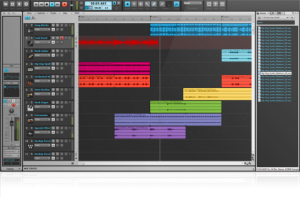
Cakewalk has announced Music Creator 6, the newest version of its ‘Sonar lite’ music making app.
Music Creator 6 Features:
- Based on Cakewalk’s SONAR X1 professional studio software
- Record up to 160 tracks of audio & MIDI (32 audio and 128 MIDI)
- 24-bit audio quality
- Drag & drop instrument sounds, loops, more (over 4 GBs of content)
- Song Construction Kits for fast and easy creation of backing tracks
- Hundreds of instruments and over 1,000 professionally recorded music loops (beats, bass, guitars, keyboards, horns, strings, and more)
- 3 virtual instruments: Cakewalk Sound Center for easy access of hundreds of instrument sounds, TTS-1 General MIDI sound module featuring Roland sounds, and Studio Instruments Drums
- Pro effects include EQ, Reverb, Delay and epic guitar amp tones from IK Multimedia AmpliTube 3 CS guitar amp simulator
- Remix tracks and jam with the Matrix View
- Create playlists and burn songs or an entire album to audio CD
- Upload songs directly to SoundCloud and share using Twitter, Facebook, and other popular social media sites
- Print musical notation scores and lead sheets
- Integrated video help created by Groove3
Cakewalk Music Creator 6 has an estimated street price of $39.99 U.S.
Teaser: Netduino with MIDI shield and touch screen
This video shows a Netduino connected to a Arduino MIDI shield and a Nintendo DS touch screen. X controls filter cutoff and Y controls filter resonance, that in combination create some quite dramatic effects. Of course and MIDI control can be assigned to X or Y. Just add some software.
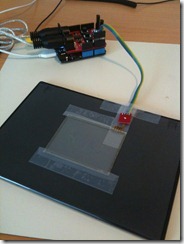
The prototype uses an off-the-shelf MIDI shield and a Nintendo DS touch screen connected piggy back on the shield.
The Netduino runs a simple “convert X/Y touch values to MIDI control changes” application. Right now it sends volume as X and modulation (in practice vibrato) as Y, but that’s easy to change in the code. If no finger is touching the screen the last setting will stay. I also filter so that MIDI data is only sent when there’s an actual change in any direction.
The touch screen is not very sensitive, but works as a demo of what can be achieved with no additional electronics beyond what’s mentioned and very little software too.
Reaper 4 is coming!

In alignement with Cockos’ open development strategy the documentation for Reaper 4 is already released, ahead of the release of the software. The Up and Running, a REAPER User Guide either as free download of as printed book. There’s also the advanced guide REAPER 4 Unleashed: Unlock Your Inner REAPER which is priced at modest $6.59!
As release candidate 4 came yesterday it’s a fair assumption Reaper 4 is coming this week, or even today!
Producer Thomas Penton – masterclass in loudness

A defining characteristic of current dance music is loudness. If it ain’t loud, it ain’t getting played. This stems from the fact that dance tracks are mixed into one another, so (on the most basic level) if the loudness of a track being mixed in is less than the previous track there will be an undesired drop in energy.
I know many people understandably think pushing a track to its limits can be a bad thing. But the truth of the matter is if you want to make any mainstream club music then it is essential knowledge. And even if you don’t, then it is still a key skill so you know how to get the most out of your sounds when you so wish. Whether you’re looking to make the next festival anthem or simply learn some hot techniques from a pro to apply to your underground sound, make sure you read on.
1. Your kicks are damn loud, what is the key to getting the kick to punch through the mix like you do?
First truncate the audio properly, then I usually insert the audio directly into the session (24bit) on the channel. I usually then insert Para E.Q., the Oxford Inflator (to give it a little punch) and sometimes the SX Limiter to give it extra snap (put the release to 10 & input around +6dB – this should really suck up the decay volume and still hold the sound at 0dB). I´ll take the kick audio track and duplicate it creating a copy. And then on the copied track, take the audio waveform of the kick and shorten it a lot until you only hear the snap/attack. Bring the volume of the limiter down around -4dB. And then play both tracks together, now the kick is sucked up loud as can be and the attack is more snapping in your face. And of course I sidechain most of the other audio tracks so nothing is hitting loud on the quarter notes of the kick, causing good separation.
The Obama Board: Build Your Own Obama Speech
This is really funny 

Created by Ashley Lewis, The Obama Board is a new twist on a traditional musical keyboard. Instead of a musical note, each key, when pressed emits the sound of a word from Barack Obama’s inauguration speech. Press the keys in the sequence of your choice to create you own speech!
Syntron 2011 – live performance
Hot from the Synthynopsis Youtube channel:
VELVET VOYAGE – “Syntron 2011” – Performed live by Bruno Ender Lee, July 28. 2011.
This is a remake of the track “Sphere Dance” from the first Velvet Voyage album “Syntron”…21 years ago…
Roland Juno-60 (arpeggio), Moog Little Phatty Stage II & Synthesizers.com Studio-88 (leads), ARP Odyssey (fx), Absynth 4 (pads)
lightbounce. generative. physics. electronica
refmatrix generates midi notes when the ball hits an obstacle or wall. renoise sends the midi signals to the plugins, effects, and sounds. grid 1 is assigned to a filtered rhodes soundfont, grid 2 to lo-fi drumkit samples. copious amounts of reverb and calf vintage delay are layered over the instruments and tweaked throughout the track, using the nanokontrol.
audio download: soundcloud.com/ioflow/soft-photons
controllers: grayscale monome 128, korg nanokontrol
application: refmatrix (post.monome.org/comments.php?DiscussionID=12574)
production: renoise 2.7
os: gentoo linux
POLYSICS – PLUS CHICKER
Japanese synthpop – kind of
You can at least spot the KORG Polysix in the video
“PLUS CHICKER PV. Featuring SAKO. :)”
Robotics in electronic music
Electrocado has been building this robot over the past few years, quite impressive
More info about the band and their work here >>
DATAMASKIN

