
The Knife supporting Pussy Riot at Pukkelpop 17th August 2013
The Knife Shaking The Habitual Show with Tarek Halaby DEEP Aerobics.
Ghost Shift 1.1 for Reaktor with Konkreet Performer Mappings
available at www.reaktortips.com
Details abouth Ghost shift below:
When I released Ghost Shift I didn’t have live control in mind other than mapping a MIDI fader to the mix control. However, the recent update of Konkreet Performer got me thinking, and I realized there was an easy way to map Performer parameters to the individual delay taps in Ghost Shift.
Ghost Shift is a delay effect based on an earlier version of mine called Pumpkin. I’ve reskinned it, added functionality and fine tuned the filter and feedback parameters for easier sound tweaking.
The major thing you have to know about Ghost Shift is that each delay line works as a separate voice in Reaktor. Adding more voices in the instrument parameters is gonna give you more delay taps, and magically, the number of controls in the delay time, pan etc. graphs will auto-adjust to the number of voices / delay taps.
Each voice can have its own delay time as a multiple of 16th notes, separate pan, feedback and filter settings. I’ve included just a handful of presets because the settings are going to be highly dependent on the material you’re running through the instrument. Really sparse input with lots of space can have more delay lines and more filter feedback. A more full audio track, like a drum kit, will benefit from no more than three delay taps, widely panned, and not much feedback. Let experience and experiment be your guide.
Everything’s tool tipped and self explanatory. A saturator can boost the signal as well as keep it from clipping unpleasantly at the output. The one control you will want to have mapped to a controller or mod wheel is the Mixer, so you can crossfade between dry and wet signal.
“Fashion Pack” – and a synth expedition
Background story:
In the beginning of July I saw this synthesizer in the second hand pages for the equivalent of 65US$. The seller lived in the other end of the country but I decided that if it was still for sale when my summer holiday began then I would go and buy it.
Three weeks later it was still for sale and I went on the long trip up north. So this time the video is a sort of very short road movie. The synth is broken but I expect to be able to get it playing again. It could be an interesting winter project.
The music is something I made back in my tape-days. “Fashion Pack” was a hit for German singer Amanda Lear and here I play it on Yamaha HE-8, Viscount RBX-850, and Technics SX-C600 organs, Roland JX-8P synthesizer, and Roland CR-1000 drum machine. It was recorded on my Fostex model 80 8-channel tape recorder.
Apple Garage Band iOS Tutorial: Chill out
How to make a pattern for Chill out (like Cafe del Mar)? This video shows you how to start with GarageBand 1.4 for iPad. Download the song data for free: www.app-sound.com/free
KORG KROSS Introduction Movie
Background video description (Googlish from Japanese):
If you KROSS, and analogy to street and stage in its entirety, an environment program and sequence, own elaborated at home is always practice. The balance portability and rich sound across the class, I thought the convenience of on-site. Equipped with a convenient audio recorder and microphone input, and driven from AA batteries. Specifications and style are different from the others, new classic music workstation unique.
Product information
http://www.korg.co.jp/Product/Synthesizer/KROSS/
Kraftwork (Kraftwerk) Moog CZ-101 (Casio CZ-1) Review
T-Roll does another hands-on synthesizer review! This time he showcases the Kraftwork Moog CZ-101 stereo synthesizer, the world’s longest keyboard.
http://www.facebook.com/pages/T-Roll-…
Playlist:
Kraftwork (Kraftwerk) Moog CZ-101 (Casio CZ-1) Review – Published on Oct 19, 2012
T-Roll does another hands-on synthesizer review! This time he showcases the Kraftwork Moog CZ-101 stereo synthesizer, the world’s longest keyboard.
Korg JP8000 JP-8000 Review (Technics WSA1 WSA-1) – Uploaded on Sep 13, 2011
T-Roll reviews the Korg JP8000 all analog monophonic synthesizer. He showcases the features of this device, shows how to create original sounds, and explains the difference between computer software and professional music equipment.
Roland SY99 SY-99 Artificial Piano (Clavia Nord Lead 1) – Uploaded on Sep 14, 2011
T-Roll gives an in depth review of the Roland SY-99 artificial piano. He shows the unique features like front panel tuning adjuster, brightness and darkness controls, etc. It also has a comprehensive listing of all red synthesizers. This is the best review of the SY-99 on youtube.
Alesis AirSynth SLAUGHTERS Korg Kaossilator in Shootout – Uploaded on Sep 17, 2011
T-Roll puts the Alesis AirSynth and the Korg Kaossilator in the ring together for the ultimate face-off. The Alesis AirSynth motion-controlled synthesizer meets the Korg Kaossilator lame-controlled disappointment.
Dave Smith Instruments (DSI) Tetra Ambient Sequencer and Akai Miniak – Published on Feb 2, 2013
In this episode, T-Roll demonstrates Dave Smith’s Instrument Tetra Ambient Sequencer using an Akai Miniak and Mopho Keyboard
EGSY01 analog synth

ElliottGarage presents EGSY01 analog synth!
With EGSY01 you can create sounds without any limit, from modern ones to vintage analog ones.
The audio engine generate your sound mixing 2 oscillatros with 4 selectable waveforms, and you can watch the sound created on the oscilloscope screen.
You can set the sounds through the panels “Oscillators”, “ADSR/LFO” and “FX”, and play with any master keyboard (CORE MIDI), or creating a wireless MIDI network, or again sending the audio signal to other apps with AUDIOBUS.
Features:
- 2 oscillators with selectable waveforms, volume, octave e detune
- 4 Waveforms (Sine, Saw, Triangle, PWM)
- Core midi/Network midi
- Vca / Vcf
- Evenlope ADSR
- Panels FX (delay + crush)
- Keyboard with 6 octaves and control on filter cutoff
- Modulation wheel
- Oscilloscope
- Presets save – overwrite
- LFO with selectable amplitude and frequency
- Audiobus
- Polyphony
The app is priced at $2.99.
TT303 VS TB303 Devilfish
Vicmod meet, Cyclone TT303 BASSBOT VS TB303 Devilfish There is an x0xb0x too.
MIDI Designer for iPad
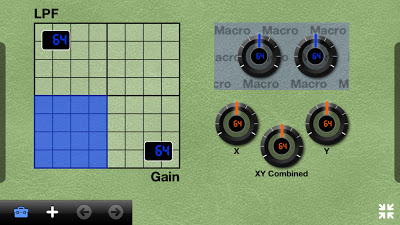
Dream, create and play your perfect MIDI controller with MIDI Designer.
“We’re adored by Recording Magazine, loved by Sound on Sound, raved about by enthusiastic users, and winner of the Sonic Touch Gold Award for Best App. Trusted on stage by touring acts like Todd Rundgren, POSTYR and Electroband. Used in studios, theaters, VJ and DJ booths all around the world, MIDI Designer is also the platform for community- and professionally-sourced layouts for top-flight gear, including synths by Korg, Roland and Casio. If you can dream it, you can create it in MIDI Designer.”
Sometimes you need a professional MIDI controller, but with just a few controls. MIDI Designer 12 provides the same rock-solid platform, ease of use and awesome playability with just 12 controls. Embrace the simplicity.
MIDI Designer is the top choice for controlling ANYTHING via MIDI—from hardware synths to DAWs, lighting rigs to other iOS apps:
- Design your perfect controller using customizable knobs, sliders, XY pads, labels, panels and more
- Choose background color, texture and LED color for up to 8 banks of 6 pages
- Save, load and share your layouts and pages with other users
- Send and receive all MIDI message types, including sysex, NRPN and 14-bit CC.
- Connect any way CoreMIDI can: use Wi-Fi or hardware such as the Line6 MIDI Mobilizer II, iRig, iConnect, and others
- Use supercontrols and subcontrols to create simple and complex relationships between controls
- Full support for external hardware via the “Pedalboards Feature”
- Presets and other features make a mature, reliable platform for your future development
MIDI Designer is easy to use, infinitely flexible and customizable, and battle-tested in performance. It’s the most-respected MIDI controller for iOS.
The app is only $0.99 at the moment.
ZMors Synth/Sequencer Demo For iPad
A demo of this synth sequencer called ZMors made by Sven Braun..A clever little app that lets you control and loop your own sounds or use the built in presets.
zMors is a 4 Layer iPad synthesizer with build in sequencer
– Audio engine use 32Bit float per sample
– Vector based oscillators with touch edit
– Audiobus support
– Midi, Clock, MTC input
– 8 Oscillators
– 4 AMP envelopes
– 4 LFOs with FM,AM,Filter and oscillator mix
– LFO beat or key sync
– 4 Filters (HP,BP,LP)
– Reverb and delay sends
– Sequencer unit
DATAMASKIN

