
Electronic instruments – Gravilux for Android
http://snibbe.com/store/gravilux
Gravilux lets you draw with stars: it’s a combination of painting, animation, art, science, and gaming. As you touch Gravilux’s screen, gravity draws simulated stars to your fingertips. You can tease and twist the particles into galaxies, or explode them like a supernova. You can color stars by their speed, change the strength of gravity, number of stars, their color, and even enable antigravity. Multiple fingers and multiple people can touch the screen at once, collaborating or competing. Gravilux was first released as a work of interactive art by Scott Snibbe Studio that was only available in galleries and museums. Now it’s available as an Android application.
“Apps like Gravilux awaken an ‘Avatar’-like sensitivity to electricity in the body, power in the palms and general connectedness.” – NY Times
“Every once in a while, an app will come along that has no practical application whatsoever but is just SO COOL that you have to have it! Gravilux is that sort of app.” –iphoneapplicationlist.com
“Of the millions of apps out there, none quite capitalize on the sheer fun and beauty of interactivity the way that Scott Snibbe’s do.” –CoolHunting
Scratch Sensor using the Android Smartphone
Scratch is an interpreted dynamic visual programming language. Being dynamic, it lets code be changed even as programs are running. It has the goal of teaching programming concepts to kids and teens and letting them create games, videos, and music. It can be downloaded for free and is being used at home and in a wide variety of in-school and after-school settings around the world.
Connections between Scratch and other programs are made using the Scratch networking protocol. With this feature turned on, Scratch automatically sends all broadcasts and values of global variables out to any program connected to it. That program can also send broadcasts and global variables into Scratch. The Scratch Sensor is an Android app that uses the Scratch networking protocol to turn the Android Smartphone into a DAQ module and sends its accelerometer and compass sensor information and broadcast two states (jump and walk) to Scratch.
Android 3.2 synth real-time HDMI out and EerieSynth, microtonal synthesizer
ACER ICONIA A100 android 3.2 Honeycomb
http://www.engadget.com/2011/08/12/acer-iconia-tab-a100-r…
Realtime HDMI output of
Ethereal Dialpad synthesizer
Drag your finger around the screen to create
flowing music with this expressive touch synthesizer.
please contact adam smith for Developer kit available for making your own dialpads.
http://users.soe.ucsc.edu/~amsmith/
“A demo of a new app I’m working on. It’s not ready yet, but it will be soon. “
Generative music performance app now released on Android
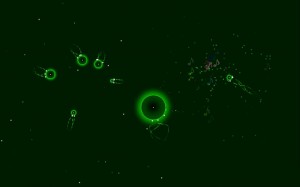
Orbits is an application for generative music performance, based around a gravity-based particle simulation. As a sandbox-type toy, there is no goal or ultimate aim.
Instructions:
Place a finger (or multiple fingers) on the screen to create particles. While you hold a finger down, the particle increases in size. Drag while holding down to set a starting direction for the particle (as if pulling back on a slingshot).Release to make the particle take off in the opposite direction. When two particles collide, they play two notes based on the particles’ sizes. The notes are locked to a scale/chord (which changes automatically), and thus are always in tune. Create particles of different sizes to get something interesting. Particles attract each other with a gravity-like force. Try to put particles in orbit around each other to create some interesting movements! Larger particles exert a more powerful force.
Press the Android menu button to open the option menu, where you can turn off the background chord or set the app into “autoplay” mode. When in autoplay, the particles will generate themselves, and you can sit back and watch what happens (you can still interact).
You can find it at the Android Market here.
Nice new little groovebox for Android phones
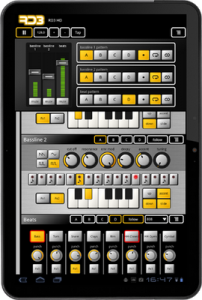
RD3 HD – Groovebox
Use your Android tablet as a groovebox and make your own music tracks!
RD3 HD – Groovebox is an audio application designed for Android tablets that is easy to use. It combines two 303-style synthesizers, a drum machine with different drum kits and three audio effects.
Recreate the sound of early electronic dance music with these legendary machines!
Optimized for Tablets
Take full advantage of your Android tablet with that multi-touch enabled app and use your tablet as a musical instrument.
Use it for live performances in landscape mode or use the additional special rack view on 10-inch tablets in portrait mode. This view is very well suited for editing with the mixer section on top and a scrollable part below for the other panels.
RD3 HD supports both 7-inch and 10-inch tablets and is optimized for Android 3.X (Honeycomb).
Features
Musical Features:
2 virtual analog synthesizers
4 types of waveforms for each synth
Reminiscent of the legendary 303 synthesizer
High-quality or regular filter modes
Drum machine with 10 drum kits: 808, 909, 606, CR-78, Linn, KR55, RX11, RZ1, DMX, DPM48
Real-time step sequencer
3 effects: distortion, phaser and delay
4 bars with 16 steps per instrument
3 play modes: Solo, loop or random
Technical Features:
Designed for 7-inch and 10-inch Android tablets
Special rack view in portrait mode for 10-inch tablets
Optimized for Android 3.x, Honeycomb
Multi-touch control
Audio loop export feature
Session save capability
Cut/copy/paste pattern
OpenSL support
App2SD
System Requirements
Android 2.2 or higher
Screen resolution 800×480 (WVGA) or higher
Screen size 7-inch or higher
800 MHz CPU or faster supporting ARMv7
Tested on: Xoom, Archos 70, Samsung Galaxy Tab, Dell Streak 7
Dynamically Create Interfaces via OSC
This video shows how you can create interfaces on-the-fly via OSC messages sent to Control v1.3. Widgets can be added, removed and modified. Arbitrary Javascript can also be executed to manipulate multiple widgets simultaneously. So, if you’re looking to turn an Android phone or flashy, new Android tablet into a touch controller for music, you’ll be really glad to see OSC and MIDI controller Control.
Control enables users to create their own interfaces for controlling musical, artistic and virtual reality applications. It is built on top of the WebKit rendering engine and allows users to define their interfaces via JSON files. Features include:
– Outputs Open Sound Control (OSC). MIDI coming soon!
– Handles multitouch on capable devices
– Bi-directional communication: use Control to set values on your computer, use your computer to set values in Control
– Dynamically add and manipulate widgets via OSC messages
– Reads and outputs data from Accelerometer and Compass sensors (on applicable devices) with adjustable update rates
– The ability to script behaviors for widgets using JavaScript
– Auto-discovery of wireless networks via Bonjour
– Interfaces can be pushed to the phone via OSC or downloaded from the web
– Supports both portrait and landscape interface orientations
– Interfaces work on both phones and tablets (tested on Droid and Asus Transformer)
– Free
If you’ve never used wireless MIDI or OSC before, Control (and all other wireless MIDI / OSC apps) will have a little bit of a learning curve to get started. Please visit the Control support website!
Caustic for Android, Demo on a Galaxy Tab 7″
Talked yesterday about the Caustic app – here are some more insights into it:
This is a small demo song I did in a few minutes with Caustic for Android on a Galaxy Tab 7″
Finally Android gets high quality music software.
Get it here:
https://market.android.com/details?id=com.singlecellsoftware.caustic
CAUSTIC electronic music rack for Android – Overview
Demo video showing an example of what can be done with CAUSTIC Electronic Music Rack for Android devices.
This is just a quick overview of how to the different machines to put together a song loop. I’m hoping to create more in-depth videos explaining some of the more complicated machines like the SubSynth and Sequencer in the near future. Stay tuned.
The developer has released these demo videos, though, that demonstrate what Caustic can do.
Features:
- 1x Virtual analog subsynth
- 2x PCM synths (23 demo samples included)
- 2x 303-like BassLine synths
- 1x Sampling drum machine (9 demo kits included)
- 1x Mixer desk with Delay/Reverb and 4 insert effects
- 1x Song sequencer
Note: The current version is free; a commercial version is in the works.
The app is available for most Android devices, and there’s a full demo version with no time restrictions. To unlock full-version features (song save/load/export), use the in-app purchase option.
https://market.android.com/details?id=com.singlecellsoftware.caustic
Reactable goes Android

The upcoming Sonar electronic music festival in Barcelona will be the setting for the much awaited release of the award winning Reactable Mobile for Android!
Reactable mobile is a versatile synthesizer that allows you to generate, play and process your own sound samples and audio input. Change the sound as it flows with a great variety of effects and filters. Generate melodies with the sequencer modules. Load and store your sessions and share them with your friends. A complete and flexible live performance instrument with professional audio quality in your pocket.
The Reactable Mobile is now part of the ever growing range of products which use the Android platform. With this version of Reactable Mobile dozens of Smart phones and Tablets with various sizes and features can be converted into a portable music making tool for musicians, Dj’s and sound artists. It is also one of the first music applications which have a version for Android tablets as well as for Apples iPad.
Exploring the revolutionary Reactable concepts has never been easier than this. Learn more about the Reactable mobile at: http://www.reactable.com/mobile/
Android Open Accessory demonstration
Phil checks out an Android-powered piano — powered by the Android Open Accessory ADK — at Google IO
DATAMASKIN

