
Miselu Neiro powered with Korg Polysix, Yamaha Vocaloid App & More
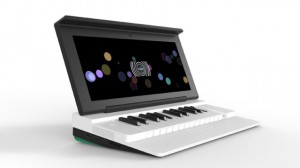
Miselu has been slowly debuting new apps for its Android-powered music making device, Neiro, for a while now. But at the Google I/O convention, music-making on the Neiro just got serious. Since SXSW the hardware reference design continues to mature, but mainly focused on the software side and have released our music SDK alpha to a select group of developers that used our Miselu emulator environment (alpha for Mac and Linux) to the build apps.
Showing off a flashy Korg Polysix synth and telling us of some additional news regarding the Yamaha Vocaloid technology, Miselu’s Malte Goesche explains: “Yamaha has produced a Vocaloid application prototype for the Miselu platform. The app (codename MV-01) is produced by music game designer luminary Tetsuya Mizuguchi.
“Vocaloid is a singing synthesizer technology developed by Yamaha that uses concatenative synthesis to splice and process vocal fragments extracted from human voice samples. Vocaloid allows you to create an authentic computer-generated singing voice with text-to-lyrics capability.”
With the launch of the Polysix, it seems that Korg is committed to developing for this aspiring Android music platform, too. Hironori Fukuda from Korg says: “The Miselu platform has brought us a great opportunity to develop a synthesizer application with a totally new user experience.
“The reason we decided to create the Polysix is that the platform has already been perfectly customised for synthesizer use with low latency audio playback based on their great MusicSDK, a wide multi-touch display and a built-in musical keyboard. It was quite easy to port from our Polysix software. The Miselu platform is all set for music creation.”
Mikrosonic RD3 Groovebox HD Demo – Android Test – HTC EVO
“I downloaded the app from Mikrosonic called “RD3 HD Demo” and started messing around with it. It was pretty easy to figure out and fun to use. I would recommend it to anyone who likes to play around with a looping/drum machine. The only bothersome thing is that you can’t save your sessions and an ad pops up every few minutes to encourage you to buy the full app. Which makes sense because this is the free version of the app and just lets you get a taste for what it can really do.”
RD3 – Groovebox is a high quality audio application for Android devices that is easy to use. It combines a 303-style synthesizer and a drum machine with different drum kits. Create grooves on-the-go with these machines that defined the sound of early electronic dance music.
If you have a high-end Android phone or tablet please check out the RD3 HD version with more features.
Features
Musical Features:
- Virtual analog synthesizer
- 3 types of waveforms
- Reminiscent of the legendary 303 synthesizer
- High-quality or regular filter modes
- Drum machine with 8 drum kits: 808, 909, 606, CR-78, Linn, KR55, RZ1, DMX
- Real-time step sequencer
- 4 bars with 16 steps per instrument
- 3 play modes: Solo, loop or random
Technical Features:
- Multi-touch control
- Audio loop export feature
- Session save capability
- Cut/copy/paste pattern
- App2SD
Basic beat creation, effect usage, G-Stomper Drum Machine for Android
G-Stomper demonstration video: Basic beat creation, effect usage.
(Device: Samsung Galaxy Tab 10.1)
G-Stomper is a highly optimized Drum Machine/Groovebox for doing electronic live performances on your Android device.
https://play.google.com/store/apps/details?id=com.planeth.gstomperdemo
https://play.google.com/store/apps/details?id=com.planeth.gstomper
Official Website:
http://www.planet-h.com/gstomper/
[Android App] EerieSynth – Harmonics
A quick spectral improvisation of an up and coming Android synthesizer, EerieSynth.
“Recorded with my laptop webcam. The application has been in development for a long time (hey, I couldn’t stop adding features), but yes, it is finally pretty much finished, and it will soon be purchasable from the Market.”
Magic Piano on Android
OK so more game then music creation, but still
Download Magic Piano for Android devices here, FREE:
http://bit.ly/MagicPianoAndroidYTRainbow
Download Magic Piano for iPad, iPod touch and iPhone here, FREE:
http://bit.ly/MagicPianoYT
For more videos featuring Magic Piano and our other apps, subscribe to Smule’s YouTube channel: http://www.youtube.com/smule
About Magic Piano:
From Bruno Mars to Mozart, play the hottest songs effortlessly on the #1 piano game, now available on Google Play for Android devices! Get free songs every day and enjoy the largest catalog of songs in any piano app. Turn on game mode to unlock achievements and free songs, or just relax and play your favorite tunes. Join the over 13 million Magic Piano players and experience the fun of playing piano – no lessons needed!
HUNDREDS OF SONGS – NEW SONGS ADDED EVERY WEEK!
Songs by Selena Gomez, Justin Bieber, Lady Gaga, Rihanna, Bruno Mars, and more!!!
WaveSynth for Android
WaveSynth for Android is “easy and full-fledged musical instrument app”, a wave table synthesizer application for Android devices with 128 preset sound tones and 1 drum set defined by General MIDI (GM) specification.
Mobile DAW for Android
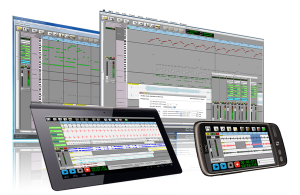
Audio Evolution Mobile for Android has been released! Multi-track audio with non-linear editing, mixing, real-time effects and much more is now available for your Android phone or tablet. Use as a stand-alone app or in combination with AE5 for Windows/OSX!
This first release includes
- Multitrack audio playback
- Audio recording (while playing back other tracks)
- Import of wav, aiff, flac, Ogg/Vorbis audio files
- Import of mp3 (requires an optional download due to patents on mp3 if applicable to your country)
- Mastering to stereo file
- Each track has controls for volume, panning, mute, solo, arm, 4-band EQ, 3 insert effects and output bus selection
- Unlimited number of tracks (*)
- Unlimited number of groups (*)
- Real-time effects include: chorus, delay, dual delay, reverse delay, reverb, bandpass, highpass, lowpass, flanger, noisegate and tremolo (*)
- Non-linear non-destructive editing with move, trim, split, cut/copy/paste, remove, range editing
- Unlimited undo/redo for editing facilities
- Several grid options for aligning your samples (with tempo and time signature settings)
- Repeat samples with several options to create loops
- Add markers and quickly jump to them
- Load/Save projects including loading projects from Audio Evolution 5 projects
- Buffer size preferences
(*) = depending on the speed of your hardware
Planned for next releases
- Cross-fades
- Metronome
- Automation of most parameters
- MIDI sequencing
- Upload to SoundCloud
- Your ideas are welcome!
- …
Requirements
- Android 2.2 or higher
- 800×480 screen resolution (both phones and tablets are supported if the resolution requirement is met)
mikrosonic RD3 HD – Groovebox for Android
Finally we start to see more quality apps coming also for Android tablets – check out this new Groovebox. Create your own grooves and drum loops with RD3 HD – Groovebox!
Use your Android phone or tablet as a musical instrument and make your own electronic music tracks!
Recreate the sound of early electronic dance music with the RD3 HD — Groovebox that recalls two 303-style analog synthesizers, a drum machine plus distortion, phaser and delay audio effects!
Developed in Berlin, RD3 HD – Groovebox is a pioneering audio app that lets you program your own grooves. This multi-touch enabled app makes it simple to invent unique loops and manipulate them with resonant filters and effects on the go.
Appropriate both for experienced musicians and novices.
Use it for live performances in landscape mode on phones and 7-inch tablets or use the additional special rack view on 10-inch tablets in portrait mode.
RD3 HD is optimized for Android 2.3 (Gingerbread), 3.X (Honeycomb) and Android 4 (Ice Cream Sandwich).
Loops you’ve created and exported with the Groovebox can also be automatically integrated into mikrosonic’s audio mixer app SPC – Music Sketchpad.
Musical Features:
– Two virtual analog synthesizers
– 4 types of waveforms per synth
– Reminiscent of the legendary 303 synthesizer
– High-quality or regular filter modes
– Drum machine with 10 drum kits: 808, 909, 606, CR-78, Linn, KR55, RZ1, DMX, RX11, DPM-48
– Real-time step sequencer for the synths and the drum machine
– 3 effects: distortion, phaser and delay
– 4 bars with 16 steps per instrument
– 3 play modes: Solo, loop or random
Technical Features:
– Special portrait mode for 10-inch tablets
– Multi-touch control
– Live session recording
– Audio loop export as WAV files
– Session save capability
– Cut/copy/paste pattern
– OpenSL support
– App2SD
System Requirements:
– Android 2.3 or higher
– Screen resolution 800×480 (WVGA) or higher
– 800 MHz CPU or faster supporting ARMv7
More details at: www.mikrosonic.com/rd3hd
Pulsate for Android
Out now in the Android Market: https://market.android.com/details?id=de.despudelskern.application.pulsate
Pulsate allows you to use geometry to create melodies straight from your Android device. Pulsate’s simple, organic functionality lets you explore a world where sounds and shapes are inextricably linked. Pulsate will keep you hypnotised for hours, you will never make the same melody twice!
Audiotool Sketch Tutorial
Luke explains the basics of Audiotool Sketch in this video.
Out now in the Android Market: https://market.android.com/details?id=de.despudelskern.application.audiotools…
Audiotool Sketch allows you to sequence sounds using emulations of three different classic devices. Make some beats with one of the drum machines and then move onto the bassline. Once you have finished building your sequences navigate to the overview and start switching up the patterns, add some delay or change the tempo, all in real time.
Each device includes the full range of parameters which would have been found on the original machines, this coupled with the multi-touch functionality makes it possible for the user to really control each device’s output signal. Audiotool Sketch is built around the same audio engine as Audiotool and outputs full power audio.
DATAMASKIN

