
iTablaPro
iTablaPro is by far the best background accompaniment available for iPad. It’s perfectly suited for Mugician. It doesn’t prevent Mugician from sounding right even with all features turned on at once.
DXi FM synthesizer for iPhone Multi-track Matrix Sequence Play
Please visit the URL for more information: http://itunes.apple.com/app/dxi-fm-synthesizer/id370138065?mt=8
DXi is a FM synthesizer application inspired by 80’s most popular synthesizer. Enjoy making music and creating sound by FM synthesis engine easily.
The movie show you the new great features about DXi version 2. DXi version 2 loads new powerful synthesis engine and brushed up preset voices.
Turn an iPad, iPhone or iPod Touch into a wireless controller for a Mopho synthesizer
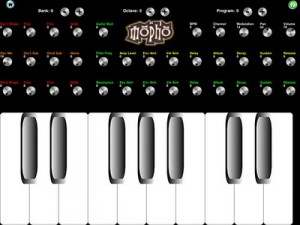
Mopho To Go (App Store link) is a third-party app that’s designed to turn an iPad, iPhone or iPod Touch into a wireless controller for a Mopho synthesizer connected to a Mac or PC, or connected directly to an iPad with USB Camera Connection Kit.
Features:
- Mopho To Go adds a knobtastic, retro control panel to the Mopho module. Rotate iPad to landscape orientation for controls, Rotate iPad to portrait orientation for a full two octave plus keyboard.
- Mopho To Go provides an octave of full width keys and multi-touch controls for Mopho Oscillators (shape, freq, fine, glide,) Mixer (mix,sub1,sub2,noise) and filter and amplifier envelopes (delay,attack,sustain,release,) audio mod, resonance, levels, BPM, Modulation, Pan, Volume, Channel, Program and Bank Select.
- Mopho To Go is CoreMIDI compatible. No additional server software or downloads necessary.
- Mopho To Go is a universal app for all iOS Devices.
Mopho to Go is $.99.
Monolith – Turns your guitar into a Moog Synthesizer
This is a preview of Sentient FX’s upcoming Monolith – an application that turns your guitar into a Moog synthesizer.
Here’s what they have to say about Monolith:
Our guitar synthesisers do not use MIDI to achieve their tones. We feel that the MIDI protocol is too crude to deliver the full range of guitar players’ nuances, rendering performances sterile and lacklustre. Pitch informaion is derived directly using “Literal Nuance Interpretation” which values “feel” above all else.
Somebody once said of conventional MIDI guitars, “it feels like the guitar is playing you, not you playing the guitar”. We aim to put you back in control..
You can use palm muting, harmonics, ebows, sustainiacs and whammy bars with this technology. You don’t have to close old doors to open new ones here.
Monolith is expected for release in Spring 2011.
SynthTronica – synth for iPad – Dynamic Multitouch Filter
SynthTronica (App Store link) is a new polyphonic spectral synthesizer for iPad, designed to take full advantage of iPad’s multitouch capabilities.
This video demonstrates SynthTronica, the spectral synth by Leisuresonic for the iPad. This episode showcases SynthTronica’s Dynamic Multitouch Filter, an expressive and innovative musical controller, for use in live performance, and for touch sound synthesis.
Features:
92 ARTISAN SOUND PRESETS
- Virtual analog sounds
- Vocal sounds including vocoder effects
- Looped grooves providing a full ensemble sound
*DYNAMIC MULTITOUCH FILTER
- Control up to 11 independent filters by intuitive touch
- Unique live expressive control
FORMANT SYNTHESIZER ARCHITECTURE
- Filters use complex time-varying spectral formants
FORMANT EDITOR
- Organize, edit and view formants in spectral form
CREATE NEW FORMANTS IN SEVERAL WAYS*
- Import audio files (mp3, m4a, AIFF, WAV, et al)
- using the iPad’s microphone
- through SynthTronica’s unique Dynamic Multitouch Filter
MULTIPLE KEYBOARDS
- Two piano-style layouts and a unique grid keyboard
RECORD AND MIX YOUR PERFORMANCES
- Simultaneous recording and playback of mixes
- Bouncing
SHARE YOUR MIXES
- export SynthTronica recordings as 24-bit or 16-bit AIFF or WAV audio files
EXPLORE MUSICAL SCALES
- Display scale patterns on keyboards
- Over 70 scale choices
POWERFUL INTERACTIVE SYNTH CONTROLS
- Virtual analog synth front-end
- Reverberation
CONTEXTUAL HELP
- Nearly all interface elements have documentation by touch
Yet another theremin :-)
Seems like everyone’s doing theremins these days, hehe

Ethero (App Store link) is a free app that turns your iPhone, iPad or iPod touch into a light theremin.
Ethero takes the amount of light coming into the device’s camera and translates it into a sound frequency. Moving your hand or another object in front of the device camera will change the pitch of the sound. The more light coming into the camera, the higher the pitch.
To control the volume of the sound, simply touch the screen of the iphone and move it up and down the screen.
Features:
- Calibration. To get the full frequency range of the instrument even when in poor lighting conditions. Press the cog icon, hold your device still then press the tick icon. If you want to reset the calibration, just press the cog icon again and press the cross icon.
- An LFO (low frequency oscillator) which adds vibrato to the sound. Press the ‘LFO on’ button to switch it on, and again to switch it off.
- A lock to chromatic frequencies. This makes the instrument easier to play if you’re just getting used to it, as only frequencies on the chromatic scale are played and the ‘glide’ from the sound is removed. Press the music-note button to switch to chromatic mode, and again to switch it off.
Fluid simulation
A fluid simulation drives a stack of detuned oscillators, brings pleasure to initiated and otherwise, facilitates the making of musick. New synth coming ASAP from The Strange Agency to your local App Store.
Shared by strange agency
Thicket for iPad (via Ableton Live, Novation Nocturn)
playing around with THICKET for the iPad — one of the most unique audio iPad apps with a great user interface. also controlling FX through ableton live & a novation nocturn.
Via Keenan Gaynor
Singing Fingers for Iphone
More fun then useful I would suspect, but still 
This is an app called Singing Fingers. It’s a great idea as u can see. Check it out! Singing Fingers lets you fingerpaint with sound. Just touch the screen while you make a sound, and colorful paint appears. Touch the paint to play back the sound again!
Hard to find the right microphone?
Well then this might be of assitance:
Don’t know which mic to choose? If you need help determining which microphone is right for the task at hand, check out myMicSound, a free Web application by Ear Machine that simplifies the sometimes difficult chore of using your ears to decide which microphone to purchase.
The myMicSound application learns your preference by analyzing ratings of example microphones; it then returns a list that ranks microphones by the probability that you will like their sounds.
About the free Web application, Andrew Sabin, Ear Machine owner and psychoacoustics researcher, comments, “MyMicSound is the first step toward a fundamental change in how people decide to purchase audio equipment.” He continues, “Currently, people make these decisions by receiving recommendations from friends, or by conducting a clumsily-organized listening comparison. MyMicSound offers users a simple format to use their own ears to conduct a free, controlled, and comprehensive listening test.”
To get started, you can either submit your own recording, or use one from myMicSound’s collection. How does it work? MyMicSound removes the sound of the microphone used to make that recording, and then simulates the sound of new microphones. According to Ear Machine, myMicSound carefully considers factors influencing the sound of the microphone, such as the proximity to the sound source, the polar pattern, and whether filters are active or not.
MyMicSound is the first sound-based recommendation engine in the audio equipment market, Ear Machine says. Its software algorithm is said to rely on state-of-the-art knowledge in both auditory perception and computer science. Similar algorithms, such as the one used by Pandora, are widely used in music recommendation.
For more information or to try myMicSound for yourself, visit Ear Machine’s Web site at ear-machine.com.
DATAMASKIN

