
Updated multi-functional vocal channel strip effect plugin
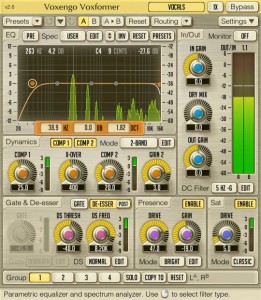
Voxengo has released version 2.6 of Voxformer, a multi-functional vocal channel strip effect plugin for Windows and Mac.
The most important change this version implements is the addition of 3 new saturation modes that extend the sound coloration palette you can use to process your tracks.
Changes in Voxformer v2.6
- Added 3 new modes to the saturation module.
- Plugin’s popup-windows now recover last position after reopening.
- Mouse backward and forward buttons can be used for filter type and parameter value selection.
- The “Alt” key can now be used to adjust knob parameters synchronously in several channel groups.
- The “Min Infrastructure” user interface display mode added.
- The “Flat Level Meters” level meter display mode added.
- The “Show All Filter Shapes” global switch added.
- Version change history information window added.
- The “Do Not Show Latency Changes” global switch added.
Voxformer for Windows and Mac (VST/AU) is available to purchase for $69.95 USD.
Background info:
Voxformer is a multi-functional vocal channel strip plug-in for professional audio applications. Combining several professional quality processing modules, Voxformer was designed to be a comprehensive solution for all your vocal processing needs – be it spoken or sung vocals.
The coolest feature of Voxformer is its one-knob vocal compressor. Using only a single knob, you can get a tight, open and definitive professional vocal sound with an excellent articulation in no time. You do not have to worry about common ratio and make-up gain controls since they are automatically selected by the advanced compression algorithm while attack and release parameters are stored in a mode preset. Moreover, Voxformer features two compressors of this type, allowing you to apply either a two-band or a two-stage (serial) vocal compression.
Voxformer also features the de-esser with selectable center frequency and threshold. Multi-band noise gate is available, which, in a manner similar to the compressor, was designed to bring ease of tuning while providing excellent sonic results. For those who like a saturated vocal sound, Voxformer implements a special module which applies a smooth saturation. Another useful feature Voxformer has to offer is the presence boosting module, which you can use to add some shine and space to the vocals.
As a finishing touch, Voxformer offers you a flexible easy-handling 5-band parametric equalizer (pre/post selectable) with a real-time output stage fast Fourier transform (FFT) spectrum analyzer display. In most cases Voxformer can be used for processing of a wide range of instruments beside vocals.
Flux is a new member in the Moog family, check it out here
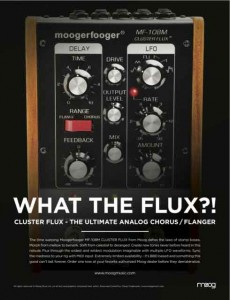
Moog have a new member of their Moogerfooger family coming soon. The MF-108M Cluster Flux will be officially announced later this week but the news has already leaked out, so, what the Flux? Here’s what Moog has to say…
It’s an analog BBD based chorus flanger w/ Tap Tempo modulation for guitar players, and extensive MIDI control for keyboardists, recording, etc. This new Moogerfooger takes the Chorus/Flanger to a completely new level, significantly expands the musician’s sonic palette; and is CV as well as MIDI controllable.
This will be a limited availability product. The MF-108M Cluster Flux uses BBD (Bucket Brigade Device) chips that were specifically designed for the short delay times associated with chorus / flanger type effects. But like all BBD devices (e.g. the MF-104 Analog Delay) the availability of this chip is very limited. We are constantly looking for more supply but as with the MF-104, the supply will be limited by chip availability.
Features:
- The Cluster Flux provides warm, great sounding analog chorus / flanger / vibrato effects. In addition, it has a much wider (and wilder) range of modulated delay line effects than traditional chorus / flangers due to the extended range of front panel controls, the multi-waveform LFO, and the extensive CV and MIDI control.
- The LFO has six waveforms. Use sine or triangle for classic chorus flanger effects. Check out the Sample and Hold, Square, Sawtooth, and Ramp for radical new sounds. There are no analog chorus / flangers that have a sample and hold capability
- In Flange mode, you adjust the delay time from approx. .6 to 10 milliseconds. In Chorus mode, from approx. 5 to 50 milliseconds.
- The Feedback control is continuously bi-polar for both non-inverted and inverted feedback for flanging with even or odd harmonics.
- The MF-108M has both input drive and output level control so you can use it from instrument to line level.
- Parameters are MIDI controllable and the MF-108M will ship with an application editor for managing the array of possibilities. Just one example of the many applications: Control the delay time with MIDI notes for “tuned” flanger comb-filter effects.
- There’s a Feedback Insert jack on the back for external processing of just the wet signal just after the BBD’s.
- The design includes high voltage MN3007 BBD’s for their superior headroom and excellent signal to noise ratio.
Pricing and Availability:
Expected to begin shipping in late summer.
More information:
Beta 2.0 of the LiveProfessor
LiveProfessor is designed to be a effect rack of VST-plugins. It has been designed specifically with live sound in mind. The concept is very simple. Using a ASIO audio card you can route inputs and outputs through your VST-plugins. The program supports snapshots, MIDI and both VST-effects and VST-instrument.

ifoundasound has announced the release of LiveProfessor Beta 2.0, which brings some big changes, although most of them are under the hood.
The audio engine has changed: There was a need for more flexible routing and better multi-core support. Each plug-in input can now mix any number of sources, from sound card inputs or other plug-in outputs. Routing is done like before but you can now use the CTRL-key to add more then one input to a plug-in. In the same way all plug-in outputs can be split to multiple destinations.
Multi-core processors are now supported so that each signal chain can run on its own core. So if you have 4 plug-ins and 4 cores each plug-in gets its own core. But if all the plug-ins are connected to each other, they run on the same core, as they have to wait for each other any way. You don’t have to think about this, it’s just to give you a hint that routing affects the efficiency of the program.
MIDI controllers: The next big change is the way MIDI controllers are handled. Users reported that they where limited by the early system of a global map with 8 layers. The system has now been split up. You now add a new Controller, you add as many knobs, buttons, sliders as you want to match your physical device, and then assign MIDI messages to these (instead of directly to the plug-in-parameters).
Each plug-in instance can now have as many controller maps as you want, and you can switch between them like you do with snapshots. There has also been added a bunch of filter, scale and logic options so you can tweak the controllers just the way you like.
LiveProfessor Beta 2.0 Change Log:
- Feature: New audio engine. Summing on all plug-in inputs, split on all plug-in outputs.
- Feature: Better multi core support. All cores are now used. The cores are divided pr. “Signal-chain”.
- Feature: “Route back” you can now split a signal and route it back to a plug-in earlier in the signal chain. (Please look out for feedback).
- Feature: New MIDI controller system. The way hardware MIDI controllers control plug-in parameters is completely changed.
- Feature: Library. Most LiveProfessor settings (Snapshots, Cues, Cue Actions, Controllers, Controller Maps, etc) can be saved in a global Library so you can use them in other projects.
- Feature: Each cue now has a button to assign a MIDI trigger.
- Fix: MIDI learn ignore active sense message.
- New: Comment action. Empty cue action that can be used as a note/hint/memo.
- Fix: Bug in patch window when hiding plug-ins with multiple I/O.
- Feature: Warning when opening a project on a system with less IO then the one the project was saved on. (Will remove the patch points).
- Feature: 88.2 KHz sample rate.
- Feature: Snapshot masks. When recalling a snapshot in a cue action, you can now choose to not recall selected parameters.
- New: Export cue lists. Cue lists can now be saved (Only makes sense for cues that are not linked to a plug-in).
- Feature: Expand/Hide all in cue list.
- Feature: New location of program settings. The program settings are no longer saved in the Program Files folder but in the AppData folder, as this is the Vista/Win7 way.
- Fix: Bug when replacing snapshots when using the global cue tool.
- Fix: Cues could get stuck to the mouse.
Want to add some sausage to your mix?

Dada Life has released the Sausage Fattener, an effect plug-in for Windows and Mac in collaboration with Tailored Noise.
The Sausage Fattener only has two knobs. But don’t be fooled. With those seemingly simple parameters you can create loads of different sounds. Use the Sausage Fattener on a single channel with moderate settings as a musical compressor. Turn it up and you have a dirty bastard of distortion. But you can also use the plugin on a bus (for example all the drums and the bass) or the whole track as a mastering plugin.
The Sausage Fattener is used by Tiësto, Kaskade, Diplo, Laidback Luke, Chuckie, Sebastian Ingrosso, Dirty South, Hardwell, Angger Dimas, Frank E, Zedd, Lazy Rich, Dimitri Vegas and Like Mike, Marcus Schossow, John Dahlbäck and many other DJ/producers.
The Sausage Fattener is available as an effect plugin for PC and Mac (VST/AU) for $29 USD.
Featuring a new auto-panner and tremolo effect plug-in
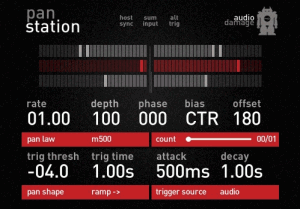
Audio Damage has released Panstation, an auto-panner and tremolo effect plug-in for Windows and Mac.
Panstation is, without question, the most sophisticated autopanner plug-in available.
We started with a loose model of the venerable Drawmer M500′s panning engine, then added the counting features from the Audio & Design PanScan (probably the most famous vintage autopanner, and the “secret weapon” of many well-known producers.) The result is an autopanner plug-in that is second to none in both feature set and sound.
Panstation features
- Four different panning laws, including an exact 1:1 clone of the M500 pan law.
- Ten panning waveforms, including all the waveforms present in the M500.
- Free-run, MIDI tempo sync, MIDI note trigger, MIDI note number, and CC control of panning.
- Audio trigger counting feature from the A&D PanScan.
- Easy-to-read user interface. No squinting at tiny pixel fonts.
- Relative phase control of each side, for tremolo and stereo widening effects.
- MIDI Learn for full MIDI CC control over every parameter.
Panstation for Windows and Mac (VST/AU) is available to purchase for $39 USD.
The new vintage MPX Master Tape plug-in with some surprises
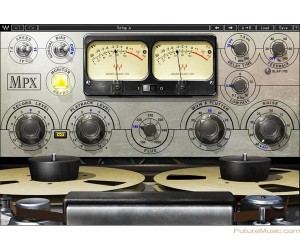
Waves Audio has unveiled the MPX Master Tape plug-in. Developed in association with producer/engineer Eddie Kramer (Jimi Hendrix, Led Zeppelin, Kiss) as part of an ongoing series of collaborations, the MPX Master Tape plug-in for Mac and PC is modeled on a rare machine consisting of an Ampex 350 transport and 351 electronics. With adjustable tape speed, bias, flux, wow and flutter, along with noise parameters, the MPX provides comprehensive control over the contours of any sound. Additionally, Waves has added a flexible slap and feedback delay, ideal for rock, dance, dub and countless other styles. For recording, mixing, mastering and more, MPX brings the richness and warmth of real tape saturation to any DAW setup.
When Waves started their hardware modeling project with Eddie Kramer, it was always their intention to create a model of the original recording chain from Olympic Studios in London that Kramer used on his great recordings of Led Zeppelin, The Rolling Stones and Jimi Hendrix. The Ampex 350 and 351 valve tape machines were mainstays of the recording industry and were used for literally thousands of hit albums and singles over more than two decades of recording. Waves tracked down a perfectly maintained machine (owned by veteran mixer/engineer Eric Schilling), and began the long, complex modeling process. Assisting Waves were Bob Olhsson (Stevie Wonder, Marvin Gaye, Diana Ross) and co-developer John Haeny (Jim Morrison and the Doors, John Coltrane, Joni Mitchell, Jackson Browne). Waves used 3M Scotch 206/207 tape for the modeling, as it was considered an almost ideal match for this machine.
Features:
» Modeled on the Ampex 350/351 1/4″ reel-to-reel
» Adjustable tape speed, bias, flux, wow and flutter
» Slap and feedback delay
» Up to 24-bit 96kHz resolution
» Mono and Stereo components
» Supports TDM, RTAS, Audio Suite, VST, AU
» PC- and Mac compatible
Controls:
» SPEED selects the simulated tape speed
» MONITOR selects the monitoring mode
» BIAS controls the level of the ultrasonic bias signal
» VU METER displays input or output level
» VU CALIBRATION controls the VU meter headroom calibration
» DELAY TIME controls the time of the tape delay effect, with settings for 7.5 ips (266 milliseconds) and15ips(133ms)
» DELAY TYPE toggles between delay modes
» FEEDBACK controls the amount of the delayed output signal
» LOWPASS controls the LP cutoff frequency on the delay path
» RECORD LEVEL controls the input level
» LINK I/O links Record and Playback Levels controls
» PLAYBACK LEVEL controls the total signal output level
» FLUX controls the level of simulated magnetic radiation emitted from the record head
» WOW & FLUTTER controls the speed and gain modulations and fluctuations
» NOISE controls the level of added modeled noise but not noise modulations and signal additive noise
The Waves MPX Master Tape plugin is availablenow for $200 Native / $300 TDM, with special introductory prices of $99 Native/$149 TDM being offered for a limited time.
Making thing Endless
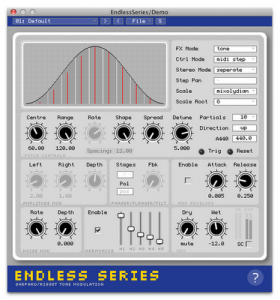
Endless Series is unique synthesis and effect plugin based on the Shepard Tone auditory illusion. It generates mind bending infinite scales, psychedelic drones and fascinating sonic textures and works as a tone generator, a ring modulator, phaser, flanger or resonant filter bank effect.
Features:
VST2 / AudioUnit plugin based on the Shepard Tone auditory illusion
Additive tone generator with up to 40 partials
Circular pitch ring modulator, flanger, filter and 24 stage phaser FX
Glissando, auto-stepped and MIDI stepped modes
Many options to tweak harmonicity and timbre
Stereo detune, phase offset and auto-panning
Quantise pitches to 14 different scales
Soft clipping, extra harmonics and noise modulation
Fast ASR amplitude envelope in MIDI stepped mode
MIDI reset-able for repeatable output
Integrated help system
32 high quality factory presets”
Circuit Abbey goes Gravity and Distortion
The Gravity Well is a wave modifier using asymmetrical wave warping to create interesting new sounds. Think of the signal in orbit around a heavenly body whose gravity is being changed by the CV inputs. One CV varies the gravity field, another pushes it to one side, the third affects the north-south magnitude, and the forth the east-west. The module has one signal input and four CV inputs, all of which have level controls. Each CV channel has a BIAS control for setting initial bias level.
The module works by warping the positive and negative portions of the incoming signal by amounts determined by the CV inputs. The Inclination CV varies both polarities equally. The Eccentricity CV increases the positive warp and decreases the negative warp. The Longitude CV increases the positive warp only, while the Latitude CV increases only the negative warp.
In these videos:
A short demonstration of the Circuit Abbey Gravity Well wavewarper module being used as a CV processor. Various CV sources are run through it and sent to a ULFO that is being used as a VCO. Manual tweaks and adjustments made along the way.
A quick demo using the upcoming Circuit Abbey Gozinta module as a distortion unit!
Rated PG-13 for brief coarse language.
Awesome site for synths and effects made with Synthedit
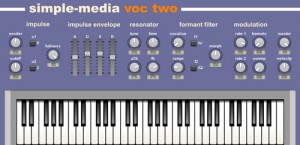
Simple Media announced their new website update. to coincide with the update they’re releasing two new free VSTi instruments, Striker and Voc-Two, and two new products retro-gsx and Cathedral.
The instruments and effects that appear on this page have been created using Synthedit. Synthedit is a tremendously powerful tool for creating software synthesizers, samplers and effects. The quality of software it can be used to create can rival software produced by high profile commercial developers. The package itself is very versatile, capable of recreating a number of different synthesis techniques from simple sample playback and analog modelling right through to FM and physical modelling.
Please note all instruments and effects are currently PC(Windows) only. This is due to the fact that Synthedit currently only exports VST dll files for Windows.
The two free VSti’s Striker is a physical modelling instrument created to reproduce the sounds of various types of tuned percussion such as marimbas, vibraphones and other instruments where a hammer or mallet strikes a block where as Voc-Two allows you to create realistic string ensemble and choir sounds without the use of samples. It includes a wide range of controls over the source sound generation and the morphable formant filter making it a surprisingly flexible instrument for creating rich and atmospheric pads and realistic ensemble sounds. The two new products are retro-gsx is a new addtion to the SID inspired synths retro-gs01 & retro-gs02 where as Cathedral is being hailed as a new approach to a pipe organ. All instruments are available at http://www.simple-media.co.u…
Electro-Harmonix Effectology – World Sounds By Bill Ruppert
Electro-Harmonix Effectology, Vol.18 World Sounds
By Bill Ruppert
Welcome to Electro-Harmonix’s “Effectology” series, in which we create a remarkable collection of impossible sounds using just a regular guitar and EHX effect pedals!
No keyboards, samplers or midi pickups were used.
Electro-Harmonix Effectology, Vol.18 World Sounds
In this episode I explore exotic sounds of the world using a guitar and effect pedals.
I also show all the individual pedal settings at the EHX forum listed below.
http://www.ehx.com/forums/viewthread/3798/
DATAMASKIN

