
Improvisation with the Wicks Looper electronic instrument
Improvisation with the Wicks Looper electronic instrument. Part of the Regents Lecture concert by Amar Chaudhary at the Center for New Music and Audio Technologies (CNMAT) at U.C. Berkeley on March 4, 2011.
Draw your sounds – Introducing Artikulator
Artikulator is an app for your iPad that lets you draw sound. Break free of the grid with Artikulator! Check it out in the App Store: http://itunes.apple.com/us/app/artikulator/id439286191
Sound Cells app – Midi Clock Sync demo
Sound Cells is an interactive generative music app. Just touch the matrix to create some moving cells and see them interact with each other and generate sound in realtime. If a cell hits the wall, it creates a sound. If a cell ends up in the same location as another one, they change directions. You can remove cells by touching them or by hitting the cell removing button.
The app comes with the 2 different sounds, which can be controlled in realtime for very expressive effects.
Also the app can generate MIDI output, so you can hook up a midi capable instrument for endless possibilities.
On the newest version, it is possible to choose the scale that the app will use, the tempo and the key. This allows the app to be able to become a performance tool, where it can play along different musical settings.
This is a universal app and on the iPad, it will use the full available resolution for a rich visual experience.
This app is inspired by the web app Otomata at http://www.earslap.com/projectslab/otomata, which also has a iOS version in the works, so make sure to keep an eye for it.
In this video:
This is a demo of the new Midi Clock sync feature that I’ll be adding to it soon. In this video, the Drum Machine (Korg ER-1) is sending the clock signal to Sound Cells. In turn, Sound Cell, is sending midi note data to the DSI Tetr4 synth to make sound.
The app can be found in here:
http://ow.ly/5azwj
The electronic Swiss army knife for iPad gets a massive upgrade
Audioforge has done a major update on heir app reforge for iPad. Edit the wave form directly just by touching it. Set selections to cut, copy and paste within files or even paste from another file. Set the selection to trim unwanted parts of your audio off and more.
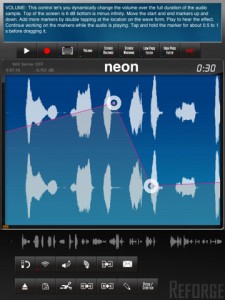
Automate volume changes for fade in effects or remove unwanted clicks. Adjust stereo balance and set it to the far left channel for the beginning of the track continuously transferring over to the right channel for the end. Add stereo widening effects or bring it all to together to make is sound mono. Add high pass and low pass effects to start an intro, simulate a telephone conversation or just distort your sound. Use control markers to automate the effect levels. Add as many markers as you need by double tapping on the waveform. Move them around to generate the changes to the effect you need.
New in Version 2.0
Complete rework of Reforge.
New audio engine
New Audiocopy and paste version (1.2.1)
New design
Stereo recording
Import podcasts and other long (over 3h) audio files for further processing
Portrait mode contains a help screen that explains each function in detail. Start using Reforge in portrait mode and every button you touch will be explained. Once you feel more comfortable with using Reforge, flip to landscape mode where you have more area to view and interact with the wave form.

Import mp3, im4, aif files directly from emails into Reforge. If you receive an email with an attached mp3 file on your iPad, tap and hold the mp3 representation in the email app until the menu appears and then tap “open in Reforge” This feature enables you to receive mp3, aif and im4 files via email directly on your iPad and audiocopy them over into StudioTrack for further mixing. Use the iTunes FileSharing to upload your mp3, im4, aif and wav files. Use the built in wifi server to upload music in mp3, im4, wav, aif format. Use Audiocopy and Audiopaste (V1.2.1 with 12 file history and support for the General Pasteboard) to exchange music with other apps that support it. This enables you to interact with apps like Fourtrack as well as Beatmaker. Import your music directly from your iPod library on your device, that includes podcasts.
Available through itunes. More info and specs at http://www.reforge.info/Site…
CAUSTIC Electronic Music Rack for Android devices
CAUSTIC Music Rack lets you create powerful electronic music on the go. Demo video showing an example of what can be done with CAUSTIC Electronic Music Rack for Android devices. This is a quick overview of how to the different machines to put together a song loop. Hoping to create more in-depth videos explaining some of the more complicated machines like the SubSynth and Sequencer in the near future. The app is available for most Android devices, and there’s a full demo version with no time restrictions. To unlock full-version features (song save/load/export), use the in-app purchase option.

This app is packed with 8 machines including:
* 1x Virtual analog subsynth
* 2x PCM synths (23 demo samples included)
* 2x 303-like BassLine synths
* 1x Sampling drum machine (9 demo kits included)
* 1x Mixer desk with Delay/Reverb and 6 insert effects
* 1x Song sequencer
All files are stored on the SDCard, and users can supply their own WAV files for use in the PCMSynths (drum machine setup coming soon)
Minimum recommended device specs are:
– 800 MHz ARMv7 processor
– 800 x 480 resolution screen
– Headphones or external speakers
This is a demo version of CAUSTIC Music Rack, with the ability to unlock to full version. There is no time limit in demo mode but save/load/export are disabled. The app will automatically save your current song between sessions.
Full version unlock is available as an in-app purchase. For those who can’t use in-app billing, other options will be available shortly, more info on the developer’s website.
Permissions:
– SDCard: All samples and songs are stored on your sdcard.
– Wake Lock: A few people have requested an option to keep the app awake, this is now available through the menu options.
– Billing: To contact Android market servers for full-version unlock.
Circuit Abbey goes Gravity and Distortion
The Gravity Well is a wave modifier using asymmetrical wave warping to create interesting new sounds. Think of the signal in orbit around a heavenly body whose gravity is being changed by the CV inputs. One CV varies the gravity field, another pushes it to one side, the third affects the north-south magnitude, and the forth the east-west. The module has one signal input and four CV inputs, all of which have level controls. Each CV channel has a BIAS control for setting initial bias level.
The module works by warping the positive and negative portions of the incoming signal by amounts determined by the CV inputs. The Inclination CV varies both polarities equally. The Eccentricity CV increases the positive warp and decreases the negative warp. The Longitude CV increases the positive warp only, while the Latitude CV increases only the negative warp.
In these videos:
A short demonstration of the Circuit Abbey Gravity Well wavewarper module being used as a CV processor. Various CV sources are run through it and sent to a ULFO that is being used as a VCO. Manual tweaks and adjustments made along the way.
A quick demo using the upcoming Circuit Abbey Gozinta module as a distortion unit!
Rated PG-13 for brief coarse language.
Here’s a treat for all you synth and Kraftwerk fans – The Kraftworker
http://youtu.be/a0n4b_I627A
Best Service has introduced Kraftworker – a Kraftwerk inspired virtual instrument for Mac & Windows. Features Orchestron, Stylophone, Speak & Spell & More
Kraftworker includes sounds made famous by Kraftwerk, including:
- Orchestron
- TI Language Translator: german-english-french-spanish
- FX-501P Pocket Calculator
- Speak & Spell
- Stylophon
- BG Rhythm Machine
The virtual instrument comes with 1,300 electronic sounds:
- Synthesizer Sounds
- Chord Sounds
- Electronic Speech Synthesizers, Choirs, Vocoders
- Computer Sounds
- Pad Sounds
- Organic Sounds
- Basses
- EFX Sounds
- Musical Patterns and Sequences
Features:
- Digital Modular system
- Flexible routing of all modules und effects
- Extreme fast Sound-Loading average access and loading of a new instruments with all its parameters and effects in less than a second
- Direct stepping through the soundpool
- Analog reproduction of digital sounds
- Solo-Mode, Legato Mode, Portamento und Samplestart shifting
- Multi Mode Filter / Resonator
- QuickEditPage: Blue english Kraftworker interface with instant access to all important parameters
- ProEdit Page: Offers every possible parameter, FX-Rack with 46 effects, Convolution Reverb etc.
- Infinite Polyfonie
- Infinite number of modulators
- Infinite number of effects
- Extrem flexibler Arpeggiator inklusive Midifile Abspieler •Extrem flexible Arpeggiator including Midifile player
- Step und Modular Sequencer
Pricing and Availability
Kraftworker is available now for 249,00 €, inc VAT.
Link:
Boost your Reaktor environment
The Colorspace has released three virtual instruments for Native Instruments Reaktor.
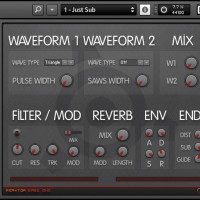
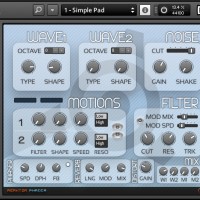
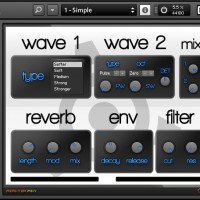
The Colorspace Reaktor ensembles:
- Reaktor Phadia – 4 oscs pads/atmospheres synthesizer.
- Reaktor Bass One – 3 oscs bass synthesizer.
- Reaktor Piky – 2 oscs pikes/plucks synthesizer.
All three Reaktor ensembles are available as a free download. Requires Reaktor full version.
Introducing The Choppertone!
A Live mashup of a classic jazz tune, performed on a custom-built MIDI controller. Nick Francis is at the controls.
Binary Bleeps Sampler

Binary Bleeps Sampler is an audio capture and performance instrument with motion-controlled pitch, filter, delay, and bit crusher effects.Record from the microphone or paste audio from other apps. Play your samples from velocity sensitive pads. Control effects through the motion of your device. Save samples and record performances.
Sampler’s pads are velocity sensitive and trigger samples with very low latency for expressiveness and great playability.
Recording is input sensitive to ensure firm sample start points without further editing. Sensitivity is adjustable to your input source.
The complete effects section is motion controllable. Effect parameters can be assigned to your device’s tilt axes. Sampler comes with a real-time pitch shifter, a resonant lowpass filter, a feedback delay and a lo-fi bit crusher, all of which can be active simultaneously.
Performances can be copied into other apps or transferred to your computer via iTunes file sharing. AudioCopy and AudioPaste are supported.
Sampler comes with quality presets, so you can start making sound instantly.
Get Binary Bleeps Sampler now on iTunes at http://itunes.apple.com/us/a…
DATAMASKIN

