
Free music creation app for mobile producers
This video shows some of the features of a FREE, new studio.M multitrack music creation app for mobile producers and songwriters. Based on the top-selling studio.HD app, it offers 4 audio tracks, mono or stereo (upgradeable to 8) with recording, editing, an extensive loop library plus automated mixing and effects all controlled by a fast and creative touch interface. Get ideas down fast and work with them anywhere!
Grab a beat and throw down a rap, capture the spark of a song before it’s gone or produce dance tracks on the go. It’s even great for making custom soundtracks for your next YouTube movie!
Features:
– 4-tracks of CD audio quality playback (with recording one-track-at-a-time)
– Streaming recording/playback engine for long recording times limited only by storage
– Automated mixing and effects
– Effects include Compressor, Reverb, Pan and Low Pass Filter
– Loop library spanning popular music styles (including Pop, Funk, Industrial, Hip Hop, Trance, Reggaeton, House, etc.)
PLUS there is an in-app Store that offers:
– The “MX” upgrade for:
— 4-more tracks (8 total)
— More effects (Delay, Flanger, Gate, Stutter, BitCrusher and Glitchy Repeater)
— 130 more loops arranged in loop construction kits called “Loop Sets”
– Loop Store
— Featuring 100’s of loops arranged in Loop Sets by both large 3rd parties (like Beatport, Sonic Reality, etc.) and indie producers
studio.M requires iPhone or iPod touch on iOS 4 or above. It will also run on iPad in 2x mode.
New way to create cool mash-ups
MiniMash, a new iPhone application that allows users to create fun mashups and DJ sets using their favorite songs, is now available for download from the iTunes store.
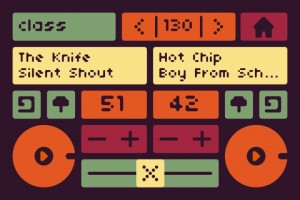
MiniMash syncs with iTunes playlists and uses a highly developed analysis algorithm to scans each track’s beat information. With MiniMash, users play tracks in rhythmic unison with one another, change the overall tempo, set loop points, change the pitch, crossfade, and more. The record function saves and shares users’ mini masterpiece via file sharing, email, or built-in SoundCloud support. In fact, the MiniMash website and blog hosts videos of mashups by MiniMash users from around the world.
Creator Daniel Iglesia makes music and media for humans, computers, and broad interactions of the two. He recently completed his doctorate at Columbia University where he studied at the Computer Music Center (CMC). He is currently a Visiting Instructor at the Pratt Institute, and a Visiting Lecturer at Princeton University, where he co-leads the Princeton Laptop Orchestra (PLOrk). He recently gave a talk on PLOrk at the TEDx conference in Brooklyn.
iPod Touch – Pythagoras synth in action
Fielding is using Pythagoras, a new microtonal iOS synth instrument, still in development.
Riffing on classic orchestral tune from The Conan The Barbarian Sound Track “The Orgy” to demonstrate that the iPod touch version of this thing is actually playable. About as playable as Mugician.
FL Studio Mobile is now live on iOS
Guess this is a given on your iPad  Image-Line has released FL Studio Mobile – a new virtual studio for iOS.
FL Studio Mobile is available in 2 versions.
- FL Studio Mobile: For iPhone & iPod Touch, G3 & G4 with Retina display support.
- FL Studio Mobile HD: For iPad 1 & iPad 2.
FL Studio Mobile is currently priced at $14.99 and FL Studio Mobile HD at $19.99.
Full specs below. FL Studio Mobile Specifications:
- 133 high quality instruments, drum kits & sliced-loop beats
- All instruments have FL Studio desktop counterparts for FL Studio desktop import and extension
- Step sequencer for fast percussion programming and sliced-loop reworking
- Configurable virtual piano-keyboard
- Configurable key labels (off, Cs only, all keys or all keys colored)
- Drum pads
- Browser with preview button and logical sorting into Instruments, Synths, Drum kits & Loops
- Pan, volume, release and attack time configurable per instrument
- Pitch bend via accelerometer
- Low-latency, iOS-optimized, high quality, battery-friendly audio engine
- Drum loops and sliced loops ready to start your project with a cool beat
- Effects include Limiter, Reverb, Delay, EQ, Amp simulator & Filter to enhance your mix.
- 99 track sequencer and intuitive editing options
- Per-track mute, solo, effect bus, pan and volume adjustment
- Edit at the level of tracks, bars or down to individual notes
- Piano roll editor for manual entry of note & chord sequence data or detailed editing of recorded performances
- Unlimited undo and redo for all editable screens
- Metronome with tempo & time-signature settings
- Intuitive positioning of screens with the slide gesture and resize with the pinch gesture
- Retina display support
- Save and load your songs, export to wave
- MIDI file import/export
- In-app user manual
- Akai SynthStation 25 & CoreMIDI (MIDI in and out) compatible
FL Studio Mobile HD Specifications:
- 133 high quality instruments, drum kits & sliced-loop beats
- All instruments have FL Studio desktop counterparts for FL Studio desktop import and extension
- Stepsequencer for fast percussion programming and sliced-loop reworking
- Configurable virtual piano-keyboard
- Configurable key labels (off, Cs only, all keys or all keys colored)
- Drum pads
- Browser with preview button and logical sorting into Instruments, Synths, Drum kits & Loops
- Pan, volume, release and attack time configurable per instrument
- Pitch bend via accelerometer
- Low-latency, iOS-optimized, high quality, battery-friendly audio engine
- Drum loops and sliced loops ready to start your project with a cool beat
- Effects include Limiter, Reverb, Delay, EQ, Amp simulator & Filter to enhance your mix.
- 99 track sequencer and intuitive editing options
- Per-track mute, solo, effect bus, pan and volume adjustment
- Edit at the level of tracks, bars or down to individual notes
- Piano roll editor for manual entry of note & chord sequence data or detailed editing of recorded performances
- Unlimited undo and redo for all editable screens
- Metronome with tempo & time-signature settings
- Intuitive positioning of screens with the slide gesture and resize with the pinch gesture
- Save and load your songs, export to wave
- MIDI file import/export
- In-app user manual
- Compatible with CoreMIDI (MIDI in and out)
See the Image Line site for more details or Image Line in the App Store.
Have you purchased a Tenori On – time to get rid of that one too
Yamaha has released a simulation of the Tenori-On on the iPad. works on the iPhone, too. The iOS version of the world-renowned TENORI-ON brings you a completely new musical interface. Even if you don’t know much about music, you can create music intuitively as if you were arranging sounds in space. The music that you see on the 16 × 16 grid of buttons is the music that is performed.
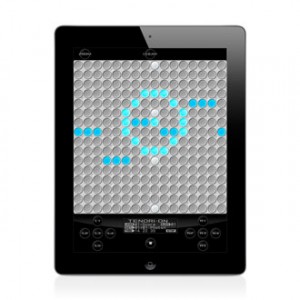
On the 16 × 16 grid of buttons, basically, the horizontal direction is time, and the vertical direction is pitch. By laying sounds on these buttons, you can combine rhythms and melodies to produce music. A button will glow when its sound is produced. The movements of the glowing lights produce a visual performance. 16€ isn’t cheap but cheaper than the hardware was/is. It has all modes and functions of the original. it can sync to other TNRs via the Game Center (from Apple). the data on the Hardware SD Cards can be load to the App as well. not said: if it loads a sample stack of 48 sounds as the original and sending MIDI signals isn’t clear, but for that price I’d assume it has to… Since Yamaha offer a MIDI connection kit it is very very likely it sends MIDI (iOS 4.3). since the built in sounds are quite strange I just like to check for it’s sample upload capability.
There are six different types of performance modes that you can select for each layer. You can make elaborate music by combining different modes. In score mode, the most fundamental of the modes, you can arrange sounds horizontally (temporally) and vertically (by pitch). In the exciting random mode, the sounds that you arrange are not just played in order—the melody and rhythm constantly change as twists are added. In draw mode, you can perform music by tracing your finger across the buttons as if drawing a picture. In bounce mode, the glowing lights are like bouncing balls that produce sound when they fall. In push mode, you can continuously change the sound as you perform. In solo mode, which is fun for solo performances, you can easily adjust the speed of repetition and the pitch.
Fairly complete overview of the SampleWiz
This is an informal but fairly complete overview of SampleWiz. A Universal app for iOS. We plan to submit in the next few days and hopefully it will arrive on the app store by the end of the June 2011. Remember-you can always hit the question mark for onscreen help. For more JR app coverage you can visit:
http://jordanrudess-apps.blogspot.com
The most portable MIDI system ever
…at least Line 6 is claiming this
Learn more about MIDI Mobilizer™ and compatible MIDI Mobilizer apps at at http://line6.com/midimobilizer
The only one of its kind, MIDI Mobilizer™ is the most portable MIDI system ever. Connect it to an Apple® iPhone®, iPad®, or iPod touch® to play, record, and backup MIDI information any time, any place.
Software developers around the world have been producing amazing apps for use with MIDI Mobilizer™. All of these are available now on the App Store™, and more are being added all the time. http://www.apple.com/iphone/apps-for-iphone/
Let your fingertips do the work
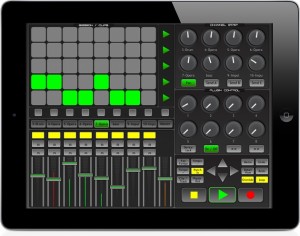
Kiss goodbye to your mouse and keyboard, and let your fingertips do the work with LiveRemote for you iPad, iPod or iPhone. LiveRemote connects to Ableton via CoreMidi networking technology with incredibly low latency of between 1-3ms. Control your session from the comfort of your couch, or whilst walking around the room. LiveRemote gives you direct and precise control over the many Live features.
Mixer:
– Control up to 8 faders at a time + the Master with solo, mute, record also available. *High Resolution Precise meter readings of the audible decibels for each channel.
Clip Launcher:
– Launch clips direct from your device, using the 8*5 matrix. *Launch scenes, or stop them at any time.
– Move around your session easily with the control arrows, the clip launcher will activate any clips that are within the red box highlighted in Live.
Channel Strip: For each channel you have precise and fast control on the pan and upto 3 send channels.
Plugin Control: Simply and easily control the plugins for each selected channel, LiveRemote automaps the available controls of the selected device.
Transport Control: All the necessary transport controls such as Play, Record, Stop ect are implemented for quick, on the fly recording.
LiveRemote is compatible with both Mac and Windows. Price £5.99/$9.99 iPad Version / £3.49/$5.99 iPhone Version and availible in the iTues App store.
For more information please visit there website www.iximix.com
FL Studio Mobile | Getting Started
Key features:
Compatible with the FL Studio desktop version.
85-key keyboard
FL Studio quality instruments and kits
5 Effects: reverb, delay, equalizer, amp, filter
Pitch bend via accelerometer
128-track sequencer
Attack and release times for each track
Piano-roll editor
Step sequencer
Drum pads
Drum loops
MIDI import/export
Mixdown to wav
iTunes file sharing support
Low-latency, high-polyphony, battery saving audio engine
iPhone 4 Retina Display support
Compatible with the Akai SynthStation 25
FL Studio Mobile – http://www.image-line.com/documents/flstudiomobile.html
FL Studio Mobile for the iPod Touch, iPhone and iPad. Tutorial on getting started. If you want, load mobile projects into FL Studio and take them to the next level. FL Studio Mobile is coming soon! Yes the hand is inside the iPad. With proper training and diet it is possible to fit the FL Studio Guru INSIDE an iPad.
Android is on the roadmap…stop nagging! 😛
Time for a Lion in the Cloud – Apple WWDC

Steve Jobs and a team of Apple executives will kick off the company’s annual Worldwide Developers Conference (WWDC) with a keynote address on Monday, June 6 at 10:00 a.m. At the keynote, Apple will unveil its next generation software – Lion, the eighth major release of Mac OS® X; iOS 5, the next version of Apple’s advanced mobile operating system which powers the iPad®, iPhone® and iPod touch®; and iCloud®, Apple’s upcoming cloud services offering.
Apple has confirmed maybe the worst kept secret in Silicon Valley: It’s been working on a cloud service, and will announce it at the June 6 Worldwide Developers Conference.
So now we know annual developer’s conference will unveil “iCloud®, Apple’s upcoming cloud services offering,” but we don’t know yet what it is, or what exactly will reside at the domain name it may have bought for $4.5 million in April.
iCloud could be the mythical iTunes streaming service, a possibility that is looking increasingly likely now that Apple has most of the major record labels signed up for it, in a space pioneered by Amazon and Google, which has no such deals. Or it could be Apple’s version of DropBox, the amazing sync and storage service that currently glues together the whole iOS ecosystem along with its desktop service.
Or it could be yet another abortion of an internet service, like Mobile Me, iDisk and Ping before it.
Whatever it is, it’ll have to be good. DropBox is already the default file system for iOS, and can be used by any developer, on almost any other OS. If iCloud is to succeed, it needs to be just as available to developers. ITunes streaming, too, needs to be something special. A “cloud locker” service like Amazon and Google’s is almost pointless, and we already have amazing streaming services like Spotify and Rdio.
WWDC will feature more than 100 technical sessions presented by Apple engineers. Mac® developers will see and learn how to develop world-class Mac OS X Lion applications using its latest technologies and capabilities. Mobile developers will be able to explore the latest innovations and capabilities of iOS and learn how to greatly enhance the functionality, performance and design of their apps. All developers can bring their code to the labs and work with Apple engineers.
For more details, visit the Apple Worldwide Developers Conference 2011 website at developer.apple.com/wwdc.
DATAMASKIN

