
NodeBeat HD 1.5 – iOS Music Sequencer
This is a brief video showcasing some of the new features in NodeBeat HD 1.5. The same features will be coming to the iPhone/iPod Touch version of NodeBeat in the coming weeks.
New Features Include:
– Entirely new user interface design
– Drag and drop new nodes
– Drum Generator Node
– Sine, Triangle, Sawtooth, and Square waveform selection
– Tempo and BPM controls
– Compress recording for faster e-mailing of recordings
– Create ringtones from recordings
– Sleep Timer. Now you can fall asleep to NodeBeat
– Shake to Clear Screen
– 5 Finger multitouch reset all
———————————————-
NodeBeat is an experimental node-based audio sequencer and generative music application for the iPhone, iPod Touch and iPad.
By combining music and exploration, NodeBeat allows anyone to create a variety of rhythmic sequences and ambient melodies in a fun and intuitive fashion.
NodeBeat.com – for free Desktop (TUIO compatible) version and iOS information
Created with openframeworks.cc, puredata.info, gitorious.org/pdlib/pages/Libpd
Starcraft Terran Theme Music made with iOS MusicApps
Here’s an inspiring video:
Starcraft Terran theme song made with iOS music apps.
Had some arrangement on original song.
All of this song’s sounds are come from iPhone and iPad.
Featured music apps : GarageBand for iPad, ThumbJam, iShred, Guitar Studio
Hokusai – the free iOS audio editor
Developer Wooji Juice has introduced Hokusai – a free/commercial multitrack audio editor for iPhone or iPad.
Hokusai comes free with a set of basic tools such as fade in/out, normalise volume levels, reverse time, and basic synthesis. If you need more power, though, additional features are available through in-app upgrades.
Here’s what they have to say about Hokusai:
Record or import a track, and make it sound the way you want it to: not just trimming the ends, but full cut, copy, paste and delete, and a suite of filters and special effects available.
Edit many tracks side-by-side, mix them together, and export to wave or mp4 format — then transfer them to your computer via USB or Dropbox, or send them to another app on your device.
Hokusai is streamlined to give you a clean, clear view of your tracks. Use the familiar pinch and swipe gestures to zoom right in and fiddle with fine detail, or step back to see the big picture. And just like selecting text in other apps, you can select pieces of audio. Live “scrubbing” means you can hear the sound under your fingertip as you make your adjustments. And you needn’t fear a bad edit with our full undo/redo support: as many levels as space allows.
Upgrade options include:
- AudioCopy/AudioPaste
- grain synthesis
- noise gating
- time-stretching
- pitch-bending
- echo
- reverb
- modulation (AM & FM)
- resonance
- distortion
grunge - vocal levelling
- monster voice
- high/low/band-pass/notch-cut filter
Hokusai is a free app, but the app’s more advanced features require in-app upgrades.
Hokusai in the App Store
AirVox – Gesture Controlled Music App for iOS
Here are the details:
Introducing a REVOLUTION: use gestures to perform music on your iOS device with amazing precision! Simply use your right hand to control the pitch and your left hand to control a selected sound parameter. It may look magical, but AirVox is actually our product of cutting-edge computer vision technology crafted for mobile devices.
Now available in the iTunes store for devices with a front-facing camera: iPhone 4, iPad 2, and iPod Touch 4th Gen.
Features:
- Move right hand up and down to control musical note / pitch
- Move left hand back & forth to control any one of 9 tonal parameters like volume or vibrato (you can turn this feature on or off: it is turned off by us on the first-launch preset to make starting out easier)
- Use other hand motions or gestures for even finer control
- AirVox has 50 musical scales, each with settable root note and octave range.
- AirVox has a complete sound engine, made of dual oscillators, many waveforms, musical filters and audio FX, including vibrato, delay, and tremolo.
- AirVox has 48 built-in presets. Tweak knobs and save any number of your own.
- Record and share your music via email, wifi or SoundCloud (also Twitter & Facebook via SoundCloud)
AirVox is available in the App Store for $2.
FL Studio Mobile has already been updated – release 1.1 is out
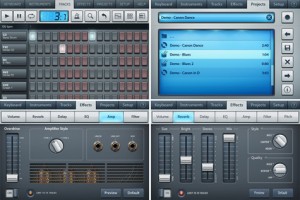
Image Line has announced an update to FL Studio Mobile – its virtual studio for iOS.
Here’s what’s new in FL Studio Mobile 1.1:
- User instruments can be created from .instr and .zip files.
- Support for Sonoma AudioCopy.
- Clipboard in the bar editor: tap and hold a selection to see the copy and paste buttons.
- Filter track editing in the bar editor.
- Record button in the Filter screen.
- Piano-roll editor: pitch-bend is visualized with curved lines.
- Heavy Mute: tuning improved.
- Bug fixes and usability improvements
Preview of Otomata – Generative Sound Sequencer
Get from iTunes store: http://batu.in/iotomata
Play from your browser: http://batu.in/otomata
Otomata is a generative sound sequencer – a musical toy that you can play with using your web browser or your iPhone/iPad/iPod.
Enjoy the mobile version of the generative music application that millions enjoyed through the web, with your iOS device!
If you want to see what Otomata is about, play with it through the web player first: http://batu.in/otomata
Otomata is a generative musical instrument that anyone with or without a music training can enjoy. You just need to create an initial scene on the cellular grid by tapping on the screen (simple as that!), and Otomata will generate and play endless melodies with beautiful visuals for your enjoyment.
When you are satisfied with your piece, you are able to share it with the world using your favorite social networking site, using just your mobile device.
This version of Otomata has:
* 40 hand picked musical scales for you to play with
* Flexible tempo
* Loaded with best presets chosen by the Otomata community
* Preset Load/Save support
* Twitter and Facebook integration to share your music with the world
* Support for playing your endless pieces when you lock your device. Press play, lock your device and do your thing with a soothing and constantly evolving musical background!
* HD graphics for Retina displayOtomata will surprise you with your musical skills (whether or not you think they actually exist).
Chris Jeffs Releases the iOS Monnix synth
Chris Jeffs has released a new synth for iOS called Monnix. This live performance synthesizer uses three points of touch to control the distribution of up to 16 harmonics, allowing for unique sound effects.
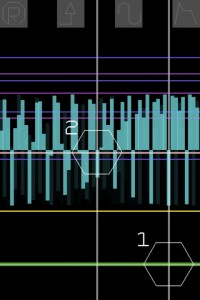
Features:
Monnix is a synthesizer app which can distribute up to 16 sine waves in various harmonic or inharmonic ways. There are 5 screens allowing performance, playback or synthesis patch editing.
Perform
Use up to 3 fingers to control the frequency and distribution of harmonics and the LFO parameters.
Replay
Any movements made in the Perform page are stored, and can be played back here.
Sample & Hold
Controls the sound as in the Perform page, but with the periodic freezing of the partials, according to the selected tempo.
Synthesis
Select the amount of FM or jitter applied to the synthesis, and the balance between odd and even harmonics.
Envelope / FM
Change the volume envelope and FM ratio
Movements can be played back in the Replay page and the pitch altered by tilting the device forward. The Sample & Hold screen freezes the partials according to the selected tempo. FM ratio, jitter and envelope parameters can be set in the remaining pages, allowing for a wide variety of sonic mayhem.
Available through iTunes. To learn more about Monnix’s many features go to http://chrisjeffs.com/monnix/
iSynthesizer Pro becomes freeware
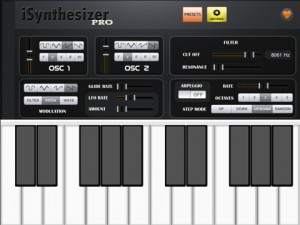
Amitech has cut the price on iSynthesizer Pro (App Store link) down to a free download.
iSynthesizer Pro is a monophonic virtual analog synth that, according to the developer, is designed for live performance.
Features:
- Monophonic, playing one note at a time like a class synthesizer
- Designed for live performance
- Configurable Presets, save your favorite settings
- Oscillator Module
- Dual oscillators
- Square, Triangle, Sawtooth, Reverse Sawtooth waves
- Octave selector, supporting 5 octaves
- Glide between notes (Lag Processor)
- Oscillator fine tune (more than one full octave)
- Oscillator sync
- Low Pass Filter Module
- Modulation module
- Tremelo/Wave
- Vibrato/Pitch
- Filter
- Envelope Generator module
- Supports ADSR (Attack, Decay, Sustain, Release)
- Volume
- Filter (amount of low pass filter)
- Arpeggio
Video demonstration of the SoundPrism 2.o
An introduction to SoundPrism 2.0
Available now! http://soundprism.com/
Features
* connects to your favorite DAW or hardware synth
* … via WiFi (iPhone, iPod touch or iPad) or USB (iPad only)
* allows individual control of multiple instruments at the same time
* support for non-diatonic scales (iPad only)
* turns your iOS device into a wireless 3D MIDI controller
What can you do with it?
* Create harmonies easily in any key
* Build loops graphically
* Compose effortlessly
* Experience new ways to control your Synth’s parameters while playing!
* Check out our interactive manual to find out more!
Rhythm Studio goes TRON (Daft Punk)
Rhythm Studio demo, a new universal app. Featuring Daft Punk’s Tron Legacy (End Titles) song. Coming soon to the iTunes appstore and available on all iOS devices (including iphone 3G!) with the latest iOS installed.
“Rhythm Studio is a premier universal electronic music making app, boasting richly detailed graphics and incredible sound, with impeccable recreations of classic synths and drum machines such as the 303 and 808 along with other amazing studio hardware.”
Rhythm Studio Demos by PulseCodeInc
Learn more at www.pulsecodeinc.com
DATAMASKIN

