
Jeremy Ellis performs on Maschine Mikro + NI’s Transient Master effect
Here’s one more video about the Maschine Mikro sprung out of the NI labs 
Check out finger drumming phenomenon Jeremy Ellis as he performs an amazing live routine on MASCHINE MIKRO, the upcoming compact version of the acclaimed computer-based groove production system.
For more information on Maschine Mikro, go here: http://www.native-instruments.com/maschinemikro/
“Check out TRANSIENT MASTER – a must-have dynamics effect. Uniquely powerful, deceptively simple and extremely useful. The magic wand for mixing drums and percussion.”
Native Instruments goes IOS
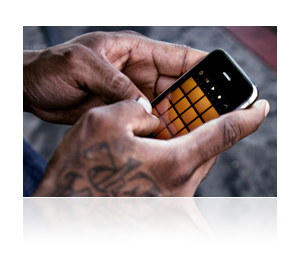
The first ever Native Instruments iPhone® and iPod touch® App is an intuitive and powerful beat sketchpad based on MASCHINE’s groove production studio concept. iMASCHINE is perfect for developing song ideas anytime, anywhere – Play and record drums on the 16 pads, jam a melody on the keyboard, sing on top of your loops via the built-in audio recorder or create your own unique sample banks from any source.
And when you’re done, you can finalize your track in the full version of MASCHINE or MASCHINE MIKRO or directly upload it to SoundCloud and share with your friends.
iMASCHINE will be available at the iTunes App Store for $ 4.99 / 3.99 € from October 1st
RealBeat has now been released
Jörg Piringer has released RealBeat, a sampler app for iOS that enables you to record sounds and create rhythms out of them.
Record your voice, your fridge, your neighbour’s dog or let your iPhone or iPad speak and make rhythms out of the sounds immediately.
RealBeat concentrates on simplicity and fast results. No steep learning curve or cluttered screens! Get creative in an instant!
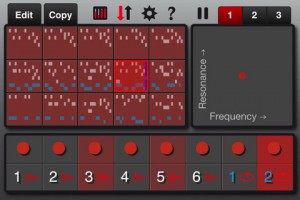
RealBeat features
- Sampler (record sounds easily).
- Text to Speech (let your device speak for you).
- Modify the sound (pitch, reverse, distortion, reverb, …)
- Sequencer (make rhythms).
- Patterns (modify the rhythm easily).
- Live effects (manipulate in realtime).
- Mixer.
- Export sounds to other apps via Audio Copy.
- Export sounds to your computer via iTunes.
- Works with internal microphone.
RealBeat for iOS 4.0 or higher is available to purchase for $1.99 USD.
Slide control fluidSynth out in october on Appstore
Slide control fluidsynth is a new application base on slide control and add a fantastic synth (fluid synth).
Fluidsynth is a sound font player, you can add any sound you want.
You can load 30 MB on iPad 1 and 230 MB on iPad 2!!
The future of iOS music continued
This is a preview of an upcoming polychord release. In this video, we’re using polychord (BETA) as a MIDI keyboard for nLog Pro (BETA) — all on one iPad, all without any cables. App makers are starting to work together to make all of your iOS music apps play nicely with each other through virtual MIDI. This is still experimental, and it will be a little while until app makers optimize their apps for multitasking, and enable virtual MIDI. It’s very exciting and clearly the future of iOS music making.
If you are a developer, get involved with the open music app group: groups.google.com/group/open-music-app-collaboration
Polychord virtual MIDI – future of iOS based music, or…?
The upcoming MIDI update to polychord lets you do some exciting and powerful new tricks with your iPad. Now you’ll be able to have your music apps talk to each other, while they run in the background, and use polychord to control them.
In this video we show how polychord can control another app (MoDrum) running in the background — all through virtual MIDI, all without any cables. Polychord sends MIDI clock signals out, keeping everything in sync.
Chords made easy
Polychord gives you instant access to a lot chords. By wrapping the different types of chords around each circle, we were able to fit a lot into a small space, while keeping them big enough to press easily. This gives you easy access to over 60 chords at any time!
Auto Accompany
Turn on Auto Accompany, press any chord, and the drums and bass will play along in tune –there’s also an arpeggiator which dynamically plays the notes of the selected chord. Switch to a different chord and they’ll follow you. Beginners can button-mash their way to a song, while more seasoned song-writing pros will find that polychord is a great way to break out of a rut.
Picking & Strumming
This is what truly sets polychord apart. Have you tried to play a piano keyboard on a small touchscreen? It’s not ideal. Polychord’s strum keys change automatically with the chords, so it doesn’t have to make room for keys you don’t need. They’re incredibly fast and responsive, so you can slide up and down the keys with many fingers at one time.
Dohi releases TableDrum iOS app
Dohi Entertainment has released TableDrum, a virtual drum app for iOS.

TableDrum is an Augmented Audio application that allows you to sync the sound of any real object and trigger a real time response of high quality drum sounds.
You can now build your own drumset from practically anything. Drum applications where users tap the screen are things of the past. This is the future!
TableDrum features
- Augmented Audio.
- Wide amplitude sensitivity.
- Real time response.
- Supports iPhone 3Gs or later.
TableDrum is available to purchase for $0.99 for a limited time (75% off regular price).
More information: TableDrum
The popular app BeatMaker for iPad has been updated
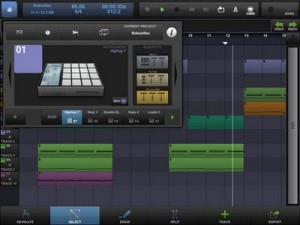
“NEW FEATURES:
– Native iPad interface
– Support for MIDI controllers through CoreMIDI, with MIDI learning and templates
– Instruments parameters automations (LFOs, envelopes, pads settings, etc.)
– MIDI export improved with Control Change (MIDI CC) messages
– New Master track with volume, pan, and 3 FX slots
– Audio input monitoring while recording
– New “Note Repeat” mode
– Pad copy & paste on the drum machine
– Improved memory management
– Info window for monitoring CPU, memory usage, battery and controlling the audio device
– SoundCloud API now uses OAuth2
– Reduce application binary size
– Add support for bluetooth speakers and headphones (A2DP compliant)
– Many improvements in every aspect of the application”
BeatMaker 2: the most advanced mobile music workstation.
Combining music production tools that were behind the success of countless artists, BeatMaker 2 is a powerful, easy-to-use composition interface for amateurs and professionals alike. Build your own virtual home-studio, create multiple instruments and connect them to a full-range of audio effects.
Compose, record, arrange and transform your ideas into complete songs, ready to be shared with others. Import your own sounds or use the sound library provided: more than 170 high-quality instrument and drum presets from synthesizers to realistic orchestral sounds. You can even import songs from your iPod library! Connect your MIDI accessories for an external control of BeatMaker’s instruments, effects and mixer, ideal for home-studio productions and live performances.
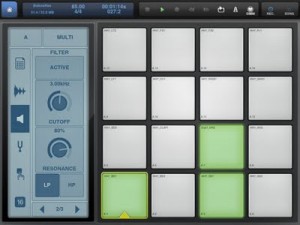
BeatMaker 2 is an universal application, with specifically designed interfaces for iPad and iPhone platforms.
Review: Rhythm Studio for iOS + a sneak peak at their new drum machine
Rhythm Studio is an analog synthesizer studio for iOS
About:
Rhythm Studio balances advanced music making features by using an easy to understand interface resembling real instruments. This means that one button does one thing just like it would with real hardware. Knobs turn, switches slide, and buttons press. You won’t get lost in abstract interfaces, menus, or design.
Imagine having a studio of rare vintage synths and drum machines in the palm of your hand. Beautifully rendered synthesizers make seeing the app as enjoyable as hearing it. Rhythm Studio is the next best thing to having the real hardware.
Rhythm Studio allows you to make music the way you want to by giving you three different ways to create your song.
1. Use the step sequencer like the real hardware.
2. Use the Control Pad to play the synths live.
3. Instantly create a random pattern.
====================
FEATURES
– Dynamic workspace full of awesome audio gear
– Intuitive pinch, double tap navigation
– Robust pattern and song sequencer
– 3 easy methods to making your songs
– Recreation of a classic drum machine
– Recreation of classic synthesizers
– Mixer
– FX
– X/Y style control pad
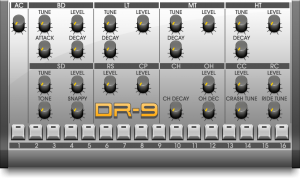
Sneak peak at the DR-9 Drum machine:
The Making of Start the Show on the iPhone
Everything iOS – from start till end in the music production process:
Hear more songs like this at http://www.reverbnation.com/onelikeson
Using apps and hardware for the iPhone Stephen Poff of One Like Son records START THE SHOW for their upcoming release.
Apps/Hardware used: AmpKit, FourTrack, Multitrack DAW, GuitarJack, Pocket Organ, Thumbjam, AC-7 Core Mini. Drums composed in Drumcore by Sonoma Wireworks.
DATAMASKIN

