
iRig MIDI in action with SampleTank and GarageBand
iRig MIDI is a compact standard Core MIDI interface for iOS that connects any MIDI compatible device to the iPhone, iPod touch and iPad. iRig MIDI connects MIDI keyboards, drum machines, drum pads, pedal boards and more to an iOS device to control not only the included SampleTank FREE* but also a world of MIDI-compatible apps such as GarageBand. You can also use iOS apps to control external MIDI equipment such as sound modules, DAWs or lighting systems right from the mobile device. iRig MIDI is the only compact iOS MIDI interface sporting 3 MIDI ports: IN/OUT/THRU. These connect to any standard MIDI jacks using the included 2 x 1.6m/5.2′ cables. iRig MIDI also has 2 LEDs for displaying the MIDI activity on the IN and OUT ports.
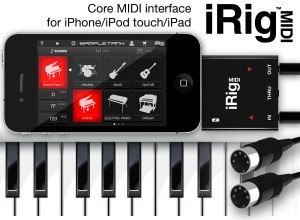
iRig MIDI also exclusively provides a micro USB port — with included cable — that connects to any standard USB power supply source so that the iOS device can stay fully powered during long sessions.
Features:
- Standard Core MIDI interface connects any MIDI hardware device to Core MIDI-compatible apps like SampleTank FREE and GarageBand®
- Directly connect MIDI keyboards, synthesizers, drum machines, drum pads, pedal boards and more using the included 2 x 5.2’ (1.6 m) MIDI 5-pin DIN cables
- 3 MIDI ports: IN/OUT/THRU
- 2 LEDs for MIDI IN/OUT activity display
- Micro USB port can charge the iOS device while in use
- Free apps included*: SampleTank FREE* the powerful sample-based sound module app and iRig MIDI Recorder FREE*
Music Studio 2.0 for iOS
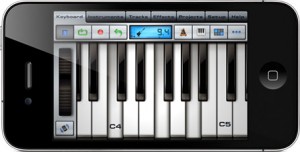
Music Studio offers a complete music production environment for the iPad/iPhone/iPod touch with features and a sound quality previously only known to desktop applications and expensive audio hardware.
It combines a piano keyboard, 65 studio-quality instruments with sustain, a fully fledged 127-track sequencer, extensive note editing, reverb, real-time effects and much more on a user-friendly interface.
FEATURES
• Photorealistic dynamically configurable 85-key keyboard
• Instant positioning via the slide gesture and resize with the pinch gesture
• Drum pads, chord pads and chord programming
• 125 studio-recorded instruments (16bit 44.1kHz sampled from real instruments)
• 65 free instruments, 60 available in the in-app shop
• 4 categories: classic, band, electronic, world
• Release and attack time configurable per instrument
• Sustain samples
• Pitch bend wheel and accelerometer control
• Audio tracks:
• Microphone recording
• AudioCopy & AudioPaste
• iPod library or wav/mp3/AAC/ogg file import
• Waveform and audio region editing
• Low-latency, highly optimized, 64x polyphony, battery saving audio engine
• 100 drum loops
• 5 real-time effects with lots of parameters:
3 high-quality reverb algorithms, delay, 3-band equalizer, amplifier, filter
• 127-track sequencer
• Beat & metronome settings (tempo and signature)
• Mute, solo, effect bus, pan and volume adjustment for each track
• Edit tracks, bars and even individual notes:
Draw, quantize, transpose, repeat, move, length, velocity, etc.
• MIDI import and export
• Save and load your songs and export to wav and AAC formats
• Share your songs via email, AudioCopy and SoundCloud
• Wi-Fi and iTunes file transfer to your computer
• Songs and MIDI files can be opened directly from Safari and Mail
• Unlimited undo and redo
• Detailed in-app help
• Play or record 2 different instruments at the same time with 2 keyboard rows
• iPhone 4 Retina Display supported
• Compatible with: CoreMIDI (MIDI in and out), Line 6 MIDI Mobilizer I & II, Akai SynthStation 25, iRig, iRig Mic, iRig MIDI, Ampkit Link, Apogee Jam, Alesis IO Dock and iConnectMIDI
Isle of Tune iPad app sneak peak
Some footage of the upcoming Isle of Tune app for iPad, iPhone and iPod Touch!

features new to iOS version:
– super crisp retina graphics
– add up to 8 cars
– change car speeds (2x, 4x, 8x)
– ‘traffic lights’ for pausing cars
– view all islands created with the online version
– create and share your island for people to view
Android version coming soon after!
visit www.isleofune.com to play online now!
Background information:
A little bit about me: I’ve worked as an animator, flash developer and art director over the last 10 years in London, UK – mainly for digital ad agencies (some previous work here: www.happylander.co.uk). Around about June last year I pretty much quit advertising work (before my soul was lost completely in the desolate mire of micro-sites and adver-games!) and took some time out to make stuff for myself – mainly based around music and playful interaction.
Isle of Tune came from a desire to make a different kind of music sequencer along the lines of http://lab.andre-michelle.com/tonematrix or the Reactable – but with less of an abstract feel and a little more game-like and social. Since it went live in December there has been over 60,000 islands made
with some properly creative tunes in there eg. http://isleoftune.com/?id=63320 or http://isleoftune.com/?id=48359Over the last few months I’ve been making updates from user requests – mainly to the way you can browse, search and view rated islands, it seems a lot of visitors come by just to check out the islands other people have made!
I’m currently working with a talented chap – Stuart Middleton – a developer since the days of the Spectrum (and now runs a small app dev company at www.abstractalien.com) who is converting the Isle of Tune codefor various mobile platforms and also helping me take it beyond what I could online with the limitations of flash. My far-fetched dream with the app is to be able to fund further development and allow me to make more stuff like this in the future without having to go back to the world of advertising!
Arctic Keys soon to be released for iOS

One Red Dog Media has announced that their new virtual analog synthesizer for the iPad, Arctic Keys, has been submitted to Apple for approval.
Arctic Keys is a four-voice synth, offering extensive modulation capabilities, an arpeggiator, a sequencer and deep MIDI options.
Details:
Tweak. With all the synthesizer parameters immediately available on one page, you get instant feedback as you tweak.
The two LFOs each have three modulation destinations. Each LFO may also be free running or sync’ed to tempo and the timing rate adjusted.
The modulation matrix allows for deep routing between the Mod Wheel, aftertouch and 16 x 4 analog-style gated step-sequencer.
Perform. The classic arpeggiator is complimented by the 16 x 4 gated step-sequencer. Play a note to trigger the sequencer.
Step through a sequence to play short melodic lines or let it modulate the synthesiser. Each of the 4 tracks have an assignable modulation destination and loop point.
Adjust the velocity by tapping along the length of the key from top to bottom. Change the key mode to mono for retro lead lines.
Share. The live phrase recorder lets you save your performances as 44.1KHz 16-bit WAV files and as a Standard MIDI File.
The MIDI File includes all the knob’s control change information along with the notes you play.
Use Sonoma AudioCopy or Intua Audio Sharing to paste recorded audio directly into other apps.
E-mail the patches you make or share them over Wi-Fi
Pricing and availability are to come.
Specifications:
- Synthesis: analog modelling
- Polyphony: up to 4 voices
- Oscillators: 2 per voice, alias free, saw, triangle and square with pulse width, hard sync, ring mod, noise generator
- Filter: 1 multi-mode resonating filter with 4 filter types
- Envelopes: filter and amp ADSR envelopes
- Modulation: 2 LFOs with multiple wave shapes, sample and hold, 3 routable destinations per LFO
- Effects: master effect processors: 3-band EQ, Distortion, Chorus, Stereo Delay
- Arpeggiator: classic apreggiator with octave shift, MIDI-sync-able
- Sequencer: 16×4 gated step sequencer with multiple modulation destinations, MIDI-sync-able
- Keyboard: glissando, scroll, multi-touch poly pitch bend and aftertouch
Features:
- KORG WIST
- Sonoma AudioCopy
- MIDI Learn
- Live phrase recorder with audio and MIDI export
- File and patch sharing via iTunes File Sharing, e-mail and Wi-Fi
- Supports external MIDI in and out via CoreMIDI Networking and USB with the Camera Connection Kit
- Audio background operation
- Virtual MIDI cabling
- Open Music App Collaboration compliant
Sunrizer and SoundPrism Pro: Setup
Sunrizer was issued in a new release a couple of days ago, the popular software synthesizer for iOS.
Here’s what’s new in Sunrizer v 1.3:
- Virtual MIDI ports and full multitasking support (use BKG button)
- Sunrizer now reacts to MIDI program and bank change messages. Internal Sysex format allows other supporting apps to take full control of Sunrizer.
- Web banks library
Highlights:
- True SuperSaw sound emulation, first found in the legendary Roland JP-8000 synthesizer. SuperSaw is a layered waveform consisting of multiple saw waves which are detuned to create an extremely full and epic sound. It’s possible to use 2 supersaw oscillators per voice * 7 polyphony = 98 saw oscillators playing the same time!
- Two independent filters per voice with configurable routing. You can select between various filter types including classic resonant LP,HP,BP,Notch and less common like Comb and Formant.
- The Morph Group function lets you continuously morph of up to 30 parameters in a sound (including effects), using only the modulation wheel.
- Full support for CoreMidi and MidiMobilizer, MIDI mapping
Fairlight Instruments: iGrowUP App for iPhone, iPad, iPod touch
Have you ever wondered what your children will sound like when they grow up? This fun, easy-to-use iPhone, iPad and iPod* App lets you explore the possibilities.
So easy to use:
• Record speaking or singing (tap mic to start, tap again to stop)
• Adjust for bigger or smaller (swipe or pinch)
• Listen to how it sounds (tap speaker)
• Send the adjusted voice with a message to friends via E-Mail.
Once you have a sound you like, you can send it to your friends. Swap recordings, and see who sounds the most grown-up or the most awesome.
You can also hear what grown-ups might have sounded like a few years ago. Just remember that having fun is half the fun!
NOTE:
• iGrowUP requires an Internet connection and E-Mail account to send your recordings to others.
* iPod Touch 2G and 3G require an external microphone, such as an Apple headset with mic. iPod Touch 1G does not support microphone input and cannot be used with iGrowUP.
iOS releases: VidRhythm – Real Instrument Example & MadPad
Available now! http://itunes.apple.com/us/app/vidrhythm/id457548851?ls=1&mt=8
The virtuosos in the Harmonix Audio Department put together this example video with real instruments so you can see how fun it is to get creative with VidRhythm.
Made with VidRhythm by Harmonix on iOS. http://www.vidrhythm.com
Get MadPad for iPhone here: http://bit.ly/MadPad-iPhones, Get MadPad for iPad here: http://bit.ly/MadPad-HD
When you download MadPad you can make your own remix of this set of video clips! It’s like magic!
MadPad for iPad, iPhone, iPod Touch, by Smule.
MadPad from Smule is like Cambox on steroids. It is very similar except it’s iPad native and you can browse other peoples sets. I absolutely love the browsing feature. I can already see people creating some nice modular or synth sets. This is a wicked app that anyone creative will love.
With VidRhythm you record some video clips and auto creates a music video for you. Although it’s more a fun toy than something you are going to create a real music video the concept is great. It’s not too unlike the web service Animoto. EDIT: After playing with the app a little maybe you CAN make something special…
“Remix your life with MadPad! Turn everyday sights and sounds like your car, an empty soda can, or your friends into the ultimate percussive instrument. Oh the possibilities! Woosh, boom, clap…anything can be music. Just aim the camera and shoot the sounds all around you: your local café, car, kitchen, kids, cat, friends… MadPad magic will take care of the rest. Or have fun playing with the hundreds of free premade sets.” – smule.com/madpad
“Remix your world! Introducing VidRhythm, the fun and easy way to make video music from Harmonix, the makers of Rock Band™ and Dance Central™. Video-sample yourself, your friends, your pets, or anything else, and use VidRhythm to instantly mash it up into a crazy video remix!” – vidrhythm.com
For more info: smule.com/madpad and vidrhythm.com
What is Moog up to?
Marc Doty ipad from Moog Music on Vimeo.
People are going to go crazy for this. I’m going crazy for it and I’m the guy who hates this!”
-Analog synth enthusiast Marc Doty.
Review: BeatMaker 2 for iOS
BeatMaker 2 is an elaborate studio with loads of effects and hundreds of samples. I ignore both of those facts completely as I go on a wild tear to put it through its paces. Included are tips on Hokusai and all kinds of sample chopping fun.
“Build your own virtual home-studio, create multiple instruments and connect them to a full-range of audio effects. Compose, record, arrange and transform your ideas into complete songs, ready to be shared with others. Import your own sounds or use the sound library provided: more than 170 high-quality instrument and drum presets from synthesizers to realistic orchestral sounds. You can even import songs from your iPod library! Connect your MIDI accessories for an external control of BeatMaker’s instruments, effects and mixer, ideal for home-studio productions and live performances. BeatMaker 2 is an universal application, with specifically designed interfaces for the iPad and iPhone platforms. Works on all iPhone, iPod and iPad models starting with third generation devices (iPhone3GS, iPod3G 32GB, iPad 1 & 2).”
Björk’s Moon App from Biophilia
Here’s some pics and video of Björk’s new experimental music app:
Biophilia is an extraordinary and innovative multimedia exploration of music, nature and technology by the musician Björk. Comprising a suite of original music and interactive, educational artworks and musical artifacts, Biophilia is released as ten in-app experiences that are accessed as you fly through a three-dimensional galaxy that accompanies the album’s theme song Cosmogony. All of the album’s songs gradually become available inside Biophilia as interactive experiences, currently including the first three singles Crystalline, Virus, and Moon.

Björk has collaborated with artists, designers, scientists, instrument makers, writers and software developers to create an extraordinary multimedia exploration of the universe and its physical forces, processes and structures – of which music is a part. Each in-app experience is inspired by and explores the relationships between musical structures and natural phenomena, from the atomic to the cosmic. You can use Biophilia to make and learn about music, to find out about natural phenomena, or to just enjoy Björk’s music.
Biophilia opens into a three-dimensional galaxy with a compass allowing navigation between the 3-dimensional universe and a two-dimensional track list. Take a closer look by tapping on stars within the constellations and you’ll see that each is an in-app purchase that gives access to the inspired combination of artifacts for each new Björk song: interactive art and games, music notation which can be used to sing along karaoke-style, abstract animations, lyrics, and essays that explore Björk’s inspirations for the track. These artifacts bring together conventional and alternative ways of representing and making music to create an environment for entertainment and learning. Biophilia challenges the way we think about music. Here, for the first time, is a music album that exploits the multimedia capabilities of mobile interactive technologies.

Biophilia was created by Björk in collaboration with interactive artist and app developer Scott Snibbe, and Björk’s longtime design collaborators M/M (Paris).
Features:
• Three-dimensional galactic interface with the song Cosmogony
• Access to new songs and apps immediately as they are released
• Music scores with karaoke playback
• Abstract song animation
• Lyrics
• Essay
DATAMASKIN

