
Who doesn’t need an 8bit Drum app and BTW it’s free
♬♬♬ Chiptune and Vintage Drum Machine theme Appeared Drum App!!! ♬♬♬

♬ 24 drum kit appropriate for 80’s Video game console,Home computer,Vintage Drum Machine,Rhythm Machine
(NES/FC,GENESIS/MD,GB-DBG,ATARI2600,C64,TR808/909,VL-1,Simmons SDS-V etc)
♬ 24 drum sets that is appropriate for Soul, Funk, R&B, and HIP HOP are prepared.
♬ 24 lesson riffs are collected.
♬ The drum can be played according to the accompaniment of iPod if it starts after it reproduces with iPod.
♬ Spec:
– Collection drum kit 24
– Collection lesson riff 24
* When the sound doesn’t become it even if touching, it might be a manner mode as for the drum.
* Please confirm the volume setting of “Ring tone” by “Sound” of “Setting” application program when the lesson riff rings and it doesn’t sound the drum.

SunrizerXS Synthesizer Updated Now With SynthStation Support

Developer BleepStreet has updated SunrizerXS, their software synth for iOS, to add support for the Akai SynthStation25.
Sunrizer is a fairly deep synth, featuring SuperSaw emulation, two independent multi-mode filters per voice, mod-wheel morphing between sounds, a programmable arpeggiator and effects.
The update adds a lot of value to both the Akai SynthStation25 and SunrizerXS. If you’re a SynthStation25 owner, the update means that you’ve effectively got a new synth keyboard for $3.
iOS GarageBand Tips – Smart Drums
Well although it is in Japanese I think the message is clear
GarageBand Smart Instruments Tips for iPhone / iPod touch / iPad Part1. Today I introduce to you “Smart Drums”. That is great tool for generating drum patterns. No need to tap any drum pad. Only put these icons. お待たせしました、以前より要望の高かった誰でもできるガレージバンド講座(iOS向け)でございます。全5回のうちの第一回目となる今回は、スマートド ラムスを使って楽
アプリのダウンロードは以下のリンクよりどうぞ。
http://bit.ly/vbMT3R
詳細ブログ記事:簡単ガレージバンド講座その1 スマートドラムスで打て!
http://gajetdaisuke.com/archives/111203_154737.php
Free universal analogue mono synth for iOS
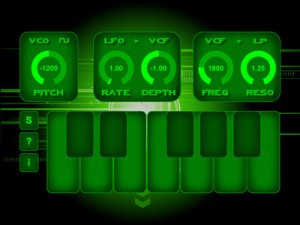
Anaphobia Mini (short: AnaMini) is a monophonic virtual analog synthesizer for iOS 5.0. It features a classical analog synthesizer setup using a VCO, LFO, VCA and VCF. Of course, none of it is really controlled by voltage, but rather by a 32-bit digital synthesis engine.
Features
- One oscillator with two wave types and scalable within the range of -1 and +1 octave.
- One LFO with fixed wave type (saw) and selectable frequency/rate and depth. LFO can modulate VCO frequency or VCF cutoff.
- One VCA with fixed ADSR envelope.
- One 24dB/octave VCF with three filter types and selectable cutoff frequency and resonance.
- A one-octave keyboard with support for portamento and legato play.
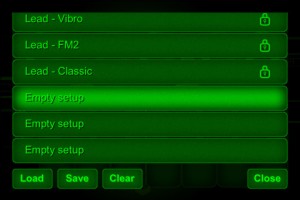
- 14 factory presets.
- 20 custom presets.
Creating a track using FunkBox, Little MIDI and the iRig MIDI interface
Demo of the CoreMIDI capabilities of two iOS music apps, FunkBox and Little MIDI Machine, when connected to an iRig MIDI interface. Other instruments used are a Monotribe, Little Phatty, Tattoo drum plugin, Arctic Keys synth app, NLog synth plugin, and Ableton Live. With CoreMIDI your music apps become musical instruments that can interface with the rest of your studio to make music.
FunkBox is a virtual vintage drum machine app designed to be fun and easy to use. It runs on your iPad, Iphone or iPod Touch.
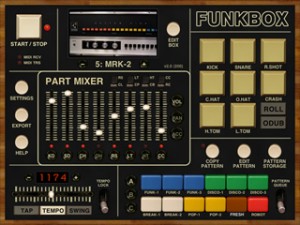
FunkBox features:
The look and feel of a vintage beatbox
Samples from classic drum machines
Thirty six preset drum patterns
Straightforward x0x style editing
Mix, mute and tap individual parts
Tempo, swing, emphasis, random controls
Audio and MIDI export plus audio copy
Fun, cool looking, and easy to use!
v2.0 JUST RELEASED! Includes more drum machines, sample import, customized boxes, CoreMIDI support, and tons more! FUNK YEAH!
iKaossilator Version 2 is available now!
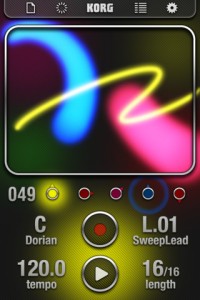
And here is what´s new:
Audio export, iPad full-screen support, and many more new features
● Audio Export records and saves your performance, just as you heard it
● iPad native support allows the iKaossilator to fill the iPad’s large 9.7″ screen
● “SoundCloud” allows users to share and remix loops with other users worldwide
● “AudioCopy” provides an easy way to copy audio data between musical instrument apps
● Flex Play makes it easy to generate fills and breaks
☐ Audio Export saves your performance as a file
Now you can record your performance in real time, or export a completed loop as an audio file. By sending your creations to a Mac or PC via iTunes, you can share them with your friends or use them in a full-fledged music production. You can also upload them directly to SoundCloud.
☐ iPad native support provides full-screen (9.7″) iKaossilator enjoyment
Now you can perform taking full advantage of the iPad’s large 9.7″ display. Enjoy iKaossilator on your iPhone while riding public transportation, and on your iPad while performing live!
☐ “SoundCloud” allows sharing or remix loops with users worldwide
“SoundCloud” is a music distribution and sharing service that’s very popular among musical creators. The loops you create can now be uploaded directly to “SoundCloud” from within the app. If you attach the loop data when doing so, it will be shared to other users’ loop lists. Users worldwide will be exposed to new loops they’ve never heard, and can combine them with their own loops to create remixes. It’s a new way of enjoying music by and unleashing your iKaossilator’s potential throughout the world.
☐ “AudioCopy” lets you share audio data between musical instrument apps
Newly added support for “AudioCopy” from Sonoma Wire Works means that you can copy and paste audio data between apps. Audio data you export from iKaossilator can be sent to apps that support AudioPaste.
☐ Flex Play makes it easy to generate fills and breaks
Designed for live performance, the Flex Play feature makes it easy to generate fills or breaks. Touch and hold Length or Tempo buttons, and then try stroking the touchpad. Movement in the X-axis will change the Length of all parts, and movement in the Y-axis will change the Tempo, allowing you to add dynamic changes to your song that will further expand your performance possibilities.
Endless Fantasy Worlds
Nice ambient tones made with SunVox, enjoy
Made in SunVox: http://www.warmplace.ru/soft/sunvox/
It is a small and fast multi-platform pattern based sequencer (tracker) with modular synthesizers.
With this program you can compose music anywhere. On any device. It also available (for FREE!) for Windows, Mac OS X, Linux, Maemo, PalmOS and Windows Mobile.
Listen to tracks made in SunVox:
soundcloud.com/groups/sunvox
[ Jordan Rudess about this app ]
Sunvox is a serious music application. I am personally running it on my iphone. In the overcrowded world of music apps, Sunvox stands out as both unique and powerful. If you are a musician and own an iphone, you owe it to yourself to try this amazing application!
[ Key features ]
• Modular interface.
• Highly optimized synth algorithms.
• Flexible architecture: SunVox can working on variuos devices with completely different CPUs;
• WiFi export/import;
• Multitrack WAV export;
• MIDI IN/OUT;
• Mic/Line-in recording.
[ Built-in synthesizers & effects ]
• DrumSynth with 120 unique synthetic drum sounds;
• FM synthesizer;
• Generator (saw,triangle,square,noise,sine);
• Kicker;
• Sampler (supported formats: WAV, XI, AIFF);
• SpectraVoice (FFT-based synthesizer for deep and beautiful pads);
• Amplifier;
• Side Chain Compressor;
• DC Blocking Filter
• Delay;
• Distortion;
• Echo;
• 3Band equalizer;
• Filter (Low-pass, High-pass, Band-pass, Notch);
• Flanger;
• LFO;
• Loop (for glitch effects);
• Reverb;
• Vocal Filter (for human voice simulation);
• Vorbis Player;
• Vibrato.
Music Studio Guitar Recording
And here are the details:
http://www.xewton.com Music Studio offers a complete music production environment for the iPad/iPhone/iPod touch with features and a sound quality previously only known to desktop applications and expensive audio hardware.
It combines a piano keyboard, 65+60 studio-quality instruments with sustain, a fully fledged 127-track sequencer with audio tracks, extensive note editing, reverb, real-time effects, microphone recording and much more on a user-friendly interface.
Try the free Lite version!
More insight into the iKaossilator for iPhone/iPod Touch
As announced earlier, but here’s a new video demo of the app. Given how perfectly suited the iPhone is to being used as an X/Y pad, a mobile version of Korg’s Kaossilator was always a no-brainer. And so we have the new iKaossilator, which has appeared on the App Store this very day.
The full details are below, but the bottom line is that you can make music with the app just by “stroking, tapping or rubbing” your Apple mobile device’s screen, which also displays visual effects.
There are 150 built-in sounds, scale/key settings and a five-part loop sequencer.
The Korg iKaossilator is available now from the App Store priced at £6.99 (the price will double as of 30 November). There’s no native iPad version at this time.
Korg iKaossilator official details
Korg has revolutionized the musical instrument world with their dynamic line of Kaoss products, using an intuitive X-Y pad to provide expressive musical control. The palm-sized KAOSSILATOR synthesizer placed modern music-making in the hands of thousands of musicians and non-musicians alike. Now that same excitement has been captured in the iKaossilator app for iPhone!
iKaossilator for iPhone Highlights:
? Play sounds by simply stroking, tapping, or rubbing the screen with your finger
? Bold Visual Effects move along with your performance and add excitement
? 150 diverse built-in sounds cover any style of dance music
? Scale/Key settings allow anyone to perform with musical precision
? Easily create tracks with the loop sequencer using up to five parts
? Control loops in real time for DJ-Style live performances
? WIST capability allows wireless sync-start with other apps such as the iELECTRIBE
Perform Using A Single Finger
iKaossilator uses the unique X-Y interface made famous by Korg’s entire Kaoss Line, including the original hand-held KAOSSILATOR. Create melodies and phrases simply by stroking, tapping, or rubbing the touch screen with your finger; no musical knowledge is required.
Bright, Colorful Visual Effects
iKaossilator is also focused on its graphic design, which shows up beautifully on the iPhone’s high-quality display. The visual effects on the iPhone’s display move along with your performance and add excitement. These bold, colorful graphics provide an exciting performance experience.
150 Diverse Sounds Covering Many Musical Styles
Use the 150 built-in sounds to perform and produce a broad range of dance music styles including hip-hop, house, techno, dubstep, nu-disco, and electro. Enjoy the synth leads and synth bass sounds you expect from a synthesizer, as well as acoustic sounds that simulate piano or guitar chords, even the popular sound effects used by DJs. The drum sounds let you play and manipulate various patterns simply by moving your finger.
Loop Sequencer
The built-in loop sequencer lets you layer up to five musical parts. To create a track, simply assign a loop such as synth, bass, chords, sound effects, or drums to each part. Fifty loops created by professional musicians are built-in to help you get started quickly. In addition to its track-making capabilities, this loop sequencer is also a great feature for live performance. The Mix Play feature makes it easy to enjoy live remixing; you can switch seamlessly to another loop or extract a specific part from another loop while the playback continues.
Link : KORG iKaossilator by [?] – Download KORG iKaossilator in the iTunes App Store
Enjoy
Sasha – Classic Dance – O-Generator Dance App
Classic Dance track made simple. Using a Sasha idea to build a dance track using O-Generator Dance App.
A Simple Interface that Generates Sophisticated Results.
Use O-Generator to compose music, sketch out music ideas and create original loops. This is NOT a preset sample loop device. You can choose from a wide range chords, select notes and build the rhythmic patterns for your music compositions.
For those new to making music each app comes with step-by-step song writing tutorials. For more experienced song-writers O-Generator is a superb tool to explore musical ideas.
AVAILABLE ON THE APP STORE
http://itunes.apple.com/gb/app/o-generator-dance-music-maker/id439280418?mt=8
DATAMASKIN

