
Introducing the Orphion
Orphion is a dynamic velocity touch playable sounds and manipulation app
The Orphion is a new percussion instrument, which will be ported to the iPad / iPhone. The video shows a prototype in which the iPad is used only as a remote control of a laptop, but the whole should be converted into a native app, so everyone can download in the App Store.
In order to provide potential developers with an advance can I need this budget.
_______________________
UPDATE:
Hi! The App is allready finished by now: You can get it on the app store here:
http://itunes.apple.com/en/app/orphion/id495465097
iOS VOCODER App “VOICE SYNTH”
字幕ONでご覧ください。
ブログ記事: iPhone / iPadで使える最新ボコーダー VOICE SYNTH
http://gajetdaisuke.com/archives/12120_121230.php
Googlish:
Please use the subtitles ON.
Blog: the latest VOICE SYNTH vocoder use in iPhone / iPad
Easy OSC learn with Sensomusic Usine
Here a presentation of a new feature for OSC control in the new version of Usine ( http://sensomusic.com). if you know the midi learn, now count with the OSC Learn ! Move a parameter on your smartphone, ipod or android tablet , Usine automatically recognize and name the parameter ! Never be so easy to use OSC in an audio appz !
Here a simple example of mapping sounds on a picture , implemented in Sensomusic Usine with a touch-screen.
IK Multimedia has announced that SampleTank® 1.1 for iOShas been released
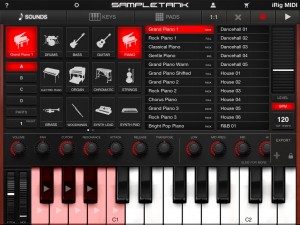
IK Multimedia has announced that SampleTank® 1.1 for iOS is now available as a universal app for iPhone, iPod touch and iPad.
The SampleTank 1.1 update adds a 4-track MIDI recorder that enables the mobile musician to record beats, grooves or complete songs anytime and everywhere. The new recorder features quantize and loop functions, export to audio and integration with the built-in pattern player making SampleTank a full-featured mobile sound and groove workstation. Plus the new beat-making interface with assignable pads makes groove creation a breeze.
The impressive number of sounds and patterns has grown even further with this update. The number of included instruments has doubled in the regular version and now exceeds 500 total available instruments. SampleTank now also includes over 1,000 professionally programmed patterns so that anyone can make music regardless of prior musical ability. Instruments and patterns are organized into 16 categories including Pianos, Organs, Strings, Basses, Guitars, Drums, Synths, Woodwinds, Brass, Ethnic Instruments, Percussion and more all instantly accessible from a single app to create any style of music.

Additionally SampleTank 1.1 update also adds increased compatibility with third party iOS docks and accessories plus many more new features.
SampleTank 1.1 for iOS is available to purchase for $19.99 USD / €15.99 EUR. A free version of SampleTank is also available with 8 sounds plus their selection of patterns. An additional 22 expansion sound packs are available for in-app purchase starting from $4.99 USD / €3.99 EUR each or all together for a competitive bundle price.
Features:
- 4-part multi-timbral professional quality sound and groove workstation
- Expandable sound library with more than 500 instruments in 16 categories
- Over 1,000 melodic and rhythmic patterns for groove creation or accompaniment
- Included 4-track MIDI recorder with audio export
- Built-in insert effects and master reverb
- Easy-to-use, intuitive interface
- Sound and effects editing with multiple parameters
- Play interface with piano keyboard, scale-based keyboard and drum pads
- Compatible with iPhone 4S, 4 and 3GS, iPod touch 4th and 3rd generation, iPad 2 and iPad with iOS 4.3 and newer
- Designed in concert with iRig MIDI interface for iOS devices
- Free version also available
SampleTank 1.1 released – The first professional sound and groove workstation goes universal!
SampleTank® 1.1 is a universal app for iPhone, iPod touch and iPad. New features include an enhanced PADS interface and 4-track MIDI recorder with unlimited overdubbing. Over 500 instruments and 1000 patterns are now available as well along with increased compatibility with third party docks and accessories. The familiar drum machine-style interface lets you lay down beats easily with adjustable quantize values that you can change on the fly as well loop record and a click track that you can turn on and off at will. Put a drum kit on part A, a piano on part B, a bass on part C, sound FX on part D … anything you like! You can export your recording as a stereo audio AAC file via E-Mail or iTunes File Sharing to use it in another app like AmpliTube or VocaLive or a computer DAW like Logic or Pro Tools. You can also export a .MID standard MIDI file. SampleTank 1.1 is a free update for all existing users and is available in the App Store. Check it out today!
http://ikmultimedia.com/sampletankipad/features/
Yet another app gets the “i” – iOrgan
Let’s perform a lead organ!
While pushing the keyboard, sound continues sounding eternally.
Ten kinds of tones can be chosen.
Moreover, two or more sound is sounded simultaneously and an effect like a pipe organ can perform easily.
The tone of a lead organ can be created.
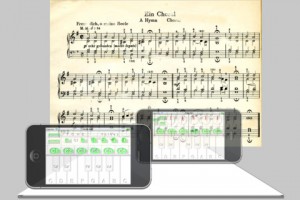
Operation
tone
– Ten kinds of sound can be chosen with plus and a minus button.
voices
– Sound two or more sound simultaneously.
C1~C6
– Specify the range of the pitch of a keyboard.
scale
– Choose the display of a pitch, and un-displaying.
manual(Auto)
– Create the tone of an organ by a pitch and volume.
It returns to the original screen by Auto.
Melodizer – Teaser demonstration
“A very brief teaser for my next iOS sound app.”
Damien has recently also released the WaveShaper app:
Video of the WaveShaper app for iPad in action. Load sounds into the app, tweak the effect in real-time, record your performance, share on SoundCloud. It’s great for sound design or just messing around. More info at http://waveshaperapp.com or head straight to iTunes http://itunes.com/app/waveshaper
Magic Midi – Midi on the iphone with no extra hardware!
http://www.alkex.com/magicmidi
This app enables you to use your iphone as a 16 pad midi controller with no extra hardware.
Install the app onto your iphone, download the free software (pc/mac/linux) and simply plug your iphone into the MIC socket of your computer!
A Particle Magnetophone – free unique musical instrument
No need to touch anything.
http://itunes.apple.com/us/app/a-particle-magnetophone/id485278828
Description:
Let me introduce you one of the best innovative iPad/iPhone apps, which brings a totally new concept of a touch-less, audio-visual application that literally make music in the air and visual effects at the same time. The audio control of generating sound can be compared to the theremin. The trick is that you need not to move or touch your device.
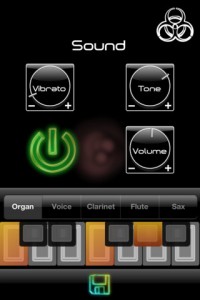
The application uses a combination of the magnetic sensor, great graphic possibilities, and marvelous sound which are offered by iPad/iPhone and iOS. The magnetic sensor is placed just around the biohazard sign on the app’s view, so closer you get with a magnetic stuff the higher tones are generating. By included keyboard you can determinate in which musical scale will magnetic fields play sounds.
The sounds are very suitable for music like funky, dub step, electro, trip hop, noise, and many more.
So just grab some magnetic, metaled stuff or get closer to them by upper-right corner of your device and try out.
Use:
– unique musical instrument
– the most impressive metal detector ever
– practical tool to teach/learn how physics or music works
– magician’s tool, to make illusion of a magical hand
Features:
– uses 3D space around magnetic sensor to make sounds and animations, touch-less control
– up to 5 octaves available (depends how strong magnet is)
– change speed or variation of particle animation sequences
– change particle size of animation sequences
– variety of 5 synth instruments simulating sound of organ, human voice, clarinet, flute and
saxophone
– tune color or vibrato of the generating tone
– change sound volume
– set your own musical scale by the virtual keyboard to be played
– save your settings
– play along with your music library or on the background while playing another touchable or shakeable instrument (more feasible for dual-core devices)
– designed for iPad2, but iPhone version included
A closer look at the Roland R-Mix Tab
This looks really useful  R-Mix Tab for iPad lets you filter our areas from music
“View the instruments or components of the music which imported from your iPod library as color-coded clouds of energy and harmonic matter onscreen. You can lower the level, keep or move the panning position of the selected instrument on the screen. You can use R-Mix to easily create “minus-one” type play-along tracks. You can also isolate guitar sound, for example, and solo that phrases for study.” – Roland
DATAMASKIN

