
FLUX:FX Preset Soundbites [Processing Drum Loops]
This is a demo of 15 presets from FLUX:FX, processing a simple drum loop.
Available now on the AppStore: http://bit.ly/getfluxfx
FLUX:FX is a multi-effect audio processor app for the iPad that lets you ‘play’ your effects. Innovative, intuitive and exciting, FLUX:FX lets you manipulate any audio signal into something entirely new, and redefines the possibilities of audio design and live performance in an app with an almost unlimited range of effect options. FLUX:FX is a truly authentic digital platform for designing your sound. Featuring more than 30 modular effects blocks, a master Performance view with 1-touch interaction, an advanced Edit view with multi-touch and full assignment possibilities, and an innovative Sequencer view to bring motion to the audio signal, this app allows the user to easily create previously unheard sounds. Fully compatible with Audiobus, Inter-App Audio and MIDI, FLUX:FX is made to connect seamlessly with existing live rigs and studio workflows. Designed and built by the collective NOIISE – incorporating the acclaimed US guitarist Adrian Belew, mobile specialists MOBGEN and audio experts Elephantcandy.
Full details on the FLUX:FX application can be found at http://flux.noii.se
Checking out the new Soundprism Electro
Download SoundPrism Electro here: http://soundprism.com/electro/download
Audanika has introduced SoundPrism Electro – a new iPad musical instrument, based on their SoundPrism Pro instrument and MIDI controller.
Features:
- New sound engine with rock-solid polyphony and great-sounding effects. SoundPrism Electro’s new sounds are hand-crafted by Swiss sound designer Oliver Imseng to work beautifully with each other.
- Innovative and improved chord input system: effortlessly play inversions and chord progressions while focusing on your track, not on the music theory behind it.
- A ribbon controller for live manipulation of the built-in effects.
- New interactive tutorial system: SoundPrism Electro walks you through its interface and teaches you how to play.
- Supports Audiobus including state saving.
- Supports Core MIDI
Sparkle App – Spectral manipulation on iPad
Demo of Spectral Manipulation, Cross Synthesis, phase-sync transformation audio app for iPad
Cross-synthesis, phase-sync high-quality transformations.
Pricing and availability details are to come, but they say it is ‘coming soon’.
Photophore Synth Demo and Tutorial for iPad
You can get Photophore Synth here at the app store.
https://itunes.apple.com/gb/app/photo…
Photophore is a unique instrument that uses flocks of up to 100 sound generators to create rich, organic synthesizer sounds. By controlling the behavior of the flocks you can make Photophore sound like a choir of synthesizers or, at more extreme settings, a swarm of angry insects.
Unlike other digital synthesizers, Photophore creates warmth and character in a completely new way. Instead of modeling analog circuits, it models animal behavior. Photophore’s sound engine is made up of flocks of oscillators that move through a virtual three-dimensional environment. Their motion is controlled by a special behavioral algorithm and physics simulation that keeps the oscillators in tune with each other, but allows for a certain amount of natural drifting and detuning. This creates rich timbres that are perfect for crafting massive bass sounds, complex pads and searing leads.
You can interact with the oscillator flocks by controlling their behavior – how much they try to flock together, how much they avoid each other, their speed, and how much turbulence is in their environment. Oscillators will flee from your touch, so you can create extreme pitch modulation and more chaotic effects by simply swiping across the screen.
Key Features:
• Unique flock synthesis engine
• Up to 100 oscillators per patch
• Monophonic or polyphonic operation (up to 6 voices)
• 6 oscillator waveforms (saw, square, pulse and more)
• Low pass/High pass filter with resonance
• Dedicated amplitude and filter envelopes
• Stereo echo effect
• Arpeggiator
Photophore | Flock Synthesizer for iPad
Taika Systems has introduced Photophore – a unique instrument that brings ‘flock synthesis’ to the iPad’. Photophore uses ‘flocks’ of up to 100 sound generators to create rich, organic synthesizer sounds. By controlling the behavior of the flocks, you can make Photophore sound like a choir of synthesizers or, at more extreme settings, a swarm of angry insects.
**Now available on the App Store at special introductory price of only $4.99!**
Photophore is a unique instrument for iPad that uses flocks of up to 100 sound generators to create rich, organic synthesizer sounds. By controlling the behavior of the flocks you can make Photophore sound like a choir of synthesizers or, at more extreme settings, a swarm of angry insects.
App Store Link: https://itunes.apple.com/us/app/photo…
More Info: http://www.taikasystems.com/photophore
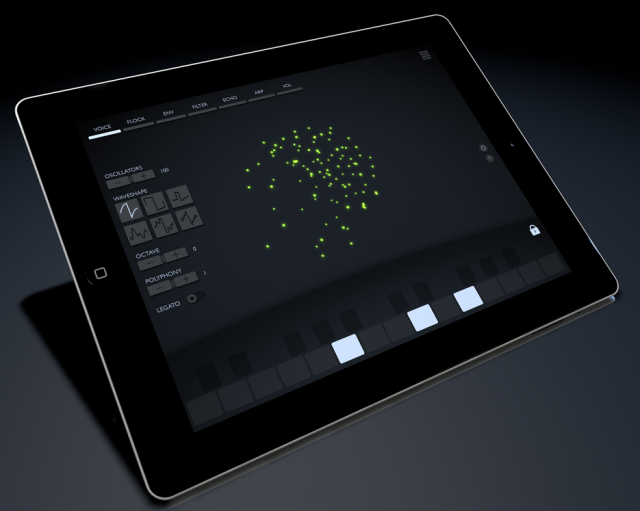
Flock Synthesis
Unlike other digital synthesizers, Photophore creates warmth and character in a new way. Instead of modeling analog circuits, it models animal behavior.
Photophore’s sound engine is made up of flocks of oscillators that move through a virtual three-dimensional environment. Their motion is controlled by a behavioral algorithm and physics simulation that keeps the oscillators in tune with each other, but allows for a certain amount of natural drifting and detuning.
You can interact with the oscillator flocks by controlling their behavior – how much they try to flock together, how much they avoid each other, their speed, and how much turbulence is in their environment. Oscillators will ‘flee’ from your touch, so you can create extreme pitch modulation and more chaotic effects by swiping across the screen.
Features:
- Unique flock synthesis engine
- Up to 100 oscillators per patch
- Monophonic or polyphonic operation (up to 6 voices)
- 6 oscillator waveforms (saw, square, pulse and more)
- Low pass/High pass filter with resonance
- Dedicated amplitude and filter envelopes
- Stereo echo effect
- Arpeggiator
Connectivity:
- Use any iPad-compatible MIDI keyboard to play notes and perform pitch bends
- AudioBus and Inter-App Audio support for streaming audio to other apps
- Control Photophore from other apps via CoreMIDI
Tech Requirements:
- iOS7 or later required
EGLM1 – new drum machine for iPad, inspired by the Linn LinnDrum
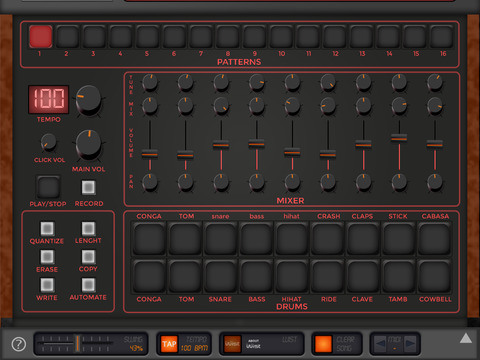
Elliott Garage has introduced EGLM1 – a software drum machine for iPad, inspired by the classic Roger Linn LinnDrum drum machine.
Features:
- 16 programmable rhythm patterns with variable length
- Save the pattern you’ve created and play songs
- Automation of Drumkit parameters (pan, volume and mix)
- Song Mode page (swipe to left to open it) with loop option
- Swing and tap tempo
- Core MIDI & clock MIDI (network session, external controller, inter app midi)
- Audiobus
- Interapp Instrument
- Record and export your performance with iTunes, eMail or Audio Copy
- Korg Wist sync
Official audio/video demos are to come.
EGLM1 is available for US $2.99 in the App Store.
Svep – a stereo modulation filter effect for iPad
Klevgränd has introduced Svep – a stereo modulation filter effect for iPad.
All parameters are easily editable in one screen.
Features:
- Inter App Audio (IAA) compatible. Works fine with Garageband and other IAA compatible hosts.
- Supports Audiobus 2 including state saving.
- Load / Save presets
- Remembers IAA hosts (will automatically load last used settings when a host connects)
- Low cpu usage
- Simple but yet powerful user interface
Svep is available for US $1.99 in the App Store.
Space Effects Created Entirely on an iPad
Are iPads only good for consuming media? I don’t think so!
Everything you see here was created on an iPad Air (first generation), mostly using Sprite Dancer, a great animation app that reminds me of After Effects version 2.0 — 15 or 20 years ago! Other apps used include Procreate, iDraw, FluidFX, Plastic, the iPad Camera, and more. All of the music was created on the iPad using GarageBand, AudioBus, Animoog, Sunrizer, Korg iElectribe, and more.
FM4 – a new FM synthesizer for iPad, modeled on classic 1980s Yamaha DX
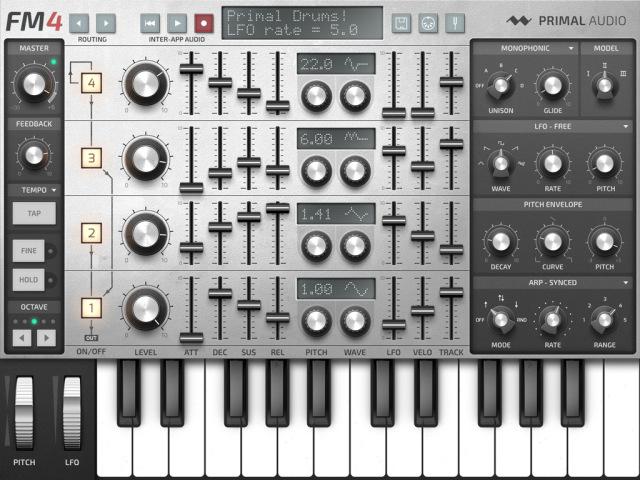
Primal Audio has announced FM4 – a new FM synthesizer for iPad, modeled on classic 1980s Yamaha DX series keyboards.
According to the developers, “Great care has been put into analyzing and replicating inherent sonic characteristics of the original hardware, such as internal quantization errors and digital-to-analogue conversion.”
Features:
- Four operators configurable via eight different routings
- Three sound engines modelled on 1980s hardware units
- Eight waveforms derived from classic FM synths
- 2x, 3x, and 4x polyphonic unison
- Tempo-syncable arpeggiator with up, down, up-down, and random patterns
- Microtuning with eight different temperaments
- Supports Inter-App Audio, background audio, and MIDI (support for Audiobus is planned)
- Up to 24 voices of polyphony
- Import/export presets through iTunes
- Works on all iPads supporting iOS 7.0 and up
FM4 will be available in the App Store in December 2014, with an introductory price of $0.99. See the Primal Audio site for details.
Introducing Auxy for iPad
Modern beat making without distraction
Download free from the App Store: http://appstore.com/auxy
Let us know what you think: feedback@auxy.co or https://twitter.com/auxyco
Introducing a new way to make electronic music. Create your own drums, bass lines, and synth melodies. Auxy is modern beat making without distractions.
DATAMASKIN

