
Teaser: Reason Refill optimized for tablet synths
This is preview of “XYZ- Tablet Synth” combinator device from Navi Retlav – Missing Pieces Refill.
If you have tablet, or any device with multi axis controls like kinect and software for transforming it in to midi controller, this combinator will help you to play music and fx-es with your favorite synth sound. Audio Samples from this video are not included in this refill.
New Reason Refill Coming Soon !
Subscribe for more videos and feel free to give comments.
Taking iPad synths to the next level
Horizon synth for iPad – playing with some presets by Jarek J
Horizon synth is a virtual analog synthesizer that takes the definition of iOs synthesizer to the next level.
Thanks to carefully designed architecture and heavy usage of coprocessor it blurs the boundaries between iOs and hardware synthesizers.
Horizon was built to perform and works perfectly with any MIDI keyboard or sequencer. A lot of research has been done in order to achieve unheard warmth and clarity.
HIGHLIGHTS
· True SuperSaw sound emulation, first found in the legendary Roland JP-8000 synthesizer. SuperSaw is a layered waveform consisting of multiple saw waves which are detuned to create an extremely full and epic sound. It’s possible to use 2 supersaw oscillators per voice * 7 polyphony = 98 saw oscillators playing the same time!
· Two independent filters per voice with configurable routing. You can select between various filter types including classic resonant LP,HP,BP,Notch and less common like Comb and Formant.
· The Morph Group function lets you continuously morph of up to 30 parameters in a sound (including effects), using only the modulation wheel.
Horizon synth-hardsync-test by Jarek J
Horizon Synth for iPad – alpha demo by Jarek J
Draw your sounds – Introducing Artikulator
Artikulator is an app for your iPad that lets you draw sound. Break free of the grid with Artikulator! Check it out in the App Store: http://itunes.apple.com/us/app/artikulator/id439286191
WiFi controller: Instrumental for iPad – Triangulum Nebula
Instrumental’s Generic surfaces provide a great deal of flexibility, allowing you to configure control panels suitable for all sorts of virtual devices. The modular panel system allows you to quickly reconfigure an entire surface, and the labelled control system frees you from worrying about MIDI messages.
The modular panels used by the Generic surfaces are the same ones used by the other, more musical surfaces, except there are more of them.
Controls can be labelled in three ways:
- Control labels and display ranges can be customised per preset
- A MIDI Control Map that specifies the MIDI parameters for every available control. You can create a MIDI Control Map that defines the messages supported by each device you own, and label them there.
- MIDI SYSEX Message. Plugins for DAW packages can send the labels and text readouts for all controls via MIDI SYSEX messages. This allows the controls to be accurately labelled even when controls are being dynamically remapped. (Currently this is only available for Propellerhead’s Reason & Record)
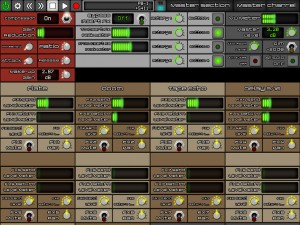
In this video:
Instrumental is a Wi-Fi MIDI Control surface for iPad.
This video shows it in action controlling Propellerhead’s Reason & Record.
See quantumclockwork.net for more information.
8-band vocoder for your tablet
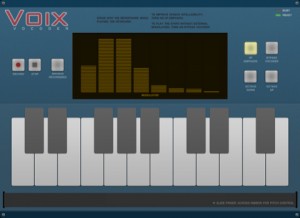
Voix is an 8-band vocoder for iPad that lets you play your voice like a synth. With Voix, your voice sounds like a singing robot. For best results, use with headphones.
– Simple to use: just speak into the iPad mic while playing the keyboard.
– Slide your finger across the ribbon controller for finer pitch control.
– Play up to 5 octaves with the Octave Up and Down buttons.
– Make speech more intelligible with the HF Emphasis button.
– Play the vocoder like a regular sawtooth synth with the Bypass Vocoder button.
– Record your performances, save them to your computer with iTunes or send them via e-mail.
Teaser video: SampleWiz Wah Wah feature
SampleWiz will be on the store in a couple of weeks. here is the unique Wah feature on the factory JR lead sound!!
Soon to be released on AppStore
About Wizdom Music and their previous releases:
Welcome to Wizdom Music! Founded by Jordan Rudess, the legendary keyboardist of Dream Theater, Wizdom Music is dedicated to pushing the boundaries of technology to create expressive and exciting tools for making music.
Wizdom Music’s first commercial release, MorphWiz, is a versatile and expressive musical instrument for Apple’s iOS platform. It combines cutting-edge synthesis techniques with stunning graphics to allow musicians to explore their ideas in ways never before possible.
While the primary focus of Wizdom Music is on the creation of musical instruments, our technological expertise is sometimes applied to other fields, as well. Our second release, SketchWiz, is a photography app that was born out of some experimental visualizations for the next generation of MorphWiz.
The electronic Swiss army knife for iPad gets a massive upgrade
Audioforge has done a major update on heir app reforge for iPad. Edit the wave form directly just by touching it. Set selections to cut, copy and paste within files or even paste from another file. Set the selection to trim unwanted parts of your audio off and more.
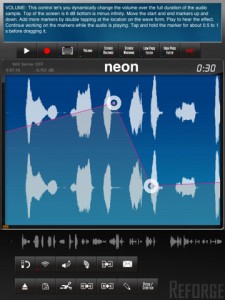
Automate volume changes for fade in effects or remove unwanted clicks. Adjust stereo balance and set it to the far left channel for the beginning of the track continuously transferring over to the right channel for the end. Add stereo widening effects or bring it all to together to make is sound mono. Add high pass and low pass effects to start an intro, simulate a telephone conversation or just distort your sound. Use control markers to automate the effect levels. Add as many markers as you need by double tapping on the waveform. Move them around to generate the changes to the effect you need.
New in Version 2.0
Complete rework of Reforge.
New audio engine
New Audiocopy and paste version (1.2.1)
New design
Stereo recording
Import podcasts and other long (over 3h) audio files for further processing
Portrait mode contains a help screen that explains each function in detail. Start using Reforge in portrait mode and every button you touch will be explained. Once you feel more comfortable with using Reforge, flip to landscape mode where you have more area to view and interact with the wave form.

Import mp3, im4, aif files directly from emails into Reforge. If you receive an email with an attached mp3 file on your iPad, tap and hold the mp3 representation in the email app until the menu appears and then tap “open in Reforge” This feature enables you to receive mp3, aif and im4 files via email directly on your iPad and audiocopy them over into StudioTrack for further mixing. Use the iTunes FileSharing to upload your mp3, im4, aif and wav files. Use the built in wifi server to upload music in mp3, im4, wav, aif format. Use Audiocopy and Audiopaste (V1.2.1 with 12 file history and support for the General Pasteboard) to exchange music with other apps that support it. This enables you to interact with apps like Fourtrack as well as Beatmaker. Import your music directly from your iPod library on your device, that includes podcasts.
Available through itunes. More info and specs at http://www.reforge.info/Site…
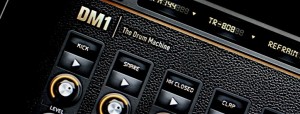
Slick snap shots of the upcoming Fingerlab drum machine for iPad
And judging from these teaser pics we are in for at least a graphical UI treat
Fingerlab has announced DM1 – a new iPad drum machine:
We, at Fingerlab, Paris, are proud to announce the release in early July of “DM1 | The Drum Machine”, the next generation of drum machines for iPad. We have been closely monitoring and testing any iPad drum machine since the iPad1 was relased and have decided we could do better, smarter, cooler. Which is why DM1 now takes the concept one step further by unifying in one realistic and beautiful application the smartest tools for beat drumming with the best vintage drum kits.

Features:
- 24 vintage and produced drum kits, mastered at in-house Fingerlab Sound Studios
- Mixer page with pitch, length and level rotary controls and individual sound loading per channel
- Super fast drum kit loading
- Playable pattern selection for extra creativity
- Big Drum pads, quantized recording and MPC-like Repeat touch-stripe
- Step Sequencer with multi-touch matrix for unexpected beat creation
- Duo FX Trackpads for real-time sonic destruction and cool multi-FX
- Mode song with intuitive editing
- High-quality export to email or iTunes shared folder
- Optimized for iPad 2
Fingerlab expects DM1 to be available in July. Pricing is TBA.
New full-featured sampler/sequencer for iPad
Sample Lab is a full-featured sampler/sequencer made exclusively for iPad. With a professional set of features packed into a simple, multi-touch interface you can skip the learning curve and start making tracks within minutes.

* Pinch-zoom precision sample editor lets you select your audio and drag it right onto a track.
* 8 stereo tracks @ 44.1kHz with per-beat volume control.
* Pitch-shifting preserves time and gives you 2 full octaves from one sample; without chipmunking.
* Record your own samples, or import wav & mp3 files using iTunes.
* Trigger pads for tapping-in patterns or stand-alone performance.
* 4 real-time DSP FX: compressor, bit crusher, resonant cutoff, and phaser.
* Shuffle control for syncopation.
* Support for stereo recording and playback through iPad compatible audio interfaces.
* More than 100 samples included to get you started.
Sample Lab was made to fit into your live set. You can:
* Trigger samples or tap un-mute for percussive slam fading
* Punch-in loopbox style recording on each track allowing for live layering of beatbox, guitar, or harmonizing vocals
* Slice up a beat or drag a micro loop selection across the sample editor for a unique grinding effect
* Load a different composition or sample kit
* Control 8 FX parameters at once with X/Y axis controls
* MIDI input support for triggering samples and recording beats with variable velocity and lower latency using a MIDI controller. Plug & play support for Akai LPD8**.
* Use MIDI to punch-in/out for pedalboard hands-free looping. Plug & play support for Behringer FCB1010**.
Get the grips with Slide Control for iPad
Slide Control is an iPad music application for musicians. This application makes improvisation easier. You can choose any scale (major, minor, pentatonic, blues …) and slide your finger to play any melody. With Slide Control it does not have bad grades, your movements are in harmony. Easier to play !! Easier to improvise !! Easier to create !! More imagination!!
Features:
★ Very simple application for very simple improvisation
★ Video tutorial Include
★ Many scale for best improvising (major, minor, pentatonic, blues …)
★ Polyphonic Control
★ Choose from 11 different wallpaper
★ Program change/ Bank change
★ All Midi CC support on Y direction
★ 16 Midi channel
★ Quick switch Sustain / Partamento / Legato
★ Quick switch Oct +1
★ MIDI Device support – connect devices via the Camera Connection Kit (near zero latency)
★ Measured latency over WiFi to OS X: 2-5ms
★ Fullscreen
★ Cool Animation 
★ More to come!
DATAMASKIN

