
Showcasing the MASTER Reactable
Improvise and create music playfully with the Reactable mobile. Based on the award winning Reactable as used by Björk on her Volta Tour, this application brings the full creative power of the famous interactive instrument onto your mobile device.

It uses concepts of modular synthesis, sampling, digital audio effects, DJing, and combines them with modern human computer interaction and multi-touch technology.
Based on the very same audio and graphics engine as the Reactable, the mobile version brings a complete range of objects to multi-touch devices:
A set of generator objects:
• loop players, with possibility to upload your own loops,
• synthesizers, with a large range of instruments to select from,
• oscillators, to synthesise pure and complex tones,
• input, to get audio directly from the device’s microphone.
A set of effects to modify generated sounds:
• wave shapers: distortion, compression, and resampling,
• delays: reverb, feedback, and ping-pong,
• modulators: ring modulation, chorus, and flanger,
• filters: low pass, high pass, and band pass.
A set of controller objects to modify other objects parameters:
• sequencers, with step-by-step, matrix, or random modes,
• low frequency oscillators (LFO), with different waveforms,
• accelerometer, to fetch data from the movement of the device.
A set of global objects to modify the settings of the entire table:
• tempo, to change the speed of the table,
• volume, to lower or increase the loudness,
• tonalizer, to change the harmony of the melody.
Into the experimental world of apples and pads
“I’ve been sneaking around Apple’s garden for a long time, dating back to the Apple II motherboard hacked into my code-munching poly-synth of the early ’80’s. I’ve modded iMacs, towers, endless accessories, and I’ve drastically bent mac-centric code with wonderful result. This movie loosens another brick in Apple’s wall, and opens the iPad’s usability tremendously.
I know I’m not the only individual appreciating the experimental music apps available on the iPad. I’m anxious to support the developers’ fine work. But for musicians, the iPad’s interface can be frustrating. Do you really want to use dongles, mini-jacks and flimsy wire to get in and out of the thing?
This audio breakout solves these problems, is easy to do, and is inexpensive.
No bending here, just a quick, theory-true hack based upon iPad docking charts I found online. Not a superdock. No competition for the Alesis breakout. But if you want a slick, basic and functional DIY audio desk, on the cheap, check this hack out!
The breakout board is available at kineteka.com
Be sure to see the photos and REVISIONS, and pick-up the printable schematic at my iPad Audio Desk flickr gallery:
http://www.flickr.com/photos/moonbear3325/sets/72157626688587705/
This audio desk is really fun to use. Hacking the apple is always a good thing. I hope you’ll enjoy the movie! (Let it download for full-screen 1080).
-Reed Ghazala
NEW FL STUDIO MOBILE! iPhone iPad – BETA Version Demonstrated, Making a Beat!
IT’S REAL! No tricks. This will soon be available to buy on the app store. It’s easy to use, sounds great, and you can export it to the PC version of FL Studio to do more complicated mastering, etc.
VJ FranzK offers an exclusive look of the soon to be released iOS version of the popular long running music production software FL Studio. FranzK goes over the a few of the main features including a very useful export feature that will allow you to export your iOS works from FL Studio to your PC for more detailed and extensive work. More info about FL Studio from Image Line at http://forum.image-line.com/…
Making music on the iPad – BBC talks to 6 artists
The iPad is hot and BBC has made interviews with several artists around creating music on tablets:
“Mike Skinner and Bjork have also used Apple’s tablet computer on their latest records.
Largely, they are using software synthesizers to make loops and riffs, which can be expanded upon in the studio.
In that sense, says Nate Lanxon of wired.co.uk, the iPad is being used much like Yamaha’s Tenori-On, popularised by Little Boots a few years ago.
“That was basically a sequencer,” Lanxon explains. “You could sit on a plane and tap out a riff then use that in a recording in a studio environment when you get off the plane.”
So why has the iPad superceded “professional” synthesizers and sequencers? Is it really a viable tool for making music? And are there other devices that musicians should consider?
6 Music’s Mark Savage found out more. “
Teenage Engineering OP-1 controlling the KORG iMS20
Apple Ipad2 & Teenage Engineering OP1 directly connected with Camera connection kit and a USB cable…Korg iMS20 being triggered by OP1 sequencer
Simple test locking each others tempos for synced delay.
KORG iMS-20 & iElectribe Gorillaz Edition DEMO
KORG Bloggers Meeting 2011 at G-ROKS, Tokyo. Demonstrater is a KORG engineer Mr. Ohta.
Two iPad are syncing.
Controlling a dubstep wobble on your iPad
An experiment using an iPad and the Konkreet Performer app to control dubstep wobble / LFO sounds and drum effects in Traktor 2. Konkreet uses multi-touch technology to the full. Instead of traditional faders and knobs, use multi-touch and gestures to manipulate PERFORMER’s beautiful shapes to dynamically control your computer’s software instruments in real-time.
In the studio, it allows the artist to approach their sound-design routine from a new, inspiring angle: to reconnect to their software instruments and Digital Audio Workstations by using Performer’s revolutionary interface and arriving at sounds and progressions impossible with traditional controllers.
More info:
Download the Traktor 2 and OSCulator template files for free at http://digitaldjtools.net/news/traktor-mapping-for-konkreet-performer-wobbula…
SunVox on iPad with MIDI-keyboard
SunVox is a small, fast and powerful music sequencer with modular synthesizers. It is a tool for those people who want to compose music anywhere. SunVox available for desktop PC (Windows, Linux, Mac OS X), pocket computers (Windows Mobile, PalmOS, Maemo, iPhone/iPad) and netbooks.
Key features
- Modular interface.
- Highly optimized synth algorithms.
- Flexible architecture: SunVox can working on variuos devices. For example: PDA with slow CPU – 16bit sound (fixed point arithmetic); or big PC with powerfull CPU: 32bit sound (floating point arithmetic).
- Built-in synthesizers & effects:
- FM synthesizer;
- Generator (saw,triangle,square,noise waveforms);
- Kicker;
- Sampler (supported formats: WAV, XI, AIFF);
- SpectraVoice (FFT-based synthesizer for analog-like pads);
- DC Blocking Filter;
- Delay;
- Distortion;
- Echo;
- EQ;
- Filter (Low-pass, High-pass, Band-pass, Notch);
- Flanger;
- LFO;
- Loop;
- Modulator;
- Reverb (with DC Blocking Filter);
- Vocal Filter;
- Vorbis Player;
- Vibrato.
- Supported systems: Windows, Linux (x86/x86_64/arm), Mac OS X, PalmOS, WindowsCE (Windows Mobile), iPhone/iPad.
- Export to WAV.
- MIDI IN/OUT.
- Realtime sample recording.
What’s New in Version 1.6.2
* quantization noise is reduced by 4 times;
* improved sound quality of the following modules: Generator, SpectraVoice;
* new Generator waveforms: half-sine (6); abs-sine (7); pulse-sine with duty cycle (8);
* added Copy and Paste of modules;
* added new control “Velocity” to MultiSynth module;
* now Sampler can record signals from another modules; just connect some output module (Generator, for example) to the Sampler and press the “Rec”, “Rec mono” or “Rec LoFi” button under the Sampler controllers; “Rec” – record stereo; “Rec mono” – record mono; “Rec LoFi” – record mono with reduced sampling frequency;
* added Input module for audio receiving from microphone or line-in; at the moment only iOS supported; the Input for other systems will be available in the next releases;
* iOS: added D-pad for more precise cursor positioning in the pattern editor;
* iOS: added Audio Copy/Paste (Intua Audio Sharing); Sonoma compatible; Where to find: Main menu -> Export/import -> Copy/Paste;
* iOS: added multitouch support to Touch Theremin;
* iOS: added multitouch support to piano keyboard;
* added base MIDI IN/OUT in versions for Linux (ALSA), OSX and iOS (CoreMidi), Windows (MM);
* supported commands for MIDI IN: NoteON/OFF;
* supported commands for MIDI OUT: NoteON/OFF; Control Change; Program Change; Bank Select;
* use controllers with number 80+X to send MIDI Control Change; where the X is MIDI Controller Number; for example: 8100 8000 – set Modulation (MSB and LSB) to the max value;
* added ASIO support (for Windows only);
* added Preferences (in the Main menu);
* templates support (in the Preferences);
* fixed bug with overload of EQ module;
* added new songs and instruments (samples);
* many bugs fixed.
Time to get those funky rythms going!
FunkBox was used by Gorillaz when recording their new album “The Fall”, hear it at thefall.gorillaz.com! Also featured in Computer Music Magazine’s “Amazing Music Apps” special issue and Electronic Musician magazine’s “Attack of the Killer Apps” best music tools for the iPad.
Put a little funk in your pocket with the FunkBox vintage drum machine app from Synthetic Bits! FunkBox is designed to look, feel, and sound like a classic beatbox from the 70s and 80s. It uses original audio samples taken directly from our own personal collection of vintage drum machines.
In this video:
In this tutorial, I show you how to lay down beats with Funk Box. I also cover virtual ports and how to route Funk Box beats to other apps in real time like Electribe, Mo Drums, and Music
Quick access to all of your controls on the iPad
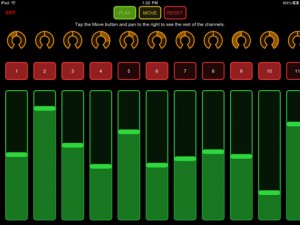
Manipulant is a customizable wireless MIDI control surface for iPad. It takes advantage of some of iPad’s best features to put all of your controls on the same surface with quick access:
– Put all of the buttons, knobs and faders in your set on a single large surface.
– Trigger multiple overlapping controls with a single touch.
– Quickly travel across your workspace using pan, zoom and rotation gestures.
– Connect to the same control surface with multiple iPads and see control actions on each one in real time.
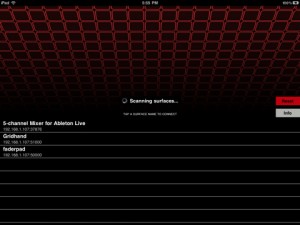
– Host multiple control surfaces on the same computer and connect a different iPad to each one.
DATAMASKIN

