
Ready to take your DJ performance to the next level?
djay for iPad, the premier DJ app, is now optimized for iPad 2! Taking full advantage of the iPad 2’s high-performance dual-core processor, djay now features Key Lock (time-stretching) and high-precision beat-grid analysis.
djay transforms your iPad into a full-fledged DJ system,
allowing you to mix your iPod music library on a hyper-realistic turntable interface. Perform live, record mixes on-the-go, or enable Automix mode and let djay mix your favorite playlist automatically. With unprecedented ease-of-use and innovative multi-touch mixing features, djay for iPad takes DJing to the next level and offers a unique experience for beginners and professionals alike.
To learn more visit http://www.algoriddim.com/djay-ipad
or simply search for “djay” on the App Store.
Track: Johnson & Haske vs. Jerome Isma-Ae — Telling the Story feat. Mo Morsy (Jee Productions)
Polychord 2 is drums, bass and chords all wrapped into one
A quick rundown of different sounds you can achieve with polychord’s synthesizers. We’re using the strum keys and making changes to the envelope, wave, cutoff & resonance, tremolo, and more.
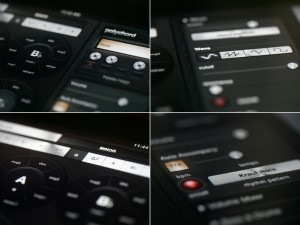
Shoulda Woulda Coulda has released Polychord 2, a music app for the iPad.
Polychord is drums, bass, chords, and accompaniment all wrapped into one.
Simply press one of the chord circles and your on you’re way to writing a song. Drums and bass follow the chords automatically, but the coolest part is probably the strum keys on the right: simply swipe your finger over the yellow keys (or chrome keys in version 2) to strum a chord.
Changes in Polychord 2
- Record and share songs with SoundCloud.
- Sleek new UI made in collaboration with Jonas Eriksson.
- Palettes, so you can save your settings.
- Palette f-keys, for fast switching between palettes.
- Sine, Sawtooth, Triangle and Square Waves for each instrument. (We used an ‘analogue simulation’ technique for generating the synthesizer waves, which warms them up a bit.)
- Bitshift features for drums: full control over the reduction of bits / bitrate, allowing you to completely decimate the sound or just add a touch of noise.
- Basic low-pass filtering, resonance for each instrument.
- Tremolo Depth controls.
- Scale mode for the strum keys: rather than the strum keys playing the notes of the current chord, you can set them to numerous other scales.
- Arpeggiator based on time-signatures. Full control over the speed and count of the arpeggiator — allows you to mix a different time signature over the beat. Arpeggiator now has all of the same synth controls as the other instruments.
- The UI now highlights the last chord you pressed, rather than always highlighting the root-note.
- Octave control for every instrument.
- Precise BPM control, with text input.
- A global on/off switch for Auto Accompany.
- File manager for renaming/deleting/loading palettes, songs, etc.
- Pitch bending on strum keys (sends out MIDI too).
- Skins panel lets you switch back to the classic color scheme.
Polychord 2 is available to purchase for $9.99 USD.
Get an entire orchestra in your iPad
WI Orchestra is a full orchestral library and composition tool for iPhone and iPad. You can now create and record your own orchestral music on the iPhone, layer by layer, using the instruments and built-in recording features of WI Orchestra. Choose between a full range of orchestral strings, brasswinds, woodwinds, saxophones and percussion. When starting WI Orchestra for the first time, press the “play” button to listen to the included demo song, which was made with the WI Orchestra app in only a few hours! WI Orchestra features a velocity sensitive keyboard (requires iOS 4.0 or higher) allowing you to play different dynamics by touching the keyboard harder of softer. The simplest way to use WI Orchestra is to choose one of the dynamics presets (pp, p, mp, mf, f or ff) and play only using the keyboard. You can work on as many as 98 different projects at a time, and export your songs to your computer, as *.wav files, via the “Apps” tab in iTunes (requires iOS 4.0 or higher). iOS devices with less than 256 MB RAM are capable of 1 minute length projects (iPhone 3GS and earlier) while iPhone 4 and iPads are capable of 5 minute length projects. For those who are unfamiliar with orchestral music, each instrument in WI Orchestral comes with a picture and description of the instrument. For the brave, you can also choose to use the microphone as a breath controller!
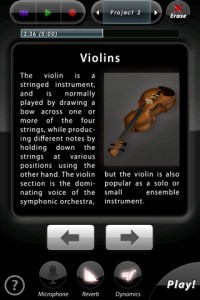
WI Orchestra is a universal iOS app, with a native full-screen iPad version and beautiful high-resolution graphics on iPhone 4 retina displays. Five amazing instruments from the different sections of the orchestra are included for free, Violins, Trumpet, Flute, Tenor Saxophone and Timpani! TIP: For first-time users on iPhone/iPod Touch, in order to access the keyboard you need to press the “Play!” button!
TECHNICAL SPECIFICATIONS
————————————–
All wind instruments in WI Orchestra are based on the WIVI technology, an additive synthesis/behavioral modeling pioneered by Wallander Instruments with the professional music production software WIVI.
Strings and percussion in WI Orchestra uses a new patent-pending filtering technology by Wallander Instruments, that allows seamless dynamic changes of any sampled instrument in real-time.
WIVI technology is used on a daily basis for producing music for movies, TV and writing classical scores, by composers all over the world.
CONTENTS (Instruments marked with * are included for free)
————————————–
STRINGS
– Violins*
– Violas
– Cellos
– Double Basses
– Violins Pizzicato
– Violas Pizzicato
– Cellos Pizzicato
– Double Basses Pizzicato
BRASSWINDS
– Trumpet*
– Piccolo Trumpet
– Trombone
– Bass Trombone
– French Horn
– Wagner Tuba
– Tuba
– Cornet
– Flugelhorn
– Euphonium
WOODWINDS
– Flute*
– Piccolo
– Alto Flute
– Bass Flute
– Recorder
– Clarinet
– Bass Clarinet
– Oboe
– English Horn
– Bassoon
– Contrabassoon
SAXOPHONES
– Sopranino Saxophone
– Soprano Saxophone
– Alto Saxophone
– Tenor Saxophone*
– Baritone Saxophone
– Bass Saxophone
PERCUSSION:
– Timpani*
– Harp
– Mixed percussion (Bass Drum, Toms, Bongos, Castanets, Triangle, Cymbal, Gong, Snare, Tambourine, Wood block, Tam-tam)
– Glockenspiel
– Xylophone
– Marimba
– Vibraphone
– Celesta
– Piano
In this video:
An amazing new app for iPad and iphone! Arne Wallander is some kind of magician in the fact that he squeezes all these amazing dynamic models into an IPAD app!
Brainwaves in music, kind of :-)
Well this is what you get. This is how to use coreMIDI in Brainwave 1.1. Brainwave is a clip based MIDI sequencer for the IPad. Bring your melodies and drum beats into life with the streamlined and intuitive MIDI clip editor. Assemble and arrange entire songs with the Arrangement editor. Control up to 16 instruments using the built-in sampler. Use the built-in audio samples to quickly get up and running, or use your own samples for even more creative sounds. Then produce and export MIDI files to be imported to your favourite Digital Audio Workstation software. All this inside of an ergonomic and minimalist user interface that will help get your inspiration to fruition.
For more information: http://www.facebook.com/pages/Brainwave/139992022734576
Check out the new Slide Control for the iPad
Slide Control is an iPad music application for musicians. This application makes improvisation easier. You can choose any scale (major, minor, pentatonic, blues …) and slide your finger to play any melody. With Slide Control it does not have bad grades, your movements are in harmony. Easier to play !! Easier to improvise !! Easier to create !! More imagination!!
Features:
★ Very simple application for very simple improvisation
★ Video tutorial Include
★ Many scale for best improvising (major, minor, pentatonic, blues …)
★ Polyphonic Control
★ Choose from 11 different wallpaper
★ Program change/ Bank change
★ All Midi CC support on Y direction
★ 16 Midi channel
★ Quick switch Sustain / Partamento / Legato
★ Quick switch Oct +1
★ MIDI Device support – connect devices via the Camera Connection Kit (near zero latency)
★ Measured latency over WiFi to OS X: 2-5ms
★ Fullscreen
★ Cool Animation 
★ More to come!
Slide Control is an Midi controller. NO SOUND is generate by the ipad. You must have a virtual synth or hardware midi instrument for use Slide Control.
Compatible with all AU, VST…
In this video:
Playing with iOS Music Apps in a very different way using the app Slide Control (iPad) for controlling the Mac version of NanoStudio, a very famous app for iPhone/iPod Touch/iPad, via wi-fi coreMIDI.
Polychord for the pad gets a facelift
The version 2 update brings a vast quantity of new exciting features to this highly-rated app including the ability to record your song data, a new graphical user interface, and Palettes. Only six months after its debut, Shoulda Woulda Coulda is back with a major update based mostly on user feedback. The biggest gripe turned out to be that users wanted a way to record their performances inside the app. Although you could use the iPad audio out or MIDI out into your workstation to record your track, there wasn’t any way to save a song idea. Since the iPad is a mobile device, this was a big gap in what the program offered, especially since Shoulda Woulda Coulda pushed it as a song-writing tool.
App store: itunes.apple.com/us/app/polychord/id402625491?mt=8
First and foremost, Polychord 2 gives you instant access to over 60 chords at any time via a clever graphical interface that houses each root and its variations in a circle. However, in order for a user to fully flesh out song ideas quickly, Polychord also affords an Auto Accompany feature. Press any chord and the drums and bass will play along in tune with your inspiration. Switch to a different chord and “your rhythm section” follows along with you.
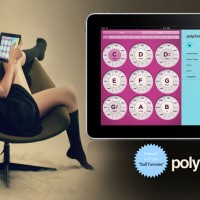
Features:
» Chords: Major, Minor, Seven, Diminished, Half Diminished, Augmented 5th, Sus 4, Major 6, Major 7, Minor Seven
» Scrolling accordion menus for instant access to all features while playing
» Low-latency strum keys and chord buttons
» Fast key change, transposing, major and minor palettes
» Volume mixer, controls for each instrument
» 27 drum & bass patterns for Accompaniment
» Speed/tempo controls
» Bass follows chords (Major, Minor,etc)
» Arpeggiator with speed, direction, and variation controls
» WiFi MIDI Controller
Shoulda Woulda Coulda determined that playing a multitude of chords via a touchscreen piano keyboard interface came up wanting, so they developed a Strum attribute. Polychord’s strum keys change automatically with the chords, so the interface doesn’t have to make room for keys you don’t need. Simply swipe your finger over the yellow keys to strum a chord, and your on your way to creating a new progression.
Enhancements:
» New GUI by Jonas Eriksson
» Palettes – Group Settings Recall
» Sine, Sawtooth, Triangle and Square Waves for each instrument. We used an analogue simulation technique for generating the synthesizer waves, which warms them up a bit.
» Bitshift features for drums: full control over the reduction of bits / bitrate, allowing you to completely decimate the sound or just add a touch of noise.
» Basic low-pass filtering, resonance for each instrument
» Tremolo Depth controls
» Scale mode for the strum keys: rather than the strum keys playing the notes of the current chord, you can set them to numerous other scales.
» Arpeggiator based on time-signatures. Full control over the speed and count of the arpeggiator — allows you to mix a different time signature over the beat. Arpeggiator now has all of the same synth controls as the other instruments.
» The UI now highlights the last chord you pressed, rather than always highlighting the root-note.
» Octave control for every instrument
» Precise BPM control, with text input
» A global on/off switch for Auto Accompany
» File manager for renaming/deleting/loading palettes, songs, etc.
Version 2 lets you save all of your settings into Palettes (what key your in, every instrument setting, etc). There’s also a row of Palette F-keys along the top of the settings pane, each can be set to a palette, so that you can switch quickly between them. Holding one down for a few seconds (until you see “F-key saved” in the status window) will assign the current palette to that F-key.
Shoulda Woulda Coulda’s Polychord 2 costs $9.99 — the update is free for current owners of Polychord 1 — and will be available on shortly on Apple’s iTunes.
Reaktor Loupe for TouchOSC on iPad
Perhaps even more interesting then the previous Reaktor post. Coming soon – a new version of Loupe with bidirectional OSC mappings for TouchOSC – the slice / note settings update as you play each note so you see the settings at a glance. Grab all three filter parameters with your fingers and drag them around, navigate the waveform with your ears instead of your eyes.
More here:
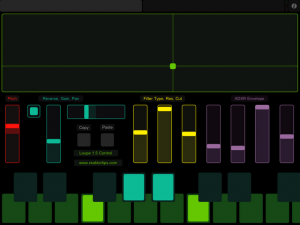
Above is the slice page. Each of the sliders gets updated from Reaktor when you trigger a new slice. This lets you see the loop area, filter settings, envelope settings, etc. of each slice and adjust them. Copy and paste buttons let you copy slice parameters to a different key – handy if you want the same thing on a different key except for panning, or reverse playback.
There’s no way to get the sample waveform to display in TouchOSC, but the large green XY pad works the same way as the Reaktor Loupe GUI – X position sets loop position, Y sets loop length. I actually prefer working with my ears this way instead of looking at the display – it’s a more hardware-y approach.
Changes include:
- Added copy / paste slice (fixed since beta)
- Added duplex OSC mappings for TouchOSC
- Added two page OSC iPad template
- Fixed release envelopes cutting off prematurely
You may download it here. Update is free for owners of Loupe 1.0 – same license info will unlock Loupe 1.5.
Ableton Live iPad controller apps – Miixer tutorial
The Miixer module for Griid gives you high-resolution control over your mix. Make precise adjustement to the volume or make drastic changes to the sends and pans. Options include 0dB lock, relative touch mode and units display. Miixer is free with Griid Pro and available as an In-App purchase for Griid.
Meteor Multi Track Recorder for the iPad released
Developer 4Pockets has released Meteor – a new digital multi-track recorder for the iPad. The program features up to 12 tracks of digital audio, a built-in mixer and multi-effects processor.
According to the developer, Meteor is ‘ideally suited for creating musical compositions, and also a great tool for journalists and business people who need to splice and piece together voice notes, narration or dictation’.
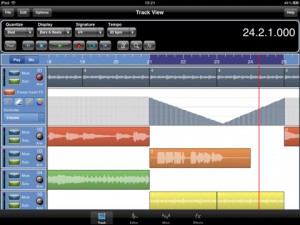
Meteor includes a full-featured sound editor, allowing recordings to be trimmed or spliced together. You can apply various effects to your recordings either directly, as part of the recording process or in real time during playback. Editor features include cut, copy, paste, fade in/out. clear, reverse, gain, normalize, remove DC offset, time stretch and pitch shift. Effects include digital delay, chorus / flanger, reverb, graphic equalizer, tone boost, compressor (with side chaining) and distortion.
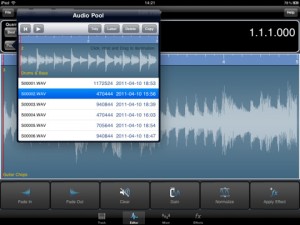
Recordings can be exported to standard file formats.
Features:
- Record up to12 tracks of CD quality audio
- Multi-Effects Processor
- Integrated 12 channel Mixer
- Integrated Sample Editor
- 3 Global Send Effect Busses
- Insert Effects with freeze facility to reduce CPU load.
- Record Effects & Record Monitor
- Mixer and Effect Automation
- Metronome
- Mixdown / Bounce Facility
- Import samples and iPod songs.
- Export to compressed CAF and WAV formats
- Automatic Delay Compensation
- In-App Purchases through the Online Shop found in the Help Menu.
Pricing and Availability
Meteor MultiTrack Recorder is available now for US $19.99.
Link:
Propellerhead Adds AudioCopy Support to ReBirth for iPad
Propellerhead has released ReBirth 1.1 for the Apple iPad. Version 1.1 supports AudioCopy, which enables pasting of ReBirth tracks as audio directly into other compatible third-party iPad apps. The update is currently available from the iTunes AppStore.
Users of ReBirth 1.1 for iPad now can select AudioCopy then paste their ReBirth song, loop or section as audio into any AudioPaste application.
Audio data captured includes tempo info, file format info, the name of the app copied from, duration and more. AudioCopy/Paste apps include StudioTrack by Sonoma Wire Works, Synth by Retronyms, MorphWiz by Wizdom Music, Looptastic by Sound Trends, to name but a few of over 70 applications from 31 companies.
DATAMASKIN

