
How does the new iPad Tenori-On app compare with the original?
The new APP! How does it compare to the original machine? I have both, so I’ll tell you in DETAIL
The new TNR-i is, as with its parent the Tenori-on, based on a 16 x 16 grid of buttons which are used to sequence and trigger sounds; the horizontal direction relates to time, the vertical pitch. Most other features of the original, such as its interchangeable 16 song patterns and different composition modes, also make it to the TNR-i, although this new incarnation has its own set of benefits. Users can link with up to four other people via a network for simultaneous composition, while those who already own the Tenori-on can also connect via this feature.
Re-creating the Roland TR909 for iPad
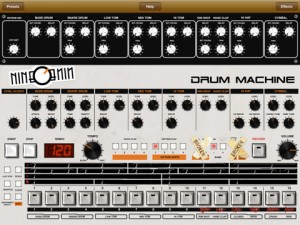
nineOnine is intended to emulate not only the sound of the classic TR-909, but also the logic of programming and saving rhythm patterns.”The TR-909 is an awesome analog drum machine! THE standard House and Techno beatbox. Sounds include kick, snare, hand clap, open and closed hi hats, low mid and hi toms, rim shot, ride and crash cymbals. Sounds are tweakable – attack, tone, tuning, decay, snap and accent. This machine does not sound like true acoustic drums, and we don’t want it to. It has a unique and very loveable analog sound that’s all its own!” And now it is here for the iPad:
Features:
- 16 step drum sequencer
- 10 user defined presets
- 9 drum instruments
- 8 drum patterns (4 x 2 banks)
- 4 preset tracks
- Knob zoom for easier handling
- Effects rack (Reverb, Delay, BitCrush and Pan)
- Record and export loops in 16bit/44.1kHz stereo WAV format
However, nineOnine needs some additional features in order to become a no-brainer. MIDI features are missing in action and “Track Play is preset and can not be user defined.”
Developer Mirko Trkulja promises some significant enhancements with the next update, though, including:
- Knob automation
- Wi-Fi MIDI sync
- Full sound synthesis
- Step or Tap pattern write mode
- More patterns and presets
- User defined Track Play
Björk goes iPad ALL !! the way
http://youtu.be/DzYDl3FuGV4
Bjork will release her new album “Biophilia” as a multimedia project, comprised of 10 separate iPad apps, one for each song. The 10 separate apps will be released under the umbrella of one album app. Expect all kind of interactive options, such as the possibility to remix the tracks in various playback modes and so on. You will be able to get the apps right here in mid-July when Bjork will premiere the apps at the Manchester International Festival next month. The app was co-created in collaboration with interactive artist Scott ‘Sona’ Snibbe. Snibbe is best know for his 2008 work “Falling girl”. In the meantime a first song popped up online, “Crystalline”. “Crystalline” is released formally on Thursday June 30th.
Via SL
A short demo of what Horizon synth for iPad is capable of
A short demo of what Horizon synth for iPad is capable of. iPhone version coming soon! (MIDI keyboard connected).
Here are a few of the highlights of Horizon’s features:
- True SuperSaw sound emulation, first found in the legendary Roland JP-8000 synthesizer. SuperSaw is a layered waveform consisting of multiple saw waves which are detuned to create an extremely full and epic sound. It’s possible to use 2 supersaw oscillators per voice * 7 polyphony = 98 saw oscillators playing the same time.
- Two independent filters per voice with configurable routing. You can select between various filter types including classic resonant LP, HP, BP, Notch and less common like Comb and Formant.
- The Morph Group function lets you continuously morph of up to 30 parameters in a sound (including effects), using only the modulation wheel.
Synthesist and author Mark Jenkins calls Horizon ‘the first truly mature polyphonic synth for the iPad’. And early reviewers in iTunes have given Horizon synth a 5-star rating and have called it ‘an instant classic’.
Experience the magic in Gravitarium2!
Slightly of track, but still a pretty cool app. Gravitarium 2 combines music, art and science in one relaxing experience. Use all your fingers to guide the star flow. You can create 10 different animations depending on the number of fingers touching the screen:
1 – Rocket, 2 – Sparkle, 3 – Energy flow, 4 – Atomic, 5 – 3D freeze, 6 – Circularium, 7 – Fish, 8 – Vortex, 9 – Lasers, 10 – Lightning.
Use different options to create spectacular drawings made of stars. You can load the “Drawing” preset from the “Options” screen.
You can even connect to random user (or a friend) and play together with the stars. You can always send a “Like” message to let the other player know you enjoy your connected game. There’s a leaderboard available that lets you discover the best G2 players.
The soundtrack is amazing! 10 different tracks push you further away into a deep relaxation state. If you’re connected to a remote user, you even share the same music ambiance.
Unleash your creativity and create unique masterpieces!
Features:
* Multitouch (upto 10 touch points in single mode, 20 in multiplayer mode)
* Thousands of particles animated at 60 frames per second
* Changing/manual colors
* Play/pause the animation
* Save snapshots to your Photo Library
* Original soundtrack (includes 10 relaxing tracks by Silent Strike)
* Multiple animation options (ex: speed, tail, size, opacity, etc.)
* Ability to save and load option presets
* Multiple play modes: default, drawing, tranquility and user defined
* Multiplayer over wifi/internet (auto-match or invite-a-friend)
* Ability to send “likes” and GameCenter friend requests
* Leaderboards: “like” count, overall time spent, overall time spent connected
* Syncronized options and soundtrack during multiplayer sessions
VirSyn has announced iSyn Poly – a new electronic music studio for the Apple iPad.
iSyn Poly is an electronic music studio for use with Apple iPad. iSyn Poly places an unbelievable number of features including three studio-quality, fully programmable virtual analog synthesizers and a drum machine packed in just three different screens on your iPad !
Each synthesizer is a full-featured analog modeling synth with three oscillators, a classic 24 db/oct ladder-style lowpass filter, independent filter and amp envelope generators, and full modulation routings. With our 10+ years of experience with analog simulations you can expect some serious sound easily covering all those fat frequencies so prevalent in modern production.
iSyn Poly also includes a sample playback-based drum machine with seventeen kits, each containing eight samples. Drum samples include 808, 909, modular synth drums and numerous 80’s drum machines. Volume, pan and decay time are individually adjustable and pitches are tunable over a wide range for crazy effects.
The full fledged sequencer let you arrange complete songs and can record the notes and controller movements of your performance. The unique gesture oriented user interface makes it ideal for live editing of notes and automations.
Play the three synths or drum machine with the onscreen keyboard/drum pads for fun live jam sessions, or let iSyn Poly do the playing for you with its full featured piano roll sequencer editable while playing. Play the keyboard by touching notes, or sliding up and down for amazingly expressive pitch glides and vibrato. iSyn Poly can even play a beat and synth track while you jam over sequenced tracks for a one-man iPad band!
With the Apple iPad Camera Connection Kit you can use a CoreMIDI compatible MIDI Keyboard to control iSyn Poly.
iSyn Poly is developed by VirSyn with content from audioMIDI.com

Features:
- Three Independent Synthesizers
- Three oscillators with sawtooth, pulse, triangle and sine waves. Modulations routings: LFO->pitch, filter ADSR->cutoff, LFO->pulse width.
- White/Pink noise generator.
- Classic 24 dB/oct ladder-style lowpass filter with drive parameter. Modulations routings: LFO->Cutoff, Filter ADSR->Cutoff, Velocity sensitivity with external keyboard.
- Amp section includes distortion with drive, asymmetry and crusher (bit reducer) parameters.
- Control matrix allows real time control of five parameters using the X/Y touch pad, the modulation wheel of an external keyboard and the tilt sensors of the iPad.
- Arpeggiator for automated sequences.
- 64 factory presets, unlimited user presets can be shared.
- Drum Machine
- Eight simultaneous instruments arranged into eight user-selectable drum kits.
- Editor page allows tuning, panning, level and decay time for individual instruments.
- Effects Section
- iSyn Poly features one global effects unit with phaser, flanger, chorus and stereo/cross delay.
- Effects amount is individually settable for each of the synths and drum machine.
- Live
- Play melodies live with onscreen keyboard/drum pads. Drag fingers for slides and vibrato.
- Optionally use CoreMIDI* compatible hardware keyboard.
- Full featured Sequencer
- Four track sequencer with piano roll and automation editor.
- Record what you play live with the onscreen keyboard/drum pads or using an external CoreMIDI compatible keyboard.
- Real time quantize function and metronome for recording.
- Arrange your songs with variable length patterns ( 1 – 99 bars ). Move and copy/paste patterns.
- Recording and playback of X/Y Pad movements, modulation wheel, pitch bend and key velocity.
- Full set of editing functions with unlimited undo.
- Modeless gesture optimized editing.
- Global
- Manage unlimited number of songs.
- Render song or patterns to audio and midi files.
- Audio pasteboard. Copy audio recordings to Clipboard for use with other Apps (e.g. Intua BeatMaker and many others)
- Exchange songs and user presets with File Sharing in iTunes.

Have you purchased a Tenori On – time to get rid of that one too
Yamaha has released a simulation of the Tenori-On on the iPad. works on the iPhone, too. The iOS version of the world-renowned TENORI-ON brings you a completely new musical interface. Even if you don’t know much about music, you can create music intuitively as if you were arranging sounds in space. The music that you see on the 16 × 16 grid of buttons is the music that is performed.
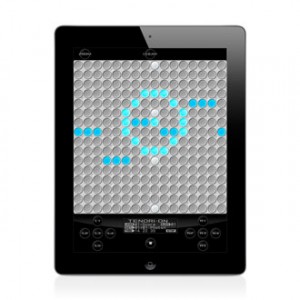
On the 16 × 16 grid of buttons, basically, the horizontal direction is time, and the vertical direction is pitch. By laying sounds on these buttons, you can combine rhythms and melodies to produce music. A button will glow when its sound is produced. The movements of the glowing lights produce a visual performance. 16€ isn’t cheap but cheaper than the hardware was/is. It has all modes and functions of the original. it can sync to other TNRs via the Game Center (from Apple). the data on the Hardware SD Cards can be load to the App as well. not said: if it loads a sample stack of 48 sounds as the original and sending MIDI signals isn’t clear, but for that price I’d assume it has to… Since Yamaha offer a MIDI connection kit it is very very likely it sends MIDI (iOS 4.3). since the built in sounds are quite strange I just like to check for it’s sample upload capability.
There are six different types of performance modes that you can select for each layer. You can make elaborate music by combining different modes. In score mode, the most fundamental of the modes, you can arrange sounds horizontally (temporally) and vertically (by pitch). In the exciting random mode, the sounds that you arrange are not just played in order—the melody and rhythm constantly change as twists are added. In draw mode, you can perform music by tracing your finger across the buttons as if drawing a picture. In bounce mode, the glowing lights are like bouncing balls that produce sound when they fall. In push mode, you can continuously change the sound as you perform. In solo mode, which is fun for solo performances, you can easily adjust the speed of repetition and the pitch.
Do you want to be a true Wireless DJ ?
The check this iPad app out!
iPad touch controller for DJs, works wirelessly with Traktor Pro or anything else, easy to set up

Multi-touch mixer and decks
Faders, EQ, headphone and playback controls, needle search and pitch bend — it’s all there.
Magic Stripes for pitch bending and direct manipulation
We have a better idea than simulating a jog dial: Magic Stripes. One finger for pitch bending, two for ultra-precise tempo adjustment.
Plug & Play iPad Editors for Vintage & Software synths
http://youtu.be/Cf_Cdbfhtdc
Background:
Leveraging 2 years of experience in designing GUI for control surface and 25+ years of experience in designing synthesizers sounds, we are bringing the best of those experiences to the iPad with iControlMIDI for Moog Memorymoog LAMM, namely iMemorymoog.
iControlMIDI is a UI Friendly and Workflow Efficient Solution that let you control your MIDI machines and software, simply from your iPad.
iControlMIDI is Plug & Play (actually there is nothing to plug!).
In 3-clicks on your Mac or couple of clicks on your PC, you are up and running…
iControlMIDI uses your:
• iPad with WiFi connectivity
• WiFi router (like an AirPort)
• [MAC] MacOS / Utilities / AudioMIDISetup / Network (MIDI Network Sessions)
• [PC] rtpMIDI and Apple Bonjour
iControlMIDI let you control all MIDI controllable parameters.
Parameter Name and Value displayed on iControlMIDI UI are the same as the ones displayed on your synth if you were to program it from its control panel!
iControlMIDI offers 4-Controls per Parameter:
• Slider: full range parameter value adjustment for a ‘coarse’ workflow
• + button: precise +1 parameter value adjustment for a ‘fine’ workflow
• – button: precise -1 parameter value adjustment for a ‘fine’ workflow
• Parameter default value button: default parameter value for a faster workflow
iControlMIDI is a Workflow Efficient Solution as it offers UI Consistent Synth Functions, for example, the VCF functions are grouped on the same iControlMIDI Page.
iControlMIDI integrates with your DAW. Real-time parameters adjustments triggered on iControlMIDI can be recorded and playback on your DAW.
iControlMIDI is a Zero [Mac] and Low [PC] Dependencies Solution; iControlMIDI relies on iOS 4.2 CoreMIDI and MacOS CoreMIDI frameworks is 100% MIDI, 100% iOS and 100% MacOS compatible and:
• Does not require to pay for additional software or have additional software installed on your Mac; requires to download rtpMIDI and Apple Bonjour on your PC
• Does not require to pay for additional hardware
• Does not require to do message mapping
• Does not require to design a UI on your Mac or PC and upload/sync it on your iPad
• Does not require to design a UI on your iPad.
With iControlMIDI, we are offering you to be immediately operational, so you can focus on your music (not on the IT/MIDI part of it!) and unleash your creativity.
iControlMIDI is designed by Electronic Musicians for Electronic Musicians.
In this video:
iControlMIDI. Plug & Play iPad Editors for Vintage & Software synths.
iMemorymoog for Moog Memorymoog LAMM
Site: http://www.icontrolmididesign.com/
App Store: http://itunes.apple.com/app/imemorymoog/id428843212?mt=8
Using the iFighter template to create a dubstep mix
http://youtu.be/zF4LdVdHT5A
A short dubstep mini-mix, demonstrating the “iFighter” template for TouchOSC / Traktor / iPad. The template (created by SloanY) is based on the DJ Tech Tools ‘Instant Gratification’ mapping for MIDI Fighter, with a few extras thrown in. Download the template for free here: http://digitaldjtools.net/news/traktor-touchosc-template-for-ipad-ifighter/
You can buy TouchOSC for iPad / iPhone for £2.99 from the App Store: http://goo.gl/xL714
Watch the original video by Ean Golden on the Instant Gratification mapping for MIDI Fighter here: http://www.youtube.com/watch?v=QrNqFXnI_Pg
Music:
Stupid Fly – “Twinkle” (Available from Beatport: http://goo.gl/lCTzi)
D-Jahsta – “Evil Freddy” VIP (Originally a free download from Soundcloud: http://goo.gl/fs206)
Feed Me – “Strange Behaviour” (Available from Beatport: http://goo.gl/ArbVP)
Stupid Fly – “Douchebag” (Available from Beatport: http://goo.gl/lCTzi)
DATAMASKIN

