
Isle of Tune iPad app
Some footage of the upcoming Isle of Tune app for iPad, iPhone and iPod Touch!
features new to iOS version:
– super crisp retina graphics
– add up to 8 cars
– change car speeds (2x, 4x, 8x)
– ‘traffic lights’ for pausing cars
– view all islands created with the online version
– create and share your island for people to view
Android version coming soon after!
visit www.isleofune.com to play online now!
A music score is, in essence, a way of making space into time: traversing notation from left to right and top to bottom, you move through a series of events. So, why not make that spatial map an actual map, as in the familiar, isometric interactive cityscape popularized by Will Wright’s classic game Sim City?
Isle of Tune does just that: lay out trees, houses, and city streets, and you sequence musical patterns as virtual islands. It’s available right now on the Web, powered by Flash – Chrome users can even get a one-click install via the Chrome Web Store. If you prefer to use a phone or tablet, mobile versions are coming, too, beginning with an imminent iPad release, seen in a video below.
MIDI Breakout Box Version 1.5 demo
This is a demo of the MIDI Breakout Box app version 1.5 which allows MIDI channels to be routed and transposed using an iPad. See our website at http://www.vinclaro.com.au/ios/midibreakoutbox/default.html for more info.

The MIDI Breakout Box allows you to:
- Route MIDI input to one or more different channels
- Transpose input up or down in pitch before sending it to the output channels
- Change instrument presets, volume and stereo panning on output channels
Selecting the Input Channel
The input selection panel is at the top of the screen. Touch the channel from which you would like the MIDI input to be received
Tip: For best results set your music keyboard to “Local OFF” mode to prevent the notes on the keyboard from sounding when you play them, so that the only sound is transmitted from the MIDI Breakout Box app. This will allow the full range of 16 channels to be available without interference.
Selecting Output Channels
There are 16 switches down the left side of the screen. Turn a switch to the “ON” position to allow MIDI output to that channel.
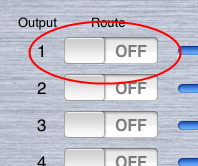
The “All On/Off” button underneath the switch for channel #16 allows all channels to be turned on or off simultaneously.
Setting Output Volume and Pan
Use the Volume and Pan controls for each channel by moving the Slider controls
The sliders below channel #16 can be used to adjust all channels simultaneously.
Setting Instrument Presets
Touch inside the “Bank” and “Preset” text fields to enter numbers. The touch Keyboard will appear to assist in data entry:
The values you enter must be a number from 0 to 127. Instrument presets are generally provided by the MIDI device manufacturer and many devices today confirm to the General MIDI specification.
Touch the green “Update” button at the bottom of the Bank/Prog list to send the new instrument settings to the MIDI device. Settings will not be applied until you touch this button!
Tip: Some MIDI manufacturers label their presets as starting from instrument #1. MIDI Breakout Box uses the raw MIDI value so it may be necessary to subtract 1 so that the preset list is 0-based.
Transpose
MIDI Breakout Box can transpose the MIDI input in real time. Enter a value in the “Transpose” field next to each channel.
This value can be a positive or negative number corresponding to the number of semitones by which to adjust the input. For example, setting the Transpose value to “12” will output a note that is one octave higher than the note value played. Setting Transpose to “-12” will output a note that is one octave lower.
Transposing will happen immediately as you type values into the fields. Use the “INIT” button under channel #16 to reset the Transposition of all channels back to 0:
Other MIDI Controls
Use the buttons at the bottom of the screen to send MIDI control messages to the connected MIDI devices.
These are:
- GM Reset – Performs a “General MIDI Initialization”
- GS Reset – Performs a “GS Initialization”
- Ctrl Reset – Resets all MIDI controllers to their default values.
2D’s iELECTRIBE Tutorial 1 – Playing with Patterns
2D’s first tutorial on ‘Playing with Patterns’ on the new Korg iELECTRIBE Gorillaz Edition app for iPad.
Gorillaz has teamed up with Korg – the legendary electronic musical instrument developers – to create a new dedicated beatbox for the iPad: The iELECTRIBE Gorillaz Edition. Featuring the iELECTRIBE original beat-making characteristics, this special Gorillaz Edition has been customized to generate sounds from the band latest album The Fall.
Get iELECTRIBE Gorillaz Edition: http://itunes.apple.com/app/korg-ielectribe-gorillaz-edition/id430288460
More details here : http://gorillaz.com/KORG-iELECTRIBE-Gorillaz-Edition
Block iPad dock
Here is a quick demo I made for our Block iPad dock controller. the space also fits a netbook. Expect something like this to be released from us soon.
Getting Started in Brainwave Sequencer for IPad
This video shows how to get started in Brainwave Sequencer.
Brainwave is a clip based MIDI sequencer for the IPad. Bring your melodies and drum beats into life with the streamlined and intuitive MIDI clip editor. Assemble and arrange entire songs with the Arrangement editor. Control up to 16 instruments using the built-in sampler. Use the built-in audio samples to quickly get up and running, or use your own samples for even more creative sounds. Then produce and export MIDI files to be imported to your favourite Digital Audio Workstation software. All this inside of an ergonomic and minimalist user interface that will help get your inspiration to fruition.
For more information: http://www.facebook.com/pages/Brainwave/139992022734576
SampleWiz preview
Go robotic I guess!
Decided to share with you a moment of our upcoming app.
This will be the next release from Wizdom Music
iELECTRIBE New 1.5 iMS20 WIRELESS SYNC
Making Tracks! Two examples, using the WIST Wireless Sync between iElectribe and iMS20.
MidiMe Demo
This is a quick demo of the features of MidiMe, a new midi control app for the iPad. You can see here how the direct, record and bounce modes work and get a feel for the UI.
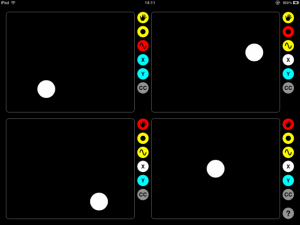
It connects over WiFi so no midi cables are required. It works directly with core midi in OS X and Windows users can connect via the free rtpMIDI driver.

Dark Matter Audio’s CEO Jon Stuart Introduces the DMA1 Smart Audio Hub
http://www.youtube.com/watch?v=ug-9Wz2E_vo
Dark Matter Audio release the DMA1. This incredible audio device is anything you want it to be — guitar effects processor, high quality studio tool or performance instrument — thanks to its open architecture and Online Store that lets you wirelessly update DMA1 with a growing range of pro audio apps.
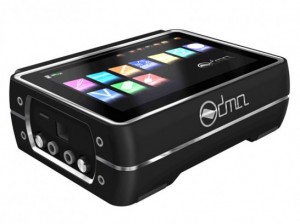
The DMA-1 is basically designed to be the iPad of audio interfaces.
It’s a software-powered audio interface with a touch-screen interface. Because it’s software-powered, the DMA-1 can be a guitar effects processor, a multi-FX processor, a digital multitrack recorder, MP3/4 player, MIDI interface, a 5.1 digital mixing desk and whatever else developers imagine.
According to Dark Matter Audio, you’ll be able to wirelessly download applications to make DMA1 into a drum machine, sampler, loop recorder, digital patchbay, video tutorial device, chord and scale matcher, database of transcribed music, lyric organizer or a composition sketch tool.
But unlike iPhones or iPads, DMA1 is built from the ground up for music making.
Main features:
- 7-inch Touchscreen
- Studio Quality Processing
- Wi-Fi and Ethernet
- 3 x USB, 2 x Analogue and 2 x SPDIF connections
- HDMI support
- 5.1 Surround Sound Mixer
- 4 Channel Architecture
- Battery and Mains powered
- Open Developer Community
SynthTronica – unique multitouch music
The surface of your cherished tablet becomes a sensual and expressive musical instrument. This may be just the way to show iPad how much you care.
DATAMASKIN

