
Creating algorithmic compositions on the iPad
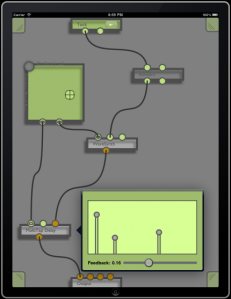
Dingsaller is a workspace for creating algorithmic compositions on the iPad. Patch together a complex graph of music generating nodes, synths, and effects and Control them with a touch.
Key Features:
- Synths and Sampler Instruments
- Digital Effects
- Pattern Sequencer
- Random Note Generators
- Touch and Tilt Controllers
- Recording
ExpressionPad – midi/synth controller for the iPad
Mugician developer Rob Fielding created this demo video for ExpressionPad – a new kind of midi/synth controller for the iPad. Continuous multi-touch support means you can control pitch bend, dynamics, and modulation with each touch, even as you change notes.
ExpressionPad (App Store link)
expressionPad is a new kind of midi/synth controller. Continuous multi-touch support means you can control pitch bend, dynamics, and modulation with each touch, even as you change notes. We’ve created a flexible and intuitive interface so you can focus on music. Watch our video and see for yourself!
Tune your expressionPad in fourths, fifths, or in guitar tunings such as standard or Open C.expressionPad features a built-in polyphonic synthesizer so you can start making music right away. Experience the flexibility of polyphonic portamento an electronic music first!
Connect to your music studio via Wifi MIDI. With expressionPad and our free moxMidi tool enables you to control Reason, Ableton Live, Logic, Garage Band, and more!
expressionPad is rounded out with all sorts of little touches: Color your expressionPad like a piano, or color it by pitch. Enable or disable touch parameters. Adjust global pitch bend and base amplification. We’ve worked hard to make a clean interface, a clear synthesizer, and lightning-fast MIDI response. Push your musical ideas to new limits with expressionPad.
Orphion – rough demo teaser
Multitouch instrument on the iPad
by Bastus Trump
iPad MIDI controller for the Arturia Minimoog V, iMinimoogV
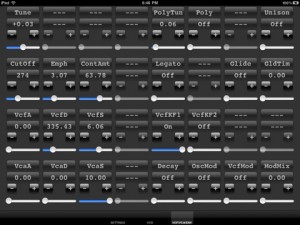
iControlMidiDesign has introduced a dedicated iPad MIDI controller for the Arturia Minimoog V, iMinimoogV:
Leveraging 2 years of experience in designing GUI for control surface and 25+ years of experience in designing synthesizers sounds, we are bringing the best of those experiences to the iPad with iControlMIDI for Arturia MinimoogV, namely iMinimoogV.
Details below.
iControlMIDI uses your:
- iPad with WiFi connectivity
- WiFi router (like an AirPort)
- [MAC] MacOS / Utilities / AudioMIDISetup / Network (MIDI Network Sessions)
- [PC] rtpMIDI and Apple Bonjour
iControlMIDI let you control all MIDI controllable parameters.
iMinimoogV is available now for $29.99.
Free Wireless MIDI control app for iPhone/iPad
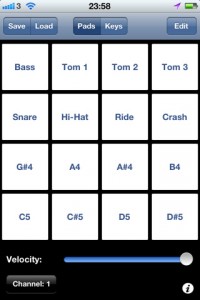
Onoko has released Pad MIDI (App Store link), a free Wireless MIDI control app for iPhone/iPad.
Features:
- Supports native Mac OS Network MIDI (Core MIDI)
- 16 assignable / renameable MIDI pads
- Full 88 key piano
- Selectable MIDI channel and velocity
There’s a tutorial on setting up MIDI on an OS X network at Nix Fox-Gieg’s Tutorials.
WNAMM 2011 Wayoutware SynthX
This iPad app is a real synthesizer, with a novel UI and the ability to serve as an effects chain for external instruments.
Introducing gbTouch for iPad
Highlights the features of Delora gbTouch iPad application
http://www.youtube.com/watch?v=M_9N7GpYlj8
Delora Software introduces gb Touch For iPad. Transform your iPad into a touch screen controller for GarageBand. With features such as layouts automatically adjusting for landscape or portrait orientation. The following videos explain what gb Touch is and how you can get the most out of the app.
Everybody needs a 303
live pa version of Fat Boy Slim’s “Everybody Needs a 303” using ReBirth for iPad.
REX Loops and effects triggered from Reason 5 via the Ohm 64.
Latest config has Beat Counter Lamps driven by Combinator patches.
Shared by Peff
eyoControl 1.1 is out now
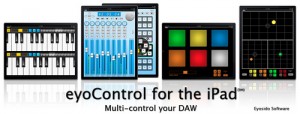
eyoControl 1.1 for the iPad, free update to the MIDI controllers set, adds support for the iPad’s native MIDI wireless connectivity (CoreMIDI), enabling users to connect to their DAW without requiring eyoControl Server. The latter is still being supported and provides advanced connectivity options for Mac users. The CoreMIDI update also brings Windows XP/Vista/7 compatibility through the third-party rtpMIDI software (see details on eyosido.com), which makes eyoControl compatible with most Windows based DAW.
This update adds a fourth entry to the controller library, mXY, a highly configurable multi X/Y controller. mXY has the following features:
– 4 independent X/Y controllers.
– Merge and Split modes: controllers can placed either in a common area (merged) or in individual slots (split).
– 1, 2, 3 or 4 controllers on screen simultaneously.
– controller axis individually assignable to Pitch Bend or any of 56 MIDI continuous controllers.
– enable/disable X and Y axis for each controller with a single tap.
– swap the settings of X and Y axis with a single tap.
– mirror mode: values can be mirrored in each direction around center position.
– reversed mode: min. and max. values can be reversed.
– return to center mode: releasing a controller makes it go back to center position.
– sticky mode: for easy positioning at center position.
– outer grip (Split mode only): enables to move a controller by dragging finger outside of the controller’s button.
– fine mode: choose between high or low resolution values for controllers whose values are larger than 8 bits.
– choose between 2 button sizes per controller.
– support for portrait and landscape orientations.
– controller settings are preserved for later reuse.
eyoControl is a set of MIDI controllers enabling control of your Digital Audio Workstation (DAW) software from your iPad in various ways, such as a control surface or a virtual instrument.
eyoControl includes the following controllers:
– Surface: a control surface supporting the Mackie Control protocol. Surface presents a traditional Mixer view with per-track buttons/knobs/faders, and a Panel View with quick access to the status of 64 tracks. Supports major DAW such as Logic, Cubase… (read details about DAW support at http://eyosido.com/eyocontro…).
– Pad: a 4/6/8/12-pads MIDI controller with tap-location sensitive (controls MIDI note velocity) pads suitable to play drum parts. Each pad has a configurable color/MIDI channel/note. A global velocity slider adds up to the velocity control of each pad.
– Keys: a dual keyboard MIDI controller with separate MIDI channels assignable per keyboard. Choose among three key widths per keyboard, and customize key colors. A global velocity slider controls note velocity.
– mXY: a multi X/Y controller featuring four independent, highly configurable X/Y controllers. Choose among 56 MIDI continuous controllers or pitch bend to assign. Each axis can be swapped, muted, reversed, mirrored etc…
eyoControl communicates with your DAW through the iPad’s WIFI connection using either the native iPad wireless MIDI capabilities (CoreMIDI) or eyoControl Server (Mac only) for advanced connectivity options.
NOTE: eyoControl is a set of MIDI controllers, it does not produce sound by itself!
Requirements:
– iPad running iOS 4.2 or above.
– a local WIFI connection.
– a laptop/desktop computer running MacOS X 10.4 or above, Windows XP/Vista/7 (rtpMIDI required) or any system compatible with the iPad wireless MIDI protocol.
– a Digital Audio Workstation software / audio sequencer with MIDI support.
Optional: if you opt for eyoControl Server instead of native MIDI, a Mac computer running Mac OS X 10.5 or above is required.
Check out http://eyosido.com for more details about eyoControl.
Akai Synthstation 49
Here’s what AKAI has to say about it:
SynthStation49 is the most advanced, intuitive music controller designed specifically for use with the iPad and the first true iPad performance tool for musicians. Working seamlessly with Akai Professional’s heralded SynthStation software, SynthStation49 provides unparalleled music creation capabilities, including direct in-app MIDI recording from its velocity-sensitive keyboard, nine MPC-style drum pads and array of transport controls. In addition to its integration with the SynthStation app, SynthStation49 is also completely iOS CoreMIDI compatible, making it instantly compatible with dozens of music apps already in the App Store and hundreds more on the way.
Dock, power and position the iPad perfectly using the adjustable-angled cradle, or establish commanding control over your favorite computer software using SynthStation49‘s USB/MIDI port. Professional ¼” outputs and extreme portability ensure you’ll be able to take your sequences straight to the stage at a moments notice.
SynthStation49 is the only full-featured, professional keyboard controller allowing direct MIDI performance recording onto an iPad. Bridging Akai Professional’s popular MPK controllers with the previously released SynthStation25, SynthStation49 provides immense software control with forty-nine, full-size velocity-sensitive keys, nine backlit MPC-style drum pads and full transport buttons. An adjustable-angled dock for iPad allows the user to easily slide their tablet into the SynthStation49’s cradle and position the screen to their preference.
SynthStation49’s keyboard, pitch/modulation wheels and sustain pedal input provide great feel and the essential controls for musicians and producers to compose, record and perform. The nine drum pads of SynthStation49 give users immediate, intuitive beat-creation capabilities over the 50 classic and modern kits available within the SynthStation software. Program, Sequence, Song select and Transport buttons also provide quick navigation to the SynthStation App’s most used components for a seamless, efficient workflow.
SynthStation49 also contains a stereo pair of professional ¼” TRS outputs with volume knob for easy connecting to other pro audio equipment on stage or in the studio. A headphone output also lets users practice and compose in private. The SynthStation49’s USB port can be connected directly to a Mac or PC computer to receive power in addition to transmitting MIDI to and from music software – a great way to turn the SynthStation App or other CoreMIDI compatible App into a sound module. You can even use SynthStation49 as a traditional USB MIDI controller with your computer – no iPad required!
DATAMASKIN

