
Reason 5 Audio Processing with ReBirth for iPad
Reason maestro “Peff” has released this nice video on his Youtube channel featuring the ReBirth on the iPad
The iPad audio output is routed to the line in on the workstation. Reason 5 receives the active audio input and can process the sound in real-time. This demonstration features a range of custom combinator effect devices including CycleOn for Reason 5 beta.
Combinator Effects being controlled by the Livid Instruments OHM64. Thanks Peter!
Demo of the new FAIRLIGHT CMI iPad App
Fairlight’s iPad application simulating the series 2.
In addition to Peter Vogel, Fairlight Sampler author, showed off the latest model of the Fairlight, they also featured showed a Fairlight, Emulator for Apple iPad, Iphone and Ipod Touch.
The app is based on a Fairlight CMI Series II, and has most of the features – in addition to the connections. But the sequencer is ready and able to see the waveform is plotted in 3D. A really cool feature is that the waveform changes the perspective, depending on how you hold the iPad: one. There are also features not previously available, such as the ability to edit samplingars loop points in real time.
However, there is one difficult challenges to overcome for those who thirst after a Fairlight. When the app pops up on the Apple App Store by the end of January, it will not have the support of core midi. But it is quite possible that it will in a future update.
iCade Brings Retro Arcade Experience to iPad
Perhaps slightly off topic but this is pretty cool, I must say, enjoy
ION Audio, ThinkGeek and Atari teamed up to create an actual retro arcade gaming experience on the iPad.
Fender on the iPad – it’s here
After a number of other cool releases for the iPad, e.g. iMS20, here’s another one from Fender this time
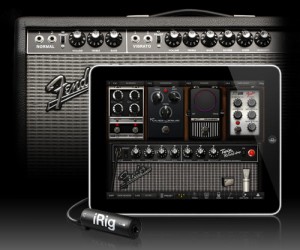
IK Multimedia introduces AmpliTube® Fender™ for iPhone®, iPod touch and iPad: full featured tone guitar rig apps with built-in recording studios offering the legendary Fender tone designed and developed in close cooperation with Fender.
The AmpliTube Fender™ app, at its core, is all about pure Fender® tone. It was developed with careful guidance and critical tone testing from the tone gurus at Fender® to ensure the authenticity of the sound. Derived from the award-winning desktop version of AmpliTube Fender™, the app offers 5 Fender® amp models — the ’65 Deluxe Reverb®, the Super-Sonic™, the ’65 Twin Reverb®, the ’59 Bassman® LTD and the Pro Junior™, and 6 Fender® stompbox models — Tape Delay, Compressor, the Blender™, Phaser, Overdrive and Noise Filter.
AmpliTube Fender™ features:
• Real time guitar and bass mobile multiFX + recording app
• Full rig with 3 stompboxes (iPhone)/4 (iPad) + amp with effects + cabinet + mic
• 6 Fender® Stomps — Fender® Phaser, Fender® Blender™, Tape Delay, Overdrive, Compressor (by registering) and Noise Filter
• 5 Fender® Amps with matching Cabinets — ’65 Deluxe Reverb®, ’65 Twin Reverb®, ’59 Bassman® LTD, Super-Sonic™ and Pro Junior™
• 2 Mic models, dynamic and condenser
• Single track recorder (with re-amping) expandable to full 4 tracks (iPhone)/8 tracks (iPad) recording studio with master effects through in-app purchase
• Import and play up to 50 songs/backing tracks directly from your iPod library on your device or from your computer
• Ultra-realistic tones derived from the AmpliTube Fender™ Mac/PC studio
• Slow down or speed up to tempo (-50% to +200%) of imported songs without affecting their pitch
• 36 presets can be saved/named/recalled on the fly
• Includes tuner/metronome
• Low-latency for real time playing
• FREE version also available – can be expanded by individual gear model purchases, or bundle purchase via the in-app purchase feature
• Can be incorporated into the AmpliTube 2 for iPhone/iPad app via in-app purchase
Pricing and availability:
The AmpliTube Fender apps for iPhone and iPad costs $14.99/ €11.99 each and will soon be available on the iTunes app store. A free version will also be available and will be expandable with individual amps and effects a-la-carte through in-app purchases. The 4 –Track recorder and 8-Track recorder with master effects section on iPhone and iPad cost $9.99/ €7.99 and $14.99/ €11.99 respectively as an inapp purchase.
AmpliTube 2 for iPhone or iPad users will be able to add AmpliTube Fender stomp box and amplifier models as individual in-app purchases for only $4.99/ €3.99 per amp, $2.99/ €2.39 per stomp box, or $14.99/ €11.99 for the entire bundle.
Available soon from the App Store. More info at http://www.ikmultimedia.com/…
PreSonus releases StudioLive Remote, wireless control software
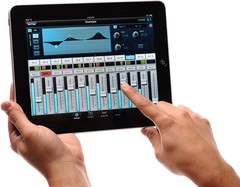
PreSonus has released StudioLive Remote for the Apple iPad, the first dedicated wireless control software for the StudioLive small-format digital console.
At last, you can have wireless remote control of any PreSonus StudioLive-series digital mixer’s channels, auxes, effects, subs, Fat Channel processors, and more. Not only can these functions be controlled from anywhere in a venue by the front-of-house sound person, but custom aux mixes can be simultaneously adjusted by any performer with an iPad.
StudioLive Remote, available free from the iPad Apps store, provides direct wireless control over PreSonus Virtual StudioLive software for Mac and Windows, which in turn controls the StudioLive mixer.
Can’t set up your StudioLive mixer front-of-house? Put it on stage; grab your iPad, running StudioLive Remote; and stroll to the back of the hall to adjust the main and aux mixes, channel settings, Fat Channel processing, effects, and graphic EQs. Need to tweak a monitor mix while on stage? Now you can!
More information: PreSonus
Bringing your iPad DJ’ing to a whole new level
Transform your iPad, iPhone or iPod touch into a portable DJ rig with Numark’s iDJ Live controller. Numark brings your iPad DJ’ing to a whole new level.
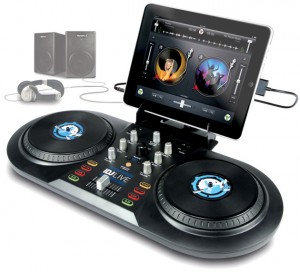
PRO MEETS PORTABLE
iDJ Live is the easiest way to become a DJ with your iPod touch, iPhone or iPad. This iOS-DJ controller is perfect for anyone from Pro DJs to music lovers who have never tried DJing before. The iDJ Live system harnesses the processing power of your iPad, iPod or iPhone and enables you to DJ parties, events and even clubs using the music that is already on your iPod via Core MIDI-enabled apps.
You can mix and scratch your music, including your iTunes Music Libraries using two large performance platters and a central mixer section with a crossfader, buttons and knobs. iDJ Live is laid out in to carefully recreate the two-decks-and-a-mixer setup that professional DJs prefer. Just load your tracks to either Deck A or Deck B, and then control it, cueing up the start point, performing advanced transitions and even scratching.
PLUG IN AND START THE PARTY
iDJ Live comes complete with iPad stand and custom headhpone/speaker audio cable so connecting to your sound system of choice is easy. Connect your iPod touch, iPhone or iPad in seconds using the built-in dock connector. Once these two connections are made, just switch the party into overdrive.
Get serious with your iPod, iPhone or iPad with iDJ Live.
NAMM: AKAI releases Synthstation49
Introducing the synthstation49 by AKAI
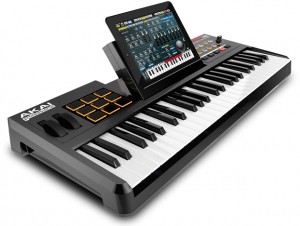
More info below:
SynthStation49 is the most advanced, intuitive music controller designed specifically for use with the iPad and the first true iPad performance tool for musicians. Working seamlessly with Akai Professional heralded SynthStation software, SynthStation49 provides unparalleled music creation capabilities, including direct in-app MIDI recording from its velocity-sensitive keyboard, nine MPC-style drum pads and array of transport controls.
In addition to its integration with the SynthStation app, SynthStation49 is also completely iOS CoreMIDI compatible, making it instantly compatible with dozens of music apps already in the App Store and hundreds more on the way.
Dock, power and position the iPad perfectly using the adjustable-angled cradle, or establish commanding control over your favorite computer software using SynthStation49‘s USB/MIDI port. Professional ¼” outputs and extreme portability ensure you’ll be able to take your sequences straight to the stage at a moments notice.
SynthStation49 is the only full-featured, professional keyboard controller allowing direct MIDI performance recording onto an iPad. Bridging Akai Professional’s popular MPK controllers with the previously released SynthStation25, SynthStation49 provides immense software control with forty-nine, full-size velocity-sensitive keys, nine backlit MPC-style drum pads and full transport buttons. An adjustable-angled dock for iPad allows the user to easily slide their tablet into the SynthStation49’s cradle and position the screen to their preference.
SynthStation49’s keyboard, pitch/modulation wheels and sustain pedal input provide great feel and the essential controls for musicians and producers to compose, record and perform. The nine drum pads of SynthStation49 give users immediate, intuitive beat-creation capabilities over the 50 classic and modern kits available within the SynthStation software. Program, Sequence, Song select and Transport buttons also provide quick navigation to the SynthStation App’s most used components for a seamless, efficient workflow.
SynthStation49 also contains a stereo pair of professional ¼” TRS outputs with volume knob for easy connecting to other pro audio equipment on stage or in the studio. A headphone output also lets users practice and compose in private. The SynthStation49’s USB port can be connected directly to a Mac or PC computer to receive power in addition to transmitting MIDI to and from music software – a great way to turn the SynthStation App or other CoreMIDI compatible App into a sound module. You can even use SynthStation49 as a traditional USB MIDI controller with your computer – no iPad required!
AkaiConnect SDK allows third-party developers to take advantage of all the professional controls and capabilities of Akai Pro’s SynthStation49 keyboard controller and incorporate support for those controls within their iPad applications. Software developers interested in creating programs compatible with SynthStation49 can submit an application now at SynthStationApp.com.
Quick demo of the eyoControl for the iPad
eyoControl is a set of MIDI controllers for the iPad, including a control surface, a dual keyboard MIDI controller, a pad set, an X/Y controller. It connects to your Mac or Windows Digital Audio Workstation (DAW) through the native iPad MIDI wireless connection, or optionally the dedicated eyoControl Server app (Mac only) for advanced connectivity options. Check out http://eyosido.com for details.”

eyoControl includes the following controllers:
- Surface: a control surface supporting the Mackie Control protocol. Surface presents a traditional Mixer view with per-track buttons/knobs/faders, and a Panel View with quick access to the status of 64 tracks. Supports major DAW such as Logic, Cubase… (read details about DAW support at http://eyosido.com/eyocontrol/surface).
- Pad: a 4/6/8/12-pads MIDI controller with tap-location sensitive (controls MIDI note velocity) pads suitable to play drum parts. Each pad has a configurable color/MIDI channel/note. A global velocity slider adds up to the velocity control of each pad.
- Keys: a dual keyboard MIDI controller with separate MIDI channels assignable per keyboard. Choose among three key widths per keyboard, and customize key colors. A global velocity slider controls note velocity.
- mXY: a multi X/Y controller featuring four independent, highly configurable X/Y controllers. Choose among 55 MIDI continuous controllers or pitch bend to assign. Each axis can be swapped, muted, reversed, mirrored etc…
bleep!BOX drum and synth now also as VST & AU plug in
bleep!BOX, the drum and synth hit from the iPhone and iPad has arrived on the desktop as a Mac and PC compatible VST & AU Plugin. In addition to being able to load all your patterns from the iPhone version, bleep!BOX is a powerful drum synthesizer in it’s own right.
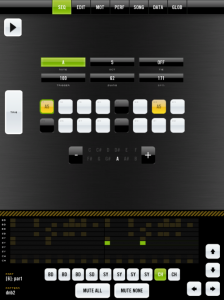
It features 10 synthesis parts which can play the role of percussion or instruments and has 50+ parameters enabling you to recreate all kinds of classic drum sounds. Specialized parts for replicating vintage snare and hi-hat sounds are also included.
bleep!BOX is even more capable as a Plugin, since almost all parameters can be automated by your host. You can choose to use bleep!BOX’s pattern playback or sequence notes using your host’s piano roll allowing bleep!BOX to act as a tone generator or a full groove box.
Features List
* – VST & AU Compatible plugin, which means it runs on the majority of hosts.
* – 10 Synth / Drum parts (aka voices)
* – Emulations of ‘classic’ x0x drum sounds (snares, hihats, claps, bassdrums, toms, cymbals)
* – Ringmod, FM, Phase Modulation, Sync
* – Very low CPU usage
* – 50+ Parameters
* – Global delay FX
* – Soft / Hard distortion FX
* – 8 Waveforms – Saw, Square, Sine, Triangle, etc
* – Save patches and presets
* – Live performance modes – Loop / Stutter, Mute
To hear samples, download a demo, and where. How to buy the new VST version go to http://www.bleepboxapp.com/b…
Runxt Life is pixels and bleeps and iOS meets Ableton
Runxt Life is pixels and bleeps and iOS meets Ableton. Full on music nerd fun. Available in the App Store now: click here
“Runxt Life is a generative music application created for the iOS® platform based on the cellular automaton theory “Conway’s Game of Life” by John Horton Conway.” – Firma 103
For more info: runxt.be
The ‘game’ is a zero-player game, meaning that its evolution is determined by its initial state, requiring no further input from humans. One interacts with the Game of Life by creating an initial configuration and observing how it evolves.
You can draw single cells or a predefined pattern stamp on a two dimensional grid. This pattern will evolve according to the rules of “Conway’s Game of Life” after you press ‘play’ or ‘step forward’. Five different colors each represent a different sound or channel.
Runxt Life uses the output of the grid, affected by a few parameters, to either generate sounds or send midi notes to your computer with the help of the Runxt Life – OSC to MIDI application. In this application you can configure which color is sent to which midi channel.
DATAMASKIN

