
Fat drums on ReBirth
iPad lovers are posting new videos, here´s a good one featuring the ReBirth
New version of Propellerheads Rebirth for iPad, this one is very good, the iPhone version are not good enough
Shared via lasercicalone
iMS20 Xmas orchestra
One man recording by Korg iMS-20
Jingle Bells was created by the Electric Holiday Orchestra, featuring the iPad running Korg iMS-20
Filatron performance on the iPad
Jamming on an iPad using various apps like Shiny Drums, MorphWiz, Filtatron etc.
Shared with us via rishabhrajan
Turn your iPad into a sampling workstation
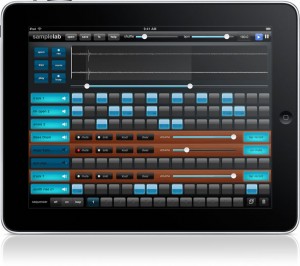
Sample Lab is a new app for the iPad that turns it into a sampling workstation.
Features:
- Pinch-zoom precision sample editor lets you select your audio and drag it right onto a track.
- 8 stereo tracks @ 44.1kHz with per-beat volume control.
- Pitch-shifting preserves time and gives you 2 full octaves from one sample; without chipmunking.
- Record your own samples, or import wav & mp3 files using iTunes.
- Trigger pads for tapping-in patterns or stand-alone performance.
- 4 real-time DSP FX: compressor, bit crusher, resonant cutoff, and phaser.
- Shuffle control for syncopation.
- Over 100 samples included to get you started.
- Audio Copy & Paste to share with other apps.
- Upload your mixdowns to SoundCloud to collaborate & share.
- Import new samples using iTunes.
Check out the video below for an example of Sample Pad in action.
Sample Pad is expected to be available in the app store as soon as iOS 4.2 is released to iPad. Pricing is to be announced. See the SampleLabApp site for details.
A few minutes with the app + some random samples and he showed us how it’s done:
http://www.youtube.com/watch?v=yi7Vg8o7nfY
Exclusive preview of djay for iPad coming to iOS 4.2
Macrumors has shared this teaser video of the new Djay app for iPad
When the iPad was first announced, one of the most exciting aspects of the device was that developers now had a large multi-touch platform to develop cool new apps. In particular, the possibility of DJ applications with multi-touch scratching and mixing captured some people’s imaginations, but for a number of reasons those full-fledged apps never really arrived.
The primary reason is that the iPad has been stuck on iOS 3.2 which offers far fewer audio-related options than the 4.x build. But with the imminent release of iOS 4.2, at least one developer is going to finally deliver a full featured iPad DJ app. We’ve learned that Algoriddim, the makers of the popular djay application for Mac, has ported djay over to the iPad, taking full advantage of the new iOS 4.2 audio features.
These iOS 4.2-specific features coming in djay for iPad include:
– Full access to iPod library
– Multi-tasking: you can run djay in Automix mode and listen to a continuous, seamless mix running in the background while you surf the web, play games, etc.
– AirPlay: you can wirelessly stream your mix to your Apple TV or AirPort Express station in real-time.
– Fully leverages accelerated CPU extensions (SSE-like) for high-quality audio processing and analysis
– Very low latency (< 3 msec)
– Background audio playback (multi-tasking support)
– Pre-Cueing (via mono/stereo adapter)
Polychord – new instrument for the iPad
http://vimeo.com/16518652
Polychord is drums, bass, chords, and accompaniment all wrapped into one. Simply press one of the chord circles and your on your way to writing a song. Drums and bass follow the chords automatically, but the coolest part is probably the strum keys on the right: simply swipe your finger over the yellow keys to strum a chord.
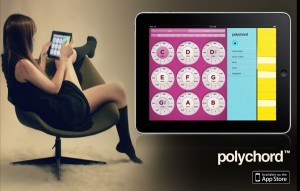
App store: itunes.apple.com/us/app/polychord/id402625491?mt=8
Routing tips for the KORG iMS20
With the new KORG iMS20 for iPad out now I thought it be good to revisit the original synth the MS20. Many who will download the iMS20 has probably never owned or used the original synth and how to go about routing it to make the sounds it has become famous for. Therefore I have uploaded a couple of tutorials with the original synth to give you an idea how to go about creating those sounds on your iPad version. Since that really is the beauty with the iPad version that it functions very close to the original.
If you have more input on the topic please leave your comments:
About the original machine:
The MS-20 was one of Korg’s first major successful portable analog monosynths and even today it is still a great little machine! The MS-20 is the big brother to the MS-10. It is an analog two-oscillator monophonic lead and bass synth with hard wired and patchable connections. The hard-wiring can be overridden however, using patch-cords. This type of hard-wired but patchable design was similar to the ARP 2600 of the late seventies. Of course the 2600 was much bigger and better. But the MS-20 offered a lot of flexible control and great sounds at a more affordable price.
In addition to two analog oscillators, the MS-20 featured two resonant VCF filters, two VCAs, sample and hold, a noise generator, an assignable mod-wheel and lots of knobs! The VCF filter section is capable of high-pass, low-pass, notch and band-reject which is unique and different than your basic lowpass style filter. External sound sources can be routed through the filter section as well. In fact William Ørbit uses the filter in his MS-20 relentlessly to filter and tweak his samples, beats, delay returns, vocals, etc.
There’s also a Pitch-CV converter for triggering sounds from external sources. Aphex Twin makes quite a bit of use of this, feeding the input stage of his MS-20s with drum sounds and other untrackable audio to get the synth to make a wide variety of crunch/squawp/screech noises by mistracking the filters, etc.
As for its sounds, the MS-20 sounds great! It makes a great alternative for Minimoog-seekers. The MS-20 is great for just about any type of analog synth sound you could want! Fat round bass sounds, percussive bass or sounds, noise effects, squiggly-bubbly sounds or sinuous-worm leads are all waiting to be unleashed from inside this classic beast. The MS-20 is not only a great sounding instrument, but a great learning-synth. It is fairly easy and intuitive to operate but in doing so you can learn and understand more about synthesis and signal-flow. It is used by William Ørbit, Aphex Twin, Hardfloor, Air, SkyLab, Stereolab, Vince Clarke, Astral Projection, Biosphere, Apollo 440, Mr. Oizo, Jimi Tenor, The Prodigy, OMD, Freddy Fresh, Luke Vibert, Einstuerzende Neubauten, Add N to (X), Daft Punk, Coldcut, Die Krupps, Skinny Puppy, Electronic Dream Planet, Jimmy Edgar, Front 242, Front Line Assembly, The Legendary Pink Dots, KMFDM, Severed Heads, Royksopp, The Faint, The Shamen, Jean-Michel Jarre, and Portishead.
iDJ – designed for DJs with no skills
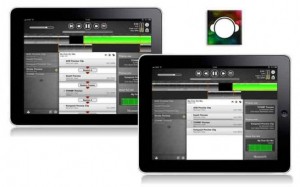
Numark, possibly inspired by the turntables are dead meme, has released a new iPad DJ app, iDJ, that’s designed for DJs with no skills:
iDJ allows anyone to make instant, continuous mixtapes of their favorite songs all blended together as one in perfect rhythm.
As fun as it is powerful, iDJ’s elegant interface and patented technology will have you assembling customized soundtracks that ignite, accompany and enhance every occasion. Whether for workouts, road trips, dance parties or any other event, iDJ keeps your music moving and completely in time for an exciting new playlist experience.
When apps like this are getting put out by Numark, Hell might as well go ahead and freeze over.
DJ beatmatching is now consumer technology. iDJ (App Store link) is $9.99. Details below.
Features:
- Create seamless, synchronized playlists of your iTunes music library on iPad
- Automatically detects songs’ tempo and performs crossfades in perfect time
- Mix up to four songs at once for a completely new playlist experience
- Playlists can contain an unlimited number of songs
- Playlists can support audio WAV, MP3 and AAC files
- Easily manage your iDJ music using Itunes 9.2 (or later) on Mac or PC
Nice review of the KORG iMS20 for iPad
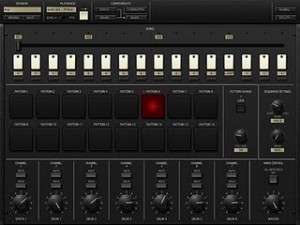
ipaddj has provided us with a review of the recently launched iMS20, check it out and see if you agree:
Anyone who has used the Korg Legacy plug-in will know what they are in for and the fact that you can grab patch cables and route them using the touchscreen is almost mind-melting. Like a childhood fantasy come true.
The huge sound of the MS-20 is totally there and I couldn’t stop making Daft Punk patches for the first few hours using the beast.
Korg just released an iPad version of their classic MS-20 analog synth. It is amazing. The only thing is, I don’t know what I am going to use it for…
The Overview
The virtual hardware included in the iMS-20 consists of an analog monosynth (the MS-20), an analog sequencer, a drum machine based on MS-20 patches, a drum step sequencer, a song sequencer a virtual keyboard, two virtual kaoss (x-y controller) pads and a mixer. I guess the word I would use to describe this setup is cool. It all looks and acts like you have a classic monosynth sitting in front of you. However, I wouldn’t exactly describe this as utilitarian. Just as with the iElectribe and even Rebirth (which was also just released as a dedicated iPad app) sometimes the decision to emulate analog hardware in an electronic, touchscreen, software environment is questionable. For example, the analog sequencer is totally cool, but it would have been much more conducive to songwriting and workflow to use a real multi-touch based sequencer. I understand that Korg is trying to keep it real, so to speak, but I want something that I can use more than something that is just totally cool.
Fiddling with the iPad
Smule has released Magic Fiddle, a new music app for the Apple iPad.
Hello. I am your fiddle. I am programmed to make you a musical prodigy. Your untrained fingers will play beautiful music in a matter of minutes. Seriously, in the amount of time it took you to read this you could have learned ‘Ave Maria’. I kid you not (fiddles never joke).
Use my magic to earn high scores, medals and badges for your performances. I understand that you humans like to win. Well then, can you get a gold medal on every song?
You, my friend, are not just someone with an iPad. You are a virtuoso.
Magic Fiddle features
- Pick up and play:
- Pick up and play beautiful songs by following streams of colored light in my SongBook, no skill required!
- Impress your friends by playing any of my 20 songs I have in my SongBook, from video game theme songs to ‘Ave Maria’ and everything in-between.
- Bow, pluck, trill, and play vibrato and glissandi right from your iPad.
- Take it to the top:
- Earn scores for every song, and medals for playing well. I will be the judge of ‘well’ (not your mother).
- Show off your newly found musical aptitude to your fellow fiddlers by competing for a spot on the global leaderboards.
- Earn badges as you accomplish new heights of fantastic fiddlery.
- Learn fiddling techniques easily:
- Learn basic and advanced fiddle techniques through fun learning adventures with me – my StoryBook takes us on an 8-chapter interactive journey to teach you different techniques with activities and step-by-step instructions.
- Practice your new techniques on real songs as you improve.
- Listen and share with the world:
- Listen to other magic fiddlers play on the globe around the world.
- Broadcast your masterpieces for the world to enjoy.
- Show your support for fellow fiddlers by ‘liking’ their songs.
Magic Fiddle for iPad is available to purchase from the iTunes App Store for $2.99 USD.
More information: Smule / Magic Fiddle
DATAMASKIN

