
Propellerhead releases ReBirth for iPad
Well after the launch of ReBirth for iPhone I guess it was just a matter of time before it should appear on iPad as well, perhaps we will find Reason there soon as well
Propellerhead Software today released Rebirth For iPad (App Store link) – the original virtual techno music studio, reincarnated for the iPad.
The world of iPad music software has really heated up in the last month, and ReBirth For iPad demonstrates that another major electronic music software manufacturer is taking the platform seriously. It follows on ReBirth For iPhone – which was interesting as a proof of concept, but ultimately fiddly in use because of the iPhone’s screen size.
Here’s what Propellerhead has to say about ReBirth For iPad:
Propellerhead Software’s legendary Techno Micro Composer has been resurrected and customized for the iPad.
ReBirth faithfully emulates dance music’s three backbone devices: The Roland TB-303 Bass synth and the Roland TR-808 and 909 drum machines. Combine these with FX units, fully featured pattern sequencers and a gorgeous-looking interface and you’re ready to make killer tracks on your iPad.
Share your music with friends on Facebook, Twitter and more using the built in sharing features.
ReBirth For iPad is $14.99.
Features:
- 2 x TB-303 Bassline Synthesizer with pattern sequencer – The original Acid House and Techno bass synth. Unrivaled power, unmistakable sound.
- TR-808 Drum machine – Roland’s sub-heavy 1980 beat computer. Instant hip-hop.
- TR-909 Drum machine – The go-to beatbox for everything House and Techno. Press play and you’re dancing.
- Tempo-synced digital delay – Bouncy and hypnotic, always in time with your music.
- Compressor with threshold and ratio – A bare-bones compression unit for added beefiness.
- Distortion unit with amount and shape – Raw and rugged distortion for that extra edge. Works wonders with any 303 bassline.
- PCF effect – Pattern controlled Low-pass / Band-pass filter – a tweaker’s delight.
- Mixer – Device specific mixer sections with pan, delay sends and FX switches
- Mod support – Includes 7 original user mods with alternative sound sets and graphics
- Sharing features – Share function with easy publication of songs to Facebook, Twitter and other social networks.
Here’s some acid performance
Full KORG iMS20 feature list
KORG iMS-20 (App Store link) is virtual analog synth studio for the iPad.
Korg iMS-20 offers a complete recreation of the Korg MS-20 analog synth, an analog sequencer, a drum machine, a mixer, and even Korg’s Kaoss Pad technology.
Korg iMS-20 Details
iMS-20 is a complete music production app for iPad. It consists of a complete recreation of the Korg MS-20 analog synth with the patching capability, plus a 16-step analog sequencer based on the Korg SQ-10, a six-part drum machine which can create drum parts by simply tapping the buttons, and a seven-channel mixer with 14 types of effects.
In addition, iMS-20 offers dual Kaoss Pads allowing you to generate music by simply stroking the pad and moving your fingers over it. And with access to the SoundCloud audio platform, you can publish your songs, or collaborate on ideas with people anywhere in the world from within the app.
The regular price is US$ 32.99; a special introductory price of US$ 15.99 is being offered until January 31, 2011.
Korg iMS-20 Specifications
Components:
- MS-20 monophonic synthesizer: 1 unit
- Analog sequencer: 1 unit
- 6-part drum machine: 1 unit
- Mixer: 1 unit
- Song/Pattern composer: 1 unit
MS-20 monophonic synthesizer:
- Analog modeling synthesizer (MS-20 modeled by “CMT” Component Modeling Technology)
- 2 VCO / 2VCF / 1VCA / 2EG / Patch Panel
- Additional functions: Modulation Key/Tempo Sync
- Insert effect (selectable from 14 effect types as below)
Analog sequencer:
- 16-step analog sequencer
- Control notes, volume, pan, parameters, and voltages via knobs
- Configurable steps (1-16) and sequence mode (6 types)
- Trigger out per channel or step position
6-part drum machine:
- 6-part/16-step drum machine
- Create sounds by sampling a single note from a built-in MS-20
- Controllable notes, volume and pan by knobs
- Configurable steps (1-16) and sequence mode (6 types) per a part
Mixer:
- 7-channel mixer
- Double needle meter indicates VU level
- Master effect (selectable from 14 effect types as below)
Song/Pattern composer:
- Compose a song or select a pattern, built-in mixer
- 16 patterns and 256 bars per a song
- Tempo setting (20-300 BPM) and Swing function
Effect type:
- 14 types: Short Delay, BPM Sync Delay, Reverb 1, Reverb 2, Chorus/Flanger, Equalizer, Compressor, Tube Simulator (Valve Force), Low-Pass Filter, High-Pass Filter, Band-Pass Filter, Talking Modulator, Decimator, Grain Shifter
Controllers:
- Keyboard: Recording function, Variable width (22, 26, or 29 keys)
- Kaoss Pad: 2 units, Recording function
- Performance pad: Key/Scale (31 types) settings
- Parameter control pad: X-Y axis parameter settings
Other:
- Audio export function (Bouncing a song or pattern, and Real-time recording a performance: 16-bit/44.1 kHz stereo WAV format)
- Publish and share songs online with the SoundCloud audio platform
- Various template patterns by music genre are included
- Various template sounds by sound category are included
Note: KORG iMS-20 is a dedicated iPad app ( iOS 3.2 or later) and cannot be used with iPhone and iPod touch
Granular synthesis with Curtis

The Strange Agency has updated its granular synthesizer, Curtis For iPad, to version 2.0.
New in the update:
- all new user interface
- amplitude envelope
- scratch mode
- chromatic pitch quantize
Curtis For iPad is $4.99 in the App Store.
About Curtis For iPad
Granular synthesis works by combining many tiny grains of sound from an existing recording, creating new sounds with the texture of the original, now with endless temporal possibilities. Play the sound forward, backward, or even at a single point!
Unlike scratching a record, pitch doesn’t depend on how quickly you move through the recording. Try with spoken word, singing, synths. Mangle your recordings or create soft, gentle textures!
This release allows you to record audio with your iPad or add your own WAV files via iTunes. No more in-app server setup; just drag-and-drop!
This will make you happy – the KORG MS20 for iPad
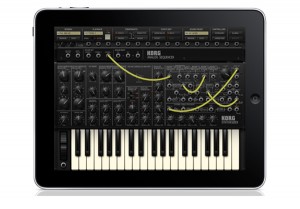
The iMS-20 is a full MS20 recreation for the iPad with some nice additions including an analog sequencer, drum machine, Kaoss Pad and SoundCloud integration. Let’s hope the knobs and connectors are as fun and easy to use as on the iElectribe. Coming soon.
“A complete recreation of the legendary Korg MS-20 analog synth. Built-in 16-step analog sequencer to control the sound. Music production studio with the MS-20 mono synth, a six-part drum machine, and a mixer. Kaoss Pad function allows intuitive performance and control. Publish and share your iMS-20 songs online with the SoundCloud music distribution site. By combining a recreation of the Korg MS-20 analog synthesizer, an analog step-style sequencer, six-part drum machine, Kaoss-style performance, and a mixer to control it all, the iMS-20 will transform your iPad into one way-cool sound studio for the modern musician – and the analog enthusiast as well!” – korg.com
For more info: korg.com
Product Highlights:
– A complete recreation of the legendary Korg MS-20 analog synth
– Built-in 16-step analog sequencer to control the sound
– Music production studio with the MS-20 mono synth, a six-part drum machine, and a mixer
– Kaoss Pad function allows intuitive performance and control
– Publish and share your iMS-20 songs online with the SoundCloud music distribution site
More details on release date and pricing are not yet published.
Here is a sound demo of the iMS-20:
How to add a touch screen to your synth using iPad
This video, via mvpadrini, demonstrates how you can use the $2.99 app S1MidiTrigger on an iPad to add a touchscreen to your synthesizer.
S1MidiTrigger is a new app for iOS which works with the Line 6 MIDI Mobilizer. You can create your own MIDI layouts using the layout menu and use the multi-touch interface to control any MIDI device.
Here, S1MidiTrigger on the iPad is connected, via a MIDI Mobilizer to a Korg microX synthesizer.
S1MidiTrigger é um novo app para iOS compatível com a interface MIDI Mobilizer da Line 6. Com ele é possível criar layouts MIDI personalizados no próprio aplicativo e utilizar a tela multi-touch para controlar qualquer equipamento MIDI.
Mais sobre o S1MidiTrigger e outros apps musicais em www.musicapps.com.br
Buddha machine explosion on iPad
If you think one Buddha machine is enough you can stop reaing now 
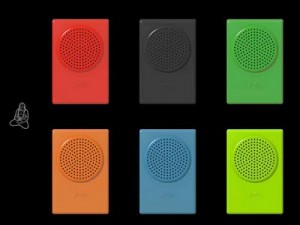
If you enjoyed our Buddha Machine for iPhone, then you will LOVE this iPad version!!! Mix the music of SIX Buddha Machines to create your own evolving ambient symphony!
If you are new to the Buddha Machine, it is a palm-sized plastic box that plays ethereal music loops composed by the Beijing-based duo of Christiaan Virant and Zhang Jian, aka FM3.
The physical device has been described as “Beautifully useless” (New York Times) “Mesmerizing” (Pop Matters) “Addictive, hypnotic” (Santa Fe Reporter) and “Defiantly rough” (Wall Street Journal)
Since its introduction in 2005, the Buddha Machine has won global praise for its novel approach to music enjoyment and has been used in hundreds of recording and performance projects from a wide range of artists.
Featuring hypnotic music designed to create a calming presence in today’s fast paced world, the machine’s colorful charm provides an experience that is hard to define. Essentially, It’s a box with a life; a tool for living, and to many, a friend.”
Note the following brings up both the iPhone and iPad versions of the Buddha Machine.

Paint your music with iPad
Singing Fingers lets you fingerpaint with sound. Just touch the screen while you make a sound, and colorful paint appears. Touch the paint to play back the sound again!
“Singing Fingers Lets You Finger Paint with Sound. Make a sound while moving your finger to record a sound-drawing. Touch the drawing you just made to play the sound back: forward, backward, sideways, or any way. That’s it! Singing Fingers lets you see music, hear colors, and re-see everyday sounds for the beautiful playground that they are. Singing Fingers lowers the floor to let beginners play with sound as if it was finger paint, and raises the roof by letting advanced DJs break out of the grooves of the records into a world where sounds take any shape you give them.” – singingfingers.com
iPad transforms itself into a MIDI controller
MIDIPilot (App Store link) is a $9.99 app that turns your iPad into a configurable, multifunction MIDI controller, using its multi-touch display to play notes and control synthesizer and effects parameters to a computer over a WiFi connection.
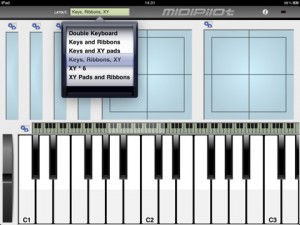
MIDIPilot is modular in structure, and can operate as various combinations of a scrollable, piano-style keyboard with pitch bender, controller ribbons and X-Y pads.
MIDIPilot works with the open-source DSMIDIWiFi software, which is available for Mac OS X, Windows and Linux.
The StepPolyArp has been updated to support MIDI
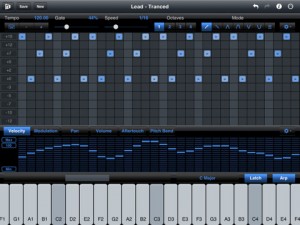
Laurent Colson’s StepPolyArp (App Store link) – a MIDI step polyphonic arpeggiator – has been updated to support the Line 6 MIDI Mobilizer.
This means you can use it with an iPad to sequence computer software, wirelessly, and your hardware synths, using a MIDI cable.
The arpeggiator does not play any sound itself, it transmits midi notes to a Mac or a PC to be used in combination with any sequencer, virtual instrument (VSTi, Audio Unit) or midi synthesizer.
StepPolyArp is available now for $11.99. See details below.
Features:
- 32 steps programmable matrix
- 11 configurable transposition lines
- Features copy and paste
- 8 octaves virtual keyboard
- Velocity, modulation, pan, volume, aftertouch and pitch bend step controller
- The apeggiator and keyboard fit the selected scale
- 6 arpeggiator modes
- 1 chord mode
- Unlimited number of saves
- Random patterns creation
- Presets manager
- Presets shared between computer and iPad using iTunes 9.1 or later
- 128 Undo/Redo levels
- Lockable keyboard (latch mode)
Supported midi connections:
- DSMidiWifi (free)
- Line 6 MIDI Mobilizer
Requirements:
- A computer running Mac OS X, Windows Vista or Windows 7
- DSMidiWifi server (free) installed on the computer for wireless midi connection
- A sequencer installed on the computer (Logic, GarageBand, Cubase, Ableton Live, Digital Performer, Reaper, ProTools, Sonar, Studio One, …)
- An iPad with iOS v3.2 or later
Turn your iPad into a Roland TR-606

Mobile Rhythm has announced a new iPad drum machine, inspired by old-school drum machines like the Roland TR-606, the mobileRhythm Computer Controlled mR-606 (App Store link):
Inspired by classic drum synths of yesteryear, the mobileRhythm mR-606 is a pocket sized classic in its own right.
A fully featured, yet easy to use interface allows editing of all controls and patterns, and 2 banks of 16 patterns gives you plenty of space to store your creations.
The mR-606 iPad drum machine is $6.99 in the App Store. If you’ve used the Mobile Rhythm mR-606, leave a comment with your thoughts!
Features:
- set tempo & beatmatch with your favourite music
- individual level controls for each drum sound
- easily switch between patterns to create whole rhythm tracks
- edit scale and last step for fine detail and crazy effects
All controls on the interface work just like the original drum machines of the 80’s.
DATAMASKIN

