
The sounds of Kraftwerk on your iPhone/iPad
iVoxel (App Store link) is a vocoder for iPhone/iPod and iPad, designed to be a “singing machine going far beyond the capabilities of traditional and software vocoders on any platform.”
iVoxel lets you:
- Speak or sing into your head set mic transforming your voice in a wide variety of ways.
- Record words, syllables or other sounds into the voxel dictionary for later reuse.
- Play different voxels live on the keyboard with ingenious pitch bending.
- Arrange and play melodies with the built in sequencer and add the lyrics from a user expandable dictionary of voxels.
iVoxel is a combination of a voice optimized synthesizer and a vocoder with an unprecedented intelligibility. The vocoder part is based on the Matrix vocoder from VirSyn used by Kraftwerk.
iVoxel is $11.99 in the app store.
Note: Preview video is not for the latest update of iVoxel. Version 1.3 details below.
New version 1.3 available !
- Compatible with Akai SynthStation25
- Improved GUI workflow
- Uses Modwheel to modulate Gender/Vibrato
- Modulate Gender/Vibrato with finger movement up/down
- Hold parameter – holds Voxel at defined moment
- Edit voxel – hear the sound while editing the hold position
- Volume increased for about 12dB
- Many bugs fixed
Via our friends at Synthopia
New wireless multi-touch controller for the Kyma/Paca(rana) sound design workstation

Symbolic Sound’s new Kyma Control app for the iPad gives sound designers, musicians, and researchers a new wireless multi-touch controller for the Kyma/Paca(rana) sound design workstation.
Kyma Control bundles four of the most popular Kyma controller-types into one, wireless multi-touch package that includes:
- An auto-mapped, labelled, bi-directional controller/display that mirrors Kyma’s Virtual Control Surface. All of the controls you see on the computer screen are also available on the iPad screen, including the Preset selection and Roll-the-dice options;
- A multi-touch pen/tablet-style controller, tracking as many as 11 fingers with identifying color trails to help you keep track of where your fingers are touching the screen;
- A standard piano-style keyboard with discrete or continuous pitches and an extra dimension for !KeyTimbre control in Kyma;
- A Tonnetz pitch-space keyboard with configurable vertical and horizontal intervals for experimenting with different pitch layouts;
- Plus accelerometer and compass-heading controls. Accelerometers supply both triggers and continuous controls based on acceleration in the X, Y, and Z directions, along with controls corresponding to Pitch, Roll and Yaw. A compass heading control corresponds to the current direction of the iPad and is useful for panning and other directional controls.
Applications
For use in the studio, on stage, in a theatre or performance venue, in an installation, in the lab, at home, or in classroom, Kyma Control frees you from having to sit in front of your computer. Put yourself in the middle of the audience, inside the sound field, and perform your Sounds in an expressive, intuitive manner using multi-touch. Performers can have access to sound controls from the stage or in the recording studio, and voice talent can have access to a silent controller in the voice-over booth. In perception and speech experiments, subjects can use a wireless, silent controller with no mechanical parts, perfect for sound-isolation booths.
Requirements
- Apple iPad
- Symbolic Sound Kyma X.77 (or newer) running on Windows or Mac OS host computer
- Symbolic Sound Paca(rana) Sound Computation Engine
- WiFi connection to a network that is accessible to the Paca(rana) (OR contact Delora software (http://www.delora.com) for information on their PacaConnect application for creating an ad hoc network using the built-in Airport on a Macintosh)
Kyma Control is available from the App Store
Moog Little Phatty in action
Experimenting with the iPad with POLYSTEPARP. This time I sent the sequence live to a MOOG Little Phatty thats running thru a Freqbox, Ringmod, and a Bass Murf which in turn is passing thru the DAWs Direct monitor live with a u-he Filter with some delays and verb. Access Virus TI Polar is playing some pads in the back
I didn’t expect this to work at all but thought I’d try it anyway just for fun…
I’m running the midi out from the Phatty through a simple Midi to CV converter which is then connected to the cv and gate inputs on the Rogue. Tracking is not the best as you can hear. I made the two synths sound almost the same in order to avoid more tracking/patch weirdness.
Step poly arp demo
First try using ipad running “Step Poly Arp” thru Wifi Midi and a Virus TI polar with no processing.
iCircuit: Designing and experimenting with circuits on iPad
iCircuit is the premier iPad and iPhone app for designing and experimenting with circuits. Its advanced simulation engine can handle both analog and digital circuits and features realtime always-on analysis. It is the perfect companion to students, hobbyists, and engineers.
You use it as you would any CAD program: you add elements, connect them together, and set their properties.
But iCircuit is unlike other CAD programs because it is always simulating. It’s just like working with the real circuit. You do not stop to take a measurement or spend a lot of time configuring reports. Instead, you just play with the circuit as you normally would, with the power on!
There are over 30 elements you can use to build your circuits. The app has everything from simple resistors, to switches, to MOSFETS, to digital gates.
The app features a multimeter that you use to probe around the circuit to instantly read voltages and currents. If you want to see how a value changes over time, then you can add values to the built-in oscilloscope. The scope can simultaneously track many signals over time and features a touch interface to control the total time displayed and stacked and unstacked modes to easily compare signals.
Supported elements include:
* Signal generators, Voltage sources, and Current sources
* Resistors, Capacitors, and inductors
* Manual SPST/SPDT Switches, and SPST/SPDT relays
* Diodes, BJ Transistors, and MOSFETs
* Speakers, Buzzers, and LEDs
* ADCs, and DACs
* Logic gates: AND, OR, NAND, NOR, XOR
* JK and D Flip-flops
* Because iCircuit is a very CPU intensive application, it is recommended that you only use it on newer generation hardware including: iPhone 3GS, iPhone 4, and iPads. However, it will still function on the older hardware.
Krueger Systems, Inc.“
StepPolyArp for iPad controlling an Oberheim FVS
Just a quick demo to show this awesome iPad application. The StepPolyArp iPad application hooks up wirelessly to a Windows or OSX computer. I currently have the StepPolyArp app talking with Logic Pro that then drives a Doepfer MCV24 to go from midi to CV and Gate. The Oberheim is being triggered in Unison for all 4 Voices on every step. Each voice is being panned right/left to create a nice stereo effect with a total of 8 oscillators.
The perfect companion for any analogue synth.
Audio signal path is:
Oberheim FVS==>Eventide 2016==>Prism Orpheus AD
Website:
laurentcolson.com/steppolyarp.html
Turn your iPhone or iPad into a pad-style MIDI controller
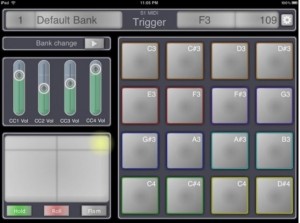
S1MidiTrigger is a new app for iOS that turns your iPhone or iPad into a pad-style MIDI controller.
With the app, you can control MIDI apps wirelessly or via the Line 6 MIDI Mobilizer.
Features:
- Send midi note message with a simple and ‘cord’
- No limit to assign ‘multiple note on one pad’
- Send midi note with velocity
- XY pad is work for modulation and pitch bend
- 4 sliders for send cc message
- Switch multiple banks
- Save unlimited banks
Here’s a preview of S1MidiTrigger in action:
S1MidiTrigger is available in a couple of versions, including a free version. You can find them in the App Store under Miura Acoustic.
Tune made with the MorphWiz and ExpressionPad
A song using some VSTis and music apps for the iPad.
VSTis: Garritan Steinway, EDIROL ORCHESTRAL, Broomstick Bass and EZ-drummer.
iPad apps: MorphWiz (Lead) and Expression Pad
*The guitar was recorded using a V-amp3.
Listen on SoundCloud.com: http://soundcloud.com/musicapps/vstis…
More about Music Apps and mobile music on www.musicapps.com.br
iOS synth party jam
Richard came over to say hi and the next thing you know we were jamming on our Iphone and Ipad. So here it is captured for you…. Looptastic on the Ipad and Nlogs Midi Synth on the iphone (actually it is a new Ipod touch)
Professional Virtual Analogue Synthesizer for the iPad
Developer Tempo Rubato has introduced what they call a “Professional Virtual Analogue Synthesizer” for the iPad, NlogSynth Pro (App Store link)
Key Features:
- It sounds pretty awesome (see video embed)
- It supports external MIDI input via Line 6 Midi Mobilizer interface.
- Full MIDI implementation for note on/off including velocity control, pitch bend, sustain pedal, modulation wheel and assignable midi controller.
Check out the features below and the demo video for more information. NLogSynth Pro is $14.99.
If you’ve used NlogSynth Pro, leave a comment and let us know what you think of it!
Features:
- 192 presets, including fresh new soundset by the trance producer 7 Skies
- ENDLESS options for SOUND EDITING
- Over one 150 parameters and options
- More than your beloved hardware synths might offer
- Store up to 96 own edits in 3 user banks
- Exchange sounds with your friends by email
- STUDIO QUALITY sounds
- Professional 44.1 kHz Stereo CD quality
- Internal 32bit floating point engine
- Highly efficient sound algorithms
- Enabling maximum CPU performance of your iPad
- STAGE safe KEYBOARD implementation
- Fully customizable keyboard to your personal style
- Keeps all settings automatically in your preferences
- SLIDING keyboard and LOCK options
- Double manual option: two independent keyboards on screen
- POLY, MONO & LEGATO modes
- Optional velocity control
- Four different key sizes
- Full range of 6 1/2 octaves
- Fully customizable EXPRESSION CONTROL
- Realistic PITCH BEND and MOD WHEEL implementation
- X/Y two dimensional controller
- Four fully customizable PERFORMANCE knobs
- Keyboard with VERTICAL modulation control
- FAT & RICH:
- New filter implementation for SMOOTH and JUICY control with 7 FILTER types
- Incredible UNISONO mode for up to 4 parallel sounds with detune, delay and panning control
- RECORDING:
- Tape recorder with metronome
- Waveform display
- Loop playback
- File manager
- Export to Sonoma & BeatMaker paste boards
- WiFi & Email export
- SOUND editing features
- 4 Oscillators with 20 waveforms:
- classic analogue SIN, SAWTOOTH, TRIANGLE and SQUARE
- and 16 additional carefully designed wavetables
- True PWM pulse-width modulation
- Modulated by LFO or envelope
- Frequency modulation
- Sinusoidal and complex waveforms
- Modulation by LFO and envelope
- Ring modulation
- The old school electronic effect
- Noise generator
- Individual modulation by LFO and envelope
- 2 Filter with incredible 7 filter types
- Low Passes, High Passes & Band Passes
- Finest sweeps and smoothest cutoff tuning
- Carefully resonating
- 12 & 24dB option for steepness
- 4 Envelope generators
- Classic Attack, Decay, Sustain and Release
- Velocity controlled attack time
- Slope control
- 4 Modulation LFOs
- 4 waveforms
- Sample & hold
- Fade in delay
- Modulation Matrix
- 4 Modulation slots each modulating 3 destinations
- Multi-effect section
- Stereo delay with cross-feed and damping filter
- chorus
- flanger
- phaser
- distortion
- reverb
- parametric EQ
DATAMASKIN

