
Updated NLogSynth Pro – virtual analog synth for the iPad
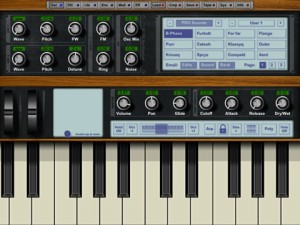
Tempo Rubato has released an update to NLogSynth Pro (App Store link), a virtual analog synth for the iPad, adding hardware MIDI support via the iPad Camera Connector Kit.
Here’s what’s new in version 3.1:
- iOS 4.2 support
- CoreMIDI support for controlling NLogSynth PRO with USB devices via Camera Connection Kit
- MIDI Out support (in addition to MIDI In) for Line6′ Midi Mobilizer, e.g. for controlling MIDI Sound Modules with NLogSynth PRO or for interfacing to Computer via MIDI Serial Line
- Rotation: NLogSynth PRO keeps now the orientation it has started with
- Bug fixes
Software Klee Step Sequencer
Defective Records Software has released version 2.0 of its software Software Klee Step Sequencer – a sequencer for Mac & PC that recreates the features of the original hardware Klee Sequencer.
In the demo video, Software Klee Sequencer, version 2, is controlling two Mutable Instruments synthesizers. On the left is a Shruti-1 in a custom enclosure, and on the right, a Shruthi-1. No external processing or other synths – all sounds from the Shrut(h)i’s, and all MIDI signals generated by the Software Klee.
Version 2 adds many new features, including:
- VST instrument hosting.
- Intelligently constrain output notes to a user-selected scale.
- Output chords based on active root note – up to 6 notes in chord, plus root note.
- External pattern load via MIDI or audio input triggers.
- External MIDI controllers support via MIDI CC messages, with MIDI learn ability.
- Group A – Group B output.
- Convert active LEDs to active switches, for Groups A, B, or A and B.
- Reverse sequence direction.
- Built-in clock divide capability, now with additional options.
- Plus, a few bug fixes, and optimization of some of the code under the hood.
The price remains the same as for version 1.0 ($40). The software is a free upgrade to existing version 1.0 users. A free demo is available for new users, for both Mac OS X and Windows.
Hybrid Djing configuration
touchAble is a complete dedicated controller for Ableton Live and iPad.
There are many different ways to perform with Ableton Live. Although Ableton Live is not a dedicated DJIING software, it is used by many professionals as a dj tool, exploiting its fantastic flexibility to extend the traditional dj use.
Touchable can become a powerful dj control surface with some preparations…we show you here the basic techniques.
touchAble for iPad is available on itunes store :
http://www.itunes.com/app/touchable
more infos : http://www.touch-able.com
music:
Le K “moody rainbow” (30porumalinha rec)
Kink “bitter sweet” (liebe detail)
Icube “bionic ears” (versatile rec)
Eddie C “dream reality” (Karat rec)
This video was shared by touchAbleapp
Introducing ElectroBeats for the iPad
ElectroBeats is a very intuitive beat making application conceived in collaboration with worldwide renowned and most demanded producer David Guetta.
Right away, you’ll create great sounding beats thanks to a powerful real-time approach and an impressive sound library.
ElectroBeats by David Guetta features
- Realtime workflow experience with sixteen pads and five different modes: Pad, Pitch, Velocity, Erase, Mute/Solo.
- Exclusive and electro oriented sound library, with hundreds of samples including Bass Drum, Snare, Clap, Rimshot, Cymbal, Hi-Hat, Open Hi-Hats, Acoustic Percussion, Electronic Percussion, FX, Bass, Chords, Leads, Instruments, Vox…
- Two sound generators : sample playback and synthesis oscillator.
- Dozens of ready to use drum and construction kits.
- Hundreds of patterns to use with the drum kits..
- Note Repeat in multiple resolutions..
- Dynamically change the quantize/repeat resolution while recording : the key to build beats very fast..
- Default quantization for instant gratification.
- Save and share your tracks using iTunes.
- Bounce song in Wav format.
- Multitrack export for use in sequencers like Logic™, Live™, ProTools™, Cubase™ and many more..
- Tap Tempo.
- Realtime previews (pattern, kits and sounds).
- Convenient undo with snapshots support.
- Embedded help in English, French, Spanish and Japanese.
More info at www.uvi.net
MIDI Mobilizer now supporting 12 different apps
Line 6 has informed us that the MIDI Mobilizer, a MIDI interface for Apple iPod touch, iPhone and iPad, is now officially supported by 12 apps.
MIDI Mobilizer connects directly with any Apple iPod touch, iPhone or iPad and, coupled with MIDI Memo Recorder (a free app available for download on the Apple App Store), allows musicians to play, record, and backup MIDI data.
Sonic State’s look at the MIDI Mobilizer highlighted the devices potential, much of which is just now being realized.
In addition to MIDI Memo Recorder, these apps are compatible with MIDI Mobilizer:
- NanoStudio
- NLogSynth Pro
- NLog MIDI Synth
- Music Studio
- Pianist Pro
- StepPolyArp
- MIDI Surface
- Little MIDI Machine
- MIDI Live
- bs-16i
- S1MIDI Trigger.
“Developers are doing an amazing job of harnessing the power of the Apple devices and turning them into serious music-making MIDI machines,” says Line 6’s Chris Grigg.
In addition to the apps above, over 70 app developers are working on new apps that will support MIDI Mobilizer.
MIDI Mobilizer has an estimated street price of $69.99.
Via ST
Making a track from scratch with iMS20
VJFranzK has shared this video featuring the iMS20 with the iPad
iPad iMS20 new KORG! Making track from scratch – Zoltan’s March
The Yamaha StageMix
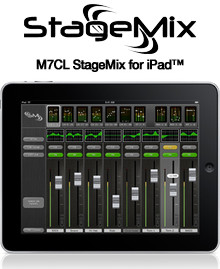
Yamaha has released version 1.1 of M7CL StageMix, an iPad app for controlling the M7CL digital mixing console.
StageMix provides remote control of M7CL functions via a simple, intuitive graphical interface from anywhere within wireless range.
The software has been specifically designed to allow engineers to adjust monitor mixes from the performers’ positions on stage, directly controlling mix parameters via the iPad rather than having to rely on verbal directions to a second engineer.
Changes in M7CL StageMix v1.1
- Changed image handling when memory is low to prevent crashing.
- Improved horizontal pinching responsiveness for Q adjustments.
- Added confirmation dialog for Delete Mixer function.
- Improved synchronization time after Scene Memory Recalls.
M7CL StageMix is available as a free download from the iTunes App Store.
More information: Yamaha / M7CL StageMix
Design your own MIDI set up
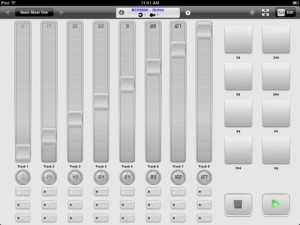
MIDI Touch (App Store link) is a new app for the iPad that lets you design your own ultimate MIDI controller, by placing knobs, sliders and other controls onto the screen wherever you want.
According to the developers, MIDI Touch lets you send MIDI over Wi-Fi with latency as low as 2-5ms and and via compatible MIDI hardware devices with near-zero latency, using the Camera Connection Kit.
Features:
- Design & save your own MIDI controllers by dragging and dropping sliders, buttons and more where you want them to create personalised control surfaces
- Native MIDI Device support – connect compatible devices via the Camera Connection Kit and your iPad becomes a proper MIDI control surface with almost zero latency
- Excellent performance – measured latency over WiFi to a Mac: 2-5ms, over Camera Connection Kit: 1-2ms
- Send messages over Wi-Fi with easy setup (Windows: requires the free software driver rtpMIDI (http://www.tobias-erichsen.de/rtpMIDI_configuration.html), alternatively use DSMI Server for Mac, Windows or Linux, also free)
- Several different control types – Add sliders, knobs, buttons (momentary or latched), drum-pads, X-Y controllers, transport controls and preset-jump buttons
- Easily change the settings of each control – CC number, note number, minimum & maximum range, size & label
- Standard & neon control themes to skin controls
- Multi touch – control multiple knobs/sliders etc at once
- In-app brightness control allows dimming of the screen to very low levels for performance
- Full screen mode to reduce distractions
- Controls snap to each other to help create aligned layouts
New computer music app that calculates note numbers and play their sounds in real-time
“ipsound” has shared this demo of a new music computer app called Live Music Coder
Live Music Coder M^2 OSC is a new computer music app that calculates note numbers and play their sounds in real-time, operated by using command-line style interface.
It supports Open Sound Control to play external sounds too.
“We make an effort at simple and real-time operation,” note the developers. “You can do all operations of the parameter change etc. while playing music in real-time.”
You can get a taste of the Live Music Coder command options below.
Live Music Coder is available now for $1.99 in the App Store.
[function]
define parameters
describe formula
start/stop sequencer
view data list
save/load/delete parameters
view current status
show help
[calculator]
1) user parameter
r1,r2 : array of note number
– note : 4 octave from 1 to 48, except for them are silence. 1tick = sixteen note.
– sound: sine wave which decreases envelope , no volume controller.
– tempo : 40 – 160 BPM
a0, b0, c0, d0 : 4 output sound channels. calculate each formula.
– simple example
define parameters:
r1=1 3 5 6
r2=13 15 17
a0=r1
b0=r2
->
output A track : C1 D1 E1 F1 C1 D1 E1 F1 C1 ……. repeated
output B track : C2 D2 E2 C2 D2 E2 C2 D2 E2 …….repeated
as sixteen note
2) operator
+, -, *, / , % ( add, subtract,multiply,divide,residue)
3) controller
?,:, !, <, =, >,| (if, else, not, smaller, equal, larger, separator)
4) embedded parameter
q : tick. increment this per sixteen note.
s : slider value (0~99)
x : random value (0~range) range:0~99
v1,v2,v3,v4 : store the value before separator(|) and branch(?,:), then reference in the expression.
(1|2|3|4| -> v1=1, v2=2, v3=3, v4=4)
a1~8, b1~8, c1~8, d1~8 : history of a0, b0, c0, d0 (a0->a1->a2->a3->a4->a5->a6->a7->a8)
5) formula samples
** First of all define the array (sequence) “r1/r2″ of note number and then calculate them in the sound track (a0, b0, c0, d0).
r1=1 3 5 6 8 10
a0=r1+1 -> 2 4 6 7 9 11 ….
a0=r1?>5+12 -> 1 3 5 18 20 22 ….
(if r1>5 then r1+12)
a0=r1?>5+12:12|v3 -> 12 12 12 18 20 22 ….
(if r1>5 then r1+12 else 12)
a0=r1?>5|24:12|v4 -> 12 12 12 24 24 24 …..
(if r1>5 then 24 else 12)
———-
r2=1 0 1 1 2 0 2 2 (0: rest)
b0=r2
->
1 0 1 1 2 0 2 2 1 0 1 1 2 0 2 2 …
———-
a0=x
(simple random music)
[button]
start/stop : start/stop music
list/load/save/delete : list data file, load/save/delete data
status/view/help1/help2 : view current status, view selected data int the list, show help1/help2
clear : back cursor or clear-all-parameter
enter : execute command
r : define note number (switch r1/r2)
a : select (a0,1,2,3,4,5,6,7,8)
b : select (b0,1,2,3,4,5,6,7,8)
c : select (c0,1,2,3,4,5,6,7,8)
d : select (d0,1,2,3,4,5,6,7,8)
a0: describe formula of sound track 1 (left operand only)
b0: describe formula of sound track 2 (left operand only)
c0: describe formula of sound track 3 (left operand only)
d0: describe formula of sound track 4 (left operand only)
a1-8: reference history of output note number of track1 (right operand only)
b1-8: reference history of output note number of track2 (right operand only)
c1-8: reference history of output note number of track3 (right operand only)
d1-8: reference history of output note number of track4 (right operand only)
v : select (v1,2,3,4)
selector : switch octave
OSC : OSC setting
Molten Drum Machine for iPad
Molten Drum Machine is a powerful and intuitive tool for creating percussive sounds and rhythm sequences. What makes it unique is its approach to grid based pattern sequencing that divides time to instantly add tuplets and fills to your drum programming. Unleash the potential of your beats on the iPad.
Molten is designed to be a flexible pattern based rhythm step-sequencer. Unlike traditional step-sequencers that have a fixed step size of typically 16 or 32 steps, Molten has a dividable step size. This flexibility allows for the easy creation of tuplet-based rhythms.
Unlike many traditional step-sequencers that have a fixed or box based time signature (usually 4/4), Molten features a flexible time signature. The power of Molten lies in its grid layout – vertically you can see as many as eight instrument parts running simultaneously. Horizontally you can have anywhere from one beat on a single page to 16 beats over four pages. With Molten it is possible to divide any beat into as many as nine pieces, and this is where things become interesting.
Built on a versatile synthesizer Molten allows you to play and process your own sound samples. The kits can be mangled, filtered and crushed using the multi-touch interface. Load and store your patterns and share them with your friends. Export to a standard MIDI file and import into a professional digital audio workstation. With the forthcoming iOS4.2, Molten will support USB MIDI devices with the iPad Camera Connection Kit. Connect directly to hardware with the MIDI out and to a Mac over Wi-Fi with MIDI networking.
Key features
- Easily and quickly create rhythms with complex time signatures
- Intuitively divide a note into tuplets
- Each pattern has eight instrument tracks
- Each instrument track has its own effects processor which can be tweaked in real-time
- Global master effects processor including delay, reverb, EQ and compressor
- Sample based synthesis with user loadable samples
- Share your pattern compositions as audio or MIDI files or transfer patterns between Molten users
Pricing and Availability:
Molten Drum Machine, is available via the App store for an introductory price of USD $9.99 for a limited time only
More information:
Via Sonic
DATAMASKIN

