
NanoStudio – adding support for the Akai SynthStation25 MIDI controller
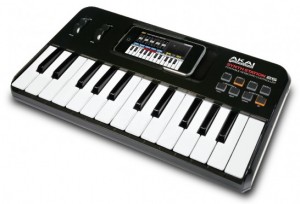
Blip Interactive has updated its iPhone music app NanoStudio, adding support for the Akai SynthStation25 MIDI controller, and the update is now available in iTunes.
Here’s what’s new in the update:
- Support for Akai SynthStation 25 MIDI controller
- Song/metronome monitor during sample record
- Improved sample interpolation quality
NanoStudio Features:
- 4x Eden synths, TRG-16 trigger pads, 6 track sequencer, 7 input mixer with two sends
- Insert Effects – 2 per synth (waveshaper, chorus/flanger/delay)
- Send Effects – 2 (reverb, chorus/flanger/delay)
- Total polyphony – 48 stereo 44.1kHz voices, Buffer latency – 10ms
- Highly optimized code for good battery life and no audio stuttering
- Sampling and resampling
- Transfer samples and final mixes to or from your Mac/PC over WiFi
- Audio copy/paste for sharing audio with other compatible apps (Sonoma/Intua)
- MIDI input with the Line 6 MIDI Mobilizer or Akai SynthStation 25
- Upload your mix directly to SoundCloud (wav or ogg formats)
- Sample editor with 4 levels of undo/redo
- Real-time performance and recording with single or dual keyboards, trigger pads, XY controllers and pitch bend wheel
- 128 global synth presets and 64 per-project synth presets
- 16 trigger pads with configurable loop direction, trigger mode, mute groups, volume envelope and much more
- Realtime record with undo
- 6 track song editor with up to 250 parts/patterns
- Pattern editor with up to 500 events per pattern
- Draw note and controller events
- Editing functions include delete, merge, copy, move, note length, transpose, clean and quantize
- Controller editing and automation
- Time signatures 2/4 – 7/4
- 4 levels of undo/redo on every song/pattern editing operation
- Built in help
Support for Akai Pro’s SynthStation25 keyboard controller is included. SynthStation25 delivers hardware control for improved performance capability and expression.
GyroSynth – a gesture-driven music synthesizer
GyroSynth is a gesture-driven music synthesizer for the iPhone 4, that takes adventage of the gyroscope to let you play and modulate the sound by moving your hand through the air.
GyroSynth uses the iPhone 4’s gyroscope to measure roll, pitch, and yaw of the phone and translates them to sound parameters like pitch, volume, modulation or filter cutoff.
Features:
- 4 types of oscillator: vocal (formant synthesizer), sine wave and square (PWM modulation), R2D2 – experimental FM modulation
- Several control modes
- Delay effect
- Included musical scales allow you to effortlessly play in several styles
- Built-in recorder and player with overdub function
Pricing and Availability
GyroSynth is available now for $9.99.
Link:
- GyroSynth in the App Store
AmpliTude 2 is here


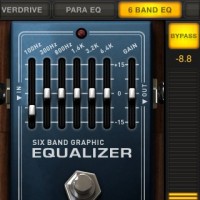

IK Multimedia has announced a major update to AmpliTube for iPhone, adding considerable weight to its claim that the app is “the leading guitar software for iPhone.” Available from the App Store now, AmpliTube 2.0 features the following upgrades:
“New built-in one-track recorder with re-amping feature (free update)
New multi-track recorder with 4 tracks and master FX section with 3 effects: Reverb, EQ and Compressor (available as in-app purchase)
5 new stompbox effects: Compressor, Reverb, Parametric EQ, Graphic EQ and Limiter (available as in-app purchase)
Improved sound quality of gear and cabinets with DSP parts derived from AmpliTube 3 and T-RackS 3 for Mac/PC (free update)
Export recordings and mixes as high quality WAV audio files or send them by email as MP3s (free update)
Import songs as backing tracks directly from user iPod library, from iTunes using file sharing or Wi-Fi (free update)
New SpeedTrainer allows players to slow down/speed up imported songs without affecting the pitch (free update)
Up to 50 songs can now be imported (free update)
New preset naming feature (free update)
New Setup panel including input and output level controls (free update)
New scrollable menu for easier and faster gear selection in the FX and AMP sections (free update)”
And the rest… This version also features 50 song slots for import and a setup panel with input and output controls. That adds to the existing features of AmpliTube for iOS:
- Tuner, metronome.
- 3 simultaneous stomp slots, plus an amp with effects, cabinet, and mic settings.
- Low-latency playback.
There are three versions; even the free version is fairly capable. (The free version also includes add-on support, so if you just want the four-track recorder, you can even add it to the free release.)
AmpliTube: 11 stompboxes, 5 amps + cabinets, 2 microphones $19.99/€15.99.
AmpliTube LE: 5 stompboxes, 1 amp + cabinet, 2 microphones $2.99/€2.39.
AmpliTube FREE: 3 stompboxes, 1 amp + cabinet, 2 microphones, free
Additional stomps are US$2.99/EUR2.39 each.
Stay tuned for some video; let us know your impressions if this is something you use.
AmpliTube iRig (which, incidentally, attaches to the audio jack, not the Dock Connector – meaning you could use this and a MIDI adapter at the same time)
Moog Filtatron “Lite” (free) under the name of “Moogfest App”
Think the Filatron app is too expensive :-), well here´s the free version
Here is the Moog Filtatron App in a sort of a Lite version.

Differences: / s wanted Difference compared:
– No line / no “line”
– No delay in the rate + depth mod / no delay rate / depth mod
– On the pads no vcf / vcf for no pad
– The sampler is no record / no recording in sampler
The sounds of Kraftwerk on your iPhone/iPad
iVoxel (App Store link) is a vocoder for iPhone/iPod and iPad, designed to be a “singing machine going far beyond the capabilities of traditional and software vocoders on any platform.”
iVoxel lets you:
- Speak or sing into your head set mic transforming your voice in a wide variety of ways.
- Record words, syllables or other sounds into the voxel dictionary for later reuse.
- Play different voxels live on the keyboard with ingenious pitch bending.
- Arrange and play melodies with the built in sequencer and add the lyrics from a user expandable dictionary of voxels.
iVoxel is a combination of a voice optimized synthesizer and a vocoder with an unprecedented intelligibility. The vocoder part is based on the Matrix vocoder from VirSyn used by Kraftwerk.
iVoxel is $11.99 in the app store.
Note: Preview video is not for the latest update of iVoxel. Version 1.3 details below.
New version 1.3 available !
- Compatible with Akai SynthStation25
- Improved GUI workflow
- Uses Modwheel to modulate Gender/Vibrato
- Modulate Gender/Vibrato with finger movement up/down
- Hold parameter – holds Voxel at defined moment
- Edit voxel – hear the sound while editing the hold position
- Volume increased for about 12dB
- Many bugs fixed
Via our friends at Synthopia
Review: Filtatron, Moogfooger goes iPhone
Apps, apps, apps – the market is flooded with iphone, ipad apps and now also android apps. Musicians have been I particular blessed with many new tools. Quite a few are made by independent developers and start ups. As a consequence many have been more innovative but less successful in terms of being a useful and musical tool. Therefore I was surprised when I saw Moog is entering the app market. A company with a prestigious brand known for making quality instruments well adapted to the needs of a performing musician. I was surprised as it’s Moogs first ever (stand alone) software product and if any company is associated with analog equipment it’s Moog.
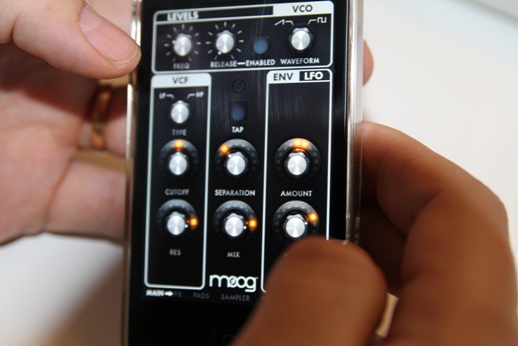
What is it
In short the Filtatron includes three sonic elements: a filter, an oscillator and a sample loop player.
The filter is an emulation of the classic 4 pole ladder low pass filter we all know and love. There are knobs for frequency and resonance and with possibility to self resonate at high settings. Also the filter can be set to high pass, or anything in between.
The oscillator offers sawtooth and pulse wave forms, or anything in between. And a dedicated amplitude envelope with controllable release. No attack.
The sample player can play loops, either from the built in library or your own recorded loops.
Added to there is an effects unit with an amplifier emulator for distortion and a delay unit with a dedicated LFO.
There’s also a number way to control things. First is an envelope follower and a LFO frequency of the controlling filter. Then there are the pads to control the filter, LFO, delay, VCO, envelope follower and amp simulator.
In use
Opening up the app for the first time you instantly get a Moog look and feel. Knobs are imitating the real thing but adding a led ring to some important parameters for better read out.
So what kind of animal is Filtatron? I guess you could look at it as some kind of extension to the Moogerfooger product line which is effects pedals really. As the name implies the filter is at the core. Feeding external sounds or loops though the filter/delay/amp sim effects is a real pleasure. The sound is impressive considering it’s running on my iPhone. The amplifier simulator really adds some vintage grit. The loop player is pretty basic but does the job still having some tweak options like start and end loop points. Changing play rate into low rates or even to reverse is also really useful for some lo-fi quality.
Also you can play a loop, mess around with the filter/delay/amp and record it into a new loop and then start all over again. The built in file system is simple but does the job and Moog provides a batch of cool loops to.

There’s number of well made presets demonstrating the capabilities very well and giving you good string point for you own sonic experiments. And I think that’s where the Filtatron is at best use – experimenting.
The oscillator made me first think the Filtatron was a proper synthesizer but as you only can play it using the pad with no note quantization or other means to make sure you play notes in key it’s useless to play any kind of melodies (Bebot is an app much more suited for playing melodies e.g.). This makes me constantly wishing there was a step sequencer controlling the oscillator – or even the filter/delay/amp for that matter. The pads offers only control over 4 parameters at a time and they are predefined in pairs. I think that is an unnecessary limitation making it hard to make the most of the effects available.
In the end
The Filtatron is pretty easy start using but there’s also a really good user guide and a glossary even. Well written and easy to use it adds value and shows that Moog knows how to make high quality products for musicians. Maybe the Filtatron is not innovative but it brings you a tool for instant filter processing on loops etc with a Moog quality to it, however in the digital realm. Automating the filter by LFO and envelope follower is useful but the Filtatron doesn’t make the most of using the touch control pads and I really miss a step sequencer. Let’s hope for a version 2 with a revived 960 step sequencer! If you like experimenting with soundscapes from processed loops the Filtatron is for you!
Updated Xewton Music Studio
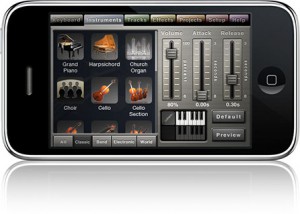
Xewton has announced an updated version of its iOS Music Studio (App Store link) that adds hardware MIDI support, file sharing, new instruments and more.
Here’s what’s new in Xewton Music Studio 1.5:
- iPhone 4 retina display support
- 16 additional instruments (13 free, 3 in the shop)
- Line 6 MIDI Mobilizer support
- 100 beat loops
- iTunes file sharing (iOS 3.2, iOS 4 and later)
- File associations (open .xms and .mid files from Safari and Mail)
- Improved multitouch on the keyboard (slide and play simultaneously)
- Battery consumption improved
- Lots of performance optimizations and stability improvements
- New instruments: HipHop Kit, Sound Effects Kit, Harp, Harmonica, 9 Synths (and Sitar, Shakuhachi, 8-bit kit in the shop)”
Music Studio, which retails for $14.99, is designed to offer a complete music production environment on the iPhone, iPod touch and iPad.
Full feature list below.
Features:
- Photorealistic dynamically configurable 85-key keyboard
- Instant positioning via the slide gesture and resize with the pinch gesture90 studio-recorded instruments (16bit 44.1kHz sampled from real instruments)
- 40 free instruments, 50 available in the in-app shop
- 4 categories: classic, band, electronic, world
- Release and attack time configurable per instrument
- Sustain samples
- Pitch bend via accelerometer
- Low-latency, highly optimized, high-polyphony, battery saving audio engine
- 100 beats (drum loops)
- 5 real-time effects with lots of parameters
- 3 high-quality reverb algorithms, delay, 3-band equalizer, amplifier, filter
- 128-track sequencer
- Beat & metronome settings (tempo, signature)
- Per-track mute, solo, effect bus, pan and volume adjustment
- Edit whole tracks or bars, down to individual notes:
- Draw, quantize, transpose, repeat, move, length, velocity, etc.
- MIDI import and export
- Save and load your songs and export to wave
- Wi-Fi and iTunes file transfer with your Mac/PC
- Songs and MIDI files can be opened directly from Safari and Mail
- Unlimited undo and redo
- Detailed in-app help
- Play or record 2 different instruments at the same time with 2 keyboard rows
- Key labels (Cs only, all keys, all keys colored)
- iPhone 4 Retina Display supported
- Line 6 MIDI Mobilizer supported
Turn your iPhone or iPad into a pad-style MIDI controller
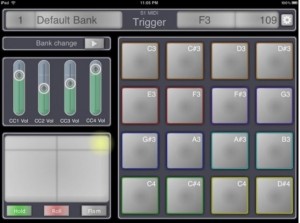
S1MidiTrigger is a new app for iOS that turns your iPhone or iPad into a pad-style MIDI controller.
With the app, you can control MIDI apps wirelessly or via the Line 6 MIDI Mobilizer.
Features:
- Send midi note message with a simple and ‘cord’
- No limit to assign ‘multiple note on one pad’
- Send midi note with velocity
- XY pad is work for modulation and pitch bend
- 4 sliders for send cc message
- Switch multiple banks
- Save unlimited banks
Here’s a preview of S1MidiTrigger in action:
S1MidiTrigger is available in a couple of versions, including a free version. You can find them in the App Store under Miura Acoustic.
It’s official the Moog iPhone launches next week
Ms Tara Busch has confirmed it, after all, she’s a Moog endorsee, so she would know.
Then this video shows up on with Richard Devine and the Filtatron….
Turns out the speculation was correct – the iOS application FilterTron features several modules with a distinctly Phatty look. These are:
- Moog Ladder Filter – 4 pole resonant Moog Ladder Filter, with Lowpass and Highpass modes
- and adjustable cutoff and resonance parameters.
- Oscillator – a high-resolution, alias-free DSP oscillator with sawtooth and square waveforms,
- adjustable frequency from 0.3 Hz to 2kHz.
- LFO – five waveforms: sine, ramp, sawtooth, square, sample & hold, with crossfade and morph between adjacent LFO shapes.
- Envelope Follower – uses the volume envelope of sound inputs to sweep the filter, with
- controls for amount and speed.
- Amp and Delay FX Modules – Amp provides warm, smooth overdrive with feedback control. Delay can be modulated by its own LFO (with rate and depth controls) and delay time is smoothly interpolated for analog-style delay time tweaks.
- File Sharing – Easily move audio files back and forth between the Filtatron and your computer.
- Audio Copy and Audio Paste enables sharing audio between the Filtatron and other compatible apps. Built-in email function allows sharing presets with other Filtatron users.
- Record and Playback – All audio processed in stereo, 16bit, 44.1kHz resolution. Filtatron will record samples up to 10MB. Tap and Drag sets start and end points for seamless looping. Playback control can be adjusted from double-speed playback all the way down through zero to double-speed reverse.
Available October 18th in the Apple App Store $4.99
- More Information
- MoogMusic.com
iOS synth party jam
Richard came over to say hi and the next thing you know we were jamming on our Iphone and Ipad. So here it is captured for you…. Looptastic on the Ipad and Nlogs Midi Synth on the iphone (actually it is a new Ipod touch)
DATAMASKIN

