
Aura Flux – a new ambient music application
This is a preview of Aura Flux – a new ambient music application for iPhone & iPad.
The app combines elements of apps like Nodal and Brian Eno’s Blo0m.
Here’s what the they have to say about it:
Aura Flux is a new way to create unique music on the iPhone and iPad by simply connecting sounds together visually on screen. With over 48 individual sounds and a huge choice of options on how these react and link with each other, Aura Flux has unlimited possibilities.
4 moods (keys) and control over the background ambiance enable to user to create dynamically changing sound environments that can automatically morph as the visuals represent the connections made.
Each scene can be saved and recalled for future listening and adjustments.
Using AmpliTube iRig as an effects processor for his Yamaha Motif synthesizer
Synthesist Erik Norlander, of Sonic Reality, demonstrates using AmpliTube iRig as an effects processor for his Yamaha Motif synthesizer, in this this official IK Multimedia demo video.
Amplitube iRig is a $39.99 audio adapter designed to let you connect guitars and audio gear to iOS devices. Paired with Amplitube for the iPhone/iPad, which are available in free and commercial versions, the software/hardware combo makes a pretty cheap multi-effects processor.
More information at http://www.amplitube.com/irig and http://www.ikmultimedia.com/drummertr…
AmpliTube iRig is a combination of an easy-to-use instrument interface adapter and guitar and bass tone mobile software.
With AmpliTube iRig, you can plug your guitar into your iPhone/iPod touch/iPad and jam anywhere with world class guitar and bass tone right in the palm of your hand – from the leader in studio-class guitar and bass software.
Simply plug the iRig interface into your mobile device, plug your instrument into the appropriate input jack, plug in your headphones, amp or powered speakers, download AmpliTube for iPhone Free and start rocking!
via ikmultimedia
New music creation and editing tool for iPhone and iPod Touch
LoopXtreme demo video. Shows use of Sliders Controls and OnBoard sounds. Shows how to create a sample loop and export to a wav file. LoopXtreme (App Store link) is a new music creation and editing tool for iPhone and iPod Touch
To see more visit www.extremelyniceapps.com
Features:
- Fifteen pads for triggering sound samples using three trigger modes, Single shot, Play while Touch and Loop.
- User control for each individual pad of:
- Volume, Stereo pan, Equalisation, FX send level and mute.
- Low pass or High pass filter with individual cutoff control per Pad.
- Sample start and end points and sample pitch for Single shot and Play while Touch modes.
- Sample group for Loop mode.
- Loop sounds play in time even if they have different tempos.
- Preview sounds before load with beat and tempo syncronisation.
- All sounds stay in time with tempo changes using pitch shifting.
- Realtime linear pad touch recording. You can record your tune from start to finish in one pass.
- Record fader movements with playback automation.
- Easy navigation to anywhere in your song using the NAV bar, song markers and transport controls.
- Pattern Editor to easily edit your song data including:
- Four clipboard editing stores for delete, erase, copy and paste using insert, merge and overwrite options.
- Editing of pattern data for all pads or selected pads including slider automation data.
- Set Song Loop points.
- Export finished mix or part of to wav file and export via WiFi.
- Export live sounds to wav file.
- Three pattern record quantise levels.
- Pattern record undo.
- Sound Library of Single shot and loop samples.
- Eight sound banks to organise your sounds in.
- Demo songs to get you started.
- WiFi file transfer for wavs and created songs.
- Save complete song or just your sample kit.
- Auto loading of your last project.
- Audio wav output rendered to 16Bit Stereo 44.1KHz.
- Supported wav loading 16/24Bit, Mono/Stereo, 44.1KHz.
Next iOS ships with MIDI
The next version of iOS – the operating system for the iPhone, iPad and iPod touch – will have an unexpected surprise for musicians: real MIDI support.

Apple’s iOS 4.2 update, due in November, includes some interesting new features that didn’t make Steve Job’s official announcement.
According to a report in AppleInsider, beta testers have found that iOS 4.2 adds support for the CoreMIDI framework to the operating system’s application program interfaces.
CoreMIDI could be huge for iOS music apps, because it provides standardized MIDI support. It is a built-in system that supports MIDI devices and how they communicate with other applications.
MIDI support means that the iPad could be a touchscreen control surface for any MIDI device; developers will be able to create multi-touch sequencers that control MIDI hardware; and you should be able to plug your MIDI keyboard into an iPhone, iPod touch or iPad and play your iOS software synths.
CoreMIDI on iOS 4.2
CoreMIDI support should help make MIDI more plug-and-play on iOS devices.
Here’s what Apple has to say about CoreMIDI:
In Mac OS X, Apple provides a new set of system services, so that applications and MIDI hardware can communicate in a single unified way, using a single API.
MIDI services, which are low level, provide high-performance access to MIDI hardware devices. There is a driver model in the MIDI world that “talks” directly to IOKit, so your application has a direct path from the MIDI services API to the hardware.
Using this driver model, third-party manufacturers can create driver plugins that talk to IOKit. Those can then be loaded and managed by a server, which applications talk to through the Core MIDI framework.
The CoreMIDI framework provides the client-side API that applications use to interface to MIDI devices.
The primary goal of MIDI services in Mac OS X is to have interoperability between applications and hardware, so that everyone is working to the same standard. Other goals include providing MIDI I/O with highly accurate timing, as required by professional applications. This means from a musical point of view being able to get a MIDI event into and out of the computer within one millisecond, i.e., to keep latency under one millisecond, and also to keep jitter –– i.e., the variations in I/O –– under 200 microseconds.
Another goal is to provide a single system-wide configuration, i.e., knowing what devices are present, and being able to assign names to those devices, manufacturer names, and what MIDI channels they’re receiving on and so on.
The MIDI services are designed as an extensible system. Toward that end, a device can have any number of properties attached to it. And a device manufacturer can publish their particular properties of their device.
Developers should be able to code apps with MIDI support, rather than having to support individual interfaces. CoreMIDI could also open up using the Apple iPad Camera Connection Kit for connecting existing USB MIDI devices.
Developers are already starting to support MIDI hardware on iOS, with devices like the Line 6 MIDI Mobilizer interface, This trend is likely to explode, though, with CoreMIDI support.
It’s not clear yet how “baked” MIDI support will be in iOS 4.2. If you’re an iOS developer or if you’re testing the iOS 4.2 beta, let us know if you’ve done any MIDI testing yet.
iPhone, iPad & iPod touch Getting MIDI Support
With this news, iOS 4.2 just got a lot more interesting for musicians.
iPhone goes Theremine with the GyroSynth
GyroSynth is a music synthesizer for the iPhone 4, which takes full adventage of the gyroscope. You can play and modulate the sound by moving your hand through the air – just like the legendary Theremin instrument.
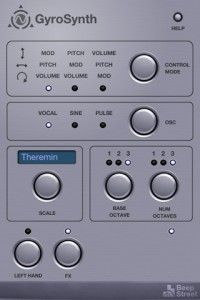
GyroSynth makes use of the gyroscope to measure true roll, pitch, and yaw and translates them to sound parameters like pitch, volume, modulation or filter cutoff. Thanks to phenomenal accuracy (2000 degrees), you can play melodies perfectly in tune.
FEATURES
– 3 types of oscillator: vocal (formant synthesizer), sine wave and square (PWM modulation)
– Several control modes
– Delay effect
– Included musical scales allow you to effortlessly play in several styles
nLog – a feast for your eyes
Isn’t this a real little beauty? The nLog for the iPhone
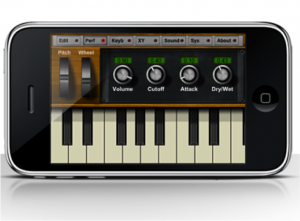
NLog MIDI Synth – a new iOS app that they describe as “The first synth app making your IOS device a real synth playable with MIDI hardware.”
NLog MIDI Synth is based on NLog synth, an existing iOS synth, with added support for the Line 6 MIDI Mobilizer. The developer announced Sept 10th that they had been approved by Line 6 and that the app was being submitted to Apple.
Vocal Beater lets you beatbox into a phone
Mike Gao has released an new $2.99 app for iPhone and iPod Touch, Vocal Beater, that lets you beatbox into a phone, email it, then load it up in a MPC, other beat machine, or DAW.
Vocal Beater turns your beat boxing into a velocity sensitive MIDI file to email. Detected hits can be edited.
The missing link
It is a wireless device that receives OSC and outputs MIDI. When I open my settings in my phone it shows up as a network that I can connect to. When I go to my OSC app, and press a button, an OSC message will be sent wirelessly from my phone. This message will get received by the Missing Link, which converts it to MIDI and sends it to the instrument. I can now use my phone to play a keyboard or control my mixer or MIDI LED lights.
In other words, you can slap one of these on your old MIDI gear and then control it wirelessly from an iPhone or iPad or other wireless device. There used to be a device called the Missing Link made by CP Technology that was a MIDI-to-Control Voltage adapter, but this doesn’t appear to be related to that.
Frippertronics style demo of SynthPad
This is a Frippertronics style demo of SynthPad – a new iPhone instrument inspired by the interface of the Korg Kaossilator family of devices.
Instead relying on piano keys to register notes, SynthPad uses a dedicated touch surface to control the sounds. Additionally the Y-Axis on the touch surface can be used to control different parameters, like filter cutoff and LFO values, making it an “expressive little toy.”
Its sound engine is a fully programmable monophonic virtual analog synthesizer. Among its parameters one can find:
- 2 oscillators with different wave shapes
- Fine tuning of the second oscillator
- Volume Envelope
- LFO modulation
- A Low-Pass filter
- Filter Envelope
- Arpeggio
Additionally, the scale and the key on the touchpad surface can also be configured, for live improvisation.
SynthPad is available now in the App Store for $1.99.
YMCK for iOS
Pod Library (iPod Touch in Music) played the keyboard while playing any song
Easy enough to play the keyboard slides
Scaling function keys that can play sound without removing the keyboard at all but ?Kenaku
Tilt the iPhone emotional Biburatoefekuto
With Song of the recorded version of “Music Flowing” is newly written songs dedicated this App!
[Basics]
Song selection button (note button) Press, iPod Library (iPod Touch in Music) to select their favorite songs. Press the Play button to start playing.
Slide your finger to play on the keyboard. (You can also play music when you stop.)
When the pitch of the keyboard and the song fit the drawers pull out the key from the right scale (scale) Change. You can also adjust the volume and tone.
Tilt the keyboard to scroll from side to side, up and down the pitch accordingly. Tilted back and takes a vibrato.
Set the direction of the scroll panel size keyboard keys (open wheel buttons) can be changed.
[Application Guide]
Once the scale is the key information in the automation editor (text format) you burn a song you can play the same key from the next scale.
Because plain text, a copy of data created externally and paste is easy.
With Song song version bundled “Music Flowing” is configured so the automation can play a key scale for now.
DATAMASKIN

