
Sneak peek at the Hexaphone
This is a preview video of Hexaphone – an improvisation instrument for iPhone.
SynthStation music production app for both iPhone or iPod Touch
Akai Professional, the name synonymous with music production, announces the immediate availability of the SynthStation music production app for both iPhone or iPod Touch in the iTunes App Store. SynthStation also works on the iPad. SynthStation transforms an iPhone, iPod Touch or iPad into a portable music production studio. While the SynthStation app is powerful enough for professional musicians, virtually anyone can use it to easily create music. Built around Akai Professional’s history in synthesis and drawing on the company’s newest MINIAK synth, the SynthStation app sounds great and offers wide-ranging sonic flexibility with its virtual analog synthesis. The app gives musicians three synthesizers for creating melodies, chords and bass lines. For creating melodic and accompaniment parts, the SynthStation contains an on-screen keyboard complete with an arpeggiator and an XY control interface for expressive control of key parameters.
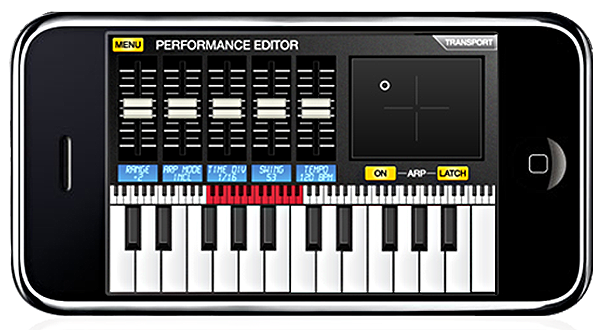
SynthStation also contains over 50 drum kits containing all the classic sounds of the past, legendary MPC samples and most popular modern samples. An onscreen MPC-style pad interface offers a trusted method of drum performance, while individual sample controls for Pitch and Volume enable tweaking the drums to fit the mix just right.
SynthStation contains a full mixing section to provide immediate control over the individual synth and drum parts. Adjust volume levels, mute tracks or route instruments to the internal effects processor to quickly create dynamic and engaging mixes.
SynthStation users can create and save sequences and complete songs. Once sequences have been programmed and organized, SynthStation can record a performance of the song capturing all modulation, mixing and keyboard playing. Through a WIFI connection, download both an audio (.WAV) and MIDI file of the performance for further editing, or uploading online and sharing newly composed tracks with others.
“The SynthStation app transforms the iPhone or iPod Touch into a professional musical workstation in a streamlined, all-in-one program,” said Adam Cohen, Director of Business Development, Akai Professional.
The SynthStation app is available now from the iTunes App Store for $9.99 US.
A truly remarkable digital musical instrument for iPhone OS
Streetly Electronics, designers and manufacturers of the original mellotron and Omenie, creators of Ellatron for iPhone and iPad, are delighted to announce their first joint development, Mellotronics M3000 HD.

The M3000 is a truly remarkable digital musical instrument for iPhone OS. The M3000 features 13 voices sampled from Streetly Electronics’ production tapes. These are the same tapes that featured on Strawberry Fields Forever, Nights in White Satin, Watcher of the Skies, Odessey and Oracle and hundreds more timeless, classic records.
All 35 notes of each tape set are sampled, and all the character of the classic mellotron sound has been retained. All 35 keys are on-screen and available at once, so anything that can be played on a mellotron can be played on the M3000. In fact the M3000 is even more flexible than a true mellotron because it includes Ellatron’s 12 programmable chord pads. The M3000 also supports 4 in-memory voices at one time, with independent keyboard and chordpad voices. The inclusion of a rich, spacious onboard reverb unit allows the M3000 to be used as a recording or performance instrument with no outboard effects chain.
Martin Smith of Streetly Electronics, says “I was amazed to hear our classic sounds coming out of the iPad. This is the truest, most playable digital mellotron for iPhone OS, and it has to be heard to be believed.”
Nano studio, soon in your pocket (iPhone that is)
Blip Interactive announces a new music making application called NanoStudio for iPhone and iPod Touch which is expected to be available in the App Store from mid July. NanoStudio combines sampling, synthesis, sequencing and mastering in a single application and aims to be a complete solution for those who want to make electronic music on the move.
The app gives musicians five instruments to play with. The TRG-16 instrument has a set of 16 assignable touch pads for triggering samples and sits alongside four synths, each with an eight voice polyphony. Synth voices have two oscillators configurable in mix, ring or sync modulation modes, a resonant filter, four LFOs and three envelopes. Expressive control is possible with two XY control pads, a pitch bend wheel, a dual keyboard and accelerometer control. Each synth has a virtual patchbay, two dedicated insert effects (waveshaping and chorus/delay) and is also capable of playing samples.
NanoStudio has an advanced sequencer with features aimed at practical music making such as draw events, quantize, multi-level undo/redo and velocity/controller editing. Editing operations can be performed in real-time as the song plays.
Samples are recorded using the iPhone’s built-in microphone or uploaded from a PC or Mac over WiFi. A resampling function increases the potential for adding far more depth to compositions than five instruments would otherwise allow. There is a built-in sample editor with multiple levels of undo/redo.
A seven input stereo mixer brings everything together and adds two send effects (reverb and chorus/delay). NanoStudio will render the final mix to a wav file and transfer it to a PC or Mac via WiFi.
Blip Interactive will be giving away a free full version of NanoStudio for users to try out on a PC or Mac as soon as the iPhone version has passed submission to the App Store.
Digging the Fatboy Slim mix
In this video, Fatboy Slim (Norman Cook) gives his personal tips for using his new Fatboy Slim Mix App .
The Fatboy Slim Mix App is available now for just £1.79 ($2.99 / €2.39)… whether you’re a seasoned DJ or a complete novice, it really is fun for all the family – get it from the App Store Here (or just go to the App store on your smart phone and search ‘Fatboy Slim’)
The app comes pre-loaded with 15 classic Fatboy Slim tracks – including ‘Praise You’, ‘Star 69’, ‘Right Here Right Now’ and brand new Herve collaboration ‘Machines Can Do The Work’.
The app drops the beats in on the beat and in time, but there are a host of effects to play with, including Delay and Flange.
Apple Unleashes iPhone 4 – Music Fans Gain Power, Speed, Clarity
Apple’s iPhone 4 is the biggest upgrade yet for the handset. Highlight features include a front-facing camera, a 960-by-640 “retina display” that shows image and text more crisply, the same A4 processor that powers the iPad, and a 5-megapixel still camera that also shoots high-definition video.
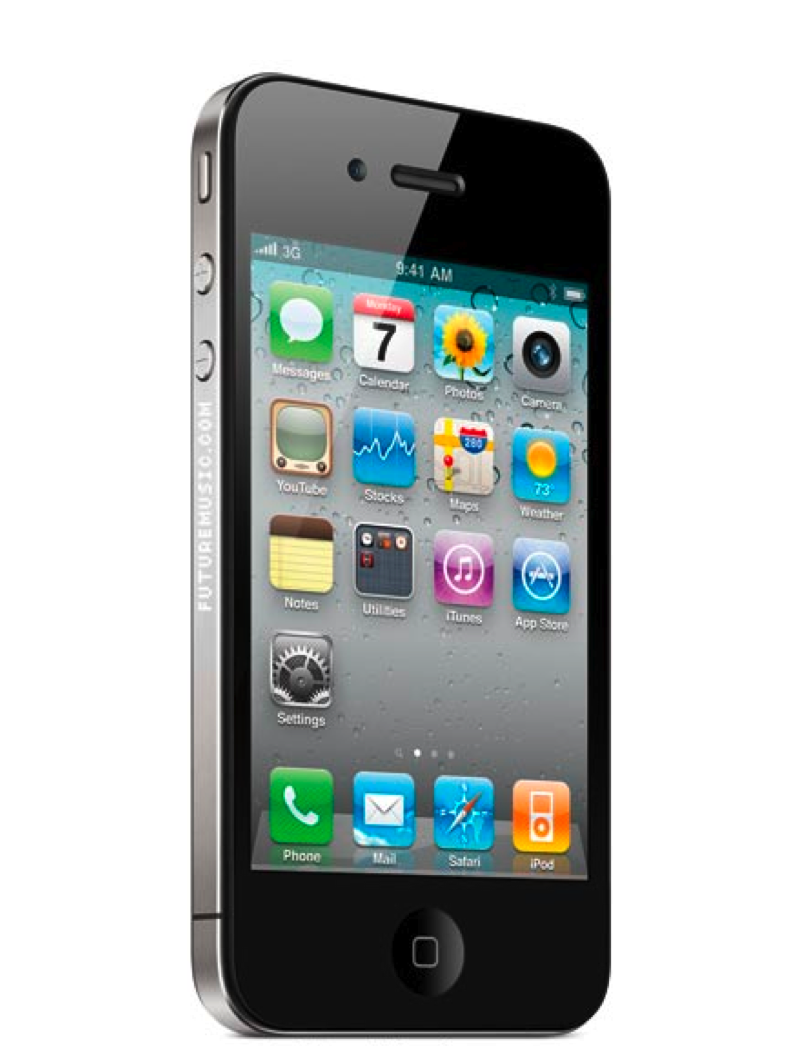
The overall look and feel has changed as well: Both the front and back of the iPhone are composed of a sturdy glass that Apple claims is 13 times harder than plastic. Overall, the case is 24 percent thinner than the current iPhone 3GS.
There are more music apps for the iPhone than for any other mobile music platform. There are drum machines, MPC-style workstations, synth, 24-track recorders, audio editors and more.
Social networking has become an essential tool for musicians.
Apple succeeded where other companies have failed in building the iTunes music store and turning it into the top music store in the world
Is it as good as an HD video camera? No – but it’s still pretty astonishing. And Apple also announced iMovie for the iPhone, which lets you edit HD video
iPhone 4 features the world’s most sophisticated mobile computing platform, iOS 4
Introducing Aurora, new Tenori clone, kind of
Aurora Sound Studio HD is described as a “pattern based sequencer”.
We take that to mean that the developers were inspired by the Yamaha Tenori On. While this has been done before, Aurora Sound Studio HD is going beyond most previous Tenori On wannabe’s by including a mixer, audio effects, synth patch editing and a song mode for sequencing patterns.
Aurora Sound Studio HD is officially “coming soon”.
The iPhone becomes your stomp box
IK Multimedia has announced the AmpliTube iRig. With AmpliTube for iPhone, you’ll have an entire guitar/bass rig at your fingertips, comprised of 3 recombinable simultaneous stompbox effects, an amp-head plus cabinet and a microphone.
With AmpliTube for iPhone fully loaded, you will be able to choose between 5 amps (clean, crunch, lead, metal, bass) with full controls, 11 stompbox effects (delay, fuzz, distortion, overdrive, wah, envelope filter, chorus, flanger, phaser, octave, noise filter), 5 cabinets and 2 microphones (dynamic and condenser).
Plus, AmpliTube for iPhone features a chromatic digital tuner and a metronome. You can also import and play with songs or backing tracks with real time effects, and create, save and recall up to 36 presets on the fly!
Jasuto for the iPhone and Android

Some of the new features:
- nearly alias-free analog oscillators
- pulse width control on the square oscillator
- all the filters have been re-written and have been fattened up quite a bit
- several wave-shapers
- ADSR envelope editor
- note on/off for sustained notes
- multi-page/octave sequencer
- you can now draw notes/modulation in the sequencer
- recording into the sequencer via the midi keys
- sample recording/re-sampling
- full featured sampler
- and manymore…


Jasuto is still under pretty heavy development, so it will be improving/changing quite often. Feedback will certainly have an influence over the development direction.
Jasuto is the first truly modular synthesizer for the iPhone and is basically the 2nd coming of my previous modular synth experiment known asMode
There are several main design goals that I wanted to achieve with this.
The first goal was to make synth building fun and easy all while adding some unpredictability to the process. I’ve come up with some amazing sounds almost by accident in a lot cases that I would have never even thought of doing in a conventional synth.
The 2nd was to blur the line between patch and synth, so creating a synth should be no different (or any more difficult) than creating a patch.
The 3rd was to unify control and audio rate signals allowing everything to be a modulation or be modulated.
And finally I wanted to make sure that it was simple and efficient to add motion to a sound. So every node on the screen can record its own motion. E.g. if you wanted to create a simple LFO for a chorus effect just attach a constant to the delays time port, click the record button and wiggle away. After you are done recording hit stop and it will auto-magically blend the loop points for you. All motion including the step sequencer are syncable via triggers, more on this in the “Basics” section.
Turn your iPhone into a hardware MIDI control surface

Line 6 has introduced a new $5.99 app, MIDI Surface (App Store link), that lets you turn your iPhone, or iPod touch into a hardware MIDI control surface.
MIDI Surface works with the Line 6 MIDI Mobilizer, a MIDI adapter that connects to the iPhone or iPod touch.
This is pretty interesting – but adapt this for the iPad and get third-party app support and MIDI Mobilizer could become a new platform for musicians.
Details below.
Control Surfaces:
Keyboard
- Channel
- Velocity
Sliders
- Channel
- Controller (Mod Wheel, Channel Volume, Expression, etc.)
- Low Value
- High Value
Drum Pads
- Channel
- Category (Note On, Controller, Program Change)
- Note
- Note Off (Immediate, Touch Up)
- Velocity
X-Y Control
- Supports up to 4 touches
- Channel
- Controller
- Left Value
- Right Value
Each interface can be configured with detail and you can save Presets for quick recall.
DATAMASKIN

