
Reason – Nektar P4 Controller Preview video
The new dedicated Reason controller from Nektar
Nektar Technology Panorama P4 Keyboard Controller Delivers Hands-On Reason Control
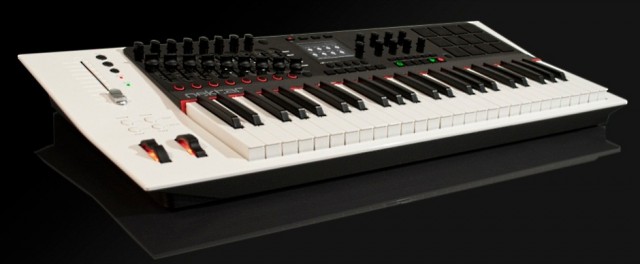
This week at Winter NAMM 2012, Nektar Technology will unveil the new keyboard controller in the most complete version we’ve seen yet; the company even has an anticipated release date of March, 2012.
The Panorama P4 offers the discerning Reason user tactile control and a number of intuitive features that make working with Reason a piece of cake. According to the manufacturer, the established workstation keyboard concepts allow for complete “on device” selecting and editing of sound with direct visual feedback. The keyboard controller is also said to be comfortable and very easy to operate in the studio or during live performances. The front panel is angled, raising important controls so that they are easy to see and reach, as well as providing the ideal viewing angle for reading the centered high-resolution display.
The synth keybed itself has 49 notes, plus a choice of 5 velocity curves (each optimized dynamically but with different response emphasis), monophonic Aftertouch, and a zone function that enables you to program four zones that can be switched on and off during performance.
As for controls, the Panorama P4 has a ton of them — 90 control elements assignable to a MIDI-message. Buttons and pads can be assigned to ASCII messages, allowing for sending shortcut commands to Reason, while 20 preset locations store the assignments of controls for later recall. A preset is linked to a Pad Map, Keyboard Map, and F-Keys Map, so that you can save and load these components independently of the individual presets.
For percussive performances, 12 Velocity- and pressure-sensitive pads are included, which can be programmed using the “Learn Note” function and then saved to any of the 20 Pad Map locations. The Velocity Spread feature spreads 1 note across all 12 pads, each with its own fixed Velocity, which allows for nuanced dynamics. Meanwhile, the Scale-Function assigns each pad to pitches within a defined scale for percussive performances with any sort of keyboard sound, while freely changing intervals or transposing the whole set.
Why you need it – It’s the controller’s dedicated Reason control, of course. The Panorama P4 is said to offer completely transparent and with unlimited access to all areas. Every single Reason device is mapped with parameters and their values clearly visible in the display. Switching between Mixer, Instrument, and Transport mode reconfigures the entire control surface by just pressing one button. Overall, the Panorama P4 was designed to give Reason the feel of hardware.
Panorama P4 Specifications:
- 49-Note Velocity-sensitive keyboard
- Aftertouch
- Weighted synth-style keybed
- Pitch bend and Modulation wheels
- 4 Keyboard function buttons
- 3.5″ High-resolution TFT display
- 16 Encoders
- 9 x 45 mm faders
- 100 mm ALPS motorized fader
- 10 Assignable LED buttons
- 28 Additional assignable buttons
- 12 Pads with Velocity / pressure sensitivity
- 4 LED mode buttons
- 5 Menu buttons under display
- Pads and motorized fader select buttons
- View and mute buttons
- Sustain pedal jack (pedal not included)
- Expression pedal jack (pedal not included)
- USB port for communication with computer
- USB Micro B connector for extra and external power
- Compatible with Mac OS X and Windows XP, Vista, and 7
Nektar Technology plans on shipping the Panorama P4 in March, 2012 for $599.99 (MSRP) or $499.99 (estimated street price). Visit nektartech.com.
Via GW
Reason Mobile
University Assignment
Graphic & Digital Design
Brief: Design an app for a next generation smart phone.
Concept: A mobile version of the well known music composition software from ‘Reason’ by Propellerhead.
Artist Interview: Surkin
When a young Benoit Heitz saw a friend’s computer running Reason he had an epiphany: “His computer isn’t better than my parent’s computer. That means I could be making music.” He started out not knowing the first thing about drums or music in general. Three years later he was touring the world as an international DJ. Surkin had us over to check out his wild yet danceable cut-up sample work.
Benoit Heitz (born 1985), known by his stage name Surkin, is a French electro DJ and producer. He gained attention with his releases on the French Institubes music label as well as a remix for Teki Latex released on Virgin. In 2011 he launched the record label Marble along with Para One and Bobmo.

Heitz was born in southern France, and is now located in Paris.
How to create a gated delay effect – Reason Sound Design
Propellerhead Software’s product specialist Mattias Häggström Gerdt shows you how to great a gated delay combinator in Reason based on the patch “Echodile” from the Reason Factory Soundbank.
Reason 6 – Getting up to Speed
ASK Video has released Reason 6 Getting up to Speed, a new video tutorial covering the new features and effects in Propellerhead’s Reason 6 music software.
https://askvideo.com/product_info.php?&products_id=331
Reason and Record have been combined into one feature packed product aptly titled, Reason 6. There are lots of new features and effects and we want to get you up to speed! The aim of this tutorial is to help those of you who are already using Reason or who already have our Reason 5 to tutorial, to get up and running quickly with the new elements Propellerhead has added.
We won’t simply be glossing over these features however, we want you to know them just as well as you would after watching one of our full length tutorials. We cover 5 main topics: The new Mixer, The Pulveriser, Alligator, The Echo, and Neptune. By the time you’re done watching you should feel confident in using them in your next project.
If you’re on old Reason veteran or you already have some of our older Reason tutorials, picking this up is a no-brainer because it avoids talking about stuff you already know and gets right to the stuff you need to know. The easy-going and fun style of the tutorial will also make learning about the new features in Reason 6 a really great experience.
Propellerhead’s ReCycle has finally been updated
ReCycle 2.2 is a free update that brings is 64-bit compatibility, is Mac OS X Lion compatible, and has a new look and some workflow improvements.
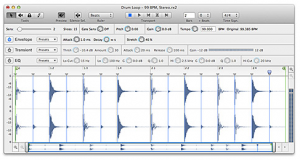
ReCycle 2.2 Fix List
- The program is now compatible with 64 bit operating systems.
- ReCyle 2.2 is also a true Cocoa program under Mac OS and fully compatible with Mac OS X 10.7 Lion.
- The main window has been graphically redesigned, including new zooming and scrolling. Scrolling is smoother and you can now zoom in further. Some redundant controls have been removed and others added.
- When exporting AIFF and Wave files, Record/Reason-style tempo information is now included in the file. Also, when importing audio files created in Record or Reason, the tempo information in those files is used for setting tempo and length in ReCycle.
- The Waveform now indicates graphically what sound will be played back, by dimming silent sections.
- You can now use the Q, W, E and R keys to select tools.
- The Preference dialog has been streamlined and updated.
- Open Recent (documents) is now a sub-menu on Mac OS.
- The status bar has been removed.
- We have removed support for the Sound Designer II, Mixman and SampleCell formats since these are all outdated.
- The authorization system and copy protection has been changed, reducing the risk of having to reauthorize the program.
- Installation under Mac OS is now drag and drop (no installer).
More info on the Panorama controller for Reason 6
The basic idea of the Panorama is a custom front end controller for Reason 6, based around a MIDI keyboard and plenty of knobs and sliders.
Mixer
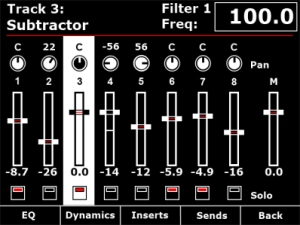
Channel strip
The mixer channel strips in Reason are comprehensive and like the real world hardware – quite long! Panorama breaks the channel strip down in to manageable localized sections, accessible at the push of a button. From the mixer menu described in Part 1, you have access to EQ, Dynamics, Inserts and Sends across the buttons below the display. The encoders to the right of the display map to the targeted channel strip in the mixer. If a track is selected in the sequencer, the corresponding mixer channel becomes targeted. Alternatively, you can target a mix channel using the 8 buttons when set to ‘select’ mode (described in part 1).
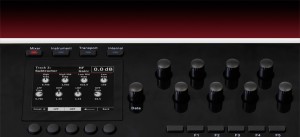
Here we are taking a closer look at how Panorama access’s the EQ parameters.
Panorama allows you to gain access to Reason’s mixer at the touch of a button. Here you see the Reason mixer channels assigned to be operated by each of Panorama’s controls. The display gives you an accurate overview of what parameter each control is assigned to as well as current value state. Let’s look at the display screen in some more detail.
Panorama is our vision of how a great controller should work. Yes, there are many ‘generic’ controllers on the market already but we have yet to find one that satisfies our criteria of operating the software, as if it’s hardware – That’s Panorama. Panorama uses a communication protocol that has been custom designed for Reason 6, putting control – every control – at your fingertips. There’s nothing generic about this controller. Panorama really does access all areas.
Nektar Panorama general specifications
- 49 note weighted keyboard w/aftertouch
- Pitch bend + modulation wheels
- Motorized fader
- 9 50mm faders
- 9 encoders above the faders
- 8 programmable LED buttons
- Display
- Additional 8 encoders
- 12 velocity and pressure sensitive pads
- Navigation and menu buttons
- Transport control
- Sustain socket
- Pedal socket
The whole design is custom for Panorama including the keybed. Our communications protocol that handles interaction with Reason 6 is also custom. The main idea behind Panorama is to complement the computer ,so a user can have immediate access to areas of Reason where tactile control is an advantage without having to reach for the mouse which typically disrupts workflow.
Or to put it in other words: Panorama is first an instrument and gives the user the experience of operating Reason, as if it was hardware.
Panorama controller for Reason 6
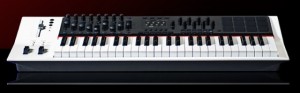
Nektar has presented a dedicated MIDI Controller for Reason 6, the Panorama controller.
Here’s what they have to say about the Nektar Panorama:
Reason 6 is here! Need a controller?
Panorama is our vision of how a great controller should work. Yes, there are many ‘generic’ controllers on the market already but we have yet to find one that satisfies our criteria of operating the software, as if it’s hardware – That’s Panorama. Panorama uses a communication protocol that has been custom designed for Reason 6, putting control – every control – at your fingertips. There’s nothing generic about this controller. Panorama really does access all areas.
Pricing, specs and availability are to be announced.
Mixer Operation:
Panorama allows you to gain access to Reason’s mixer at the touch of a button.
The display gives you an accurate overview of what parameter each control is assigned to as well as current value state.
Channel Strip Control
Panorama breaks the channel strip down in to manageable localized sections, accessible at the push of a button. From the mixer menu, you have access to EQ, Dynamics, Inserts and Sends across the buttons below the display.
Reason Tips: Pulveriser’s Envelope Follower and CV
“Propellerhead product specialist Mattias Häggström Gerdt shows us some advanced CV wiring between Pulveriser and the Matrix Pattern sequencer. By using the envelope follower in Pulveriser, we can smooth out Matrix CV curves and introduce “lag” to the signal. It’s portamento for your CV signals and it’s COOL!”

Pulveriser brings together crunchy compression, dirty distortion, a multimode filter and flexible modulation in a single sound-crunching effect. Crush, mangle, and destroy your sounds. Apply careful parallel compression to bring out the details of a sample or recording. Use the envelope follower when recording live instruments for responsive, expressive filter effects.
DATAMASKIN

