
Magellan for iPad Tutorial – Dual Synths
Here is the first video in our series of tutorials for Magellan – Professional Analog Modeling Synthesizer for iPad. In this video, we show how to operate Magellan’s TWO independent polyphonic synth engines, including: loading presets, foregrounding a synth, adjusting parameters, synth coupling, and other advanced settings.
Visit http://www.yonac.com for more info!
Magellan on the iTunes Store: http://itunes.apple.com/us/app/magellan/id544119998?mt=8
Specifications:
\\\ Synth ///
• 2 independent virtual analog synth engines running simultaneously
• 3 oscillators per synth engine; total of 6 realtime oscillators
• Osc unison stage w/ adjustable detune & width, up to 24 simultaneous wave generators for super-saw type effects
• Realtime PWM Modulation for osc 1 & 2
• FM module w/ dedicated blend, ADSR envelope, adjustable contour
• Oscillator 2>1 ring modulation
• Noise generator w/ adjustable tone
• VCA ADSR envelope
• Separate voice unison stage w/ settable stereo spread, detune
• Dual Keyboards w/ individual pitch & modulation wheels
• Dual Touch Pad controls w/ settable key & scale, individual voice parameterization
• Polyphonic, Monophonic, Poly/Mono Legato operation modes
• Glide
• Matrixpad modulation w/ configurable x/y destinations, synth out select, optional snapback
• Realtime oscilloscope displaying output signal (iPad 2 and 3)
• Synth coupling – allow running both synths by a single control interface
• Audio backgrounding
• Tap tempo
• 16 voice combined polyphony (8 voice combined for iPad 1)
\\\ Filters ///
• 2 filter banks per synth engine, configurable in series or parallel
• Dedicated ADSR envelope for each bank; selectable envelope curve, adjustable contour
• 11 Filter types for each bank:
• “Magellan” 24dB Resonant Low Pass
• “Victor” 24dB Resonant Low/High/Band Pass
• “Voyvoda” 12dB Low/High/Band Pass
• Formant, Comb, All-Pass, Notch filters
• True bypass
\\\ Modulation ///
• Dual LFO’s per synth
• Up to 4 freely assignable destinations per LFO
• Dedicated amp setting for each LFO destination
• 3 reset modes
• Adjustable phase & delay
• Frequency tracking
\\\ Arp ///
• Dedicated arpeggiator in each synth engine
• 10 arp patterns; Settable note value & gate; swing
• 6 octaving modes, plus settable note and octave repeats
\\\ Sequencer ///
• Analog inspired 16/32 step polyphonic sequencer
• 8 track poly output per pattern in 16-step, 4 track poly out in 32-step “link” mode
• Track wise selection of target synth engine
• Settable pitch, velocity, gate, octave per step
• 6 sequence direction algorithms for each pattern
• Swing
• Timeline for creating song length sequences w/ patterns
• Import/Export song files containing sequences
\\\ Chordmaker ///
• Dedicated Chordmaker module for each synth
• Create/save chord progressions, played by pressing a single key
\\\ Effects ///
• Comprehensive FX rack: Reverb, Stereo Delay w/ BPM sync, Phaser, Chorus, Flanger, Waveshaper/Distortion, Bitcrusher, Sonic Expander
\\\ Recording & Sharing ///
• Built in tape deck for recording app audio
• Metronome
• Export audio files via email, SoundCloud
• Export/Import audio files via WiFi, Intua or Sonoma Audio Copy / Paste
\\\ MIDI ///
• CoreMIDI
• Virtual MIDI, both vMIDI In and vMIDI Out ports
• Control Magellan w/ external MIDI controllers
• Synth-wise MIDI In channel select
• MIDI Out w/ settable channel or omni
• MIDI Learn w/ over 80 control destinations
• Save MIDI CC configurations to file for later use
• Sync w/ external MIDI clocks to control sequencer, arp modules
\\\ Presets ///
• Over 242 factory presets
• 34 presets and a song designed by Sunsine Audio
• Export/Import presets, banks via email or iTunes; Create/save unlimited banks & presets
Magellan iPad Synth with Jordan Rudess
Yonac Software’s new powerhouse analog synthesizer.
“A comprehensive instrument that i would consider a major release to the world of iPad music.”
Check it out here: http://itunes.apple.com/us/app/magellan/id544119998?ls=1&mt=8
Magellan is the bold new professional analog modeling synthesizer for the iPad. Not content with just one synth, we gave Magellan TWO independent polyphonic synth engines. Individually or together, they deliver a new powerful warmth to the sound of iOS music.
Complete with a full effects rack, a total of six oscillators, dual filters per engine, multiple unison stages, extensive modulation matrix, dedicated arpeggiators, powerful MIDI capabilities, and a polyphonic step-sequencer – the aural possibilities with Magellan are infinite!
Check out our awesome Magellan demo! www.youtube.com/YonacSoftware
\\\ Synth ///
• 2 independent virtual analog synth engines running simultaneously
• 3 oscillators per synth engine; total of 6 realtime oscillators
• Osc unison stage w/ adjustable detune & width, up to 24 simultaneous wave generators for super-saw type effects
• Realtime PWM Modulation for osc 1 & 2
• FM module w/ dedicated blend, ADSR envelope, adjustable contour
• Oscillator 1>2 ring modulation
• Noise generator w/ adjustable tone
• VCA ADSR envelope
• Separate voice unison stage w/ settable stereo spread, detune
• Dual Keyboards w/ individual pitch & modulation wheels
• Dual Touch Pad controls w/ settable key & scale, individual voice parameterization
• Polyphonic, Monophonic, Poly/Mono Legato operation modes
• Glide
• Matrixpad modulation w/ configurable x/y destinations, synth out select, optional snapback
• Realtime oscilloscope displaying output signal (iPad 2 and 3)
• Synth coupling – allow running both synths by a single control interface
• Audio backgrounding
• Tap tempo
• 16 voice combined polyphony (8 voice combined for iPad 1)
\\\ Filters ///
• 2 filter banks per synth engine, configurable in series or parallel
• Dedicated ADSR envelope for each bank; selectable envelope curve, adjustable contour
• 11 Filter types for each bank:
• “Magellan” 24dB Resonant Low Pass
• “Victor” 24dB Resonant Low/High/Band Pass
• “Voyvoda” 12dB Low/High/Band Pass
• Formant, Comb, All-Pass, Notch filters
• True bypass
\\\ Modulation ///
• Dual LFO’s per synth
• Up to 4 freely assignable destinations per LFO
• Dedicated amp setting for each LFO destination
• 3 reset modes
• Adjustable phase & delay
• Frequency tracking
\\\ Arp ///
• Dedicated arpeggiator in each synth engine
• 10 arp patterns; Settable note value & gate; swing
• 6 octaving modes, plus settable note and octave repeats
\\\ Sequencer ///
• Analog inspired 16/32 step polyphonic sequencer
• 8 track poly output per pattern in 16-step, 4 track poly out in 32-step “link” mode
• Track wise selection of target synth engine
• Settable pitch, velocity, gate, octave per step
• 6 sequence direction algorithms for each pattern
• Swing
• Timeline for creating song length sequences w/ patterns
• Import/Export song files containing sequences
\\\ Chordmaker ///
• Dedicated Chordmaker module for each synth
• Create/save chord progressions, played by pressing a single key
\\\ Effects ///
• Comprehensive FX rack: Reverb, Stereo Delay w/ BPM sync, Phaser, Chorus, Flanger, Waveshaper/Distortion, Bitcrusher, Sonic Expander
\\\ Recording & Sharing ///
• Built in tape deck for recording app audio
• Metronome
• Export audio files via email, SoundCloud
• Export/Import audio files via WiFi, Intua or Sonoma Audio Copy / Paste
\\\ MIDI ///
• CoreMIDI
• Virtual MIDI, both vMIDI In and vMIDI Out ports
• Control Magellan w/ external MIDI controllers
• Synth-wise MIDI In channel select
• MIDI Out w/ settable channel or omni
• MIDI Learn w/ over 80 control destinations
• Save MIDI CC configurations to file for later use
• Sync w/ external MIDI clocks to control sequencer, arp modules
\\\ Presets ///
• Over 242 factory presets
• 34 presets and a song designed by Sunsine Audio
• Export/Import presets, banks via email or iTunes; Create/save unlimited banks & presets
Pollisynth for iPhone – Scan a picture, make a sound, share it
Description of the synth below:
Mission: To more fully understand the colors that surround us we must engage an additional sense.
A Pollisynth takes a picture of something, and then translates that picture into a unique sound-wave. As stated above, in order to fully understand the colors that surround us we must engage an additional sense. A Pollisynth can be the gateway to your mindbrain, and can give you a good time doing it.
Remember that the spark to take a picture begins in the MIND, and funny enough, ends in the MIND once a song is made. There are a lot of ways to play with a Pollisynth – two people taking a picture of the same thing and then playing it, a gang of kids taking pictures of SLUSHIES and then making a harmonized song out of the soundwaves…
By logging into Facebook with Pollisynth you can post your sound-waves to your timeline as Presets. Your Facebook friends will be able to see and try out these Presets with their own Pollisynth and listen to your imagery. You can also re-download Presets you have uploaded and use Facebook as a Pollisynth sound bank online. For those who have reservations about Facebook, SMS and Email can be used to share images from your photo library that you know to generate worthy sounds. This works because the sounds are not random but entirely derived from the image, so rescanning an image will always result in the same sound so long as it hasn’t been manipulated. Your photo library will always serve as your offline sound bank.
Pollisynth was first developed by Thomas Ruby in 1987. After having passed away in 2006, Salisbury’s son, Jamie, continued his father’s work. As a company we stand by the Pollisynth and we stand by the Rubaic principles of Oneness, Honor, and Good Times.
Synthophone – the retro vintage synth style app for iOS
Following the style of the famous Stylophone. BeatsnBobs present the Synthophone (previously named Synthiphone), a mono synth for iPhone and iPad with extra modulation controls. Designed with a classic 60s wooden case.
Change the wave from classic sawtooth to square and triangle
Adjust the amplitude envelope attack and release
Adjust the key with transpose control
Adjust the vibrato depth and speed
Plus a bender as fun bonus item which probably wont be used much but it looks cool
Download here:
http://itunes.apple.com/gb/app/synthophone/id539352924?mt=8
U-he Diva soft synth tutorial – Brass bounce
The third in a series of bite-sized tutorials aimed at users of u-he’s latest synthesizer, Diva. The sounds made in this video certainly won’t be to everyone’s taste – they’re all typical old synthbrass! However, the point is to show several different methods of getting similar results, even with a limited set of modules.
So let’s bounce…
Method 1 starts with the usual synthbrass settings, but we soon run into the problem of not having enough envelopes for VCA, VCF cutoff, and pitch modulation at the beginning of each not. So LFO2 is used for cutoff, freeing up envelope 2 for pitch modulation.
Method 2 reverts to the usual envelope 2 for cutoff. The LFO takes over for pitch modulation, but in a special way: LFO2’s delay parameter ramps down to the bottom of a square wave (set to minimum rate so it won’t cycle). Note that the pitch modulation is also negative — a minus times a minus is a plus.
Method 3 is probably the most interesting one because it uses neither envelope 2 nor LFO 2 for the pitch. Instead, the Gate signal (i.e. note on/off from your keyboard) is lagged, resulting in a smooth attack. And (fortunately or unfortunately) an equally smooth release… but there’s a little surprise at the end.
Take home message: Just like classic analogue polysynths, Diva expects you to make the most of a limited set of synth modules!
iYM2151 : Dark City from The Scheme
Dark City (The Elegy of Battle) played with iYM2151.
iYM2151用のデータはこちら → http://gm7add9.wordpress.com/2012/07/16/iym2151data/
From PC-8801 game The Scheme, composed by Yuzo Koshiro.
Bronto Scorpio Music releases Future Retro soundset for Diva
Bronto Scorpio Music has announced Future Retro, a collection of 64 presets for the Diva software synthesizer by u-he.
Diva is famous for the ability to authentically recreate the great synthesizers of the past. However, I tried to go a different direction with this set. Many sounds are inspired by the past, and use Diva’s great sound design potential to go way beyond vintage sounds into the future!
You can listen to an audio demo of this soundbank below. I only used sounds from the new Future Retro bank, and no external processing for the demo.
The soundset is available to purchase for 10 EUR. A free demo bank (10 presets) is available to download right here >>
Checking out THE DARK ZEBRA synth presets
A walk through some of THE DARK ZEBRA synth presets – a Zebra2 soundbank created by Hans Zimmer and Howard Scarr. A few of the clips reveal extra “ZebraHZ” features that are not present in the regular Zebra2.
Available from July 23rd, 2012 at www.u-he.com
(running the HZ version of this plugin requires a license for Zebra2)
Epic Synth – nice little Juno emulation
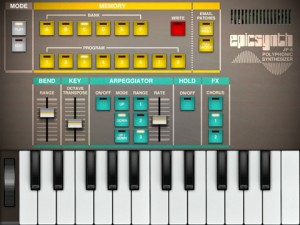
Epic Synth is a polyphonic synthesizer inspired by classic synths of the 1980s. Its beautiful and straightforward interface lets you focus on the essential: the pleasure of creating new sounds! The goal is to explore sound, not interface pages.
Epic Synth’s simple and effective sound architecture stood the test of time. It’s simple enough for beginners to learn about synthesis yet powerful enough to satisfy experienced sound modellers. Epic Synth’s sound engine provides tons of room to create great sounds, from classic leads to juicy acid basses, from 8-bit-like effects to complex evolving sonic textures.
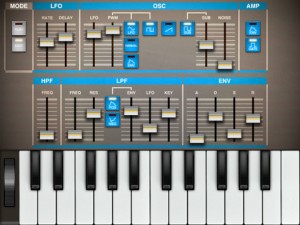
FEATURES INCLUDE
- Universal all: works on iPhone, iPod and iPad
- Takes advantage of the gorgeous Retina display on iPad and iPhone/iPod
- Classic time-tested sound architecture
- Five voices of polyphony (Six on the iPad)
- Arpeggiator with key hold
- Patch memory stores 6 banks of 8 programs
- Single patch sharing via email
- Full memory backup via email
- Pitch bend on iPad and via MIDI
XTS1 – new big sounding VST instrument
XTS1 is a new virtual instrument for your DAW. Create awesome sounds with just a few controls. 3 smooth sounding dynamic waveforms, multi-mode filter as well as chorus, vibrato, noise, drive, 3 envelopes and powerful velocity and LFO mapping.
Get it at http://www.energy-xt.com/xts1
Specifications:
- Windows/Mac OS X compatible
- 32-voice virtual synthesizer
- 32 presets
- 3 dynamic waveforms: (1) saw to sin, (2) pulse width and (3) phase modulated
- Chorus, Noise and vibrato
- Multi-mode filter cutoff, q and drive
- Poly/legato/mono and glide mode
- Master envelope
- Filter envelope
- Waveform envelope (saw to sin, pulse width, pm amount)
- Velocity: vol, pan, waveform, cutoff, filter-sustain, noise level
- LFO: vol, pan, cutoff, waveform. Freerun mode with tempo-sync.
- Pitch bend
DATAMASKIN

