
Software Klee Step Sequencer updated

Defective Records has updated Software Klee Step Sequencer to version 2.1.0.
Changes:
- Load button modified – now does a Load of the bit pattern on the next quarter note clock, not on any next clock signal.
- Baseline Note is now stored in Presets.
- Bus Devices and Channels now stored in Presets.
- On Windows, clicking anywhere in application activates window, not just title bar.
- Built with Max/MSP version 5.18.
Previously only available as a hardware, control voltage sequencer, the Software Klee Step Sequencer allows MIDI devices to be controlled by this innovative step sequencer.
Price: USD 40.00
Visit: Defective Records
Koma synthesizer – a new analogue bassline synthesizer
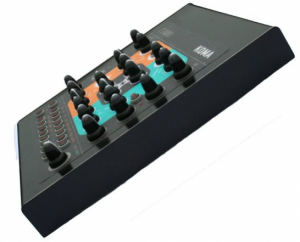
Eowave has introduced the Koma synthesizer – a new analogue bassline synthesizer, inspired by classic synths from the 80s.
Features include 4 different waveforms (saw, square, sub, noise), a 24 dB low-pass filter and a 16-step sequencer. The 16 steps sequencer has 4 rows: 1 for the notes and 3 that are freely assignable to a parameter of your choice.
The Eowave Koma is expected to be available Fall 2011, for 599 € excl. VAT. Details below.
Oscillator section
- analogue VCO with square saw sub (sub can be 1 or 2 octaves below the master freq), noise.
- VCO can be modulated by LFO and PW
- Variable glide
- mixer to mix the 4 waveforms
Filter section
- external audio with a trimmer to feed the filter
- 24dB low pass filter roland style for a classical 80s sound
- filter can be modulated by env2, KB, lfo.
VCA section
- VCA is affected to env1
- 2 envelopes ADSR modulate respectively the amplitude and the filter.
- Attack goes from 2ms to 10s.
LFO section
- LFO with 8 waveforms (triangle, ramp up, ramp down, square, random, digital noise, staircase up, staircase down)
Connections
- audio in
- audio out
- MIDI in
- Usb (for software update and MIDI in&out)
Sequencer
- 16 steps sequencer with LED
- 4 rows: 1 row controls gates and notes.
- 3 other rows are freely assignable to any parameter of the front panel.
- You can transpose the sequencer with an external MIDI keyboard.
Free step-sequencer
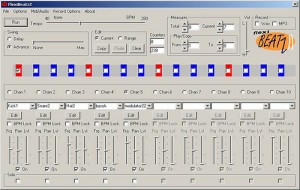
Despite the ugly looking UI you might want to give it a try 
Jim Singh presents FlexibeatzII, a FREE self-contained, standalone ten channel pattern-based Step Sequencer for Windows.
“I have felt for some time that it’d be neat if there were a FREE easy to use step sequencer program that lets you use any .wav files for sounds, but also offers powerful editing and synthesis toolsets for each sound, with the ability to shape and sculpt sounds extensively and dynamically while the sequence is playing (but at the same time not compromising the ease of use of the sequencer). “
M185 – Clone of the Classic Roland Step Sequencer
A brief demonstration of the M185 Step Sequencer by Defective Records Software. Inspired by the hardware M185 Sequencer developed by RYK. M185 is a MIDI-enabled software recreation of the hardware M185 step sequencer, designed by RYK – developed with their input! The program includes all major functions from the hardware M185. Has a multi-stage step sequencer with stage-selectable gate modes: Mute, Single, Multi and Hold. For fans of the original Roland
The M185 is playing a VST softsynth; drum loop coming from other software. More information at http://defectiverecords.com/m185 .
M185 features
* Virtually all major functions from the hardware M185.
* Multi-stage step sequencer with stage-selectable gate modes.
* Gate modes include Mute, Single, Multi and Hold.
* Trill mode available when in Multi mode within a stage.
* Polyphonic potential when using long Note Length values.
* Each stage can be from 1 to 8 clock pulses in length.
* Internal or MIDI clock control.
* Built-in clock divide capability.
* MIDI output to any hardware or software synth.
* VST instrument hosting.
* 16 preset slots for instant recall of parameters.
* Presets can be saved to and loaded from disk.
MFB’s step-sequencer URZWERG PRO

The Urzwerg Pro is an extended version of the company’s Urzwerg step sequencer. The new version offers output of MIDI-notes and -controllers as well as 32 individual step LEDs to keep track of the sequences’ status.
The Urzwerg Pro offers 32 steps that can either be used for two sequences with up to 16 steps each or with four sequences with up to 8 steps each. You may control up to four synthesizers or CV-controllable parameters in an analogue modular system simultaneously. Using the MIDI-output allows to address four separate synthesizers or multitimbral parts in a single synthesizer. In addition, you may play your MIDI-synth with two, three or voices polyphony. When playing it duo-phonically, the two remaining tracks can be used to control velocity and mod-wheel-data (MIDI-CC 01). Using it with three polyphonic voices, still allows for velocity control.
Specifications:
- 32 step-controls – 32 skip-switches – 32 LEDs
- two run-modes offering 2 x 16 or 4 x 8 steps
- 4 x CV/Gate-outputs
- polyphonic and monophonic MIDI-output
- four available note quantize modes
MFB’s step-sequencer URZWERG PRO is the extended version of our URZWERG. This advanced version has been inspired by feature requests and suggestions of many users to ensure better flexibility than ever. Most prominently, URZWERG PRO now offers output of MIDI-notes and -controllers as well as 32 individual step LEDs to keep track of the sequences’ status.
URZWERG PRO offers 32 steps that can either be used for two sequences with up to 16 steps each or with four sequences with up to 8 steps each. You may control up to four synthesizers or CV-controllable parameters in an analogue modular system simultaneously. Using the MIDI-output allows to address four separate synthesizers or multitimbral parts in a single synthesizer. In addition, you may play your MIDI-synth with two, three or voices polyphony. When playing it duo-phonically, the two remaining tracks can be used to control velocity and mod-wheel-data (MIDI-CC 01). Using it with three polyphonic voices, still allows for velocity control.
In 4 x 8 mode, URZWERG PRO can control up to four individual NANOZWERG synths using CV/Gate. As another example, you can also control and individually modulate pitch, pulse width, filter-cutoff and LFO-speed in MFB’s KRAFTZWERG. Finally, using URZWERG PRO in combination with a modular synthesizer-system will allow for even more versatile options. URZWERG PRO’s Gate- and CV-inputs are fully compatible to all common eurorack-format modular systems.
The use of MIDI allows similar applications as using CV/Gate connections but will add further functionality.Sounds can be played polyphonically with up to four voices. Using URZWERG PRO duo-phonically or as dual-monophonic, you can use the remaining two MIDI-controllers to output velocity and mod-wheel-data in parallel with the first two tracks. In a CV/Gate-based synthesizer, all parameters with CV-input can be addressed directly. On the contrary, MIDI-control through URZWERG PRO always also depends on the routing-options of the connected instrument.
URZWERG PRO was designed for intuitive operation. All functions feature designated controls for editing while the sequencer is running. For best overview, URZWERG PRO now features LEDs per step. These LEDs do not only visualize the sequence current position but also the skip-buttons’ status. While setting the MIDI-channel and the operating modes, these LEDs also function as a display.
When using URZWERG PRO on stage, you can set, edit and remove steps live. In addition, you can also modify the sequences’ directions and their individual lengths. As a new feature, URZWERG PRO features a random-function to playback a row’s steps at random. Another novelty is the auto-glide-function. Here, as in the TB-303, glide will only become active with tied notes.
URZWERG PRO allows setting of independent gate-lengths, ranges and glides for rows 1/2 and 3/4. Range defines the CV-range for the step-knobs between 1-10V. For pitch control, the range up to 5V can be quantized. Here, we have added four different scalings to chose from: semitones, whole tones, pentatonic, hexatonic.
All four rows feature skip-buttons per step to activate/deactivate gate-triggers for these positions. Alternatively, the skip-buttons can also deactivate the CV-step-control. To add more liveliness, URZWERG also offers two optimized shuffle-modes.
URZWERG PRO provides four Gate- and CV-outputs to control compatible analogue synthesizers and modular systems. Start-I/O and Clock-I/O allow URZWERG PRO to be synchronized to and sync other analogue sequencers. The additional CV-Clock-input allows for dynamic tempo-control, e.g. using an external LFO or a CV-controller. To sync URZWERG PRO via MIDI, the unit can send and receive start/stop-commands as well as MIDI-clock. In addition, it is possible to transpose sequences and address individual steps using a MIDI-keyboard or DAW.
Doepfer A-189-1 Voltage Controlled Bit Modifier
About 2 weeks ago I bought a second hand Doepfer A-189-1 Voltage Controlled Bit Modifier. I build a +/-15V to +/-12V converter to power the module (though not necessary I understood) and now it’s working. And yes, I now can reproduce that beautiful Mark Shreeve bass sound with that metal edge to it. Anyway, this is a new improvisation but I heard some elements of the Warriors Theme I did before.
The Synthesizers.com Modular , which is connected to the Doepfer A-189-1 module, initially does a 4-step sequence and after a while I switch that to an 8-step sequence. The sawtooth output Ian Fritz Teezer Through-Zero VCO is modulated by the GCS Steiner filter and drives the Blacet Miniwave. This produces a modulated sound. This procedure is described on the Muff’s forum by Bob Borries/VOLT and is called ‘MiniWave Table Tilting’. The self-built Modular does a 4-step sequence. The theme is played on the Roland XP-80 doing the Mellotron strings. The Waldorf Q Keyboard produces some agonizing sounds and the odd solo is performed on the Clavia Nord Lead 1.
You can download/see/hear the video and music from my website.
Via attorks
iPad vs Launchpad vs Monome – 16 Step Sequencing
In this video we talk about the Apple iPad versus the Novation Launchpad versus the Monome – in a topic as old fashioned as 16 step sequencing. The video is not so much about the sequencing as such, but about the different form factors, the haptic and the used software of the three candidates in the comparison. My favorite is the iPad for now, as it offers a minimal footprint with maximum possibilities. From a “touch” perspective and coolness, the monome wins, whereas the Launchpad gains momentum with its budget friendly approach. Go make some music! modul8or
Shared by modul8tor
Drum step sequencer for iPad

DrumTrackHD is aDrum Step Sequencer for the iPad. Here’s what they have to say about it…
Building on DrumTrack8’s critically acclaimed foundations (for iPhone) but completely redesigned to take full advantage of the iPad’s intuitive interface and powerful capabilities, DrumTrackHD is loaded with new features like FX (audio effects), up to 16 tracks of scalable patterns (up to 32 steps), track automation, pads, signature modification, sample patterns, new HD drum kits, reverse samples and much, much more.
Create killer rhythms in DrumTrackHD’s great looking, intuitive interface using a choice of over 15 drum kits. Customize your kits at will by importing user samples, adding/subtracting/replacing tracks, or creating multi-sample tracks. Add audio Fx, swing and more while playing back and fine tuning your song. When you’re ready, export your patterns or songs in General MIDI or WAV Format (Ipcm, aac, or Ima4), transfer files with iTunes, upload them to SoundCloud or copy them (as audio file) using AudioCopy protocol (FourTrack) or Intua (Beat Maker) public pasteboard methods.
Pricing and Availability:
$9.99
More information:
New Drum Step Sequencer for the iPad
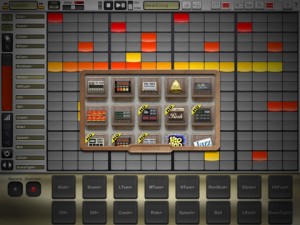
Simple Is Beautiful has released DrumTrackHD – a new Drum Step Sequencer for the iPad.
Building on DrumTrack8′s foundation (for iPhone) but redesigned to take advantage of the iPad’s interface and capabilities, DrumTrackHD adds FX (audio effects), up to 16 tracks of scalable patterns (up to 32 steps), track automation, pads, signature modification, sample patterns, new HD drum kits, reverse samples and more.
The app lets you your kits by importing user samples, adding/subtracting/replacing tracks, or creating multi-sample tracks. Add audio Fx, swing and more while playing back and fine tuning your song.
Export your patterns or songs in General MIDI or WAV Format (Ipcm, aac, or Ima4), transfer files with iTunes, upload them to SoundCloud or copy them (as audio file) using AudioCopy protocol (FourTrack) or Intua (Beat Maker) public pasteboard methods.
DrumtrackHD Key Features:
- Based on critically acclaimed iPhone app DrumTrack8, great looking, intuitive user interface to make killer rhythms.
- Classic transport functions (play/pause/reset, loop in pattern)
- Global adjustable swing
- Adjustable BPM with tap tempo recognition, long hold for numerical input, or drag & slide
- Change drum kits by scrolling or in the Kit Selection Dialog during live sets
Pattern Edition
- Up to 16 tracks depending on the Drum Kit
- 1 to 32 steps per pattern with optimized screen usage
- Edit each step’s velocity, pan, pitch and start/end offset, and even reverse samples
- Coherent color-coded visual representation facilitates pattern recognition and reading
- Multi-touch step drawing and editing
- Adjustable length and signatures (4/4, 3/4, 4/8, etc.) for each pattern
- Rectangle selection allowing to quickly move, copy, delete and duplicate whole/part of a pattern
Song Edition
- Easy drag and drop UI for song creation
- Unlimited number of unique patterns, with editable name and color, in a song.
- Unlimited number of pattern instances in a song structure.
- Mail/export song/pattern as MIDI files or audio (wav, adpcm or aac) to import into your choice of DAW
- Render to disk: transfer files to and from your iPad using iTunes.
- Sonoma Wireworks AudioCopy and Intua pasteboard integration to copy/paste (as audio) into other Apps
- Upload songs and patterns to Soundcloud to share with friends.
Drum Kits
- Choose from more than 15 kits, including the classical 808, 909, 606, LM1, etc.
- Advanced kits with multi-sample per track, with random or velocity-based triggers
- Entirely user-customizable kits: adding, removing or replacing samples in tracks, and importing user samples.
Fx: Real-time Audio Effects
- Up to two simultaneous Fx
- Assign to Master return track or two possible return tracks, with adjustable wetness
- Delay: time or beat quantization
- Filter: low-pass resonant filter
- Bitcrusher: beat rate and sample reduction
- Saturator
Mixer
- Adjustable volume and panning per track
- Large mute and solo buttons
- 2 adjustables Fx return per track
Misc:
- Automation panel for precise controls of a track’s parameters, including clear, linear or quadratic ramps, shuffle, randomize, copy/paste functionalities…
- Pads panel: live jam, overdubbing and quantized recording.
- Integrated documentation and Quickstart
DrumtrackHD is available now in the App Store for $9.99.
Via ST
Version 2 of the Klee Step sequencer
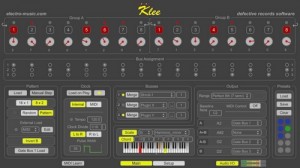
The Klee Step Sequencer is a MIDI-enabled software recreation of the electro-music.com hardware Klee step sequencer – developed with the input of the sequencer’s creators! Now with even more functionality in version 2!!
What are its features:
• Includes virtually all major functions from the hardware Klee, and adds many new ones. New features in version 2 = new
• VST instrument hosting new
• Intelligently constrain output notes to scale (using Modal Object Library) new
• Output chord based on active root note – up to 6 notes in chord, plus root note
new
• External pattern load via MIDI or audio input triggers new
• External MIDI controllers support via MIDI CC messages, with MIDI learn new
• Group A – Group B output new
• Convert active LEDs to active switches, for Groups A, B, or A and B new
• Reverse sequence direction new
• Built-in clock divide capability, now with additional options new
• MIDI output to any hardware or software synths
• Internal or MIDI clock control
• 10 preset slots for instant recall of parameters
• Presets can be saved to and loaded from disk
• Synchronous load – loading of pattern happens on clock pulses, and not in between
• Load on Play feature to allow for loading of pattern each time clock started
• MIDI-controllable baseline note
• Custom definable note range allows for alternative scales
Read more on the Klee Step Sequencer VST and check out the free demo at http://defectiverecords.com/…
DATAMASKIN

