
Undead Instruments unleash the TimeFrog2 controller
The timeFrog II is a powerful and flexible MIDI device dedicated to music computer and MIDI applications. The spin/inertial sensor provides a totally new kind of control surface, which opens new way for playing with parameters. The 8 endless encoders, 4 potentiometers and 6 buttons form a functional and compact. There is also a embedded 4 steps sequencer: 4×4 steps x 6 voices This patch was setup in Ableton Max For Live using only two instances of SonicCharge’s Synplant software synthesizer. These two patches where customized and designed to work with the timeFrogII. Creating for some very unique musical gestures. All sequencing and note generation is from the timeFrog controller.
undeadinst.com/products/timefrog
The timeFrog is an open hardware plateform. The firmware stands under GPLv3 license. New functionnalities, new modes can be added, the whole device can be totally reprogrammed.
Hardware Specs:
» Inertial surface control
» position and speed messages
» absolute and relative mode
» 0-127 looping or 0-127 locked values
» 8 endless ecoders with LED position display
» 4 buttons soft touch
» 2 buttons hard touch
» 4 faders
» MIDI in, thru, out
» USB self powered
» Dimensions: 260x160x50mm
» Firmware:
— 1.0: controller/keyboard
— 1.1: controller/4 steps sequencer
— 1.2: controller/keyboard/4 step sequencer
— 1.3 planned: 4 automates, arpeggiator editor
Kilpatrick Audio K2579 Step Sequencer Scales
Here we are checking out the scale presets on the K2579. We’re using a Livewire AFG as an oscillator, a Dual Bissell Generator as an envelope generator, a Metasonix r-51 as a VCA, and the Flight of Harmony Sound of Shadows delay on the backend. We entered a simple chromatic sequence, then flip through the different available scales. You can also control gate time as shown here in the video.
This is a great little sequencer module. It’s compact and full of usable features. More K2579 demos on the way!
FT201- Analog State Variable Filter / 10 Step Sequencer
The KOMA FT201 intro: KOMA FT201, our voltage controlled vactrol state variable filter combined with a 10 step sequencer. As with all sweet spots you can approach it in two completely different ways: either you circle around it in a delicate manner, play with the overtones and resonant frequencies or you blast out the random function and let the madness begin! The FT201, a sweet lady, who brings sexy back into your overall sound. Kadeng! The FT201 comes standard with a solid footswitch, multiple outputs, an audio and control voltage patchbay and our new innovative expression controller.
Our buddy Gerald played around with two FT201’s (our Analog Filter / 10 Step Sequencer) and crappy but lovely old Moog Satellite synth. A little insight in the general sound, IR motion controller, filter and sequencer functions.
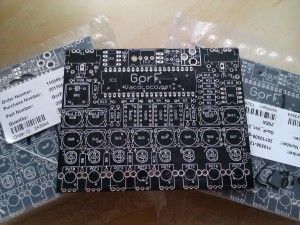
First teaser for the Gorf step sequencer
Gorf V2 demonstration video Part 1
Free VST: TubeOhm 16 Step Sequencer
FREE VERSION A-T and STEPPER OUT NOW on TubeOhm.com
First prev from a free step sequencer. The free version contains velo, hold, shuffle, 16 steps, master pitch +/- 2 OCT 2x keyboard trigger modi.
We are working on a polyphonic version too.( but not for free)
Features:
external audio trigger, 16 steps, max 24 voices poly, 2x MIDI CC send.
The Little MIDI Machine gets upgraded
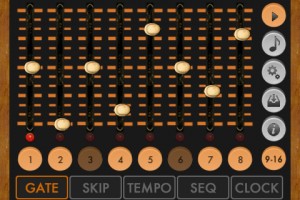
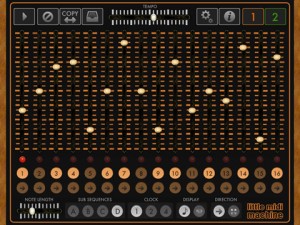
Synthetic Bits has announced a major update to its free MIDI step sequencer for iOS, Little MIDI Machine.
Little MIDI Machine v2 was just submitted to the App Store and is not yet available. Here’s an overview of Little MIDI Machine v2 Features:
- Now a universal app, supports iPad, iPhone, iPod Touch
- CoreMIDI support, including network MIDI
- MIDI clock sync for both Line 6 and CoreMIDI, send and receive
- New random sequence mode
- Updated graphics/UI
- Still free
If you’re not familiar with Little MIDI Machine, it’s one of the more wicked freebies available for iOS musicians. It lets you create two independent sequences in classic step sequencing style:
- Sequences can be any length
- Sequences can run forwards or backwards, and can be ‘played’ in realtime
- Sequences can by synced to clock at three different rates
- Note length can be controlled for the entire sequence
- Sequences can control pitch and velocity
- Sequences can be directed to different MIDI channels
The new features should open up a lot of potential for the app, especially the ability to sync to other hardware or apps via CoreMIDI.
Nice little step sequencer with 8 steps and 8 mutable tracks
Nice 8×8 matrix mixer/multiple for all kinds of duties: Mixing of course, it’s also great for gradual building up drones through muting/unmuting etc… Very versatile and sturdily built. If you use something like the Doepfer A-160/161 Clock Sequencer for the 8 inputs, you get a nice little step sequencer with 8 steps and 8 mutable tracks. Musically these sketches are embarrassingly outdated and 20 years too late, I know, but otoh, who cares. Take it as a bit of nostalgia  This channel is not for my musical output anyway, Katavist’s videos should serve (ideally) only as a source of inspiration for *your* creativity with all this new modular stuff. Thank you for watching!
Plane sequencer – monome 512, monome 64, monome arc4
In this video:
This video is the version with the voice over and saw cloud / osc calibration routine in the middle restored.
I’ve always loved step sequencers and I see the monome as an opportunity to address some of the grey area between the one knob per function analog step sequencer and step sequencers with memory. The idea is to increase the available note range without sacrificing precision and increase the available sequence length range, without sacrificing direct manipulation and feedback. So, when the arc came around it seemed like a useful navigational tool to manipulate a large plane of data.
I’ve been referring to plane as a platform because there are a number of variations I want to implement using the underlying development. This version is optimized to serve as a control voltage source. As such, it produces a lot of outputs. The top row is step enable/disable which is typically used to fire off envelopes. Plane is generating control voltages directly. There are no intermediate bits of software or virtual instruments in-between plane and the end of the patch cords controlling the modular.
The row underneath it the playback loop ruler. Pressing anywhere in the ruler area moves the playback loop to that location. A chorded gesture changes the loop size. One section of the sequence can be edited while playback is occurring elsewhere.When the loop ruler goes off the visible edge of the grid, it lets you know in which direction the active stuff is happening.
Included is a very nice saw cloud simulation of multiple detuned oscillators with adjustable fatness which you can plug directly into your modular.
Also included is direct, accurate CV control of an oscillator via a closed-loop calibration procedure. Of course, MIDI output is also available.
This version of plane uses scale degrees and passes though my modal scale quantizer, so you can switch scales on the fly. You can also use a MIDI keyboard to transpose.
Or, it can also follow a programmed chord progression score, allowing you to improvise with a step sequencer within the harmonic framework of a lead sheet.
The bottom two encoders on the arc are serving as looping automated CV sources.
You don’t have to use an arc with plane, you can navigate with the mouse or keyboard or powermate. Also, you don’t need a 512 monome. All monome sizes are directly supported and can be hot swapped.
Max for Live: Mark Egloff’s APC Step Sequencer
A mild-mannered logistics expert working for Ableton by day, Mark Egloff is also a hobby musician and remixer, who always preferred the direct control and tactile feel of hardware drum sequencers over their software equivalents. Working with Akai’s Shane Hazleton, Mark created a patch that can be used for hours of beat making without touching the keyboard or mouse.
Download the APC Step Sequencer for free here: http://www.ableton.com/pages/max_for_live/apc_step_sequencer
Also, through April, take advantage of deep discounts on Max for Live with Suite 8: http://www.ableton.com/maximized
Free step sequencer for live performances
Judging from the UI it appears to be very straight forward and easy to use. Just load your samples and run. Question remains around audio quality and real time use, but if any of you have or will try it feel free to leave your thoughts on it.
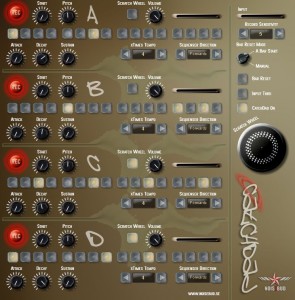
Noisebud has released CatchDad, a new plug-in created strictly for live situations.
With CatchDad you can catch 4 different sounds with just the click of a button and instantly start to program rhythms with the built in step sequencers.
Put it on a channel (or return track) in Ableton Live (or any other VST host that send time signals). Activate live monitoring if you like to record live sounds or run a loop trough CatchDad and start programming beats on the fly, or you could use loops as sound banks to change sound as you go or catch a live drummer and start to rearrange what he’s playing in real time or just add hits here and there.
CatchDad is free and is available for Windows as a VST effect plug-in.
Visit: Noisebud
DATAMASKIN

