
Tara Busch & John Foxx & Benge in the studio
Tara Busch & John Foxx & Benge in the studio with Moog
Inside the studio of John Foxx – video
Tara Busch & John Foxx & Benge in the studio with Moog
My friend Tara continues to deliver nice videos in conjunction with the Mute Short Circuit Festival. John Foxx was also featured by us a couple of months ago:

Anyone with the slightest interest in electronic music has come across the works of John Foxx. John more or less on his own reshaped the electronic landscape with albums like Metamatic and The Garden. Starting off in the 1970′s forming the band Tiger Lily, that later morphed into the legendary act Ultravox. However, John left the band in 1979 to pursue a solo career and over the years, since then, John has been extremely productive – to say the least. John did withdraw from the music scene for a while to pursue other areas, but reappeared in the 90′s via Nation12 and then later on actively started to pursue his music career often in collaboration with others like Louis Gordon, Harold Budd and most recently with Benge (ben Edwards). Currently we are all set for a real treat with the new album called Interplay, featuring John Foxx & the Maths. Without further a due, and introductions, we dive deep into the mind of Mr. John Foxx
Take a Tour of the Classixx Studio
Take a peek inside of Classixx’s studio where they crafted the GLS single “Into The Valley feat. Karl Dixon.”
Tutorial: Diffusion & Absorption Explained
When building or renovating a studio, most people have no way to hear what diffusors do or how they sound in a room.
This video aims to change all that by explaining diffusion in plain terms with no math and allowing you hear an acoustic guitar recorded in close proximity to five different surface types – a QRD diffusor, a poly diffusor, absorption, a bare wall, and a typical bookcase.
This is the latest release in the RealTraps “See and Hear” video lecture series. Most people have no way to hear what diffusors do or how they sound in a room. So this video explains diffusion in plain terms with no math, then lets you hear an acoustic guitar recorded in close proximity to five different surface types – a QRD diffusor, a poly diffusor, absorption, a bare wall, and a typical bookcase.
If you have technical questions about this video that require a reply, please do not post them here as comments. YouTube is not a good venue for a technical exchange. Please post your questions in whatever audio forum you know me from, or post in my acoustics forum at www.musicplayer.com.
Thanks to PSW
AmpliTube Fender apps for iPhone, iPod touch and iPad are now available for download
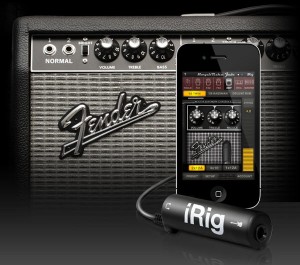
IK Multimedia has announced that its AmpliTube Fender apps for iPhone, iPod touch and iPad are now available for download from the iTunes App store.
Designed and developed in close cooperation with Fender Musical Instruments Corporation, AmpliTube Fender™ is a full featured recording studio, guitar amp and FX rig offering the legendary Fender™ tone.
AmpliTube Fender features
- Real time guitar mobile multiFX + recording and practicing app.
- Full rig with 3 stompboxes (iPhone)/4 (iPad) + amp with effects + cabinet + mic.
- 6 Fender™ Stomps — Fender™ Phaser, Fender™ Blender™, Tape Delay, Overdrive, Compressor (by registering) and Noise Filter.
- 5 Fender™ Amps with matching Cabinets — ’65 Deluxe Reverb™, ’65 Twin Reverb™, ’59 Bassman™ LTD, Super-Sonic™ and Pro Junior™.
- 2 Microphone models, dynamic and condenser.
- Single track recorder (with re-amping) expandable to full 4 track (iPhone)/8 track (iPad) recording studio with master effects through in-app purchase.
- Import and play up to 50 songs/backing tracks directly from your iPod library on your device or from your computer.
- Ultra-realistic tones derived from the AmpliTube Fender Mac/PC studio.
- Slow down or speed up the tempo (-50% to +200%) of imported songswithout affecting their pitch.
- 36 presets can be saved/named/recalled on the fly.
- Includes tuner and metronome.
- Low-latency for real time playing.
- FREE version also available – can be expanded by individual gear model purchases, or bundle purchase via the in-app purchase feature.
- Can be incorporated into the AmpliTube 2 for iPhone/iPad app via in-app purchase.
The AmpliTube Fender apps for iPhone and iPad are currently available from the iTunes App Store, and cost $14.99 USD / 11.99 EUR each. Free versions are also available for iPhone and iPad, both expandable with the individual amps and effects a-la-carte through in-app purchases.
The 4-track recorder and 8-track recorder with master effects’ sections on the iPhone and iPad cost $9.99 USD / 7.99 EUR and $14.99 USD / 11.99 EUR respectively as in-app purchases. AmpliTube 2 for iPhone/iPad users are able to add AmpliTube Fender™ stomp box and amplifier models as individual in-app purchases for only $4.99 USD / 3.99 EUR per amp, $2.99 USD / 2.39 EUR per stomp box, or $14.99 USD / 11.99 EUR for the entire collection of models.
More information: IK Multimedia
Home studio tutorial
How to Connect up Audio and Midi to a PC in a Small Studio
Just the basics that might prove helpful to other musicians looking to expand their setup beyond one or two instruments into a larger more permenant setup. I take you through what I use in my own studio to connect up the audio and midi to a PC.
Via Yorkshirelad69
SoundWorks Collection: Sound One Studios
The history and creative talent that fill the halls of Sound One is a who’s who of the New York film and audio community. Many memorable projects have been crafted at Sound One such as “Black Swan, “Chicago” “The Sixth Sense”, “The Wrestler”, “Brokeback Mountain”, “The Silence of the Lambs”, “Casino”, “Fargo”, “MIB” , “pi” , and “The Big Lebowski”.
Sound One is home to five re-recording studios, two ADR studios, a Foley studio with a comprehensive prop collection, and nearly one hundred editing suites, Sound One is centrally located on Broadway in the historic Brill Building in midtown Manhattan. For more information: soundone.com
get an entire music production studio in your phone
INTUA BeatMaker 2 – Official demo
BeatMaker 2 : the most advanced mobile music workstation.
Combining music production tools that made the success of countless artists, BeatMaker 2 brings a powerful and easy-to-use composition interface for amateurs and professionals alike.
Build your own virtual home-studio creating multiple instruments, connecting them to a full-range of audio effects.
Compose, record, arrange and transform your ideas into complete songs, ready to be shared with others.
Import your own sounds or use the included sound library: more than 170 high-quality instruments and drum presets from synthesizers to realistic orchestral sounds.
You can even import songs from your iPod library!
STUDIO
- Create multiple instruments with Drum Machine or Keyboard interface
- 10 effect units to choose from: Reverb, Compressor, Filter, Delay, EQ, Flanger, Chorus, AutoPan, BitCrusher, Overdrive.
- 3 effect slots for each instrument, unlimited global effect racks
- Customizable Cross Controller for all effects, to manipulate multiple parameters at once
DRUM MACHINE
- Up to 128 trigger pads: 16 pads over 8 different banks
- Chop Lab: Slice audio loops to automatically create new sound presets
- Control sound parameters on individual pad: volume, pan, mute, output bus, semitone, fine tune, reverse and autoscaling
- Low/high pass filter per pad with cutoff and resonance control
- Choose between various pad trigger modes: one-shot, hold & loop
- Customizable envelope (ADSR) control for each pad
- Exclusive groups and polyphony management
- “Live” modes: trigger, mute, reverse, velocity and tune spreading.
KEYBOARD SAMPLER
- 128 keys keyboard with pitch wheel with double keyboard mode, note display and zoom controls
- Easily create your own instruments from any sample combination with the keygroup editor
- Volume and filter ADSR envelopes
- Low/high pass filter with cutoff, resonance and key tracking
- 2 LFOs with customizable amplitude, offset and rate (synchronizable), controlling volume, pitch and filter parameters
- Polyphony control, with up to 32 voices per keyboard sampler
- Legato play mode with customizable glide
- Keygroup controls: volume, pan, semitones, fine-tune, reverse and one-shot, hold, hold & loop trigger modes
MULTI-TRACK SEQUENCER
- Create unlimited instrument and FX tracks
- Automations: Record, edit and replay instrument and effect parameters
- Record, draw, arrange and resize patterns along the timeline to build your song
- Compose and modify patterns with a piano-roll interface. Edit notes, parameters, and automations.
- Instrument and effect recording options: Quantize, take or partial undo, pre-roll, Overdub, note erasing.
WAVE EDITOR
- Full-fledged wave editor with intuitive pinch and selection for manipulating samples
- Basic edition tools: trim, cut, copy, paste, with 8 levels undo/redo
- High quality time-stretching and pitch-shifting algorithms
- Audio tools: normalize, silence, reverse, fade in and out, cross-fade
- Record new samples from device microphone or plugged instrument
- Loop points and tempo/signature editor
MIXER CONSOLE
- Realistic multi-track mixer with level meters
- Edit volume, pan, solo, mute and bus routing features for individual tracks
LARGE SOUNDBANK INCLUDED
- 68 Drum Machine presets from all genres
- 111 Keyboard Sampler presets, from synthesizers to realistic orchestral instruments.
SHARING & GLOBAL OPTIONS
- Export your songs to Audio or MIDI files
- Transfer and manage your files from your computer using the integrated FTP server
- Import any songs from your iPod library to create new remixes
- Upload your songs directly to your SoundCloud account
- Share audio content with more than 20 other music applications using the iOS pasteboard
- Supports BeatMaker 1 kits and projects
- Fully supports Retina display
- Native iPad version coming soon as a free update
BeatMaker 2 is available for iPhone & iPod touch now in the App Store.
PreSonus releases StudioLive Remote, wireless control software
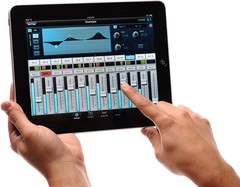
PreSonus has released StudioLive Remote for the Apple iPad, the first dedicated wireless control software for the StudioLive small-format digital console.
At last, you can have wireless remote control of any PreSonus StudioLive-series digital mixer’s channels, auxes, effects, subs, Fat Channel processors, and more. Not only can these functions be controlled from anywhere in a venue by the front-of-house sound person, but custom aux mixes can be simultaneously adjusted by any performer with an iPad.
StudioLive Remote, available free from the iPad Apps store, provides direct wireless control over PreSonus Virtual StudioLive software for Mac and Windows, which in turn controls the StudioLive mixer.
Can’t set up your StudioLive mixer front-of-house? Put it on stage; grab your iPad, running StudioLive Remote; and stroll to the back of the hall to adjust the main and aux mixes, channel settings, Fat Channel processing, effects, and graphic EQs. Need to tweak a monitor mix while on stage? Now you can!
More information: PreSonus
Bring 30 years of easy-to-use home recording to your iPad
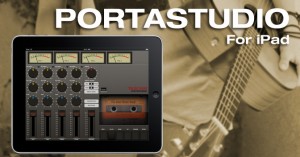
TASCAM’s Portastudio brings 30 years of easy-to-use home recording to your iPad. Based on the PORTA ONE recorder that revolutionized recording in 1984, the Portastudio app records up to four tracks with a vintage vibe.
Record one track at a time using the built-in mic or a headset microphone connection, monitoring on authentic VU meters. A cassette transport with position counter tracks your position while you mix with level, pan and EQ controls. When you’re ready to mix, the built-in mixdown function saves your song as a CD-quality WAV file. Your mix appears in iTunes when you’re finished, ready to share with friends and bandmates.
A generation of your favorite bands crafted their songs with Portastudios, now it’s your turn. Start capturing your songs with the company that invented home recording using Portastudio by TASCAM.
Click here to visit Portastudio on the iTunes store.
DATAMASKIN

