
Music Studio 2.0 for iOS
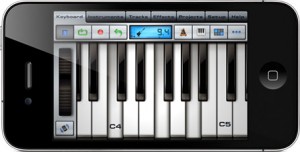
Music Studio offers a complete music production environment for the iPad/iPhone/iPod touch with features and a sound quality previously only known to desktop applications and expensive audio hardware.
It combines a piano keyboard, 65 studio-quality instruments with sustain, a fully fledged 127-track sequencer, extensive note editing, reverb, real-time effects and much more on a user-friendly interface.
FEATURES
• Photorealistic dynamically configurable 85-key keyboard
• Instant positioning via the slide gesture and resize with the pinch gesture
• Drum pads, chord pads and chord programming
• 125 studio-recorded instruments (16bit 44.1kHz sampled from real instruments)
• 65 free instruments, 60 available in the in-app shop
• 4 categories: classic, band, electronic, world
• Release and attack time configurable per instrument
• Sustain samples
• Pitch bend wheel and accelerometer control
• Audio tracks:
• Microphone recording
• AudioCopy & AudioPaste
• iPod library or wav/mp3/AAC/ogg file import
• Waveform and audio region editing
• Low-latency, highly optimized, 64x polyphony, battery saving audio engine
• 100 drum loops
• 5 real-time effects with lots of parameters:
3 high-quality reverb algorithms, delay, 3-band equalizer, amplifier, filter
• 127-track sequencer
• Beat & metronome settings (tempo and signature)
• Mute, solo, effect bus, pan and volume adjustment for each track
• Edit tracks, bars and even individual notes:
Draw, quantize, transpose, repeat, move, length, velocity, etc.
• MIDI import and export
• Save and load your songs and export to wav and AAC formats
• Share your songs via email, AudioCopy and SoundCloud
• Wi-Fi and iTunes file transfer to your computer
• Songs and MIDI files can be opened directly from Safari and Mail
• Unlimited undo and redo
• Detailed in-app help
• Play or record 2 different instruments at the same time with 2 keyboard rows
• iPhone 4 Retina Display supported
• Compatible with: CoreMIDI (MIDI in and out), Line 6 MIDI Mobilizer I & II, Akai SynthStation 25, iRig, iRig Mic, iRig MIDI, Ampkit Link, Apogee Jam, Alesis IO Dock and iConnectMIDI
Tabletop Demo: Sarah Nixey “The Homecoming (Microfilm Tabletop Remix)”
A re-creation of Microfilm’s tech house remix of Sarah Nixey’s single “The Homecoming” on Retronyms’ iPad app Tabletop. All music is played and sequenced by Microfilm using Tabletop on iPad 1. Ms. Nixey’s lead vocal has additional fx in the mp3 that’s playing on the SpinBack turntable. Also, there are 2 custom Gridlok samples (windchimes and backing vocal sample) which have external fx baked into them.

Retronyms has updated Tabletop, its virtual studio for the iPad.
New devices in Tabletop 1.1:
- Compressor
- Limiter
- Expander
- Bit Crusher
- Splitter
- High-pass Filter
Tabletop is a modular virtual studio that comes with a variety of devices, including a pad sampler, matrix synthesizer, mixer, turntable, low-pass filter and more. Additional devices are available as in-app purchases.
for more information on Tabletop visit: www.retronyms.com
Five tips on how to improve your recordings
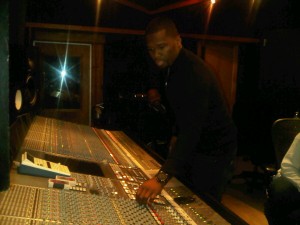
When learning to mix – sound is of paramount importance. Understanding the ins and outs, and how it all interacts is the building blocks from which any mix is made. However, once sound and the manipulation of sound is learned, there is a further and more important step: feel. People listen to music on laptop speakers, ear-buds, and in cars on the freeway with the windows down. They’re probably also listening to the mp3 version.
Under all these circumstances, the sound is clearly compromised. I’d venture that sound quality, is not really the be-all end-all of a record. Mind you, I do feel it’s important, but I don’t think that’s what people attach to and get hooked by when they listen to music.
When dealing with sound, we tend to think in terms of tone, timbre, balance, image, and punch. But why do these things even matter?
Punch is how the sound jumps out at you, image is the world the sound lives in, and balance allows the important elements to step forward. These all have emotional ramifications, and directly influence the feel of a record. So I would posit, that without “feel,” sound quality is essentially meaningless.
Here are some feel-related ideas for you to ruminate on:
1. Unbalanced Sounds – Sometimes when a certain element is unbalanced, stepping on other elements, it can feel really good. It might not sound so hot, but it can feel ever so good.
Sometimes it’s nice to momentarily unbalance a key element to build tension, and then return it to a balanced level as the release. It’s also a good way to direct the listener’s attention.
2. Groove is Everything – No matter what, at all costs, get the groove working. Whether this compromises the sound or not, groove is the innate part of music that we all feel with our body. It determines whether or not we like something before we even determine thoughtfully whether or not we like something.
Consider old Motown recordings. Any technological hurdle was superseded by incredible musicians playing with great feel. Consider this next time you’re obsessing over that hot new plugin bundle.
3. Transitions & Arrangement Dynamics – It’s very rare that a song that doesn’t vary much or have any solid transitions actually captivates people. Address and consider the points immediately before & after a song changes sections. Automate some dynamics between and during sections if necessary. [editor’s note: for transitions, check out these free cymbal swells from Joe Gilder of Home Studio Corner.]
4. Depth – That 3D image is an important part of the emotion of a song. As Jimmy Page said: “the emotion is in the room.” That can be interpreted both figuratively that the emotion is in the interchange between musicians working together in the same space, or literally that it’s the sound in the space that resonates emotionally. I think both are accurate.
5. Make the Moments Special – A song is a series of moments – if every moment is special, the song is always impactful. When recording, take the time to get the performance right. Like Edward J “UK” Nixon says, “keep working until the goosebumps come.”
Matthew Weiss records, mixes, and masters music in the Philadelphia, New York, and Boston areas. Find out more about him here.
Via PSW
Avid Console in full action
Amazing test pattern on an Avid recording studio console.
IMSTA FESTA, a celebration of music technology, features exhibits from the major music technology companies on the market today as well as the highly educating Shocklee Innertainment Panel series about music, creativity and business.” – imsta.org
Video by: Oliver Chesler
Review: BeatMaker 2 for iOS
BeatMaker 2 is an elaborate studio with loads of effects and hundreds of samples. I ignore both of those facts completely as I go on a wild tear to put it through its paces. Included are tips on Hokusai and all kinds of sample chopping fun.
“Build your own virtual home-studio, create multiple instruments and connect them to a full-range of audio effects. Compose, record, arrange and transform your ideas into complete songs, ready to be shared with others. Import your own sounds or use the sound library provided: more than 170 high-quality instrument and drum presets from synthesizers to realistic orchestral sounds. You can even import songs from your iPod library! Connect your MIDI accessories for an external control of BeatMaker’s instruments, effects and mixer, ideal for home-studio productions and live performances. BeatMaker 2 is an universal application, with specifically designed interfaces for the iPad and iPhone platforms. Works on all iPhone, iPod and iPad models starting with third generation devices (iPhone3GS, iPod3G 32GB, iPad 1 & 2).”
The virtual studio for iPad – Rhythm Studio – is being updated
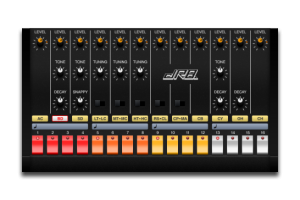
Pulse Code has announced plans for the next version of Rhythm Studio – a virtual studio for the iPad.
New Features in R3:
- Optimized Mixer that fits on one screen. The mixer has been optimized to fit on one screen which allows for better control but also gives us more workspace.
- 4 Audio Devices! That is right, with the smaller mixer the XYP Control Pad mkii has been moved which gives us one more slot to add a device!
- User selectable devices. In SETTINGS view you can change out the devices for your song. Do you want 4 x TB3 synthesizers just because? Well you can!
- Paste your song to the Intua Audio Paste clipboard to share between other apps! I exported the demo songs and sucessfully imported it into Garage Band of the iPad. http://support.apple.com/kb/HT4622
- Linear Control. In SETTINGS view you can change from Rotation control to Linear control. Thanks everyone for your feedback!
- Email Support. A button within the app will email us directly to give us feedback or ask for help.
- Email Song Session File. Share your masterpiece with your friends! (Audio in a future update)
- Song File Lock. This will prevent your song from being deleted or modified. Great for songs you want to share or just jam over.
New Devices in R3:
- Improved 4 Channel Mixer with controls that fit on one screen. The Effect Units have also been combined to make it more streamlined and simple to use.
- Improved XYP Control Pad. The new Control Pad mkii has a wider control surface that makes it easier to use.
- DR-9 Drum Machine. Perfect Four on the Floor drum machine to make those banging beats! Also includes flam to hit those 32nd notes.
- Gate Audio Insert Effect. The Gate Effect slices up the audio and takes it to another dimension.
“The only thing we need to do is build our new virtual analog subtractive synthesizer called: “The Hornet”. The Hornet will be a ribbon style synth. We’ll post the specs as soon as they are set.”
Rhythm Studio Browser and Workspace
http://youtu.be/zsekwcLgXxQ
How to turn your iPad into a virtual studio
Rhythm Studio is a workspace style app with a studio of realistic electronic music instruments. It is a universal app available on all current iOS hardware.
Rhythm Studio balances advanced features by using an easy to understand interface resembling real instruments. This means that one button does one thing just like it would with real hardware. Knobs turn, switches slide, and buttons press. You won’t get lost in abstract interfaces or design. Rhythm Studio is the next best thing to having the real hardware.
Rhythm Studio includes a full 808 drum machine, 303 synthesizer, sample based synthesizer, XY style control pad, and mixer with FX.
Rhythm Studio has three ways of creating music.
- Manually program the drum machine and synthesizers like the original hardware.
- Use the Control Pad to play the drum machine or synthesizers live.
- Create randomized patterns based on the key and scale of the song.
Ever dreamed of an 8Bit studio in your pocket?
8Bit Studio – the only circuit bent 8bit SID synth for your iphone! Customize your patterns using the built in step sequencer or play live on the retractable keyboard then bend and distort the sound using the touch contacts!
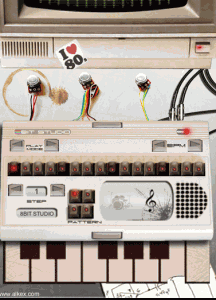
Features 128 steps of memory, 8 keyboard patches, 13 drum sounds, all sampled from the Atari Commodore SID Chip.
http://itunes.apple.com/us/app/8bit-studio/id442041384?mt=8#
Note from the makers:
!!! Email us your sticker artwork to see it appear in the next update !!!
contact@alkex.com
VirSyn has announced iSyn Poly – a new electronic music studio for the Apple iPad.
iSyn Poly is an electronic music studio for use with Apple iPad. iSyn Poly places an unbelievable number of features including three studio-quality, fully programmable virtual analog synthesizers and a drum machine packed in just three different screens on your iPad !
Each synthesizer is a full-featured analog modeling synth with three oscillators, a classic 24 db/oct ladder-style lowpass filter, independent filter and amp envelope generators, and full modulation routings. With our 10+ years of experience with analog simulations you can expect some serious sound easily covering all those fat frequencies so prevalent in modern production.
iSyn Poly also includes a sample playback-based drum machine with seventeen kits, each containing eight samples. Drum samples include 808, 909, modular synth drums and numerous 80’s drum machines. Volume, pan and decay time are individually adjustable and pitches are tunable over a wide range for crazy effects.
The full fledged sequencer let you arrange complete songs and can record the notes and controller movements of your performance. The unique gesture oriented user interface makes it ideal for live editing of notes and automations.
Play the three synths or drum machine with the onscreen keyboard/drum pads for fun live jam sessions, or let iSyn Poly do the playing for you with its full featured piano roll sequencer editable while playing. Play the keyboard by touching notes, or sliding up and down for amazingly expressive pitch glides and vibrato. iSyn Poly can even play a beat and synth track while you jam over sequenced tracks for a one-man iPad band!
With the Apple iPad Camera Connection Kit you can use a CoreMIDI compatible MIDI Keyboard to control iSyn Poly.
iSyn Poly is developed by VirSyn with content from audioMIDI.com

Features:
- Three Independent Synthesizers
- Three oscillators with sawtooth, pulse, triangle and sine waves. Modulations routings: LFO->pitch, filter ADSR->cutoff, LFO->pulse width.
- White/Pink noise generator.
- Classic 24 dB/oct ladder-style lowpass filter with drive parameter. Modulations routings: LFO->Cutoff, Filter ADSR->Cutoff, Velocity sensitivity with external keyboard.
- Amp section includes distortion with drive, asymmetry and crusher (bit reducer) parameters.
- Control matrix allows real time control of five parameters using the X/Y touch pad, the modulation wheel of an external keyboard and the tilt sensors of the iPad.
- Arpeggiator for automated sequences.
- 64 factory presets, unlimited user presets can be shared.
- Drum Machine
- Eight simultaneous instruments arranged into eight user-selectable drum kits.
- Editor page allows tuning, panning, level and decay time for individual instruments.
- Effects Section
- iSyn Poly features one global effects unit with phaser, flanger, chorus and stereo/cross delay.
- Effects amount is individually settable for each of the synths and drum machine.
- Live
- Play melodies live with onscreen keyboard/drum pads. Drag fingers for slides and vibrato.
- Optionally use CoreMIDI* compatible hardware keyboard.
- Full featured Sequencer
- Four track sequencer with piano roll and automation editor.
- Record what you play live with the onscreen keyboard/drum pads or using an external CoreMIDI compatible keyboard.
- Real time quantize function and metronome for recording.
- Arrange your songs with variable length patterns ( 1 – 99 bars ). Move and copy/paste patterns.
- Recording and playback of X/Y Pad movements, modulation wheel, pitch bend and key velocity.
- Full set of editing functions with unlimited undo.
- Modeless gesture optimized editing.
- Global
- Manage unlimited number of songs.
- Render song or patterns to audio and midi files.
- Audio pasteboard. Copy audio recordings to Clipboard for use with other Apps (e.g. Intua BeatMaker and many others)
- Exchange songs and user presets with File Sharing in iTunes.

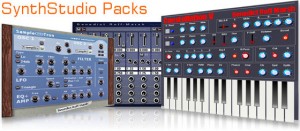
SynthStudio Packs becomes freeware
Benedict Roff-Marsh has announced that SynthStudio Packs and PreRoll Recorder are now available as a free download.
The time has finally come. I have had a great run with SSP but the time has come for it to cease being payware and to go free. For the next wile I will still hold SSP & PRR on my site and they can be downloaded free – with the hope some will buy some of my music or show their appreciation in some other way.
I really want to thank all the people who have supported the SSP not only in purchasing and using but in promotions and generally adding to the Pack. I value each and every one of you and it is with some tugging of the heartstrings that I make this move.
Please enjoy (or continue to enjoy) SSP I + II + II + IV + PRR
The SynthStudio Packs include various VST instrument and effect plug-ins for Windows PC.
DATAMASKIN

