
Major update to NanoStudio
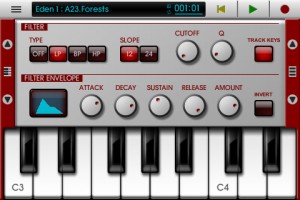
Blip Interactive has announced a big update to NanoStudio, adding iPad support and more.
Here’s what’s new in NanoStudio 1.3 (Universal):
Features:
- Universal iPad version
- Free desktop version now supports window sizing
- Added extra musical scales to keyboard
- Increased size limit for a single sample to 32MB
- Ability to slide the keyboard by fractions of a note
- Mixer mute/solo
- Improved bottom range of mixer volume faders
- Double tap on mixer channel title to go to instrument
- Double tap on ‘centre zero’ knobs to return to centre
- Added ability to tap song position on status bar to toggle between bars and hours/minutes
- Added indicator to main menu to show the last selected instrument
- Update to latest Akai SynthStation library
- Added ‘Mix audio with other apps’ option to allow iTunes music background play (iOS)
- Added buffer latency settings (iOS)
- Automatic normalization is now optional after sampling or resampling
- Added an ‘add effect’ button to empty effects slots
- Changed TRG behaviour to allow drags across pads
- Added load/save effects chain to the effects select dialogue
- Song editor – vertical zoom
- Song editor – mute/solo buttons can be swiped vertically
- Song editor – added MIDI activity indicators to each track
- Song editor – parts on muted tracks are shown in grey
- MIDI file and .nsp file export dialogues now have a ‘show file’ button (Windows/OS X)
Bugfixes:
- Buzzing sound on Eden ring mod when phase was non-zero
- TRG-16′s ‘auto BPM’ function was sometimes inaccurate
- Possible fix for OS X not enumerating some MIDI input devices
Get going with RS4000 Polyphonic Subtractive Synthesizer for iPad
RS4000 Polyphonic Subtractive Synthesizer – have a peak at the new synth here in action >>
The fully programmable subtractive synthesizer comes with 50 presets and the ability to tailor all the following parameters and save the new sounds for future use:
- Two oscillators with sine, sawtooth, square and triangle waveforms
- Phase, phase modulation, balance and drive controls for oscillator interactions
- Octave, semitone and tune controls for Oscillator A
- Low pass, high pass, band pass, notch and peak filters with frequency, Q, mod envelope, and ADSR controls
- Amp envelope with ADSR conrols
- LFO with sine, sawtooth, square and triangle waveforms, rate, fade, pitch, filter frequency, filter Q, balance and gain controls
- Mod touch ribbon with hold, LFO rate, LFO fade, filter frequency, drive and balance controls
- Pitch wheel, six scrollable octaves, and sequencing
+verb Soundpack
Newly added to the Gridlok Sampler, RS3 Keyboard, and M8RX Tone Matrix are brand new and unique sounds from +verb, an electronic producer out of Arizona who records for Robox Neotech and has recently remixed Starkey.
SoundCloud Sharing
After synthesizing the perfect sounds with RS4000 and recording, Tabletop 1.2 now allows users to post studio quality 44.1kHz, 16bit audio to their SoundCloud account. Tracks can be labeled either public or private, and public tracks can be posted to Twitter, Facebook, Tumblr and Foursquare as well. Retronyms is pleased to have increased the capabilities of Tabletop production and provide effortless audio sharing, and the company looks forward to seeing how Tabletop community utilizes the new features. Users are encouraged to upload tracks created with Tabletop to the SoundCloud Tabletop group: http://soundcloud.com/groups/tabletop
And even better, the app has dropped to just $0.99
Learn more: http://retronyms.com
Tabletop is a modular environment where you can mix and match different devices. Select from more than a dozen devices including samplers, mixers, effects, sequencers and more.
Music Studio Guitar Recording
And here are the details:
http://www.xewton.com Music Studio offers a complete music production environment for the iPad/iPhone/iPod touch with features and a sound quality previously only known to desktop applications and expensive audio hardware.
It combines a piano keyboard, 65+60 studio-quality instruments with sustain, a fully fledged 127-track sequencer with audio tracks, extensive note editing, reverb, real-time effects, microphone recording and much more on a user-friendly interface.
Try the free Lite version!
Rob Papen in the studio – Sound design and more
Here’s a short video by synth.nl with Rob Papen in the studio talking synths and more:
A while ago Rob Papen visited my Apollo studio. Together with his crew he was filming some footage for his upcoming book and DVD about sound design on synthesizers. While they were filming in my studio I filmed them with my own camera. So this short movie is sort of a ‘making of’. More info about the DVD will follow on http://www.robpapen.com. I made all the 3D animations in this movie with Cinema 4D.
Amazing guitar studio
Not much to say but “Prepared/Filtered/Guitar” hehe
Check out the demo of Rockmate – version alpha – Fingerlab
http://youtu.be/U3z4ww2e2es
Rockmate Version Alpha demo test- Fingerlab
http://www.fingerlab.net/rockmate
Rockmate is ready to rock !
We have developed Rockmate with the intention of delivering the best realtime rock music performance environment for iPad. Your guitars are always well tuned, no need to carry your drum-set or to patch your keyboard. A smart metronome and a realtime looper will help you to compose and record your songs and demos. Share your recording by mail, Facebook or iTunes sharing folders
Specifications:
✔ Realistic design and animations
✔ High quality samples*
✔ 4 players available in one single iPad
✔ Realtime Looper with unlimited undo
✔ Metronome with light and custom sounds
✔ Mixer with level and pan control
✔ Realtime Fx (distortion, multiFX, powerchord)
✔ Chords progression customizable (select 2X4 chords from 160)
✔ Guitar open tuning
✔ Save your styles (Chords progression, FX, Drum, keyboard style…)
✔ Audio Background
✔ Export: .wav or .aac
✔ Sharing: iTunes sharing folder, Facebook and Email.
*All samples have been selected from most the famous rock instruments, recorded, edited and mastered at Fingerlab professional studio: Jazzmaster,Stratocaster, Ludwig, Gretsh, Melotron, Rhodes, Wurlitzer…
Teaser pic for upcoming new synth for Rhythm Studio
Gemini Synthesizer

Details so far:
The most versatile synth created for Rhythm Studio so far…
2 Analog style oscillators
Oscillator 2 >> 1 sync
Oscillator 2 >> 1 ring modulation
Oscillator tune in +/-7 semitone range
24 db/octave resonant ladder filter
Full ADSR envelopes for filter and amp
LFO
________________________
Rhythm Studio balances advanced music making features by using an easy to understand interface resembling real instruments. This means that one button does one thing just like it would with real hardware. Knobs turn, switches slide, and buttons press. You won’t get lost in abstract interfaces, menus, or design.
Imagine having a studio of rare vintage synths and drum machines in the palm of your hand. Beautifully rendered synthesizers make seeing the app as enjoyable as hearing it. Rhythm Studio is the next best thing to having the real hardware.
Rhythm Studio allows you to make music the way you want to by giving you three different ways to create your song.
1. Use the step sequencer like the real hardware.
2. Use the Control Pad to play the synths live.
3. Instantly create a random pattern.
=====
FEATURES
– Dynamic workspace full of awesome audio gear
– Intuitive pinch and tap navigation
– Robust pattern and song sequencer
– 3 easy methods to making your songs
– Recreation of classic drum machines
– Recreation of classic synthesizers
– Mixer
– FX
– X/Y style control pad
In the studio: Ableton liveset tryout
Ableton in action:
Trying to find a way to combine a couple of tracks and keep it as live as possible(without losing the plot). The control is stock Live and Automap, no Max4Live. Sounds are 50% standard Ableton and 50% sampled hardware (mostly Oberheim Matrix-1000). FX all standard Ableton except the free “King Dubby” plug-in used in the first track. My brain is the bottleneck. I just wish Novation would do a $500 version of the Launchpad with LCD buttons which could display text/color.
Double Trouble (Rhythm Studio on iPad)
Background information:
Another little number made with Rhythm Studio. I’m still figuring out how to make a good video of the iPad (it can be hard), but I’m getting better. Enjoy!
There’s no one driving – In the studio with John Foxx
In the studio with John Foxx and Benge:
“1-practicing Interplay
2-me recording the sequenced part for A New Kind Of Man – note: most of the backing tracks for the live set are taken from the original 8 track masters that John has kept all these years, but I have to remake a few bits here and there…
3-sequencing the bass line on No One Driving
4-John, Hannah and the Digitech Vocalist II”
DATAMASKIN

