
CAUSTIC Music Rack has been released for the Android platform
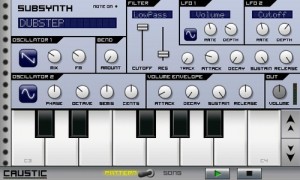
CAUSTIC lets you create powerful electronic music on the go. This app is packed with 8 machines including: Virtual analog subsynth. 2x PCM synths (23 demo samples included) with Song sequencer. 2x 303-like BassLine synths. Sampling drum machine (9 demo kits included). Mixer desk with Delay/Reverb and 4 insert effects.
All files are stored on the SDCard, and users can supply their own WAV files for use in the PCMSynths (drum machine setup coming soon)
Minimum recommended device specs are:
– 800 MHz ARMv7 processor
– 800 x 480 resolution screen
– Headphones or external speakers
This is the demo version of CAUSTIC Music Rack, because 15 minutes isn’t enough time to get familiar with everything this app can do. There is no time limit in this version but save/load/export are disabled. The app will automatically save your current song between sessions.
A full-featured paid version should be out in the next few weeks.
More info from the developer’s website:
- “The first version of is finally out on the market and I’m very excited. I’ve been working on this since Christmas, and am anxious to see what people think.When I got my Nexus One, I was disappointed in the lack of audio apps on the market. Since then, a few good ones have come out, but I really wanted a virtual rack full of machines to tinker around with and make some grooves. The goal was to get a similar experience to some of my favorite software: Reason and ReBirth by Propellerhead.
It struck me as impossible that ReBirth ran on a Pentium 90 MHz back in the day, yet somehow there was no way to get even close to that on Android because of various API issues. Well there certainly are some shortcomings in regard to audio on Android, but working around them and optimizing as much as possible, CAUSTIC was born.
I’m hoping to get how-to videos for each of the machines soon, as well as a F.A.Q. section as I’m sure they’ll be lots of common questions about this app, but please be patient. I’ve got a full-time job and only get a few hours a day to work on this.
If you’re reading this and want to help out, there’s lots to do and my time is limited so I’m still looking for:
+ A good demo song to ship with; contact me through the market’s developer email if you’d like to help.
+ More subsynth presets; if you’ve got cool presets you’ve created, send them to me and I’ll include them in future contents packs.
+ PCMSynth samples; if you’ve got any samples ( tuned to C ) that are of your creation (no copyrighted material), send me a link and I’ll look at including them in future content packs as well.
+ The other big task I’ve got on my list is the paid version with Save/Load and file export. I’ve got a basic WAV exporter working, it just needs more testing. Then I have to integrate Android licencing scheme and a few other little things. Hopefully the paid version will be out in the next few weeks.
I hope to release updates frequently with bugfixes and add-ons, and I plan to release free content packs with synth/drum presets and samples too. If you’ve got a feature you think would be cool, write me, I’m open to suggestions.
Thanks for reading, be patient with this first release and send in your feedback.”
You can download CAUSTIC Music Rack for free now from Android Market at https://market.android.com/d…
Meteor Multi Track Recorder for the iPad released
Developer 4Pockets has released Meteor – a new digital multi-track recorder for the iPad. The program features up to 12 tracks of digital audio, a built-in mixer and multi-effects processor.
According to the developer, Meteor is ‘ideally suited for creating musical compositions, and also a great tool for journalists and business people who need to splice and piece together voice notes, narration or dictation’.
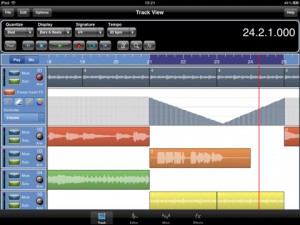
Meteor includes a full-featured sound editor, allowing recordings to be trimmed or spliced together. You can apply various effects to your recordings either directly, as part of the recording process or in real time during playback. Editor features include cut, copy, paste, fade in/out. clear, reverse, gain, normalize, remove DC offset, time stretch and pitch shift. Effects include digital delay, chorus / flanger, reverb, graphic equalizer, tone boost, compressor (with side chaining) and distortion.
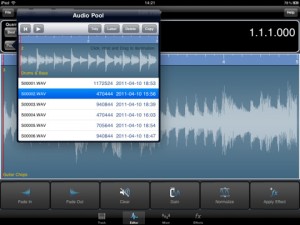
Recordings can be exported to standard file formats.
Features:
- Record up to12 tracks of CD quality audio
- Multi-Effects Processor
- Integrated 12 channel Mixer
- Integrated Sample Editor
- 3 Global Send Effect Busses
- Insert Effects with freeze facility to reduce CPU load.
- Record Effects & Record Monitor
- Mixer and Effect Automation
- Metronome
- Mixdown / Bounce Facility
- Import samples and iPod songs.
- Export to compressed CAF and WAV formats
- Automatic Delay Compensation
- In-App Purchases through the Online Shop found in the Help Menu.
Pricing and Availability
Meteor MultiTrack Recorder is available now for US $19.99.
Link:
Workstation for Android powered devices – Caustic Music Rack

Single Cell Software has announced Caustic Music Rack, a synth workstation/virtual studio, inspired by Propellerhead Reason.

Features:
- 1x Virtual analog subsynth
- 2x PCM synths (23 demo samples included)
- 2x 303-like BassLine synths
- 1x Sampling drum machine (9 demo kits included)
- 1x Mixer desk with Delay/Reverb and 4 insert effects
- 1x Song sequencer
The current version is free; a commercial version is in the works.
StudioBLADE – Best Keyboard Production Station
http://www.youtube.com/watch?v=WnbmihJ0xr0
Well, whether it is the “best” remains to be seen, if you have tried please let us know what you think of it
This video shows the new Music Computing StudioBLADE(tm) 88-key keyboard production station. It is simply the most advanced, portable, upgradeable and least expensive keyboard production station available. $500 less than any other keyboard workstation and thousands less than any other keyboard production station, the StudioBLADE line of keyboard production stations aren’t just another generation ahead, they literally redefine the entire category.
Rhythm Core Alpha: Lo-fi Johnny
Amazingly cool chip video featuring a Nintendo DSi music workstation
100% Rhythm Core Alpha. This time I used the lo-fi sounds (mainly Square, Saw and C64 samples) and tried to assemble retro tunes whith many tones and some arpeggio sounds, which personally remind me of my Game Boy childhood. Are you a Lo-Fi Johnny, too?
Amazing: You can play all your patterns (blocks) in realtime and even change the key/mode of your created tunes automatically. LIVE !!!
Thank you very much again for this awesome DSiWare release and keep up the good work, SoftEgg!!!
Transform your iPod or iPad into a music making workstation
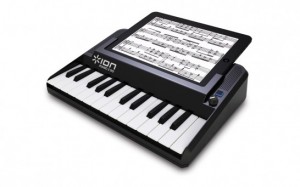
The Ion Piano 2 Go is a new dock that transforms your iPod or iPad into a music making workstation.
Features:
- Keyboard and piano performance app for iPod or iPad
- 25-note mini-keyboard for comfortable, realistic performance
- Velocity-sensitive keys for maximum expression
- Includes free App download with four different sounds to play
- Everything you need to practice, perform and write music
- Powered by batteries or AC adaptor
Pricing and availability are to be announced.
A tribute to Spectralis
Made for fun, hope nobody is bothered by the videocrap, its about the music, just to improve my skills with this machine and to have more different sound examples of the Spectralis in the net, I think its a great workstation, with a lot of soundpotential, not easy to learn, but unmatched for complex rythms and pseudo hardsequencing, cheers make music rainmaindein
Via RainMainDein
BeatMaker 2 – mobile music workstation for iOS.
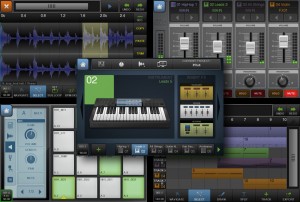
Intua has released BeatMaker 2, a mobile music workstation for iOS.
Combining music production tools that made the success of countless artists, BeatMaker 2 brings a powerful and easy-to-use composition interface for amateurs and professionals alike.
Build your own virtual home-studio creating multiple instruments, connecting them to a full-range of audio effects. Compose, record, arrange and transform your ideas into complete songs, ready to be shared with others.
Import your own sounds or use the included sound library: more than 170 high-quality instruments and drum presets from synthesizers to realistic orchestral sounds.
You can even import songs from your iPod library!
BeatMaker 2 for Requires iOS 3.1.2 or later is available to purchase for $19.99 USD / 15.99 EUR / £11.99 GBP.
More information: Intua / BeatMaker 2
Akai Synthstation 49
Here’s what AKAI has to say about it:
SynthStation49 is the most advanced, intuitive music controller designed specifically for use with the iPad and the first true iPad performance tool for musicians. Working seamlessly with Akai Professional’s heralded SynthStation software, SynthStation49 provides unparalleled music creation capabilities, including direct in-app MIDI recording from its velocity-sensitive keyboard, nine MPC-style drum pads and array of transport controls. In addition to its integration with the SynthStation app, SynthStation49 is also completely iOS CoreMIDI compatible, making it instantly compatible with dozens of music apps already in the App Store and hundreds more on the way.
Dock, power and position the iPad perfectly using the adjustable-angled cradle, or establish commanding control over your favorite computer software using SynthStation49‘s USB/MIDI port. Professional ¼” outputs and extreme portability ensure you’ll be able to take your sequences straight to the stage at a moments notice.
SynthStation49 is the only full-featured, professional keyboard controller allowing direct MIDI performance recording onto an iPad. Bridging Akai Professional’s popular MPK controllers with the previously released SynthStation25, SynthStation49 provides immense software control with forty-nine, full-size velocity-sensitive keys, nine backlit MPC-style drum pads and full transport buttons. An adjustable-angled dock for iPad allows the user to easily slide their tablet into the SynthStation49’s cradle and position the screen to their preference.
SynthStation49’s keyboard, pitch/modulation wheels and sustain pedal input provide great feel and the essential controls for musicians and producers to compose, record and perform. The nine drum pads of SynthStation49 give users immediate, intuitive beat-creation capabilities over the 50 classic and modern kits available within the SynthStation software. Program, Sequence, Song select and Transport buttons also provide quick navigation to the SynthStation App’s most used components for a seamless, efficient workflow.
SynthStation49 also contains a stereo pair of professional ¼” TRS outputs with volume knob for easy connecting to other pro audio equipment on stage or in the studio. A headphone output also lets users practice and compose in private. The SynthStation49’s USB port can be connected directly to a Mac or PC computer to receive power in addition to transmitting MIDI to and from music software – a great way to turn the SynthStation App or other CoreMIDI compatible App into a sound module. You can even use SynthStation49 as a traditional USB MIDI controller with your computer – no iPad required!
Reason 5 Audio Processing with ReBirth for iPad
Reason maestro “Peff” has released this nice video on his Youtube channel featuring the ReBirth on the iPad
The iPad audio output is routed to the line in on the workstation. Reason 5 receives the active audio input and can process the sound in real-time. This demonstration features a range of custom combinator effect devices including CycleOn for Reason 5 beta.
Combinator Effects being controlled by the Livid Instruments OHM64. Thanks Peter!
DATAMASKIN

