
Nord Electro 5 – Official Demo
Since its introduction in 2001 the Nord Electro has been the natural choice for musicians in need of authentic emulations of classical electro mechanical and acoustic instruments in a portable and easy to use package.
With greatly expanded memory, the added ability to split and layer and a live focused program section, the new Nord Electro 5 is a highly refined, focused yet flexible stage keyboard.
Read more: http://www.nordkeyboards.com/products…
Production by Kilogram
Musician: Erik “Errka” Petersson
New video from Jimmy Somerville – Some Wonder
Earlier this month, former Bronski Beat and Communards man Jimmy Somerville released Homage, his ninth studio album and one which drew on a lifelong love of disco.
You can now ahead of a run of live dates beginning in June – head to Somerville’s website for full details – here’s a first look at the video for ‘Some Wonder’.
If you like what you hear you can swap over to Cherry Red Records to get hold of the album.
Propellerhead Software has announced the release of Reason 8.2
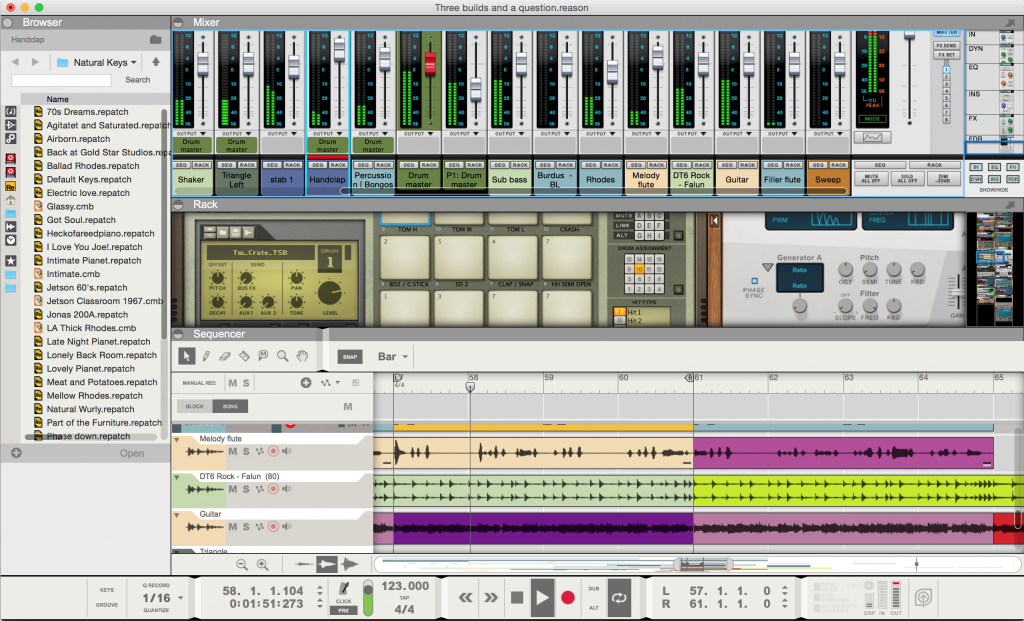
Propellerhead Software has announced the release of Reason 8.2, the most recent update of the award-winning Reason music production software.
The latest update makes it even easier for new and existing Reason 8 customers to download, install, and stay up to date with the latest version.
Eliminate the hassle of bulky manual installs with the new convenient auto-update feature. Reason now detects and downloads the most recent eligible software updates so you’ll always have the latest and greatest version. Download and get up and running faster. A typical Reason update (minus the soundbanks) will now be around 100 MB—a tenth of its old size.
The Reason 8.2 update addresses many requested features including Revert browsing—a new workflow in Reason’s browser that will be familiar to users of previous versions—more colors in the sequencer, expanded Remote support for Redrum Drum Machine, streamlined sound bank handling and more.
Reason 8.2 also gives you access to the newly introduced Propellerhead music-making service, which is continually updated with new features and functionality based on customer feedback. This free music making service connects the free Figure and Take mobile apps with the award-winning Reason music production software, so you can create, share, collaborate and remix with other musicians around the globe.
Reason 8 is available for purchase for MSRP 405 EUR/$449 USD. Reason Essentials 8 is 120 EUR/$129 USD. Reason 8.2 is a free downloadable update for Reason 8 owners.
Violent Delay – new free VST Plug-in for Windows
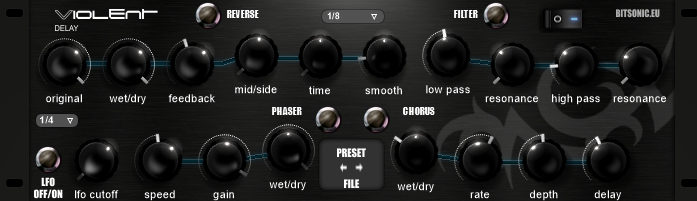
Bitsonic has released Violent Delay, a free VST Plug-in for Windows. Violent delay is a simple ping-pong delay plugin where a user can change the delay with chorus, filter and phaser:
- Original: Lower or add to the volume of the input.
- Wet/dry: Change the volume with this option.
- Feedback: Change the lenght of the feedback.
- Mid-side: At 0 state it functions as a delay mono, at maximum it functions as a ping-pong delay.
- Time: This option changes the feedback of the delay. If you want the feedback in sync with the speed this function should be at 0.
- Reverse: The delay turns around.
- Smooth: Makes the sounds of the delay more blunt. It’s like an attack-value changer.
- Filter: Filtering the delay – Cut the unnecessary deep or low sounds from the effect.
- Filter low pass: Filters the high sounds, leaves the low ones as they are. The resonance value is changeable.
- High pass: Filters low sounds. The resonance function that goes with the 2 filters can change the tune of the filters.
- Lfo: Automatized filter. It only works if the filter and filter on/off is on.
- Phaser speed: Changes the speed of the phase shift.
- Phaser gain: Changes the intensity of phase shift.
- Phaser wet/dry: Regulates the mix of the raw delay and the phaser sign.
- Chorus wet/dry: Regulates the mixing of the original and the mixed sign.
- Chorus rate: Adjusts the pitch’s measure’s difference.
- Chorus depth: Regulates the volume of the sound given by the value of the rate.
- Chorus delay: Changes the time of the altered sound.
Price: Free.
Vintage Your Synth with Rhythmic Robot Audio
http://www.rhythmicrobot.com show you how to get your synth looking vintage and playing great with our step-by-step guide to Getting Vintage!
Being a synth god isn’t just about knowing how to play. It’s not even mainly about that. What it’s really about is getting vintage. 90% of Keith Emerson’s “sound” was simply the result of oxidised jack sockets. You can achieve the same results as your synth heroes using our simple, easy-to-follow techniques, winning friends and standing out from the crowd in the process.
Colors – Sleep Museum
StaffPad – new music notation application
StaffPad is a revolutionary new music notation application for Windows 8.1 and Surface.
StaffPad allows composers, musicians, students, teachers – anyone interested in music – to write notation by hand directly onto virtual manuscript. StaffPad features advanced handwriting recognition, and will convert your music into a beautifully typeset score. Experience the magic of writing with StaffPad by getting it exclusively from the Windows Store.
StaffPad features advanced handwriting recognition, and will convert your music into a typeset score. Simply write your music straight on to the screen, using your device’s pen. As you move from bar to bar, StaffPad will convert your handwriting into an ‘engraved’ score. You can draw notes, beams, stems, articulations, accidentals, slurs, ties and more.
The developers describe it as ‘the most natural way to write music on digital device, ever.’
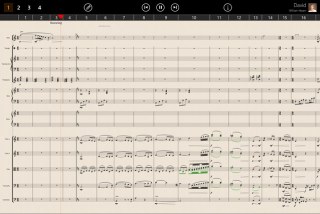
What You Score Is What You Hear
StaffPad contains a built-in playback engine, and an entire orchestra which has been recorded and programmed to play back your score. Multiple dynamics layers, multiple recorded articulations, repetition samples and smart playback rules ensure that what you see is what you hear. The entire symphony orchestra is represented, and more instruments are available to purchase from the in-app store.
Key Features:
- The interface has been designed to reduce clutter, and is context sensitive – showing only the information you want, when you want it.
- Use your finger to move around the score, and pinch to zoom – with butter-smooth scrolling. When you want to write music, just use the pen. Use your eraser button on the pen to remove both ink strokes and existing notation. You can also draw freehand on the score, using the sketch layer, to quickly brainstorm and leave notes/comments for yourself and others.
- StaffPad will intelligently layout the score when it’s time to print. You can print the entire score, as well as individual parts for each musician. StaffPad has smart collision avoidance and music layout rules which handle the reflowing of the music to a page-based layout automatically.
- StaffPad allows you to easily share and export your work. You can export MIDI and MusicXML, should you wish to continue working on your score in other programs. You can also export your score to MP3/WAV format, or quickly email an MP3 of your work in just a couple of taps via the Windows 8.1 share charm. StaffPad also supports import of MusicXML and MIDI files.
- StaffPad is always saving your score, and keeping track of versions – which you can return to at anytime. By saving your scores to OneDrive, you can ensure that your scores are kept in sync across all your devices. StaffPad also syncs your settings and preferences. You can also organise your scores into ‘collections’, meaning that your scores and projects stay neatly organised, for easy access. You can even pin frequently accessed scores straight to the Start Screen.
- StaffPad is the first notation application which allows you to easily draw dynamics/music expression data right onto the staff. By toggling the expression layer, you can elegantly draw in additional dynamics detail, which can enhance the realism of playback without compromising the existing dynamics markings on your score.
- StaffPad intelligently handles transposing instruments, allowing you to write in concert pitch and toggle to transposing when you’re ready, or when printing. You can write music in multiple voices, transpose selections, reverse stem directions, quickly repeat bars and insert text intuitively via the quick input tiles. Quick symbols provide the easiest way to enter trills, tremolos, fermatas, rehearsal marks, pedal markings, hairpins and much more.
Compatibility:
StaffPad has been designed for Surface 3 and Surface Pro.
StaffPad requires a device with a digital pen (also known as an active digitiser) and multitouch capabilities in order to function as designed. If your device does not support pen and touch, the app will not function correctly. Support will not be available to users attempting to run StaffPad on an incompatible device.
Features
- Music handwriting recognition
- Designed for pen and touch
- Realistic score playback
- Score auto-layout
- Beautiful, simple UI design
- Full orchestral instrument library included
- Print full score and individual parts
- Sketch layer for freehand comments/markings
- Expression layer
- Smart articulation symbols
- Import MIDI/MusicXML
- Export to MIDI/MusicXML/MP3/WAV
- Organise scores into collections
- Sync scores with OneDriveMultiple voice layers
- In-app store for more instruments
- Featured articles and tutorials
- Transposing score support
- Easy editing capabilities
- Quick start templates
StaffPad is available for a limited time for US $49.99 (normally $69.99).
Waldorf Blofeld synth demo
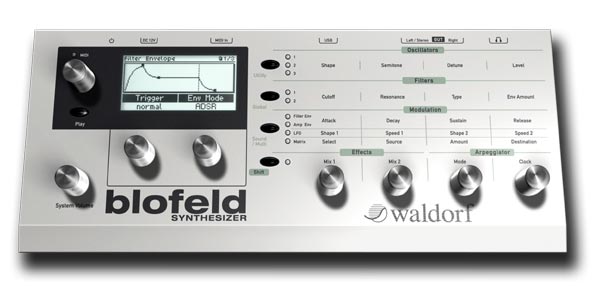
Waldorf Blofeld synthesizer. All patches 100% custom made, played live with only internal effects used. A wonderful synthesizer, capable of such a wide range of sounds, from ethereal to grating, with many magical occurrences. Very easy to program through the excellent display and programming matrix, yet quite deep and powerful. More smooth sounding than other Waldorfs, and with a great modern sound and look. I love it. If you want analog emulation why not just get a real analog synth? This is a wavetable synth, and it is in those realms that it shines. Also, the latest OS update is a must as the knob control is much improved.
More about Pulse Emitter http://www.pulseemitter.com/
Getting started with the littleBits & Korg CV Module
CV Module available at http://littlebits.cc/bits/control-vol…
Integrate your Synth Kit with other analog synthesizers like modular synths or analog keyboards.
control littleBits module behaviors like the pitch of oscillators, the cutoff frequency of filters and more from your analog synth gear!
control analog synthesizers with littleBits modules, like a bend sensor, light sensor or any other input from the littleBits library to create new control interfaces for your synth.
Sync your littleBits modules to other gear like Korg’s Volca series.
The CV module developed in partnership with Korg, a pioneer of electronic musical equipment, enables amateur and professional musicians to easily explore the iconic synthesizer instrument, allowing you to make exciting new sounds and build their own infinitely customizable and expandable analog modular instrument and put on your own performances – all with little to no engineering or musical knowledge.
Check out the latest Synth Modules at http://littlebits.cc/new-synth-modules
Find out more at littleBits.cc
Kickstarter: Parva Polyphonic Analog Synthesizer
Futursonus has launched a Kickstarter project to fund production of Parva – a new polyphonic analog synthesizer that combines an all-analog signal chain with the modern convenience of digital control.
The Parva can be configured as a monosynth all the way up to an 8-voice poly synth. Each synth voice offers three analog oscillators, dual multi-mode filters, four 4-stage envelopes, 4 LFOs, sample and hold and 40+ modulation destinations.
Features:
- ANALOG – From the oscillators and wave-shapers to the voltage-controlled filters (VCF) and snappy OTA-based voltage-controlled amplifiers (VCA), Parva’s signal path is 100% analog. There’s no DSP here.
- DIGITAL – Parva’s digital controls enable you to save and recall patches instantaneously, change parameters via MIDI, and route LFOs and envelopes to more than 40 destinations in the modulation matrix.
- POLYPHONY – Parva can be configured for up to eight note polyphony. Extremely flexible voice assignment allows you to stack as many voices as you like for more complex sounds, split the keyboard up to eight ways, or both in any combination.
- CONTROL – With its smooth analog potentiometers, Parva gives you direct access to all of the most commonly used parameters. Plus, each section of the synth has additional settings displayed on a high-visibility OLED, so the perfect patch is never more than a click away.
- CONNECTIVITY – Parva is the first analog synthesizer to feature a USB Master port, which allows you to connect any class-compliant USB MIDI keyboard — or other controller — directly, without the need for a computer. Of course, standard MIDI DIN in and out connections and a “normal” USB port are also included, as well as individual outputs for each voice, and a stereo headphone jack.
- CONSTRUCTION – Parva was designed with working musicians in mind, and features an aluminum enclosure, custom-machined aluminum knobs & sturdy panel-mounted pots,
Specifications
Parva can be configured as an expandable monophonic synthesizer, or as an eight-note polyphonic, eight-voice multi-timbral synth.
Each voice contains the following:
OSCILLATORS
- 3 Digitally-controlled analog oscillators
- Sawtooth, triangle, and PWM waveforms
- New Feature: Variable-width saw waves
- Tunable +/- 5 octaves
- Hard Syncable
- Independent level controls
FILTERS
- 2 serial-connected multi-mode filters
- 24db or 12db low-pass or high-pass modes
- 12db bandpass mode
- Self-oscillating
- Filter FM
ENVELOPES
- 4 4-stage (ADSR) envelopes
- Exponential curves for punchy attack and natural decay
- Linear mode also available
- New Feature: Loopable envelopes
- Routable to >40 destinations
MODULATION
- 4 LFOs
- Sine, sawtooth, triangle, and square waveforms
- Random sample-and-hold
- New Feature: Stepped LFOs
- Free-running or key-synced
- Routable to >40 destinations
Connectivity
- New Feature: Individual 1/4″ stereo line-level outputs for each voice
- 1/4″ left and right main outputs
- Stereo 1/4″ headphone jack
- MIDI DIN input and output
- USB MIDI port
- USB Master port for direct connection of USB MIDI controllers
The Parva is available to project backers, starting at $499 for the monosynth and $999 for an 8-voice version. See the project site for details.
DATAMASKIN

