
AfroDJMac’s Drum Track and Tutorial (Free Ableton Rack 16)
Ableton Live Drum effect Rack download and tutorial.
AfroDJMac takes you through how he uses Ableton’s drum racks, effect racks, and follow actions in his live performances to create drum fills, variations, and effects. Effect rack contains Beat Repeats, Mutes, Looper for tape effects, Reverb, Delay, Filters, New York Style Compression… Download includes a Live set with the effect rack and clips set up to play randomly generated drum fills that come in and out, very musically and on time.
Download the Live Set Here: http://bit.ly/freesynth16
Free Weekly Ableton Live Rack – Fender Feedback
Here’s AfroDJMac’s new free weekly Ableton rack featuring the fender guitar.
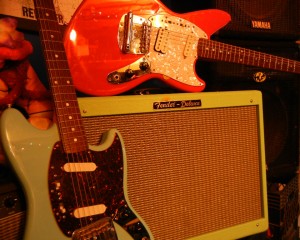
Here’s two instrument racks created using screeching feedback from Fender Mustang and Jag-Stang guitars, played through sea-foam green Fender Deluxe. Surprisingly, despite coming from such a loud and wild source, these racks are fairly mellow and reminiscent of a vintage keyboard. In the video, it is also shown how the racks work and take you through the effects. Also spend a little time explaining the mapping of the racks.
Download the rack here: http://bit.ly/freesynth15
One of my favorite sounds is that of a distorted electric guitar as it begins to screech into blazing feedback. It’s very unpredictable, wild, and difficult to control. The overtones and harmonics it creates are hard to replicate with any other instrument. For this weeks Ableton Live Rack installment, I sampled some feedback from my Fender Mustang and Fender Jag-Stang coming out of my sea-foam green Fender Hot Rod Deluxe.
Sometimes the results are surprising when you create a sampled instrument, and this is one of those unexpected outcomes. The resulting instrument sounds more like a vintage keyboard with some rich harmonic content than a screeching guitar. Also, the actual guitar used makes quite a big difference as well, so I’ve include two racks this week, one created with the Mustang and one with the Jag-Stang. I added effects that I thought were useful to the sounds, Lo-pass Filter, Tremolo, Vibrato, Chorus, Reverb, Flanger, and just to dirty it up a bit, Vinyl distortion, which can be mix to taste. Enjoy, and as always, send along word of any music you create with this or any of these racks.
New Ableton Live Rack featuring lots of Noises, Risers, Swooshes and more
This weeks Ableton Live Rack is a collection of white noise swooshes, risers, falling synths, and other useful transitional sounds.
They are great for adding tension or creating releases. Most were created with either virtual synths or sampled synths, and some sounds were sampled from old video games. These are some of the exact sounds I use during my live performances to add anything from anticipation, signaling a change, or creating atmosphere. I have added a bunch of useful effects. These are explained in the video, as well as a quick demonstration of how I might use them on a track, although for the sake of example, I may be slightly overdoing it. Enjoy and Share  **Non Live users: You can use the samples in your DAW of choice**

Download the rack here: http://bit.ly/freesynth14
So much of our enjoyment in life relies on tension and release, and music is no different. This weeks free Ableton Live Rack is designed to help build that tension and release in your music. I’ve created a bunch of white noise risers and fallers, sampled some choice sounds from old video games, and created synths that climb and fall many octaves over time. Many of these sounds have been staples of dance and electronica for years, but more and more, as genres of music mix together, I find these sounds as useful in rock music as they are in anything else. Experiment with them. Use them to alert the listener to changes that are approaching, and to smooth out transitions.
Many of these sounds are the exact ones I use in my live performances, and they can work wonders whether entering or leaving a chorus, switching to a new song, or just as something to get the audience to make some noise of their own. I’ve added some effects that lend themselves nicely to all this swooshing around. There’s Flanger, Phaser, Reverb, Delay, AutoPan, Bit Crusher and a Beat Repeat that allows you to further destroy the sound. In the video, I explain how it all works and demonstrate some ways to (over)use the AfroDJMac Noises, Risers, Swooshes Rack. Use and abuse; enjoy and share.
Korg Monotron Rack for Ableton Live
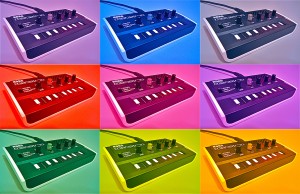
The Korg Monotron is a great little analog synth with a big, thick sound and amazing filter. However it is controlled not with keys, but a ribbon controller. I find it extremely difficult to play in pitch. So I’ve sampled it and racked it up in Ableton. Now notes are easy to hit, and there are also a few extra goodies not possible in the original. Follow along as I take you through it and download it yourself and enjoy!
**Non Live users: You can use the samples in your DAW of choice**
Download the rack here: http://bit.ly/freesynth13
More information below:
For something about the size of a cassette tape, the Korg Monotron packs quite the punch. Don’t let that built in speaker fool you, plug this little guy into an amp and it can rattle the windows. The filter sounds great, and can even be used on external audio sources, very cool. The downside: I can’t play the thing in tune! Too bad it doesn’t have some cheap little buttons for keys instead of that ribbon keyboard. Hitting the exact pitch consistently, for me, seems to be out of the realm of possibilities. Thank goodness for samplers
This week, I have created a free Ableton Live Rack using samples from my Korg Monotron. Although some might argue that this rack lacks one of the most alluring qualities: the built in filter, it is now a much more playable synth, being that you can control it with a normal keyboard with actual keys. (Plus I think the filter in Ableton’s Sampler and Simpler are pretty nice substitutes). To take advantage of some of the possibilities offered to us in this computer age, I’ve done a few things the actual Monotron is incapable of. First, I layered a few Monotron samples to thicken out the sound. I’ve made it switchable from mono to polyphonic (Polytron?), Portamento and Glide are now options, you have control over Attack and Release, the Filter Envelope now has an attack you can play around with, and another macro knob allows you to select different combinations of samples. For the purists out there that don’t want layered samples, I’ve included an identical rack, with only one sample and a few different effect macros (chorus and delay.) For both racks, I have the mod wheel set to introduce some vibrato. So, watch along in the video and download it for yourself, it’s free and most importantly, from the heart. I think you’ll be pleased with just how much punch that little box can deliver. **Big thanks to Big C for giving me the Monotron for Christmas
xo **
Free Weekly Ableton Live Rack – Vocal Rack and Dub Delay
Follow along as AfroDJMac shares the vocal effect rack he uses for live performances. Various effects and techniques from Beat Repeats to Reverbs, Distortions, Delays, etc. are discussed in a practical and immediately usable way. Also, there is a Dub Delay Rack for use on Send Channels to further add dimensions to your music. Enjoy!

Download the Live set here: http://bit.ly/freesynth12
Save the presets to your library.
I have been asked a bunch of times how I process my vocals for live performance. This week I am giving away the exact rack I use in my rig. It contains many different devices: reverbs, delays, filters, choruses, beat repeats… If we were talking about guitars, it would be as if I let you have my pedal board. I’ve spent the better part of a year tweaking this set up to get it to the point it is now, and I’m sure it will continue to evolve. The entire rack is made up of Ableton Plug ins, except for one, Izotope Nectar, which I occasionally use for an auto-tune effect (is that a sin?). (Note: if you don’t own Nectar, the rest of the rack will function normally). I’ve mapped most of the parameters of this effect rack to knobs on my APC 40 and LaunchPad. I left the midi mapping intact, in case you happen to own those two wonderful controllers (the video details the mappings). Otherwise, just map them to the controller of your choice.
Also, I’ve included another useful effect rack, “Dub Delay the AfroDJMac Way.” This is a rack I place on a Send Channel and use it to further manipulate various tracks in my set up. It has delay, reverb, chorus, high pass filter and allows you to send the output of the track back to the track itself, creating the Dub Delay effect. ( Dub Delay is simply when the output of a delay is fed back into the delay, essentially creating a feedback loop). In order to enable the sends on a send channel, you need to right click the send knob and select “enable send.” Be careful with this particular technique, because the track can get very loud very quickly.
Free Weekly Ableton Live Rack – Found Percussion
Here’s this weeks contribution from AfroDJMac:
Music from noise. This weeks rack was created by sampling various objects from around my kitchen, recording them, chopping them up, and putting them in Ableton’s drum racks.
Download the Live set here: http://bit.ly/freesynth11
it includes two versions, one with Sampler and one with Simpler.
*Non Live Users: The actual samples are included and can be imported into your DAW of choice. Instructions on how to do so are included in the download.
In a sense, music is merely a collection of organized noises. I’ve always been fascinated when everyday sounds and noises are put into a context that makes them musical. For a beautiful example of this, give a listen to Jon Brooks’ Music for Dieter Rams; every sound on this album originated from a Braun AB-30 alarm clock. Create Digital Music did a nice write up here, complete with relevant videos and Bandcamp sites. This weeks Ableton Live rack/sample pack makes musical instruments out of non-musical items.
A while back, I spent some time in my kitchen, recording percussive sounds using bottles, cans, candy wrappers, cabinet doors, car keys, the hands of a clock, brooms, guitar picks on plastic caps… literally everything but the kitchen sink. These samples have been chopped and arranged on a drum rack with a variety of effects, most notably an Arpeggiator. The Arpeggiator allows you to hold down a bunch of notes and create rhythms at a specified musical rate (quarter notes, sixteenth notes, etc. ) Set the rate fast enough (1/48 and above) and glitchy musical tones begin to emerge. Play around with the filter LFOs and you may just fashion yourself a sort of dubstep wobble bass.
In the digital and electronic realm, it’s nice to inject some “living, breathing” type “instruments.” I find this rack quite useful in creating organic percussion parts. Often, I route this rack, with the Arpeggiator running, to an audio track, and record it to create many unique bars of percussion. From there, I pick out some of my favorite bars and trim those bits down for use in a song. Of course, you can add your own samples to the collection by simply dropping them on the drum rack.
Broken Bells Rack for Ableton
Xylophone, Glockenspiel, Bells… This rack is a sample of two xylophones, they can be played in unison or separately. Layered underneath those samples are reversed xylophone samples, so when you play, the normal xylophone sounds then reversed ones echo back.
Download the Live set here: http://bit.ly/freesynth10
it includes two versions, one with Sampler and one with Simpler.
*Non Live Users: The actual samples are included and can be imported into your DAW of choice. Instructions on how to do so are included in the download. On this collection, the samples go from notes A,B,C,D,E,F,G,A for three octaves*
There’s a certain feeling created by the sound of the xylophone, maybe it is memories of Mr. Rogers’ Neighborhood or all the simple musical toys children have, but, to me, the sound is very reminiscent of childhood. This week’s download is created from samples of two different xylophones. One, I bought at a music store for about a hundred bucks and another belongs to my friend DF, who plays in an excellent noise rock band from Brooklyn called Imaginary Weapons (check them out, it’s very melodic, noisy, contemplative guitar rock woven together with some beautiful synth parts). The synth you are getting this week is actually four instruments in one. The first two are the xylophones layered together. These can be mixed together to your preference. Next, while thinking about the nostalgia I get from the xylophone, and how our memories are often distortions of what really happened, I decided to reverse the samples and layer those over the original sounds. So, when you hit the notes, a traditional xylophone sounds, but then a reversed xylophone creeps back in with an echo of those same notes. You can play the instrument with just the normal xylophones, just the reversed ones, or a blend of both. The reversed xylophones are being moved around the stereo spectrum via LFOs, which adds the the cerebral effect I am going for with this instrument.
Free Ableton Live Rack – “Yamaha CP-35”
AfroDJMac’s latest contribution where he takes on the Yamaha CP-35.
The Yamaha CP-35 is a pretty cool vintage electric piano. Made sometime in the 1970s or 80s this instrument has a wide range of tone, sometimes reminiscent of the Fender Rhodes keyboards. Probably my biggest gripe about this keyboard is its size. The thing is huge and heavy. Cleverly, the case transforms into legs, but lugging this baby around to gigs is pretty much out of the question. Fortunately, it now fits in your laptop. The original model has flanger and tremolo effects, which I have attempted to emulate. I’ve also added some chorus, vibrato, and delay to add some flavor to it. The CP-35 is capable of a fairly wide range of electric piano sounds, and I have sampled five offerings. So the next time you need a nice dreamy vintage piano sound reminiscent of “Daniel” by Elton John, or a Stevie Wonder-esque funk piano, load up the AfroDJMac CP-35 rack.
In this video:
Ableton Live Instrument Rack created by sampling a Yamaha CP35 electric piano. Effects are then layered, including a tremolo using Ableton’s Auto Pan effect.
Download the Live set here: http://bit.ly/freesynth9
it includes two versions, one with Sampler and one with Simpler.
“Nintendo EP” Free Download and Video
AfroDJMac is a persistent man who made a promise to post something every week and so far he’s keeping that promise. Nintendo Entertainment System is the sound source for this cartoon for New York based AfroDJMac’s “Yea Yea Yea.” This animation was created for the Nintendo EP, an album made up of songs created with an NES.
The Nintendo EP is a collection of songs I’ve made over the years, using my Nintendo Entertainment System as a sound source. Some of these songs have since seen many different incarnations, such as the surf rock take that was Psycho Rainbow, but these are the original versions. Sometimes you are inspired to make music because of thoughts, feelings, other songs you like, etc. These songs were inspired by the sound of the Nintendo. Those familiar timbres are what really got these tracks off the ground, and from there the other aspects of songwriting were applied. You’ll hear guitars, basses, and drums, but I don’t think these songs would have come to life without our little grey 8-bit friend. Please feel free to download the EP and show your friends, put it on playlists, add to your blog, and give it to your uncle Otis who happens to have major connections in the music industry
How about making a virtual synth out of beer bottle samples?
AfroDjMac continues persistently to deliver new racks for Ableton, just as he has promised, and this week we are heading for beer. Here’s what he says about it. Ableton Live Instrument Rack created by blowing on a Red Stripe Lager bottle and sampling the tone. Effects are then layered, including a tremolo using Ableton’s Auto Pan effect. I created a little beat and left you the stems, which I encourage you to remix. Send anything you make to afrodjmac.com or soundcloud.com/afrodjmac and I will post it.

Download the Live set here: http://bit.ly/freesynth8
it includes two versions, one with Sampler and one with Simpler.
Background info:
Sometime, about two thirds into a mid-winter “I wish I was on a tropical island” fantasy, the iPod shuffle Gods brought me The Rolling Stones’ “Sympathy for the Devil.” As I found myself increasingly lost in the antics of Jagger, Richards and company, I realized that when I blew over the top of my frosty bottle of Red Stripe, the tone was perfectly in tune with the “whoo whooo’s” that adorn most of the track. As awesome as I thought this was, I couldn’t resist another cold taste, and justified it by figuring I would drink until I found an equally harmonious tone. Soon thereafter the idea for this synth was born.
I have sampled a couple of tones from those very Red Stripe bottles, as well as others from a plastic water bottle. These two slightly different tones are mixed together to create this weeks Free Weekly Ableton Live Rack. From there, I added an Auto Filter with macro knobs to control the various parameters and LFOs; next I used Ableton’s Auto Pan to create a tremolo effect that is synced to the master tempo. A delay set to repitch mode is followed to add some fun twisting effects, followed by an Erosion plug in to add some noise for character. I especially like this particular synth for its tremolo effect, which is easily modulated thanks to the macro knob.
DATAMASKIN

