
More info on the Panorama controller for Reason 6
The basic idea of the Panorama is a custom front end controller for Reason 6, based around a MIDI keyboard and plenty of knobs and sliders.
Mixer
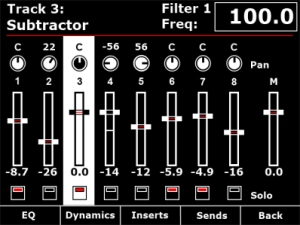
Channel strip
The mixer channel strips in Reason are comprehensive and like the real world hardware – quite long! Panorama breaks the channel strip down in to manageable localized sections, accessible at the push of a button. From the mixer menu described in Part 1, you have access to EQ, Dynamics, Inserts and Sends across the buttons below the display. The encoders to the right of the display map to the targeted channel strip in the mixer. If a track is selected in the sequencer, the corresponding mixer channel becomes targeted. Alternatively, you can target a mix channel using the 8 buttons when set to ‘select’ mode (described in part 1).
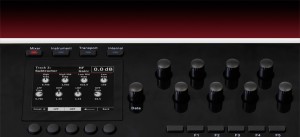
Here we are taking a closer look at how Panorama access’s the EQ parameters.
Panorama allows you to gain access to Reason’s mixer at the touch of a button. Here you see the Reason mixer channels assigned to be operated by each of Panorama’s controls. The display gives you an accurate overview of what parameter each control is assigned to as well as current value state. Let’s look at the display screen in some more detail.
Panorama is our vision of how a great controller should work. Yes, there are many ‘generic’ controllers on the market already but we have yet to find one that satisfies our criteria of operating the software, as if it’s hardware – That’s Panorama. Panorama uses a communication protocol that has been custom designed for Reason 6, putting control – every control – at your fingertips. There’s nothing generic about this controller. Panorama really does access all areas.
Nektar Panorama general specifications
- 49 note weighted keyboard w/aftertouch
- Pitch bend + modulation wheels
- Motorized fader
- 9 50mm faders
- 9 encoders above the faders
- 8 programmable LED buttons
- Display
- Additional 8 encoders
- 12 velocity and pressure sensitive pads
- Navigation and menu buttons
- Transport control
- Sustain socket
- Pedal socket
The whole design is custom for Panorama including the keybed. Our communications protocol that handles interaction with Reason 6 is also custom. The main idea behind Panorama is to complement the computer ,so a user can have immediate access to areas of Reason where tactile control is an advantage without having to reach for the mouse which typically disrupts workflow.
Or to put it in other words: Panorama is first an instrument and gives the user the experience of operating Reason, as if it was hardware.
Korg Monotribe – “Sync App Control” In The Studio
James Sajeva from Korg USA demonstrates Korg’s free SyncKontrol app for monotribe. Check out http://www.korg.com/monotribe for more videos and information.
Panorama controller for Reason 6
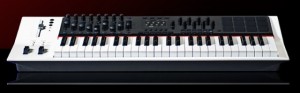
Nektar has presented a dedicated MIDI Controller for Reason 6, the Panorama controller.
Here’s what they have to say about the Nektar Panorama:
Reason 6 is here! Need a controller?
Panorama is our vision of how a great controller should work. Yes, there are many ‘generic’ controllers on the market already but we have yet to find one that satisfies our criteria of operating the software, as if it’s hardware – That’s Panorama. Panorama uses a communication protocol that has been custom designed for Reason 6, putting control – every control – at your fingertips. There’s nothing generic about this controller. Panorama really does access all areas.
Pricing, specs and availability are to be announced.
Mixer Operation:
Panorama allows you to gain access to Reason’s mixer at the touch of a button.
The display gives you an accurate overview of what parameter each control is assigned to as well as current value state.
Channel Strip Control
Panorama breaks the channel strip down in to manageable localized sections, accessible at the push of a button. From the mixer menu, you have access to EQ, Dynamics, Inserts and Sends across the buttons below the display.
Allen & Heath introduces the Xone:K2 MIDI and audio interface
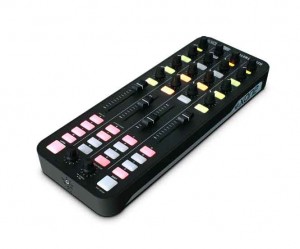
Allen & Heath has introduced the Xone:K2, a MIDI controller and audio interface with a 4-channel internal soundcard, configurable MIDI surface with tri-colour LED illumination, USB bus power, and incorporating A&H’s proprietary X:LINK to connect with other Xone equipment.
The K2 is designed to work with all MIDI-enabled DAW applications and interface with popular DJ software packages, such as Ableton, Traktor Pro and Serato Scratch Live. It has 52 physical controls – including 12 analogue and 6 endless rotary encoders with push switch, 4 linear faders, and 30 back lit performances switches – providing up to 171 MIDI control commands across 3 layers. The K2’s MIDI interface can be configured by the user, so the unit can be left in ‘Open Architecture (Latching Layers off) Mode’ or set to ‘Latching Layers Mode’.
K2 has an internal 4-channel high quality soundcard, that can operate at 44.1 and 48kHz, and all channels run from the PC to the unit, configured to provide 2 stereo channels, one for headphones one for master out L and R, allowing headphone cueing without interrupting the master out. There is also a dedicated 3.5mm headphone jack, and a master out on RCA phono connectors.
It is possible to link two K2 units together to double the control area using Allen & Heath’s proprietary X:LINK protocol. X:LINK uses a standard RJ45 connector and distributes power and data, which means two units can be connected to your DAW using only one USB port.
Xone:K2 is constructed with a strong plastic base and steel front panel employing A&H’s nutted pot construction to be both lightweight and hard-wearing. Finally, the K2 comes with a carry case that doubles as a stand for ease of use for travelling DJs.
Pricing and Availability:
SRP: £199 ex VAT
Availability: Jan ’12
More information:
Slide Control Demo by Matt Hooper
Having a blast with Slide Control App on iPad 1st gen.
Slide Control is an iPad music application for musicians. This application makes improvisation easier. You can choose any scale (major, minor, pentatonic, blues …) and slide your finger to play any melody. With Slide Control it does not have bad grades, your movements are in harmony. Easier to play !! Easier to improvise !! Easier to create !! More imagination!!
Features:
★ Very simple application for very simple improvisation
★ Video tutorial Include
★ Video community page (you can send your video)
★ Many scale for best improvising (major, minor, pentatonic, blues …)
★ Polyphonic Control
★ Support of virtual midi for communicate with other musical apps
★ Choose from 60 different wallpaper (thanks to robert handline)
★ Program change/ Bank change
★ All Midi CC support on Y direction
★ 16 Midi channel
★ Quick switch Sustain / Partamento / Legato
★ Quick switch Oct +1
★ Pitch Bend
★ Glissendo in Midi !! (Exclusive function)
★ Switch mod
★ Velocity capable
★ Panic button
★ MIDI Device support – connect devices via the Camera Connection Kit (near zero latency)
★ Measured latency over WiFi to OS X: 2-5ms
★ Fullscreen
★ Cool Animation 
★ More to come!
Slide Control is an Midi controller. NO SOUND is generate by the ipad. You must have a virtual synth or hardware midi instrument for use Slide Control.
Teaser: STS9 Controller with Modular Midi Modules
Here’s a prototype of our MIDI modules built into a custom controller we built for Sound Tribe Sector 9. The MIDI modules fit in a standard eurorack enclosure. This is a preview of what we will be releasing with our Livid Modules.
Steinberg’s CMC modular controller system now released
The CMC series is the world’s first modular controller system for Cubase. Consisting of six unique USB controllers, CMC gives you all the control options you’re looking for — along with utmost flexibility and great ease of use.
From yesterday’s announcement:
Steinberg Media Technologies GmbH today released its new CMC controllers. Dedicated to Steinberg’s Cubase advanced music production system, the six USB-powered CMC units offer an integrated control solution that provides a desirable degree of flexibility and configurability.
The CMC controllers are equipped with a combination of control elements that provide tactile control over certain Cubase functions. Each unit can be used separately or hooked up together with the included joint plate, resulting in a control desk that leaves no wishes unfulfilled.
“The CMC controllers are ultra-portable and the design’s perfect, but more importantly, the units offer a mind-blowing array of control options. Without a doubt, the CMCs are the perfect complement to Cubase, and Nuendo too,” commented Stefan Schreiber, Steinberg’s product marketing manager for hardware.
The CMC-CH channel controller houses 16 illuminated rubber push-buttons, one rotary encoder and a touch fader. The multi-colored buttons provide access to VST instrument settings, solo and mute tracks, bypass EQs, sends and inserts and channel freeze. Eight of the 16 buttons can also be assigned to a second function. The Channel Select button browses through the entire Cubase mixer, while the rotary encoder is used for panning. The LED-based touch fader controls the volume level while displaying the fader position.
The CMC-FD fader controller features four high-precision touch faders with LED-based metering and solo/mute function. The touch faders offer simultaneous control over four channels in Cubase. With the Channel Select and Bank Select buttons, users can jump to individual channels or select entire channel groups in the Cubase mixer. Up to four FD units can be combined together for 16-channel control.
The CMC-QC quick controller boasts 13 illuminated buttons and eight rotary encoders in three different modes: EQ, Quick Control and MIDI. In EQ mode, the rotary encoders reflect the channel EQ controls in Cubase, while the QC mode maps Quick Control capability onto the encoders for controlling effects and other parameters. The MIDI mode turns the unit into a freely configurable MIDI controller. Eight of the 13 push-buttons can be assigned to random Cubase functions. The included CMC-QC editor allows users to adjust MIDI control change parameters through the computer.
The CMC-PD pad controller features 16 highly responsive backlit pads and one rotary encoder. The pads change their background color according to the pressure exerted. Depressing the pads triggers MIDI notes or selects volume response curves. In 4Velocity mode, the pads are used for easy step recording. The rotary encoder browses sounds and presets in Cubase. The included PD editor software is used to assign MIDI notes to each pad.
The CMC-TP transport controller houses 17 buttons and a touch slider. The slider allows users to jog or shuttle through the project, tap in the tempo, scroll, zoom and browse. All major transport functions, including play, stop, record, cycle, fast forward and rewind, are controlled via the CMC-TP. Other buttons are used, for example, to insert markers, set the locator range or insert new tracks. The top four buttons can each be assigned to a second function, for even more control in Cubase.
The CMC-AI controller highlights Steinberg’s universal AI Knob, together with its ten function buttons. The AI Knob allows users to control any control element in Cubase by simply moving the mouse cursor over it. In Volume mode, the AI Knob turns into a high-precision master volume control whereas in Jog mode, the AI Knob is used to jog through the project. The AI Knob also doubles as a browse button to search and select presets. The four function buttons can be assigned to further control parameters.
CMC accessories comprise the CMC Studio Frame 4 and the CMC CC121 Extension Frame. The CMC Studio Frame 4 is a durable construction for housing up to four CMC units. The CMC CC121 Extension Frame can hold up to two CMC units and one CC121 controller.
Availability:
The CMC controllers and accessories are available through the Steinberg Online Shop in October. Shipping of the CMC controllers and accessories to dealers in Europe begins in October; however, the exact time of availability at certified Steinberg dealers is subject to regional variations.
Millioniser 2000 • MIDI wind controller
http://www.millioniser.com Walt Miller Walter Müller Originator of Millioniser. Amazing Grace player by Rock Erickson.
Rock Erickson -The first American called to Europe to play and record with Walter Mueller’s Millioniser 2000. (Ronald Schlimme Engineer) Harmonica like in principal giving the end user complete control over synthesizer and midi functions with the sensitivity of your own breath. This instrument is a one of a kind powerhouse. The video starts off by showing the functions of Millioniser 2000 and then merges into the on stage video which was shot in London. Rick Fenn of “Lie For A Lie” Sony Music was the music director and lead guitarist along with Charlie Barret from The FIXX on bass. The Millioniser Breath Controller units that I’m currently using in the studio are breathing new life (literally) thru their capability to dynamically control some of the most popular software and rack synths ( Garritan Personal Orchestra, Roland Sound Canvas, Yamaha VL70 ect ) and samplers like SampleTank & Tascam Giga Studio ) in both the mono and polyphonic arena. If you have comments or questions please post here or email rock@millioniser.com
Keith McMillen Instruments introduces the 12 Step foot controller
Get going with your feet
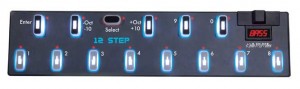
Keith McMillen Instruments (KMI) has introduced the 12 Step foot controller.
Keith McMillen had this to say, “With 12 Step, keyboardists, guitar players, bassists, instrumentalists and vocalists can accompany themselves with their feet, playing bass lines, notes and chords. 12 Step opens up a new dimension of performance by giving your feet unprecedented expressive control using polyphonic aftertouch and pitch bend. Upon the heels of the success of SoftStep, KMI’s versatile USB Foot Controller, 12 Step is another leap forward for performing musicians.”
Pricing and Availability:
$289.95
More information:
Emulator – Massive Multi Touch Screen System
“Essentially EMULATOR, provides a front end for creating multi-touch interfaces for existing MIDI controllable software. With a new modular editor enabling the design of custom interfaces, its possible to overlay your own control set while showing parts of the program if you wish (in thius case the Traktor waveform display is shown).
In this demo Alan Smithson (its creator) uses NI’s Traktor – DJ software, you can see the potential for some really great looking performances.
The system demonstrated here, comprises of the software package EMULATOR (£299) plus this 42 inch glass screen, stand plus projector its a great looking setup. (approx £5k)”
http://youtu.be/k4QS1xAWvU4
Emulator FT 1.5 now supports Native Instruments, Traktor 2 Professional DJ Software.
With the introduction of Emulator FT 1.5 for, DJ’s now have sample decks, loop recorders and more amazing effects literally at their fingertips.
Emulator gives the DJ all the functionality of Traktor 2 with a full multi-touch experience.
We tried to make Emulator more intuitive and easy to use so DJ’s can begin playing on a touch screen interface immediately. Whether they use a tablet PC, touch screen monitor or our holographic looking transparent touch surface, the DJ is now in total control”
DATAMASKIN

