
DJ Controller: Numark Orbit Overview and Demo
Going over the features and demonstrates the controls of the Numark Orbit wireless DJ controller.
The Numark Orbit has the standard DJ controls you can come to expect from other popular DJ controllers. There are some obvious differences but you have everything you need to get mixing and performing, right out of the box. While many DJ controllers tout the “plug and play” functionality but require a few extra steps to get going, the Numark Orbit and it’s companion Orbit DJ software synched as soon as I got connected. So if you are someone who is just starting out with audio and DJ software, you can rest assured that the Numark Orbit will not put up a fight when it comes to getting started right out of the box.
The pads, the bank buttons, the bumpers, and the endless rotary, all have a great feel and the controller itself is built very well. Using the rotary wheel in the middle is certainly a different way to DJ. It can be used to control volume, EQ levels, and act as a crossfader depending on what function you have it assigned to control. The wheel itself responds well to the touch and has a nice LED indicator for your level control.
Next to the wireless capabilities, the built in accelerometer is sort of what the Numark Orbit is all about. You can control all the parameters of your effects by tapping the bumpers and manipulating the controller in the proper fashion. Each bumper can control a parameter of a selected effect on its own, or you can hold down both bumpers and open the full function of the accelerometer control. You can lock the Numark Orbit’s accelerometer by double tapping the bumper, which eliminates the need to hold the bumper down when controlling effects.
New England Analog Pyxis Bass Demo
This is a video of NE playing around with their prototype external touch pad for the NEA Pyxis aftertouch system.
“This one here is our test model. The sensor pad has many unique capabilities when interfaced with the Pyxis controller. This video is to demonstrate the percussive effects that are possible with the Pyxis. The tapping effect is created by routing the output voltage from the sensor pad to the vca and vcf. The more of the sensor signal that gets sent to either, the more pronounced the effect. Keep in mind that this is not intended to be a musically coherent demonstration, but a demonstration of the capabilities of the instrument. For more information about the Pyxis, vintage synthesizer restoration, sales, and repair, please check us out at www.NewEnglandAnalog.com.”
Behringer iStudio 202 and MIDI controller FCB1010 with audio – iPad improvisation test-
Behringer iSudio 202 and FCB1010 MIDI foot controller
Used Audiobus , Loopy HD as output and Jam up XT for guitar ,Rhythm Pad free for drums
yehezkel raz – Paganini Etude for Push [original]
Composed with Ableton Push // yehezkelraz.com
Controllerist Yehezkel Raz gives Ableton Push a workout on Paganini Etude for Push, a series of original variations on a theme by classical composer Niccolò Paganini.
The new Traktor Kontrol X1 is coming
The carefully redesigned DJ performance controller for TRAKTOR PRO 2 is coming soon. http://www.native-instruments.com/x1
Witness the evolution of TRAKTOR KONTROL X1. A new multi-purpose touch strip lets you nudge, needle drop, or get creative with loops and effects – at the swipe of a finger. Touch-sensitive encoders provide smart, reactive TRAKTOR integration. Command your decks as RGB back-lit buttons provide constant feedback, even in the darkest clubs.
Power, precision, and portability under maximum control – you’ve never felt closer to the music.
Featured music:
Jack Dixon & Rick Grant – Muted (ManMakeMusic / MMAKEM002)
George Fitzgerald – Hearts (ManMakeMusic / MMAKEM001)
October – Singularity Jump (Tanstaafl / TANS002)
Sonic Logic Version 1.2 sneak preview – MIDI Broadcast mapping to Ableton Live.
Sneak preview from Sonic Logic version 1.2
The MIDI broadcast button allows you to map controls in your DAW easier and faster.
Download Sonic Logic for iPad here: https://itunes.apple.com/us/app/sonic…
App description below:
Sonic Logic is a modular MIDI controller allowing you to edit and control MIDI controller setups from your iPad.
Control Ableton Live, Logic Pro, Cubase, Protools, Traktor, and other popular DAWs right from your iPad.
Sonic Logic uses CoreMIDI to send MIDI signals so you can even hook it up to hardware synths using and iPad to MIDI cable.
Edit on your iPad! Super easy interface to create, edit, control, manipulate, assign MIDI controllers and notes live, using touch gestures. (No external editor needed).
Add Buttons, switches, toggle buttons, XY pads, sliders and text objects.
Their look and feel is meant to emulate real life controls, with real feedback.
* Create your MIDI controller easily from your iPad.
* Edit component’s color, size, MIDI channel and controller number.
* Time advancing gestures for buttons, create a timed MIDI transition from 0 to 127 with just a press of a button.
* Control everything with multi touch.
* Snap to middle feature on sliders.
* Built in, editable templates.
* iCloud support, always stay synced with all your setups on any device.
* Low latency.
Hands-on with the Native Instruments Traktor Kontrol Z1
Music Radar demos NI’s latest DJ controller, which works for both Traktor Pro 2 and Traktor DJ for iOS
It features mixer controls for two channels – each with faders and controls for gain, three-band EQ and a rotary which can be switched between controlling either Traktor’s filter or one of the software’s effects.
The Z1 also features a built-in audio interface, and allows tracks to be cued via an independent headphone output with its own volume and blend controls.
Arturia MiniLab Hands-On
Keyboard Magazine’s editor Stephen Fortner demos the MiniLab, a library of virtual analog soft synths from Arturia’s V-Collection. It’s bundled with a custom controller that pre-maps all knob assignments. All for $99.
Arturia’s product description below:
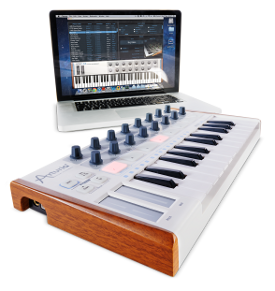
Arturia’s MiniLab USB Controller marries the style you love with the hands-on control and portability you need to take your studio wherever you go.
Made for the musician on the go or the performer with limited space, the MiniLab gives you a great depth of features in a portable package that is sturdy and looks great.
Combined with the Analog Lab software, you get a real hybrid synthesizer that comes with a collection of 5000 sounds from the Modular V, CS-80V, Mini V, Arp 2600V, Jupiter 8V, Prophet V, Oberheim SEM V, and Wurlitzer V.
MAIN FEATURES:
- 25 note velocity sensitive mini keyboard.
- 16 encoders
- 16 pads (two banks of 8 pads/buttons)
- Pitchbend/Modulation touch strip
- Footswitch input
- Recessed full sized USB jack
- Bus powered, Class compliant
- Works with iPAD (camera connection kit required)
- Comes with Analog Lab software
- 5000 sounds from the best synths and keyboards
Capacitive Paint Touch Controller
Using Bare Conductive paint and Arduino as a musical interface for my modular synthesizer.
I have been playing with Bare Conductive paint since it came out a little more than a year ago. It’s great stuff – a heavy acrylic paint that can be used as a resistor, touch sensor, paintable wire – and I keep coming up with new uses for it. This idea stemmed from wanting to utilize my modular synth in more of an installation setting than a performance music setting.
I think of this as a sort of “sonic self-portrait.” Two 10″x10″ canvases painted yellow with my hand prints painted in conductive paint. A small piece of copper tape is attached to the back of each canvas and connected to Arduino. Code on the Arduino turns the canvases into capacitive sensors and sends two channels of 0-5V PWM voltage out through RC filters into the modular synthesizer. In short: touch the painting, send modulations to the synthesizer.
The Arduino sketch uses Paul Badger‘s CapSense library. I had to use an older build of the Arduino programmer (alpha 22) in order to get the library working. You can find the most recent version of the code here: GitHub. Circuit and patch descriptions below the audio.
Project information here: jimmymhughes.com/capacitive-paint-controller/
Extended audio here: soundcloud.com/soundelectronics/capacitive-painting-controller
Heads up: Bounce Back in MIDI Designer
Bounce Back is a new feature for MIDI Designer 1.5.3 (coming in early July 2013). Bounce Back allows the user to define the 2nd Action Press for Button Groups.
Dream, create and play your perfect MIDI controller with award winning MIDI Designer: reviewed in Sound on Sound (June 2013), featured in Keyboard (May 2013), awarded Sonic Touch Gold Award for Best App (Episode 11 and featured in 23), loved by musicians, DJs, VJs, sound engineers, lighting and robotics experts the world over. If you can dream it, you can create it in MIDI Designer. Now available for iPad, iPhone and iPod touch.
Find out more at http://midiDesigner.com.
DATAMASKIN

