
Arpeggionome Pro, Nave, Cubasis, and Audiobus
Arpeggionome Pro is a new musical instrument for controlling arpeggios with the touch of a finger. This video shows Arpeggionome Pro controlling Nave (via Virtual MIDI), and recorded by Cubasis (via Audiobus). Additionally, Arpeggionome Pro has the iPad’s accelerometer mapped to control MIDI Note Velocity and Nave’s filter’s cutoff frequency.
PURCHASE APP
http://bit.ly/11QfXKz
MORE INFO
http://arpeggionome-pro.com.
iTRIGGER – new MIDI controller app for iPad
iTRIGGER is a midi controller app for iPad. It allows you to control Ableton Live and other DJ software using your iPad over a wireless or usb connection. It allows you to launch clips and scenes and control many other features of Ableton.
POJ Studios enter the app world with iTRIGGER, a grid-based MIDI controller for iPad. It is designed specifically for use with Ableton Live but also works with other music software. iTRIGGER allows bi-directional communication to mix music, launch clips, change parameters like levels and panning, and provides feedback to the user through the multi-coloured grid display.
When the user first connects iTRIGGER to their computer either by WIFI or a compatible iPad midi accessory iTRIGGER becomes a standard x-y midi controller allowing the user to assign the buttons as they wish. Once iTRIGGER is correctly synced with Ableton Live all of the buttons are automatically assigned and lit up by the software in 4 separate modes, selectable within the app:
- ‘CLIPS’ mode: The 8×8 grid is assigned to an 8×8 area of clips from Live’s ‘Session View’ with the buttons lighting up to signify whether a clip is loaded, playing or empty. The user can navigate their way around Live’s ‘Session View’ using the directional buttons in the top corner of iTRIGGER and press the corresponding button to play clips or scenes using the scene play buttons at the end of each row.
- MISC’ mode: A miscellaneous set of controls including track levels, panning, effect levels, enable/disable track, cue track and track record.
- ‘D.RACK’ mode: For playing instruments using the 4×4 drum rack layout.
- ‘X-Y’ mode: For custom assignment using an X-Y layout.
iTRIGGER supports AirPlay to stream video performances live to compatible devices via WiFi. The app’s background and button colours can be changed and the button images can be completely hidden against a black background for light shows.
iTRIGGER will be available in all regions from JUNE 22, 2013 exclusively on the iPad App Store. iTRIGGER will have a special week long launch price of $2.99 USD (priced accordingly in other regions) returning to the standard price of $7.99 USD on June 29.
MonstrumRocket – new controllable editor for the Waldor Rocket synthesizer.
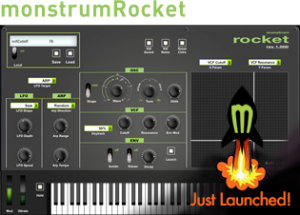
Monstrum Media has released MonstrumRocket – a software editor that gives you access to every controllable parameter on the Waldor Rocket synthesizer.
In addition to all the parameters you have access to on the actual Rocket, this editor also gives you a hold button, Vibrato Modulator, Local on/off, reset all, all notes off, MIDI panic as well as an x/y surface to modulate two parameters at once.
An added feature to this editor gives you the ability to store and load programs to and from your computer’s hard drive.
Note: Waldorf omitted any ability to control the “filter type” or “Boost” mode through MIDI. Waldorf’s very own ipad application for the rocket also has no way of controlling these two parameters simply because as it is now with the rocket’s OS there is no CC or SysEx assigned to those parameters.
MonstrumRocket is available now for US $9.99.
Introducing AeroMIDI 3D MIDI software for Leap Motion – Coming Soon!
AeroMIDI uses the Leap Motion controller to track your fingers in 3-dimensional space, allowing you to trigger notes and MIDI continuous controller messages. Works with any MIDI software or hardware! Control synthesizers, lighting rigs, DAWs, effects, virtual instruments, and any other MIDI-capable hardware or software with AeroMIDI!
AeroMIDI is the virtual 3D glue between your synths and your fingers. Prepare to create music in a whole new way.
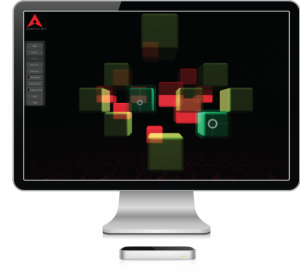
Welcome to AeroMIDI – New Dimensions in MIDI Control!
**AeroMIDI and the Leap Motion are expected to be released in late July 2013.**
To learn more, go to:
http://aeromidi.net
Mac OS/X 10.6+, Windows 7+
LE STRUM – MIDI Strummed Chord Controller Kit
If you could breed an Omnichord with a Stylophone you might end up with some of these babies….
Use combinations of the buttons to select a chord type (maj, min, 7, maj7, min7, dim, aug) and root note. The chord is then mapped across the pads, which you play with a wired stylus, sending output by MIDI.
This is an old idea of mine that I’ve now turned into an open hardware kit, so anyone can make one. The updated firmware has some new goodies like guitar open chord fingerings, chord variations (sus4, add6, add9), two channel lead + chord drone and control over velocity.
Kit is available for purchase on Tindie at https://www.tindie.com/products/hotch… and the firmware/hardware source code is on GitHub at https://github.com/hotchk155/Voici-Le…
Alien Zippers!!
WIthout the little beings from outer space, we would only have buttons.
A first try with the ribbon controller and the modular synth. The “Alien Zip” module is designed after the first Coagula dot org model. I’m using a MIDI out from it to a vst of a Novachord patch. The other sound is from the CV and Gate out to the modular synth. The fun part is setting the amount of pitch shift for each voice. They are different so as I slide around the ribbon the notes spread apart different distances from each other. A very spooky effect. The ribbon pitch bend amount in the vst is setup by using Midi CC#20 in Kontakt 5 as a modulator. The output of the high and low regions of the ribbon controller are pitch value 0 – 127 as per Midi spec.
The scale is controlled on the modular by a Q125 Signal Processor. There is no way to control the amount of pitch bend on the modular. It is a simple voltage amount generated by the Arduino and ribbon. These differences make it challenging to get harmonies from both voices because the modular’s response is very sensitive and wide and the vst requires a lot of movement along the ribbon to get a small shift in pitch. The module itself uses the Arduino Uno R3 board and the software allows the user to set up the area of the ribbon controller to be used. This makes it flexible as an instrument but hard to get the scales exactly congruent to each other after a reset for calibration. I set it up so when you touch the ribbon the pitches are in tune but when you move, they spread at different rates. All the background sounds and sequences are from the modular clocked by the Q960 sequential controller. The drum part is added later after determining the beats per minute and soft syncing to the track in Cubase. I used Addictive Drums for this.
SynthDrum Pad – a free pad-controlled drum synthesizer for the iPad
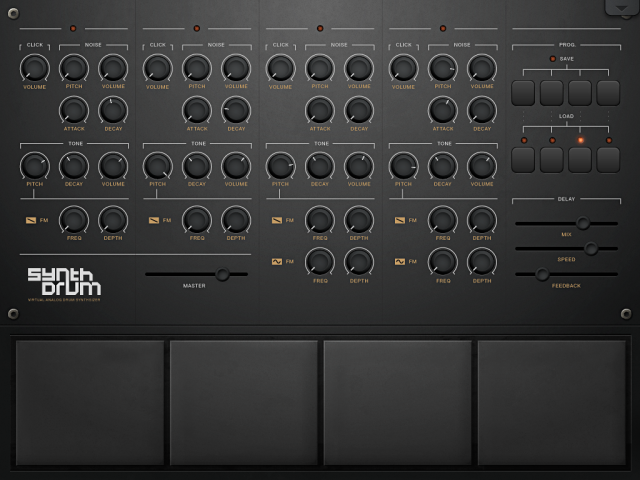
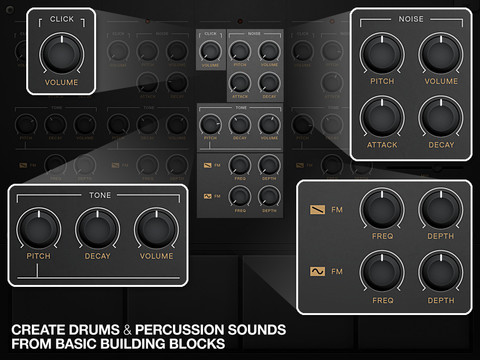
DesignByPaul has released SynthDrum Pad – a free pad-controlled drum synthesizer for the iPad.
Features:
- Virtual Analog Drum Synthesizer
- 4 Pads
- 4 Voices
- 3 Signal generators per voice; Noise, Click and Tone
- Modify pads 3 & 4 with Frequency Modulation
- 4 Save/Load slots
- Delay unit (with infinite looping capabilities)
Here’s an audio demo:
Capable of creating vintage drum sounds such as the 808 to contemporary percussion for modern electronic dance music. SynthDrum Pads can also make melodic tones for warm bass and interesting tones.
Ribbon Controller Test Coagula build
A test of the MIDI Ribbon Controller designed by Giuseppe Di Cillo.
“This is a prototype until I have all the rest of the project finished. The MIDI is implemented via an Arduino Uno R3 board and the sketch by Giuseppe. It is his first sketch prior to the more complex build with an LCD and menu dialog. Very simple and perfect for combining the MIDI output with a modular. I have since added a CV and GATE output to the modular panel which allows the ribbon controller to output analog and digital (MIDI) at the same time. This video doesn’t show the later use of the modular analog signals.”
The ribbon strips were made by Spectra Symbol and Interlink and were bought from Sparkfun dot com.
A detailed build guide and software for the Arduino can be found at Giuseppe’s wonderful blog. coagula dot org.
The ultra-portable Traktor Kontrol Z1
Traktor Kontrol Z1 is coming soon – the ultra-compact, pro-grade 2-channel mixer, controller, and soundcard for Traktor DJ and Traktor Pro 2. Pre-order now. http://www.native-instruments.com/tra…
Hook it up to your iPad or iPhone for a fully-functional Traktor DJ rig, complete with track headphone cueing, super-intuitive control, and premium, club-ready sound. Or combine it with Traktor Kontrol X1 or F1 controllers for the ultimate mobile Traktor Pro 2 setup.
More on Traktor DJ:
http://www.native-instruments.com/tra…
The track in this video is ‘Dilated’ by XLII. Visit XLII on Facebook:
https://www.facebook.com/XLIImusic
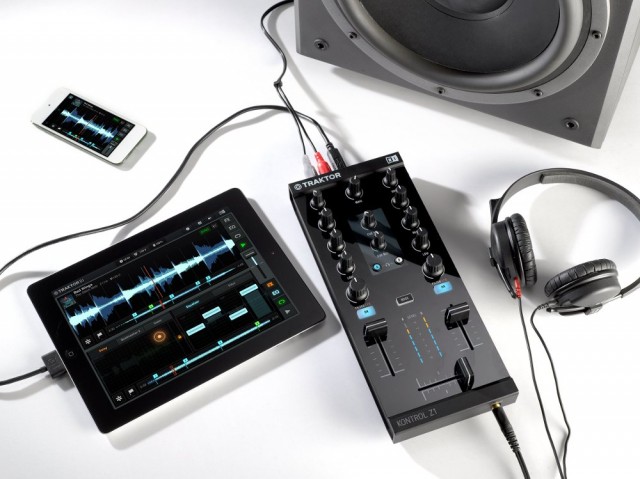
TRAKTOR KONTROL Z1 is the ultra-portable, professional DJ mixing controller forTRAKTOR DJ andTRAKTOR PRO 2. Its cue section lets you monitor and mix tracks with pro precision. Dedicated controls for two channels give you intuitive, tactile control over volume, EQ, filters, and effects. And the built-in audio interface delivers powerful, club-ready sound. Get total control and professional sound in a go-anywhere package – it’s pro on the go.
Want to deliver floor-shaking DJ sets with TRAKTOR DJ? Connect your iPad or iPhone to the Z1 and get a complete two-deck DJ setup with ultimate tactile control. Cue up the next track in your headphones while the current track still plays for the crowd. Mix and EQ with pro-grade faders, knobs, and buttons. Apply filters and effects with the ultra-intuitive one sweep knob. The Z1 even charges your iOS device while you play, so you never have to worry about battery life when your set hits its peak.
TRAKTOR KONTROL Z1 works perfectly with TRAKTOR PRO 2 – plug in and instantly start mixing with hands-on control and premium, club-ready sound. You can also expand your mobile rig with additional creative possibilities: Add TRAKTOR KONTROL X1 to control effects, loops and transport functions like play and sync, and TRAKTOR KONTROL F1 for creative Remix Deck™ magic. Whatever your style, build your setup around TRAKTOR KONTROL Z1 and rock the club or the after-party with the most compact, portable TRAKTOR system ever.
Livid all in: Base Polyphonic Aftertouch & Colors
This video demonstrates some of the wild possibilities with aftertouch and the Livid Base MIDI controller, including a novel way to integrate the iPhone with the Base. The 32 touch sensitive pads can output polyphonic aftertouch, so if your synth is great enough to use that (such as the Madrona Labs Aalto plugin), you’ve got some fantastic possibilities at your fingertips. Stay tuned: after the audio weirdness, there’s a short explanation on how to quickly configure the Base using the online Editor.
Links:
lividinstruments.com/hardware_base.php
madronalabs.com/products/aalto
lividserver.com/editor
There are LEDs everywhere on the Livid Base. With the online editor, you can change the color of every LED, and save your setup to the Base so it always boots up with the colors you want. This tutorial shows you how to use the editor with the Base to change the colors on the drum pads.
Livid Artist Interviews Presents Alluxe (aka Laura Escudé). Alluxe stopped by our studio to perform a track from her new EP and with the BASE, her custom Ohm RGB, Ableton Live, Wii remote, and violin. She discusses her live performance setup with Livid founder Jay Smith, and explains the integration of her controllers. Check out part two of this video where she performs a track.
DATAMASKIN

