
Cubasis Minisampler Tutorial for iPad, Making Great Samples
You can get Cubasis here at the App Store.
https://itunes.apple.com/us/app/cubas…
Cubasis Update, 5 New Pianos, New Drum Kits and a Minisampler for iPad
You can get Cubasis here at the App Store.
https://itunes.apple.com/us/app/cubas…
Cubasis is Steinberg’s streamlined, multitouch sequencer for the iPad. Specially designed for quick and easy operation, Cubasis makes recording, editing and mixing a breeze. Record tracks in high-resolution audio quality, and edit your music with the Key and Sample Editors, while the included mixer and audio effects polish your song to perfection. Cubasis comes loaded with three virtual instruments which can be played in real time using the virtual keyboard and drum pads. Cubasis’ projects can be even opened in Cubase under Windows and OS X! Cubasis places touch-intuitive production tools in your hands, opening up a new world of possibilities for your creativity.
Key features
• Unlimited audio and MIDI tracks (depending on the device used)
• 24 assignable physical inputs and outputs
• 32-Bit floating point audio engine
• Audio I/O resolution of up to 24-bit/96 kHz
• iOS 32- and 64-bit support (depending on the device used)
• Micrologue virtual analog synthesizer with 50 ready-to-go presets
• MicroSonic with over 70 virtual instrument sounds based on HALionSonic and 16 Allen Morgan drum kits
• MiniSampler with more than 20 instrument sounds to create your own instruments
• Mixer with 15 effect processors (insert and send effects)
• Over 550 MIDI and audio loops
• Virtual keyboard and virtual drum pads
• Sample Editor and Key Editor
• Automation
• MIDI CC, program change, aftertouch support
• AirPlay, Buetooth and HDMI audio out support
• Export to Cubase, Dropbox, SoundCloud, AudioCopy & email
• MIDI clock and thru support
• Core Audio and Core MIDI compatible hardware supported
• Full Inter-App Audio and Audiobus support
• Import audio from your iTunes music library or using iTunes filesharing, use AudioPaste or set up a Wi-Fi server in Cubasis
Cubasis 1.8 update – Automation sneak preview
Here is a sneak preview of the Cubasis 1.8 update.
Cubasis Updated With IAA And A Brand New Free Synth Called Nanologue
Background video description:
Cubasis Updated with Inter App Audio, and they have given us a brand new Mono Analogue VST Style stand alone Synth called Nanologue that also works with IAA.
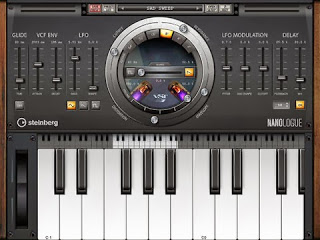
Nanologue boasts a wide scope of inspiring sounds and professional sound effects, sporting a straightforward multi-touch interface and a great-sounding monophonic synthesizer. Used stand-alone and in connection with your iOS host application via Inter-App Audio, Nanologue brings the power of VST 3 technology to the iOS platform.
Cubasis DIY send effects using Audiobus
Cubasis tutorial showing how to use 3rd party iOS effect apps with Audiobus as ‘DIY send effects’ within Cubasis.
AUFX DUB for iPad Demo with Drums, Cubasis and Audiobus
Demo of the new AUFX DUB from Kymatica, tested this with the Yamaha DD65 kit and the Korg Wavedrum Global running through the iPad via a Behringer UCA222. Then into Audiobus and into Cubasis. The recorded reggae drum pattern that plays about half way through was programmed with DM1 then treated with the other AUFX SPACE reverb app, and had some compression from Cubasis added..
AUFX:Dub. A highly tweakable stereo delay audio effect, suitable for everything from clean digital delays to filthy dub echoes and broken cassette tapes. It features tape simulation (noise and warble), filters in the delay loop for typical dub sound, stereo detune, ping-pong delay, and more
All AUFX apps have the following features:
- High quality 32-bit DSP engine.
- Process hardware input/output or other apps through Audiobus (input/filter/output slots supported).
- Ready for the future inter-app audio standard.
- Fully MIDI controllable, including Virtual MIDI.
- Built-in look-ahead limiter to avoid clipping.
- Background Audio.
- Save and load user presets.
- Comes with several bundled presets.
- Record the result directly in app.
- Email recordings or export to AudioShare audio document manager app.
- Access user presets and recordings through iTunes File Sharing.
Super Manetron – iPad Demo of this Mellotron M400 sim
A demo and tutorial of this great Mellotron M400 simulator. Also some history and multi-tracking in Cubasis via Audiobus.
Micrologue video tutorial (Cubasis 1.5)
In this video, Steinberg product specialist Sebastian Mönch teaches you how to use Micrologue inside Cubasis 1.5.
Thor iOS synth demo
Review and audio demo of Propellerhead’s brilliant Thor synth for iOS. For a full review of the app see the Music App Blog website at www.musicappblog.com
Demo of Thyses working with Cubasis and Thor. Thyses is used to send MIDI data to a Cubasis MIDI track. Via MIDI Thru, this MIDI data is passed to the Thor synth. The MIDI data can also be recorded in Cubasis.
Cubasis 1.5 – Micrologue – Factory presets showcase
Cubasis 1.5 features Micrologue, a virtual analogue synthesizer based on the award winning VST instrument Retrologue.
DATAMASKIN

