
TR-909 Bass Drum Recorded Through 13 Distortion Units
The Gear Fiend Presents: TR-909 Bass Drum Recorded Through 13 Distortion Units
1) Dunlop Fuzz Face
2) Electro-Harmonix Metal Muff with Top Boost
3) Maxon OD-9
4) Boss OS-2
5) Boss DS-1
6) Boss DS-2
7) Pro Co RAT
8) Tech 21 VT Bass
9) MXR Bass D.I. +
10) Electro-Harmonix English Muff’n
11) Moog Moogerfooger Lowpass Filter
12) Electro-Harmonix Bass Big Muff Pi
13) Elektron SidStation
SAMPLE PACK NOW AVAILABLE HERE:
http://thegearfiend.com/
micronaut – experiment seven
“In the middle of beta-testing the DSI Tempest, I decided to knock out a quick movie showing the cool pattern-switching and ribbon controller abilities. Also in this video: MeeBlip and DSI TETR4, and Eventide TimeFactor. Recorded to and mixed from 8-track 1/2″ tape.”
Hardware feature The TETR4:
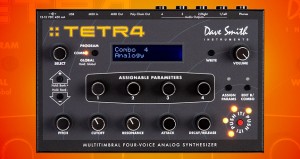
- Affordable, fully programmable poly synth with a 100% analog signal path.
- Classic, real analog sound—including legendary Curtis analog low-pass filter.
- Four-part multitimbral capability with four separate outputs.
- Combo Mode for huge unison patches, stacked sequences, and “modular-style” poly sounds.
- Expandable: poly chain with other Tetras, Prophet ’08, and Mopho for expanded polyphony
- Just 7.9″ x 5″ (20.07 cm x 12.7 cm).
- Free editor for Mac OS and Windows.
Overview
Tetra is our next-generation analog poly synth. Tetra takes the award-winning sound and features of Mopho, multiplies them by four, and packs them in a box less than half an inch larger!
Tetra has multiple personalities. It is a four-voice, analog poly synth, a sort of “mini Prophet.” It’s a four-part, multitimbral synth with separate outputs, essentially four Mophos in one very compact box. And it’s a voice expander for other Tetras or the Prophet ’08.
Outside the Box
Physically, Tetra is similar to Mopho, with four assignable parameter controls per program and a row of controls dedicated to the most commonly used performance parameters. All of the parameters can be accessed from the front panel and Tetra is fully programmable. A free, downloadable editor is available for Mac OS and Windows to facilitate more comprehensive tweaking.
Most of the rotary controls are detented encoders, but Cutoff and Resonance are potentiometers, allowing full sweeps with a single turn. The Push It button is a manual trigger to play notes and latch sequences on without the need for a MIDI controller.
Audio is output in mono, stereo, or per voice, via the four audio output jacks. There is also a headphone out. MIDI communication is by standard MIDI in and out jacks or USB. Poly Chain Out is a special, dedicated MIDI output to chain multiple instruments for increased polyphony.
Under the Hood
The voice architecture is based on the Prophet ’08, but with the addition of a sub-octave generator for each oscillator and a fully programmable feedback loop for each voice. That breaks down to two DCOs, a resonant low-pass filter, three DADSR envelope generators, four LFOS, deep modulation routing, an arpeggiator, and a 16 x 4 analog-style step sequencer per voice. Feedback is capable of producing effects ranging from mild distortion to fairly extreme harmonic instability. (That’s a good thing.) The possibilities are nearly endless. And the audio signal path is 100% analog.
An improvisation in a Valerie Dore / Italo Disco style
An improvisation in a Valerie Dore / Italo Disco style circa 1984. Featuring the Orchestrator, Juno-60, LinnDrum and SH-101
Crumar Orchestrator: string machine
Roland SH-101: bass
Roland Juno-60: synth strings
Linn LinnDrum: drum machine
Reverb: built-in Roland M-10DX digital mixer
Delay on Linn claps: Boss DD-3 digital delay pedal
Hardware feature – Crumar Orchestrator:
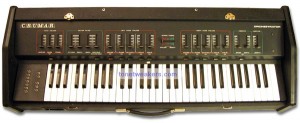
In 1977, Crumar introduced the Orchestrator (called the Multiman-S in Europe), a fully polyphonic orchestral string machine. It has five basic sounds: Brass, Piano, Clavichord, Cello and Violin. The keyboard is split in the middle allowing you to play one combination of instruments with the left hand, and another combination with the right.
All five sounds are available at all times, you simply adjust how much volume you want of each sound. Feature just a single instrument, or create your own orchestral ensemble—you are the Orchestrator! With the keyboard being split, there are five separate instrument volume sliders for the left hand (lower split) and another five for the right hand (upper split).
There is also a sixth sound: Bass. The Bass sound has its own volume slider as well, but it is assigned to only the bottom 27 notes of the keyboard. It is also not the greatest of Bass sounds either, and can sometimes muddy the sound.
There is a filter section but only for the Brass. It uses some pretty old-fashioned terminology: ‘Emphasis’ for resonance and ‘Contour’ for cutoff. There are also Attack and Decay controls for the filter. There is another filter for the Cello and Violin string sounds called ‘Timbre’ which can adjust between a ‘Mellow’ to ‘Bright’ sound—basically it’s a highpass filter. There is a ‘Vibrato’ effect section, basically the LFO, with ‘Speed’ and ‘Depth’ controls. The only global envelope control is a ‘Sustain’ length slider.
The Orchestrator’s best sounds are its Brass (probably because it is the sound with the VCF filter) and the Strings. In fact the Strings sound very similar to the famous ARP Solina. Unfortunately there are no built-in Ensemble effects to really sweeten them up…but that’s what outboard gear is for!
Like most synthesizers of its time, the Orchestrator was built with the performing musician in mind. It is its own flight-case! Its casing is very tough and durable, it has a handle and a cover/lid to keep it protected during transport. And if it looks heavy, it is! Additional options for the Orchestrator included an organ-like 13-note (G-G) Foot Pedal Board, Sustain Pedal, and a Foot Expression Pedal controller for the filter cutoff. There are no CV/Gate options, just connectors for the external pedal controllers.
About section via VSE
Tempest – Beat Exercise
Richard Devine explores the Tempest
“Just playing a rhythmic beat exercise on the new Tempest Drum machine by Dave Smith and Roger Linn. Interesting drum synthesis and parameter control allows for some really cool beat manipulation. The sounds featured are from 4 different analogue synthesis kits I created and programmed.”
rogerlinndesign.com/products/tempest/index.html
How to program a Roland TR-808
The TR-808 is a classic drum machine that used analog synthesis to create its sounds. The sounds have a very thin and pure quality and aren’t grungy like it’s successor the TR-909. In fact, the 808 has become the signature beatbox used in most R&B and hip-hop as well as a lot of dance and techno music. Booming bass kicks, crispy snares and that annoying cowbell sound made famous during the 80’s are all part of the 808 and its famous sound.
Its 16 drum sounds include the famous boomy low kick, snappy snares, low/mid/hi toms, low/mid/hi congas, rimshot, claves, hand clap, maracas, cowbell, cymbal, open hihat, closed hihat and accent. All of the sounds can be edited and/or tuned and have individual outputs. Unfortunately it is not MIDI equipped but it does use Roland’s DIN Sync.
A small demonstration about how to program a Roland TR-808
Sorry for my bad english, and please don’t complain about the bad audio quality because this movie is just for educational use.
Cool new beats on the new DSI Tempest drum machine
“This is a demo of some of the things i’ve come up with the past week that i’ve been one of the lucky beta testers for the DSI Tempest. I’m loving it so far.. finding it very inspiring to play and use and create new drum beats and sounds. I’m going to try to tell some of the things about the Tempest that arent talked about too much already.”
“The design of Tempest reflects a rethinking of what a drum machine needs to be in the current era. It’s not so much a drum machine as a new musical performance instrument for the creation, manipulation, and arrangement of beat-oriented music, with an intuitive and efficient use of human gestures.”
Tempest’s 16 velocity- and pressure-sensitive pads are arranged in an 8 x 2 array to facilitate both real-time and step entry of beats. Two pressure- and position-sensitive Note FX slide controllers provide a unique new method of performance and control.
Groove – Drum Station DT-010 by D-lusion
Groove – Drum Station DT-010 by D-lusion. (standalone application) This is not a plugin, but a standalone drum machine programme that as a lot of built in samples but you can use your own 16 bit drum samples and record and export the whole thing as a 16 bit wav. classic.
For more information visit. or check out all the other video’s on youtube
http://www.d-lusion.com/News.html
delusion also are famous for the rubberduck or RDH30, 303 acid bass machine sequencer and the mj studio mp3 dj mixing application.
ive got this working on windows7. just download, run, then reinstall under recommended settings. all these third party applications work a treat. 10/10
Showing off the Tempest drum machine
A new demo of the much talked about Tempest
Summary of Features
- Each of the 6 analog voices has 2 analog oscillators plus 2 digital oscillators (with a large bank of included samples), Dave’s classic analog low-pass filter with audio-rate modulation, an additional high-pass filter, analog VCA with feedback, 5 envelopes, 2 LFOs, an extraordinary variety of analog modulation routings, and stunning sonic quality, warmth and punch. Although optimized for drum sounds, it excels at tuned sounds as well, and even doubles as a 6-voice analog synth. In addition to the 6 direct voice outputs, there are stereo mix outputs and phones outputs, plus 2 inputs for foot switches or expression pedals, MIDI in/out and USB.
- The performance-oriented operating system, 90 panel controls, and bright 256 x 64 OLED display work together to provide a tightly integrated, non-stop workflow: record a drumbeat in real-time, switch to another drumbeat and use the lit pads to record it using step programming, switch to another drumbeat and record tuned keyboard parts, use the 2 touch controllers to to record real-time note or beat-wide parameter animations, use the generous sound controls to edit any of the drum sounds, tweak the analog effects or drum mix, arrange beats in real time and record the live arrangement into a song, enter/exit Song mode and much more, all without ever stopping play.
- 16 pressure- and velocity-sensitive lit pads are arranged in a 2×8 configuration, providing intuitive access to all your fingers and providing the ideal compromise between the popular 4×4 pad arrangement (popular for real time programming ) and 1×16 arrangement (popular for step programming) because Tempest does both. The pads can be used to play 32 drum sounds (2 banks), mute/unmute the 32 sounds on playback, play and arrange 16 beats in real time, play one sound at 16 tunings (in a variety of scales) or 16 velocities, or as 16 time steps for step programming. The ROLL button permits creating drum rolls or repeated groove patterns by varying pad pressure as the beat records, and doubles as a momemtary “stutter” effect when the pads are assigned to play beats. Use the Sustain button on tuned parts like a keyboard’s Sustain pedal, or to choke drum sounds or drumbeats when the pad is released.
- Two pressure- and position-sensitive Note FX slide controllers permit real-time recording of note or beat-wide sound parameter changes into the drumbeat as you play. For example, record simultaneous filter frequency, tuning, envelope decay and pan changes for each note, or control similar parameters affecting the entire beat.
- A variety of unique effects are provided while maintaining a pure analog signal path: 1) Stereo analog compressor and distortion circuits affect the stereo output mix, 2) beat-synced delay is achieved by generating additional delayed note events within the sequencer, and 3) a beat-synced “stutter” effect is created entirely within the sequencer by looping short portions of the drumbeat on demand.
- The degree of swing timing can be adjusted in real time during playback. Roger used his entire bag of tricks to make the swing sound very human and natural.
Quick Start Guide for Tempest Analog Drum Machine from Dave Smith Instruments, narrated by Roger Linn
Tempest is a collaboration between Smith and longtime friend and fellow instrument designer Roger Linn. Though they’ve consulted with each other on past projects, Tempest marks the first time a product will carry both the Dave Smith Instruments and Roger Linn Design logos. “If you’re going to make a drum machine, who better to have in your corner than Roger Linn?” said Smith, referring to Linn’s legacy as inventor of the digital drum machine.
Though Smith is also responsible for some fine drum machines—most notably Sequential’s DrumTraks and Studio 440—Tempest is his first to utilize analog synthesis to generate the sounds. “We’ve designed a very flexible new synth voice for Tempest,” said Smith. Linn added, “The design of Tempest reflects a rethinking of what a drum machine needs to be in the current era. It’s not so much a drum machine as a new musical performance instrument for the creation, manipulation, and arrangement of beat-oriented music, with an intuitive and efficient use of human gestures.”
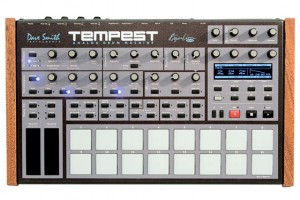
Tempest’s 16 velocity- and pressure-sensitive pads are arranged in an 8 x 2 array to facilitate both real-time and step entry of beats. Two pressure- and position-sensitive Note FX slide controllers provide a unique new method of performance and control.
- Each of the 6 analog voices has 2 analog oscillators plus 2 digital oscillators (with a large bank of included samples), Dave’s classic analog low-pass filter with audio-rate modulation, an additional high-pass filter, analog VCA with feedback, 5 envelopes, 2 LFOs, an extraordinary variety of analog modulation routings, and stunning sonic quality, warmth and punch. Although optimized for drum sounds, it excels at tuned sounds as well, and even doubles as a 6-voice analog synth. In addition to the 6 direct voice outputs, there are stereo mix outputs and phones outputs, plus 2 inputs for foot switches or expression pedals, MIDI in/out and USB.
- The performance-oriented operating system, 90 panel controls, and bright 256 x 64 OLED display work together to provide a tightly integrated, non-stop workflow: record a drumbeat in real-time, switch to another drumbeat and use the lit pads to record it using step programming, switch to another drumbeat and record tuned keyboard parts, use the 2 touch controllers to to record real-time note or beat-wide parameter animations, use the generous sound controls to edit any of the drum sounds, tweak the analog effects or drum mix, arrange beats in real time and record the live arrangement into a song, enter/exit Song mode and much more, all without ever stopping play.
- 16 pressure- and velocity-sensitive lit pads are arranged in a 2×8 configuration, providing intuitive access to all your fingers and providing the ideal compromise between the popular 4×4 pad arrangement (popular for real time programming ) and 1×16 arrangement (popular for step programming) because Tempest does both. The pads can be used to play 32 drum sounds (2 banks), mute/unmute the 32 sounds on playback, play and arrange 16 beats in real time, play one sound at 16 tunings (in a variety of scales) or 16 velocities, or as 16 time steps for step programming. The ROLL button permits creating drum rolls or repeated groove patterns by varying pad pressure as the beat records, and doubles as a momemtary “stutter” effect when the pads are assigned to play beats. Use the Sustain button on tuned parts like a keyboard’s Sustain pedal, or to choke drum sounds or drumbeats when the pad is released.
- Two pressure- and position-sensitive Note FX slide controllers permit real-time recording of note or beat-wide sound parameter changes into the drumbeat as you play. For example, record simultaneous filter frequency, tuning, envelope decay and pan changes for each note, or control similar parameters affecting the entire beat.
Cool Drum Studio on Commodore 64
Back in the days 
Drum Studio on Commodore 64
Version v2.80A
Year 1990
Copyright (c) 1990 Mark Wilson
DATAMASKIN

