
Sneak preview of Athmoscapes
Athmoscapes – preview: A machine featuring probably the easiest way for stunning spacey soundscapes and athmospheres either let it play in LazyPlay mode or via triggering i.e. switching waves by MIDI keys or MIDI CC. So this plugin is also very suited to be used with trigger pads.
Introducing ElectroBeats for the iPad
ElectroBeats is a very intuitive beat making application conceived in collaboration with worldwide renowned and most demanded producer David Guetta.
Right away, you’ll create great sounding beats thanks to a powerful real-time approach and an impressive sound library.
ElectroBeats by David Guetta features
- Realtime workflow experience with sixteen pads and five different modes: Pad, Pitch, Velocity, Erase, Mute/Solo.
- Exclusive and electro oriented sound library, with hundreds of samples including Bass Drum, Snare, Clap, Rimshot, Cymbal, Hi-Hat, Open Hi-Hats, Acoustic Percussion, Electronic Percussion, FX, Bass, Chords, Leads, Instruments, Vox…
- Two sound generators : sample playback and synthesis oscillator.
- Dozens of ready to use drum and construction kits.
- Hundreds of patterns to use with the drum kits..
- Note Repeat in multiple resolutions..
- Dynamically change the quantize/repeat resolution while recording : the key to build beats very fast..
- Default quantization for instant gratification.
- Save and share your tracks using iTunes.
- Bounce song in Wav format.
- Multitrack export for use in sequencers like Logic™, Live™, ProTools™, Cubase™ and many more..
- Tap Tempo.
- Realtime previews (pattern, kits and sounds).
- Convenient undo with snapshots support.
- Embedded help in English, French, Spanish and Japanese.
More info at www.uvi.net
Do you remember the Sequetron?
Well in case you don’t then this is for you
Showing how the Sequetron encourages building & evolving sequences on-the-fly as the mood takes you… or maybe it’s just messing about on a keyboard!
Audio recording seems a bit quiet (now I’ve uploaded it!) so you may need to crank it up.
The *only* controls used are the MIDI keys in front of the screen. All snippets are doodled/played/recorded/performed live starting with a blank sheet, or the remnants of the previous snippet, and only edited to shorten the video – no mice, qwerty keyboards or other trickery are involved!
Full info & downloads at www.philizound.co.uk
Input device is a Cheetah 5V MIDI keyboard in basic mode (any keyboard would do). Output devices are a Supernova synth in multi-timbral (performance) mode, and an EMU E5000 for drums.
Apologies in advance if it all sounds ‘samey’ …and mostly in C minor, but that’s a limitation of my music skills, not the Sequetron 
O-Bow 1 – the first optical bow prototype
Demonstration of O-Bow 1, the first optical bow prototype. Uses a single sample for synthesis. Bow speed controls gain, bow angle controls vibrato.
The O-Bow is a bow controller consisting of an optical flow sensor mounted to measure the bow speed and horizontal angle with high resolution. The bow can be anything with a grained surface, such as a wooden stick.
Development of the O-Bow was prompted by the lack of robust, and inexpensive bow controllers. Synthesized string instruments frequently appear in recordings, yet the quality of articulation is very limited for such expressive instruments. Bowing is a fairly easy skill to aquire, whereas fingering and vibrato are very difficult. Combining the keyboard with bow allows a musician previously unskilled with string instruments to quickly produce much better articulation than using a keyboard alone.Controlling vibrato with bow angle or key pressure avoids the need to control vibrato directly.
From a less utilitarian viewpoint, bowing is a very natural and expressive mode of control. It deserves to be integrated better into the modern world of electronic sound, including that which is more removed from authentic strings.
So far the O-Bow has been used with a simple one-sample synthesiser as shown in the following video. More sophistocated synthesis is being developed, including physical modelling. A related patent application has been filed.
New computer music app that calculates note numbers and play their sounds in real-time
“ipsound” has shared this demo of a new music computer app called Live Music Coder
Live Music Coder M^2 OSC is a new computer music app that calculates note numbers and play their sounds in real-time, operated by using command-line style interface.
It supports Open Sound Control to play external sounds too.
“We make an effort at simple and real-time operation,” note the developers. “You can do all operations of the parameter change etc. while playing music in real-time.”
You can get a taste of the Live Music Coder command options below.
Live Music Coder is available now for $1.99 in the App Store.
[function]
define parameters
describe formula
start/stop sequencer
view data list
save/load/delete parameters
view current status
show help
[calculator]
1) user parameter
r1,r2 : array of note number
– note : 4 octave from 1 to 48, except for them are silence. 1tick = sixteen note.
– sound: sine wave which decreases envelope , no volume controller.
– tempo : 40 – 160 BPM
a0, b0, c0, d0 : 4 output sound channels. calculate each formula.
– simple example
define parameters:
r1=1 3 5 6
r2=13 15 17
a0=r1
b0=r2
->
output A track : C1 D1 E1 F1 C1 D1 E1 F1 C1 ……. repeated
output B track : C2 D2 E2 C2 D2 E2 C2 D2 E2 …….repeated
as sixteen note
2) operator
+, -, *, / , % ( add, subtract,multiply,divide,residue)
3) controller
?,:, !, <, =, >,| (if, else, not, smaller, equal, larger, separator)
4) embedded parameter
q : tick. increment this per sixteen note.
s : slider value (0~99)
x : random value (0~range) range:0~99
v1,v2,v3,v4 : store the value before separator(|) and branch(?,:), then reference in the expression.
(1|2|3|4| -> v1=1, v2=2, v3=3, v4=4)
a1~8, b1~8, c1~8, d1~8 : history of a0, b0, c0, d0 (a0->a1->a2->a3->a4->a5->a6->a7->a8)
5) formula samples
** First of all define the array (sequence) “r1/r2″ of note number and then calculate them in the sound track (a0, b0, c0, d0).
r1=1 3 5 6 8 10
a0=r1+1 -> 2 4 6 7 9 11 ….
a0=r1?>5+12 -> 1 3 5 18 20 22 ….
(if r1>5 then r1+12)
a0=r1?>5+12:12|v3 -> 12 12 12 18 20 22 ….
(if r1>5 then r1+12 else 12)
a0=r1?>5|24:12|v4 -> 12 12 12 24 24 24 …..
(if r1>5 then 24 else 12)
———-
r2=1 0 1 1 2 0 2 2 (0: rest)
b0=r2
->
1 0 1 1 2 0 2 2 1 0 1 1 2 0 2 2 …
———-
a0=x
(simple random music)
[button]
start/stop : start/stop music
list/load/save/delete : list data file, load/save/delete data
status/view/help1/help2 : view current status, view selected data int the list, show help1/help2
clear : back cursor or clear-all-parameter
enter : execute command
r : define note number (switch r1/r2)
a : select (a0,1,2,3,4,5,6,7,8)
b : select (b0,1,2,3,4,5,6,7,8)
c : select (c0,1,2,3,4,5,6,7,8)
d : select (d0,1,2,3,4,5,6,7,8)
a0: describe formula of sound track 1 (left operand only)
b0: describe formula of sound track 2 (left operand only)
c0: describe formula of sound track 3 (left operand only)
d0: describe formula of sound track 4 (left operand only)
a1-8: reference history of output note number of track1 (right operand only)
b1-8: reference history of output note number of track2 (right operand only)
c1-8: reference history of output note number of track3 (right operand only)
d1-8: reference history of output note number of track4 (right operand only)
v : select (v1,2,3,4)
selector : switch octave
OSC : OSC setting
Halcyon – a new Generative Musical Instrument
Zach Gage has shared a new instrument with us called Halcyon, Zach is the creator of Bit Pilot, Unify, and SynthPond
Here´s what he has to say about it:
– A Unique Action Puzzle Game –
Halcyon is named for the mythological bird of ancient Greece, said to charm the winds and seas into a calm during the Winter Solstice. Gameplay is one part spacial action puzzler and one part interactive stringed instrument combined in an experience designed specifically for the iPad. Colored currents travel inexorably toward each other. Strum the strings to match the currents, creating both phonic and visual harmony. Take on the role of the Halcyon, conducting nature, untangling currents, and bringing calm to the wind, sea, land, and stars.
– A Generative Musical Instrument –
Halcyon features a complete generative soundtrack that becomes an instrument when you play the game. Since its designed to accompany you while you play, you’ll create tranquil sonic landscapes as you travel along.
– Tons of Gameplay –
: 36 Levels through Four Environments
: Two Endless Modes that dynamically adjust difficulty based on how you are doing
: A Twelve Song Generative Soundtrack
: OpenFeint + Game Center
If you enjoyed Unify, you’ll love Halcyon
A closer look at the Eigenharp
Imogen Heap is an award winning artist with Ivor Novello and Grammy awards to her name. Respected among her peers and adored by her fans, she truly embraces both modern technology and traditional instruments in her creative process.
This is the official Eigenlabs video taking a closer look at Imogen Heap and her thoughts on the new electronic instrument, the Eigenharp.
CHEAP, FAT and OPEN – open source platform for musical exploration
Jacob Sikker Remin of www.campingsex.org shows off his new open source synth/sequencer Cheap Fat and Open.
CHEAP, FAT and OPEN is an open source platform for musical exploration, composition and performance.
The platform is CHEAP, and OPEN – welcoming you to experiment.
A combination of the old and new: the raw 8bit / chip tune approach combined with wireless connectivity, state of the art open source hardware, and expandability – gives us that FAT sound.
It is portable, allowing you to make music on the go.
The platform is a performance instrument, giving a full 1½ octave keyboard control in compact packaging, through a classic stylophone interface. It is also a sequencer, allowing you to program rhythms and melodies, and play them back in sync with other platforms and instruments.
This is NOT a finished product. It works as is, but inside the platform rests an atmega328 processor, which can be programmed in the Arduino environment. This means that the platform can be modified, expanded, and tweaked to meet your exact needs.
CHEAP, FAT and OPEN is designed for geeky musicians, the chip tune community, the makers, the circuit benders, the interaction designers and the musical programmers, and anyone else who wishes to experiment with sequenced / networked / low-level musical exploration.
This project is based on knowledge and inspiration from many different communities. I hope that by bridging these different creative communities, we can create something beautiful together.
See http://tthheessiiss.wordpress.com/ for more details
MotionCommand – a line of massive touchscreen controllers
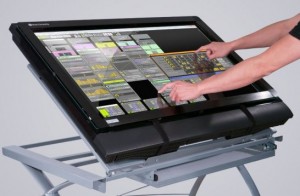
Music Computing has introduced MotionCommand – a line of massive touchscreen controllers designed for music and media.
Music Computing is an Austin-based startup headed by Victor Wong, who previously headed Open Labs.
Currently, the company has four MotionCOMMAND multi-touchscreen products available: ClearView, LCD, Rack and WorkCenter.
There are two versions – one driven by an HD video projector designed for live performance that is transparent on both sides; and one driven by an HD LCD television for studio use. Standard sizes are 32-inch and 42-inch, but special order versions up to 200-inches diagonally are also available.
Options include multi-touchscreen controllers integrated into a control console complete with Music Computing’s computer DAW (digital audio workstation) computer core and audio interface.
“MotionCOMMAND touchscreen products provide people with the ability to work in a more natural state leading to increased efficiency, better control over software interfaces and the elimination of having to map software controls to hardware controllers,” says Wong.
The controllers are compatible Windows and Mac OS. Prices for standard configurations range from $1,499 to $2,299 (U.S. MSRP).
Via ST
Fiddling with the iPad
Smule has released Magic Fiddle, a new music app for the Apple iPad.
Hello. I am your fiddle. I am programmed to make you a musical prodigy. Your untrained fingers will play beautiful music in a matter of minutes. Seriously, in the amount of time it took you to read this you could have learned ‘Ave Maria’. I kid you not (fiddles never joke).
Use my magic to earn high scores, medals and badges for your performances. I understand that you humans like to win. Well then, can you get a gold medal on every song?
You, my friend, are not just someone with an iPad. You are a virtuoso.
Magic Fiddle features
- Pick up and play:
- Pick up and play beautiful songs by following streams of colored light in my SongBook, no skill required!
- Impress your friends by playing any of my 20 songs I have in my SongBook, from video game theme songs to ‘Ave Maria’ and everything in-between.
- Bow, pluck, trill, and play vibrato and glissandi right from your iPad.
- Take it to the top:
- Earn scores for every song, and medals for playing well. I will be the judge of ‘well’ (not your mother).
- Show off your newly found musical aptitude to your fellow fiddlers by competing for a spot on the global leaderboards.
- Earn badges as you accomplish new heights of fantastic fiddlery.
- Learn fiddling techniques easily:
- Learn basic and advanced fiddle techniques through fun learning adventures with me – my StoryBook takes us on an 8-chapter interactive journey to teach you different techniques with activities and step-by-step instructions.
- Practice your new techniques on real songs as you improve.
- Listen and share with the world:
- Listen to other magic fiddlers play on the globe around the world.
- Broadcast your masterpieces for the world to enjoy.
- Show your support for fellow fiddlers by ‘liking’ their songs.
Magic Fiddle for iPad is available to purchase from the iTunes App Store for $2.99 USD.
More information: Smule / Magic Fiddle
DATAMASKIN

