
Artiphon – Multi-Instrument at CES 2013
John Biggs interviews Mike Butera, Founder of Artiphon, onstage at CES 2013. Artiphon is a multi instrument that uses an iPhone as it’s brain. This device can be a guitar, bass, violin, banjo, or drumpad.
Orphion – New year, new groove
Orphion through Audiobus
orphion.de – itunes.apple.com/en/app/orphion/id495465097
audiob.us
Apps used:
Loopy – loopyapp.com
FunkBox – syntheticbits.com
JamUp Pro – positivegrid.com/jamup/
Orphion is a musical instrument with a unique sound between string instrument and percussion. Everyone can play expressive, wonderful sounds and easy or virtuosic melodies on it just by moving fingers on virtual pads.
What can I do with it?
• Express the sounds you feel
• Play polyphonic music very expressively
• Crazy drumming
• Dream and relax
• Create soundscapes and melodies without musical knowledge
• Visually explore music and music theory
Features:
• Different articulations from soft to plucked to hardly slapped
• Natural interaction
• Extend your ways of expression as a percussionist, guitarist, pianist or other musician
• 15 transposable pad layouts with different tonalities from easy to complex
• 8 individual voices for 8 fingers (4 on iPad 1)
• MIDI support: Play your favorite synth with the revolutionary Orphion interface
• Audiobus support: Stream live audio from Orphion directly to other Audiobus-compatible apps
Close encounter with the Elektron Analog Four
We’ve been hearing a lot about Elektron’s new analog four voice. From the stylish but somewhat obscure introduction movie which piqued our interest, to the sound audition pieces coming online as people get hold of their very own units.
The Analog Four is a new type of instrument from Elektron as it has 100% analog VCOs and Filters which are digitally controlled. Their Machine Drum and MonoMachine have been Virtual Analog and sample based.
Elektron came over from their Gothenburg HQ to give us a closeup look at the Analog Four.
Jon is the product manager and is doing the talking, Jenk the guy making all the sounds.
No apologies for the length of the video, its just that there seemed to be so many things to talk about. Also this is intended to be a discussion about the features of the instrument, there are many other videos available that are just audio demos – check them out.
The Elektron Analog Four is available now via selected retailers and direct from the Elektron Website.
Auria LE has arrived – the professional digital audio recording system for iPad
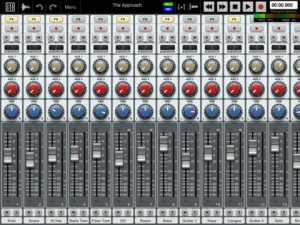
Auria LE – the professional digital audio recording system for iPad.
The mobile DAW you’ve been dreaming of has finally arrived. Auria LE is a 24-track digital recording system designed from the ground up for the iPad. With professional-level features and optional third-party plugin support from names like PSPaudioware, Overloud, Fab Filter and Drumagog (available via In-App purchase), Auria clearly sets a new standard for mobile recording.
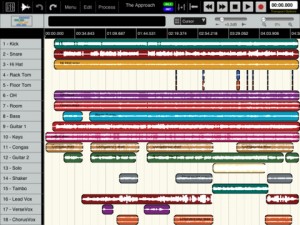

FEATURES:
- 24 tracks of simultaneous playback of stereo or mono files (upgradable to 48 tracks).
- Up to 8 tracks of simultaneous recording when used with compatible USB audio interfaces (upgradable to 24 tracks of recording) Camera Connection Kit required.
- 24-bit recording
- Supports sample rate of 44.1KHz only (upgradable to support 48K and 96K sample rates)
- Vintage-inspired ChannelStrip on every channel by PSPAudioware includes Expander, Multiband EQ and Compressor
- MasterStrip on all subgroup and master channels featuring PSPAudioware BussPressor, EQ and Mastering Limiter
- Third party VST effect plugin support available via in-app purchase (only iOS-version plugins are supported. All plugins must be purchased through the in-app store)
- ClassicVerb reverb plugin included
- StereoDelay and StereoChorus plugins included
- 2 Assignable subgroups(upgradable to 8) and 2 aux sends
- Powerful waveform editor with features like cut/copy/paste, duplicate, separate, gain, and more
- Flexible snapping tools allow snapping to events, cursor, bars, beats and more
- DropBox, SoundCloud and Audio Copy/Paste support
- Full automation support on all controls with graphical editing
- True 100mm faders when used in Portrait Mode
- Optional video import feature allows sample accurate sync of video to an Auria project with adjustable offset times and video export capability
- Timeline ruler options include minutes:seconds, bars:beats, samples and SMPTE time
- Auto-punch mode
- Full delay compensation on all tracks and subgroups
- Adjustable metering modes, including pre or post fader, RMS and peak
- Adjustable pan laws
- Sample accurate loop function
- Automatic sample rate conversion
- Built-in metronome
Includes a demo song mixed on Auria by Grammy winning producer/engineer David Kahne.
REQUIREMENTS:
iPad 2 or later strongly recommended.
Requires iOS 5.0 or later
USB audio interfaces require Camera Connection Kit
Polymoog And Seeburg Select A Rhythm
Just in case you did not know; Seeburg was an American design and manufacturing company of automated musical equipment, such as orchestrions, jukeboxes, and vending equipment. Automated musical equipment, such as coin-operated phonographs and orchestrions, were manufactured under the JP Seeburg and Company name for most of its early years. Until 1956, the company was family-owned. The company was founded by Justus Sjöberg from Gothenburg, Sweden. He moved to the US after graduating from Chalmers and used an Americanized spelling of his name for the company. In the late 1940s, Seeburg manufactured its popular and distinctive “trashcan-shaped” series of jukeboxes
Therevox ET-4 Demo
Therevox ET-4 analog ribbon synthesizer.
Inspired by the Ondes Martenot’s au ruban controller, the ET-4 is controlled by moving a finger along a reference keyboard shaped to provide tactile feedback. Dual pressure sensitive intensity keys control the amplitude of the ET-4′s two independent analog oscillators.
“A few sounds I made with my new Therevox ET-4. No processing was done to the raw output of the ET-4 other the running some of the sounds through an MXR Carbon Copy delay pedal. The reverb is the ET-4’s built-in spring reverb. With some of the sounds I control filter cutoff using a Moog expression pedal.”
Electronic instruments: Caelestis Teaser
Caelestis is a unique, sample based generative music app that creates sounds with bouncing balls. Three shapes on the screen are used as ‘rooms’ that contain a sound. Different coloured balls can be thrown around inside these rooms, generating notes when one collides with a side. Using different combinations of balls and sounds, all kinds of beautiful performances can be achieved.
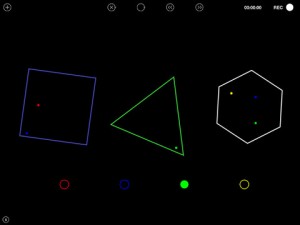
Features:
– Three rooms, with up to three balls at one time per room. Each room can be spun around to change the path of the balls inside.
– Balls added and removed easily by dragging or tapping in the middle of each room.
– Four different ball colours.
– Speed control for the balls.
– Pitch control using the built in keyboard, octave control using the different coloured balls.
– Delay and Reverb FX.
– A mixer unit, allowing volume and FX control over each room.
– 30 presets in three categories: Tuned, Abstract and Percussive.
– Import your own samples into the app via Audio Paste. Audio can be re-pitched by up to 12 semitones. Please note that only WAV and MP3 are supported formats.
– Record your performances and export them via Audio Copy
– Please note that Audio Copy and Paste is only available after a paid upgrade.
Experimental: TONEWHEELS HURDY-GURDY(VIELLE A ROUE OPTOÉLECTRONIQUE)
This optoelectronic hurdy-gurdy was commission by the Acces(s) Festival, Pau France in October 2012.
TONEWHEELS is an experiment in converting graphical imagery to sound, inspired by some of the pioneering 20th Century electronic music inventions, such as the Light-Tone Organ (Edwin Emil Welte, 1936 Germany), the ANS Synthesizer (Evgeny Murzin, 1958 USSR), and the Oramics system (Daphne Oram, 1959 UK). Transparent tonewheels with repeating patterns are spun over light-sensitive electronic circuitry similar to that used in 16 & 35mm motion picture projectors to produce sound.
The TONEWHEELS Hurdy-Gurdy presented at Acces(s) is not an “interactive” artwork in the common sense. While it does not reward the impatient museum visitor with flashing lights and noises at the simple touch of the button, it does invite participation in the process of technological music creation. Although it first appears to be a very traditional instrument known to many folk-music cultures, it functions in a very different way which can only be discovered by playing it.
The artist would like to thank Tobias Traub of Oroborus Customs e.K. and Carlo Crovato for their invaluable assistance in creating this instrument. Circuits designed by Jessica Rylan and Eric Archer are also used within the system.
More information on this project can be found at macumbista.net/?p=3020
Blade Runner opening theme with UVI CS-M
A very quick demo of one of the patches contained within UVI’s CS-M instrument, part of their Vintage Legends package
Angels We Have Heard on High: Orphion & Audiobus
Play Orphion and SoundPrism Pro through NLog to Loopy HD using Audiobus
Apps used:
Orphion – orphion.de
Audiobus – audiob.us
NLog MIDI Synth – temporubato.com
SoundPrism Pro – soundprism.com/pro
Loopy HD – loopyapp.com
DATAMASKIN

