
Patterning In Depth : Standard Loop Mode
Learn about using Patterning’s standard loop mode to create sequences.
http://www.olympianoiseco.com/apps/pa…
Follow us:
@olympianoiseco
facebook.com/OlympiaNoiseCo
Check out the brand new Patterning : Drum Machine
New iOS drum machine, all details below:
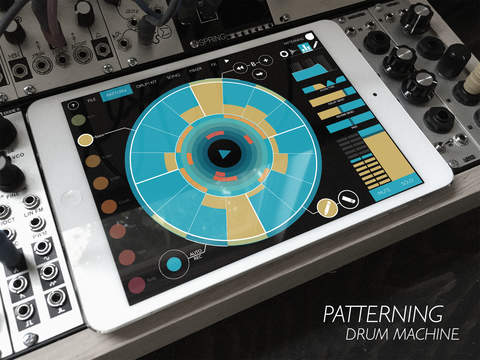
As beautiful as it is powerful, Patterning is a deep and flexible drum machine unlike any you’ve encountered before. With its elegant circular interface, Patterning transforms the iPad into a seriously inspiring tool for making beats.
Create dynamic drum patterns with the swipe of a finger. Make evolving, poly-metric rhythms, four-on-the-floor dance party jams, or laid back R&B grooves. Use Patterning’s independent loop settings to explore untapped rhythmic possibilities. Automate parameters to create intricate & complex beats. Arrange patterns on the timeline to construct songs. Use the built-in effects–delay, reverb, distortion, and 3-band EQ–to add atmosphere, shimmer and noise. Connect to other apps with Audiobus, Inter-App Audio, and MIDI.
Patterning comes loaded with classic drum machine samples as well as exclusive drum kits created and curated by contemporary producers and musicians. For the independent producer, it’s easy to create custom kits with your own samples.
With an extensive and uncommon feature set, Patterning redefines what an iOS drum machine can be.
Recommended for iPad 3 and newer.
For a complete list of specifications, please visit http://www.olympianoiseco.com/apps/patterning
https://itunes.apple.com/app/apple-st…
Available August 20, 2015
Sign up for our mailing list :
http://eepurl.com/LdQYr
Follow us:
@olympianoiseco
facebook.com/OlympiaNoiseCo
KORG iM1 App Review
Korg’s M1 digital synthesizer is back in the iM1 synth app. You get all of the original preset sounds from the original M1, plus sounds from Korg’s T1 as well. Additional sound libraries are available via in-app purchases.
Steve Reich’s Clapping Music – free iOS game that’s designed to improve your rhythm
Touchpress Limited has released Steve Reich’s Clapping Music – a free iOS game that’s designed to improve your rhythm.
It does this by challenging you to play Steve Reich’s ground-breaking work, Clapping Music, a piece of music performed entirely by clapping.
Steve Reich’s Clapping Music app is part of a research project, designed to explore if gaming experiences can help people learn musical skills.
Reich’s piece Clapping Music (1972) explores the idea of a phase canon. Two performers start by playing a simple rhythm together. One performer speeds up slightly, so that the two performers get out of sync, creating a series of new syncopated rhythms. The piece continues until, after cycling through 12 different 8th-note relationships, the two performers return to being in sync.
“Protostar”: Koushion iPad sequencer, Virus C, MS2000, Supernova, Blofeld
First recording with iOS sequencer Koushion. Drone from the Waldorf Blofeld, arps from MS2000BR, Virus C and Supernova II. Plus super-pads and subspace whistles from the Supernova. Recorded live with no overdubs.
Koushion is a flexible step sequencer for your iPad. Like a traditional step sequencer, Koushion lets you program note patterns that are triggered in time with a MIDI clock (either an external source, or a configurable built-in one). But Koushion doesn’t stop at what’s already been accomplished by its hardware predecessors. With 16 layers, each containing 8 scenes of 16 steps (that’s 2048 steps!), Koushion provides plenty of room for you to express your creativity. Each layer has customizable settings such as looping mode, MIDI channel, and musical key.
Koushion doesn’t just work with expensive MIDI hardware, but also integrates with any of the hundreds of CoreMIDI-enabled synthesizer apps. Whether you use it as part of your existing studio setup, on stage, or as a piece of your self-contained iPad studio, you’ll never run out of sounds to explore, thanks to the iPad’s powerful inter-app MIDI system.
Checking out the new Rhythm Necklace App on iOS
Now available in the app store: appsto.re/i6L72ht
Rhythm necklaces are circular representations of repeating patterns. They’ve found application in fields as varied as Crystallography, Radio Astronomy, Nuclear Physics, and Ethnomusicology. When applied to musical rhythms, circular representations show the underlying geometric properties that make them enjoyable, such as the degrees of evenness and symmetry. Computer scientist Godfried Toussaint has found that analyzing rhythms geometrically reveals surprising relationships between rhythms the world over. In fact, Toussaint has shown how a core group of geometric algorithms can generate rhythms employed in African, Cuban, Balkan, and Spanish folk music, to name a few. The Rhythm Necklace iOS app is a musical sequencer for exploring the geometry of rhythm necklaces, and for experimenting with generating rhythms algorithmically.
Rhythm Necklace is made by Meara O’Reilly and Sam Tarakajian.
Musikmesse 2015: Waldorf Attack for IOS
Waldorf make a preview of their upcoming IOS Drum Synthesizer Waldorf Attack.
In the audio demos in the middle of the video, there is a special sentence used “this is for Synth Anatomy”, maybe you hear the vocoder sentence
Take two of Propellerhead’s vocal app “Take” – In 30 Seconds
Learn more and download Take for free: https://www.propellerheads.se/take
Take Creative Vocal Recorder is the fastest app for capturing your ideas on iOS so we figured we’d show you Take in action with the fastest video walk through. Record your voice, load backing beats, sing along with yourself, add effects, and even tune your voice from subtle pitch fixes to “that” hip hop sound. When you’re ready, share your song ideas to Discover on Propellerhead to share your music with friends or to invite a world of other music makers to collaborate with your music.
Here’s what’s new in Take 2.0:
- Tune your voice – stay in tune or go full-on robot voice with Take’s Voice Tune effect.
- Clean up, distort or color your recordings with effects on each channel
- Give your tracks a “final mix” sound with mastering presets
- Sing in a key that works for you with transposable backing tracks
- Trim your songs to the desired length
- Numerous performance and usability improvements
Take is a free download from the App Store.
Pepp available FREE for iPhone and iPad
Pepp is now available on the AppStore. Pepp can sound in an endless number of ways, this is just a quick live jam.
Pepp opens up the joy of electronic music making to everyone. Thanks to an intelligent rythm and harmony engine, no musical knowledge is needed. Pepp is immediate, intuitive and vastly musical by nature.
Make electronic music like there’s nothing to it! Pepp is very easy to use yet it can produce a vast range of sounds. Forget about boring factory sounds. Come up with your own mindbending loops in no time, store them in memory slots, mix them live and jam with your friends. Tweak all parameters to the extreme without destroying your original loops.
This twisted groovebox/arpeggiator/synthesizer lets you quickly forge original electronic music using sixteen sliders and a sixteen step sequencer. Instantly save and recall your ideas without missing a beat. With 160 memory slots you’re not likely to run out of storage.
Pepp can also be synced via MIDI, played live from a MIDI keyboard or sequenced from your favorite DAW. Naturally, all sliders can be mapped to midi controllers. Pepp is also integrated with Audiobus so you can use it with all of your audiobus compatible apps!
-=Features at a glance =-
Ten synth oscillators
Five drum oscillators
FM-synthesis
Audiobus
MIDI Clock in
MIDI in (Notes and CC)
MIDI Latch/Gate
Intelligent arpeggiator
Advanced rythm engine
Lo-/Hi-pass Filter w/ Resonance
Delay
Samle and hold
Instant resample/reloop
Detune
Portamento
Reverb
Gain
Glissando
Master octave +-2
Tempo multiplier
Oscillator types
-Sine
-Square
-Sawtooth
-Triangle
-Wavetable
-Noise
Some key features are disabled in this FREE version of Pepp. The full version of Pepp can be unlocked from within the app by using in-app purchase. UNLOCK NOW AT THE INTRODUCTORY PRICE!
Been working hard for a long time to create Pepp. I hope you enjoy it and appreciate your support!
Now, hook up your headphones… It’s time to play!
Casio gets serious in the iOS game – CZ App for iPad
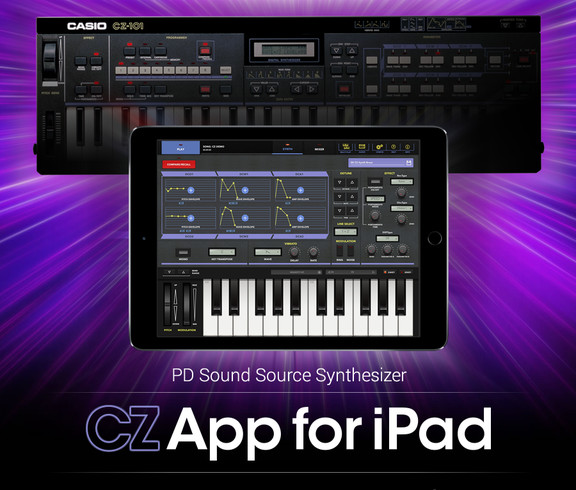
Casio has released CZ App for iPad, a virtual synthesizer app based on Casio’s best-selling CZ series of synthesizers, including the CZ-101 model released in 1984.
Along with its electronic musical instruments, Casio has been developing musical apps with the goal of providing the joy of playing music to more and more people. To date, Casio has released several apps that have become widely popular: Chordana Viewer and Chordana Tap, which automatically detect the chord progressions of songs; as well as Musical Practice Tool, a useful app for practicing a musical instrument or singing.
Now Casio has released the CZ App for iPad, an iPad app that recreates its best-selling CZ series of classic synthesizers and includes several all-new functions. CZ App for iPad allows up to four separate parts to be played using the original Phase Distortion sound source by Casio, and features 36 types of waveforms for producing a wide range of sounds.
The app is available for purchase for $19.99 USD.
DATAMASKIN

