
Barcodas – iOS barcode music generator
the barcodas app scans any ean8/ean13 or upce/upca barcode and turns it into a musical pattern in a user-selectable harmonic scale. imagine walking into a supermarket filled with thousands of tunes to discover.
// by
leovanderveen
leo@nr74.org
www.nr74.org
// thanks to
irisdouma : interaction advice
Funkbox updated
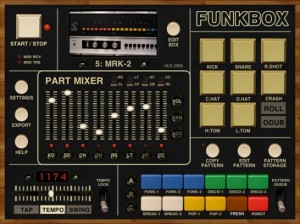
Synthetic Bits announced today that they’ve updated FunkBox (App Store link) – their $2.99 virtual drum machine for iOS – to version 2.1.:
FunkBox v2.1 was approved blazingly fast today by Apple! If you are using FunkBox with CoreMIDI, or running it on an iPhone 3G with iOS4, or do a lot of drum box custom sample editing, you will definitely want to update as soon as possible.
If you have an iOS device that can do multi-tasking, you may also want to pick up the BassLine and MoDrum apps to play with the new multi-tasking audio features that allow you to run FunkBox simultaneously with other music apps. Thank you to Finger apps for leading the way with these extremely cool CoreMIDI features that we think are going to change music making on iOS dramatically for the better!
For iOS musicians, the FunkBox update is one more small step towards iOS MIDI nirvana. Details below.
The FunkBox v2.1 update includes:
- Fixed startup issues with iPhone 3G/iOS4
- Fixed edit drum part crash problems
- Improved CoreMIDI/sync support
- Added background / multi-tasking audio support
- Added option to disable startup sounds and/or auto-start beat in Settings app
- Added lock drum machine option
- Added master volume slider in mixer
- Increased touch size of sliders
- Misc other improvements and fixes
via Synthetic Bits
MPD Software mobileRhythm mR-606 classic drum machine app for iOS updated to v1.2

mobileRhythm mR-606, adding MIDI support to the classic drum machine for iOS.
You can now use your iPhone/iPad and mR-606 with other drum machines, sequencers, samplers, synths, arpeggiators, DAW’s etc.
mobileRhythm mR-606 features
- New features:
- Copy/Paste patterns in play mode
- MIDI notes send/receive
- MIDI clock send for syncing with other hardware
- Core MIDI and Line6 MIDI Mobilizer compatible
- UI improvements:
- Last step selection – deselect with a second tap
- Drag finger across steps to set beats quickly
- Bugfixes:
- Fixed bug that prevented patterns from saving properly under certain circumstances
- Fixed bug that made toms volume occasionally load incorrectly
mobileRhythm mR-606 for iOS 3.0 or later is available for $5.99 USD.
More information: mobileRhythm mR-606
Review: The Fairlight app, regular version
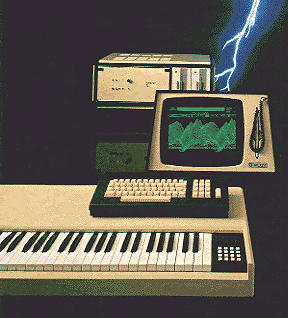
Anyone being casually interested in making synthesizer based music in the 80s have probably dreamed of owning and using a Fairlight. A complete workstation with sampling and synthesizing sonic capabilities, hugh sound library, muliti timbral, pattern and song sequencing, total recall, all in one computer and controlled by a light pen resembling of a miniature lightsaber. Only issue was that it costed as much as a house. A nice house. You could even have to add the garage. And a car.
Now fast forward 30 years and you can get all those features and capabilies for close to free if you happen to have a computer, a midi keyboard and Internet access. That’s progress for you. Still, the concept defined by the Fairlight inventors still applies apart from the lightsaber… the all integrated computer based workstation with a huge sound library still rules.
Last week the empire striked back and released the first Fairlight software only product in shape of an IOS app. It’s available in the Apple App Store for iPhone and iPad for 9.99USD, or in whatever currency you have. But unlike many other app developers that have a free or light version AND a full version in the App store, Fairlight have a only one version in the store. The uppgrade to the Pro version (as they call it) is only available from within the App itself. And the price for the Pro version is 39USD. It’s a bit of an easter egg approach.
The regular version gives you alot of vintage feel in terms of whirling floppy disc noise, load waiting time and 500 accurate sounds from the original Fairlight library including Orch 2 hits, Ahhhs and glass crash. Also the the original GUI using pages is used and fit’s like a glove in the IOS world. But from the original 20 pages the IOS app leaves you with 6 pages.
Once started you are confronted with a menu of 5 pages where one tells the history of the Fairlight. Head over to Wikipedia or Holmes page to get the full story though.
Page 2 and 3 is about loading sounds and combining them but as you can’t create or edit combinations (called instruments) page 3 is meaningless in the regular version. So what you can do is to browse though the library and load one sound at a time and then play it from the one octave keyboard. It’s here thing gets too limited, though. You get not only just one octave of keyboard to use, but it’s only from C to C. You can select which octave but is have to start with a C! This makes it hard to play just anything but tinkle little star. To load you own sounds you have to upgrade to the Pro version which I havn’t tried yet.
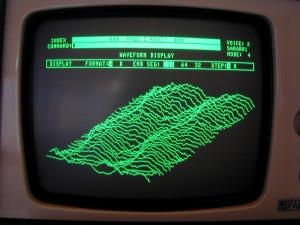
You do get the famous R page sequencer but you only have 2 demo songs to play – no edits, no save, no load. And the cool looking page D to inspect the waveform landscape is not only hard to use as you have to tilt the iPhone and keeping it still is kind of hard – but it’s kind of meaningless as you can’t load you own samples and you can’t loop the ones you get with the library. Looping is disabled. And the whole point of page D is to match the sample rate to the sound frequency to find good loop points.
Conclusion
The regular version of the Fairlight app I would call demo version. You can’t really use it in a musical context as it’s too limited. What you get is an app demonstrating the classic Fairlight library, however made with love and care it’s only a novelty app. Unless you are prepared to buy the pro version don’t expect to make any music with this app.
As I still feel a bit ripped off, I havn’t bought the Pro version but I guess I will once calmed down. What’s worring though is that although with the Pro version you can load your own samples via email or iTunes you cannot record them directly via the mic. Also the synthesizer side of the Fairlight CMI like drawing waveforms and harmonic profiles is not included in the Pro version either.
The history page in the app sais that “the app is as powerful as the first Fairlight CMI” but I really don’t agree. This is more like the marketing deparments ploy trying to find customers for the new CMI-30A. And the CMI-30A cost you ….like a house, a nice house. And the garage. And a car. Now, where’s my lightsaber!
Future DJ – new mixing software app for iOS

Xylio has announced the release of Future DJ, a mixing software app for iOS.
Future DJ is a DJ mixing software for iPhone, iPad, iPod touch that allows you to mix like a pro dj in no time. This is not a toy, it’s a full-blown software that you can use to mix for an entire party if you want to.
Although DJ software on the iPhone and iPod touch is only at the beginning, Future DJ raises the standards through features such as automatic BPM detection, beat-matching and seamless looping, thus making it the first professional handheld DJ solution.
Future DJ features
- Classic DJ setup with 2 decks and mixer.
- Fully manual or automatic mixing.
- Pitch/speed control and crossfader.
- One-click beat-matching and sync.
- Seamless intelligent looping and skip-beat.
- Automatic BPM detection (grid like) on the device.
- Effects, eqs, filters.
- Vinyl simulation including scratch, pitch, reverse play, brake, spin.
- Separate headphones/speakers output (using a simple stereo splitter).
- IPod library browsing system with search.
- Professional CUE point functions including hot Cue-Play.
- Pitch bend (using the pitch sliders).
- MotionPlaying™ – place your iPhone/iPod on a turntable and scratch any song (requires an iOS device with a gyroscope – eg. iPhone 4).
- Extensive settings.
- Built-in help.
Future DJ for iOS is available to purchase for an introductory price of $1.99 USD.
More information: Xylio
FunkBox 2 the virtual drum machine

Synthetic Bits has released FunkBox 2, an update to their iPhone/iPod touch/iPad virtual drum machine:
FunkBox 2.0 features:
- Works great on iPad, iPhone, and iPod Touch
- Look, feel, sound and quirks of a vintage beatbox
- Includes 36 preset rhythm beats, or easily edit patterns and create your own
- Nine preset boxes to choose from, including the 808, 909, CR-78, LM-2, MRK-2 and more
- Customize boxes by mix and matching preset samples, or import and use your own samples
- Export your drum loops as audio or midi to email, audio pasteboard, iTunes folder
- Use CoreMIDI to sync and/or control FunkBox with music hardware/software via USB-CCK or Network MIDI
Here’s what’s new:
- Improved graphics, including retina support
- Two new drum machines, LM-2 and TR77
- New cleaner samples from all machines
- Import custom samples (iOS3.2+)
- Set pitch and trim of samples
- Save/load custom drum box configurations
- Save/load pattern banks
- Tempo/swing saved with each pattern
- Random volume/timing saved with box
- Ability to switch in clave, clap, cowbell, ride sounds
- Tap tempo
- Accent amount per step, per instrument
- Queue up multiple sequences by pressing two sequence buttons,
- or play two sequences simultaneously by pressing two sequence buttons
- Pan per instrument (iOS4.0+)
- Tap overdub and roll functions
- Preliminary CoreMIDI support (iOS4.1+)
- – MIDI in: note, mute part, pattern/bank, tap/start/stop, clock sync
- – MIDI out: note, clock sync
- Itunes folder audio export support (iOS3.2+)
- Start/stop latency improved
- Misc other improvements and bug fixes
Intua Beatmaker 2 Review
Take a look at the Beatmaker 2 iOS app. Drums, synth, samples and sequencer
Grüvtron Demo
A demo showing the basic way of using grüvtron. It shows Arpeggio, Bass, Chord and Loop instruments and creation of new instrument parts through playing and morphing the Presets. Great fun! Grüvtron runs on iPhone, iPod touch and iPad 1 and 2. There will be another video later to show Audio Copy/Paste use and BeatSync for jamming with another iOS device.
Fruity Loops in your iPhone

Following companies like Korg and Propellerheads developing IOS version of legacy products a version of Fruity Loops for IOS is being developed to be used on iPhones and iPads. No information is available when it will be launched. FL Studio Mobile is being developed by a third party. Read more here.
Synthrtotek.com iPod iPad & IPhone Audio Interface
Synthrtotek.com iPod iPad & IPhone Audio Interface with Left & Right 1/4″ Stereo OUTS Fender Stat
This is out new audio interface for only $35.99 that outputs to discrete Left and Right 1/4 channels. Made in the USA. This demo is with the Moog Filtatron using a Fender Strat and Korg Kaoss Pad 2.
DATAMASKIN

