
Sound 8 is an interactive 8 track sound looper
In this application, each sound is represented by a circle of a different color. You can assign a default sound or any of your own imported sounds* to each circle.
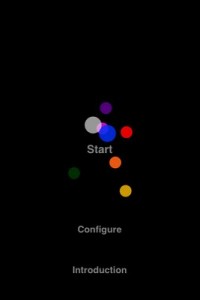
A sound’s pitch and volume is altered through the device’s accelerometer or using touch input and gestures. Swipe gestures control the accelerometers speed and allow for randomization of pitch and volume. In addition, each sound’s panning can individually be set.
It is also possible to stop acceleration completely, or to automatically position sounds in “Automove” mode.
To see an example of how to import your own sound files please visit the sound8 support page.
*supported file format is 16-bit mono WAV or AIFF.
maximum sound file size (per circle) is 5.3MB, or ~1minute @44.1kHz 16-bit mono wav.
Audio Interface for iPhone 4
AR-4i is an audio interface for iPhone4 dock connector. The high quality stereo microphone inputs with AD converter improve the audio quality of iPhone4’s video recording, video streaming via Ustream, LiveStream etc. as well as recording of live performance and ENG.

Main Features
- 3 microphone inputs with plug-in power for vertical or horizontal use.
*Input level control and EQ can be done using the dedicated App. - 2 x cardioid plug-in microphones come as standard. Third-party microphones can be used.
- LED Level Meter for input level monitoring. •Microphone gain control. •Headphone jack for input monitoring.
- 2 x AAA batteries for more than 10 hours operation. External power can be fed via USB. •Ergonomic design for secure holding.
- Screw hole provided for optional camera gears such as tripod, grip etc.
Make sure you have an insurance on your iPhone if you go this DJ route
I have to admit, I never thought of this one — and it’s pretty, pretty slick. Instead of using time-coded vinyl to interface your turntable with your computer as with Final Scratch Pro or Serato Scratch, Nicholas J. Bryan’s Mopho DJ uses an iPhone.
A novel method of digital scratching is presented as an alternative to currently available digital hardware interfaces and time-coded vinyl (TCV). Similar to TCV, the proposed method leverages existing analog turntables as a physical interface to manipulate the playback of digital audio. To do so, however, an accelerometer/gyroscope–equipped smart phone is firmly attached to a modified record, placed on a turntable, and used to sense a performers movement, resulting in a wireless sensing-based scratching method. The accelerometer and gyroscope data is wirelessly transmitted to a computer to manipulate the digital audio playback in real-time. The method provides the benefit of digital audio and storage, requires minimal additional hardware, accommodates familiar proprioceptive feedback, and allows a single interface to control both digital and analog audio. In addition, the proposed method provides numerous additional benefits including real-time graphical display, multi-touch interaction, and untethered performance (e.g “air-scratching”). Such a method turns a vinyl record into an interactive surface and enhances traditional scratching performance, while affording new and creative musical interactions. Informal testing show this approach to be viable, responsive, and robust.
To be presented at NIME 2011 (http://www.nime2011.org/) in Oslo, Norway May 31-June 1.
For more info, please see https://ccrma.stanford.edu/~njb/research/turntable/
Generate constantly evolving and changing music with no effort
SoundZen is a new concept for music. It allows you to generate constantly evolving and changing music with no effort at all. SoundZen uses a form of cellular logic to determine how your song evolves over time.
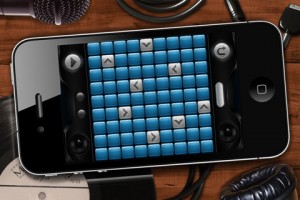
It follows 2 simple principles:
1. When an arrow touches the edge of the grid, play a note.
2. If arrows collide they must turn 90 degrees for each arrow they collide with
You set up the app by touching any of the positions on the grid, touch it again to change direction and press play. Using the principles above, SoundZen will take you on a zen-like journey based on the input you gave. Sit back, relax and watch as your song changes right in front of you.
You can also save/load your songs and we have some more features coming very soon including more instruments and different skins.
Note: While SoundZen will work on all devices, we recommend you use a 4th generation device for the best experience. Check out Sound Zen now for just 99 cents on the Apple iTunes store at http://itunes.apple.com/us/a…
Sound Cells demo – generative music iPhone app
Sound Cells is an Universal iOS app, that creates generative music, inspired by the “Otomata” web app.
By touching the matrix, cells are created and start interacting with each other. If they collide (or land on the same square) they will change directions. If a cell touches the wall, it will generate a sound.
The rest of the app mechanics are left to the user for experimentation.
The app can be found in here:
http://itunes.apple.com/us/app/sound-cells/id434171433
Mini-tutorial: Connecting Your iPad to Your iPhone with Midi
In this tutorial, I show you how to share a Midi connection between your iPhone and iPad that allows you to send notes from your iPad to your iPhone and vice versa. Be sure to check out my website for more tutorials: flamingstylus.blogspot.com
Shared by flamingstylus
Teaser: iPhone with FL Studio Mobile
FL Studio mobile will allow you to create complete multi-track projects on your i.Pod, i.Phone or i.Pad and, if you want, load mobile projects into FL Studio and
take them to the next level. If it’s a beat on the Stepsequencer, a melody on the Piano roll or a full song on the Playlist, FL Studio mobile has you covered.

Never lose that idea again.
Get it down and happening wherever you are.


Testing ReBirth – Propellerheads drum machine on iPhone
Testing rebirth iphone version in box the original rebirth … lol rss
New OSC controller App for the iPhone
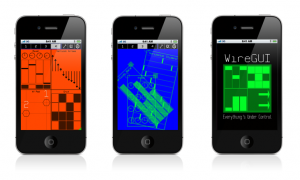
WireGUI is a new OSC controller App for the iPhone and iPod Touch. It features easy customisation of controller setups, with all editing taking place on the device. Groups of objects may be added simply by dragging and dropping a chosen icon, and they can be arranged with custom colors, resized and even rotated. Underneath the distinctive aesthetic is an extensive OSC message specification with many options for outgoing data. In an update currently in review, any group which stores values may also act as a simple step sequencer.
Features:
▪ An OSC controller App for iPhone and iPod Touch.
▪ Includes groups of controls: Sliders, Slider Bars, Arrows, Buttons, Knobs, Drum Pads, a mixer and an X-Y Touchpad.
▪ All groups respond to multiple points of contact.
▪ Quickly arrange controller elements on the device itself – no need to spend hours using complicated desktop editing programs.
▪ Groups can be resized, automatically arranged and even rotated.
▪ Arrangements may be saved on the device for later use.
▪ (forthcoming in version 1.3) Simple sequencer function allows values to be stepped through with adjustable tempo and ppqn.
▪ Distinctive, minimalist looks with customisable color schemes.
▪ Extensive OSC spec.
▪ Only $4.99
Compatibility Information:
▪ iOS 4.0+ required, 4.2+ recommended.
▪ Use of 4th generation iPhone or iPod Touch is highly recommended. Testing has revealed problems with the display of bitmaps in some older generation devices. A fix has been identified and is planned for release in a future version.
WireGUI version 1.2 is already available in the iTunes App Store: http://itunes.com/apps/wiregui
BeatStudio backing for iShred
http://fdgm.us/BeatStudioBuy – Available now at a special low introductory price, BeatStudio from Frontier Design Group.
A quick overview of making a track in BeatStudio and bringing into iShred as a backing track.
http://frontierdesign.com/BeatStudio
http://frontierdesign.com/iShred
DATAMASKIN

