
Kinect WiiMote Ableton Midi Over IP – soon as Open source
Alistair keeps feeding us with nice updates on the Kinect WiiMote solution
After battling against slow laptops and extreme latency, I’ve started turning this demo into a cluster system with different operations being farmed out to different machines, it could be the only audio application that has had it’s latency reduced by sending Midi messages over TCP/IP.
The demo only has one of the instruments connected, the green bar at the side. The little horizontal lines across the bar are the lower stave (bass clef) and can active Midi Notes. The other box does nothing, instead a wiimote is used to tune synth parameters.
Ableton Live is being used as the output device, it’s not quite the right thing for this, a software synth is preferable.
PS. Alistair also tells me this:
Just cracked getting the WiiMote and Kinect and Ableton to co-operate together making music by using midi over IP, will be releasing an open source version in February so people can collaberate making music over the net
MIDI controller application for the iPhone
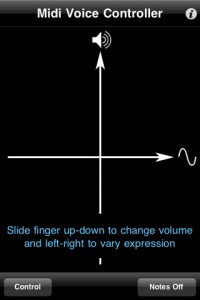
Voice Control is a wireless MIDI controller application for the iPhone that converts the pitch of your voice into signals for controlling MIDI devices networked to your computer.
Features:
- Select your vocal range – from bass to soprano (center picker wheel)
- Shift the pitch of converted MIDI signals up or down (right picker wheel)
- Display the note you are currently singing (left picker wheel)
- Sliders let you change the input audio level and the amount of pitch “smoothing”
- Tap “Set Up” to switch to the “Control” screen
- Control the volume and expression in real time using the x-y control pad while you sing
- Rotate the device to pan the sound left to right
The developer does not mention support for any of the available hardware MIDI adapters that are available for iOS devices as of version 1.1.
Voice Control sells for $1.99.
Quick demo of the eyoControl for the iPad
eyoControl is a set of MIDI controllers for the iPad, including a control surface, a dual keyboard MIDI controller, a pad set, an X/Y controller. It connects to your Mac or Windows Digital Audio Workstation (DAW) through the native iPad MIDI wireless connection, or optionally the dedicated eyoControl Server app (Mac only) for advanced connectivity options. Check out http://eyosido.com for details.”

eyoControl includes the following controllers:
- Surface: a control surface supporting the Mackie Control protocol. Surface presents a traditional Mixer view with per-track buttons/knobs/faders, and a Panel View with quick access to the status of 64 tracks. Supports major DAW such as Logic, Cubase… (read details about DAW support at http://eyosido.com/eyocontrol/surface).
- Pad: a 4/6/8/12-pads MIDI controller with tap-location sensitive (controls MIDI note velocity) pads suitable to play drum parts. Each pad has a configurable color/MIDI channel/note. A global velocity slider adds up to the velocity control of each pad.
- Keys: a dual keyboard MIDI controller with separate MIDI channels assignable per keyboard. Choose among three key widths per keyboard, and customize key colors. A global velocity slider controls note velocity.
- mXY: a multi X/Y controller featuring four independent, highly configurable X/Y controllers. Choose among 55 MIDI continuous controllers or pitch bend to assign. Each axis can be swapped, muted, reversed, mirrored etc…
New MIDI controller for iPad
An interesting new MIDI controller introduced at CES (Consumer Electronics Show).
The iON Piano Master uses an Apple iPad as the “brain” of synthesizer. It integrates a basic MIDI keyboard controller with an iPad doc, using the iPad as a giant multi-touch screen for the workstation.
Ion plans to release the Piano Master in late Spring 2011.
Amos – a reactive MIDI iPad instrument
Amos sends MIDI notes from the iPad to the Korg Electribe via the Line6 MIDI Mobilizer.”

Amos is a reactive MIDI iPad instrument. It sends MIDI notes through a USB MIDI interface or over a wireless network to trigger sounds from software synths, MIDI-capable hardware or desktop DAWs like GarageBand, ProTools and Live.
In Amos’s physics-simulated room, collisions between objects trigger MIDI notes. Up to three duration discs (half note, quarter note, eighth note) can be grabbed and thrown around the room. There are three 6-octave keyboards that can be configured via the Settings menu. When a disc strikes a keyboard key, it takes on that key‘s note value and emits that value for each collision until a new key is struck. Tilting the device controls the gravity in the room.
USB MIDI Requirements:
• iPad
• Apple iPad USB Camera Connection Kit
• Class-compliant USB MIDI interface
WiFi MIDI Requirements:
• A Mac, Linux, or Windows computer on the same WiFi network as your iPad
• A copy of the free DSMI Server running on your Mac, Linux, or Windows computer
• Some kind of MIDI capable desktop app (Garage Band, Pro Tools, Logic, Live, Sonar, etc.)
See http://anythinghonest.com/amos for further setup instructions.”
Playing with Xtrument virtual keyboard
Playing with the amazing Xtrument created by Rob Fielding. It works as a virtual MIDI controller for your Mac using the keyboard. The Xtrument is open source.
Fielding is the programmer behind the iPad music app Mugician.
Xtrument is available here (.tar).
More about MusicApps and Mobile Music on www.MusicApps.com.br
MIDI controller for Network MIDI and USB MIDI
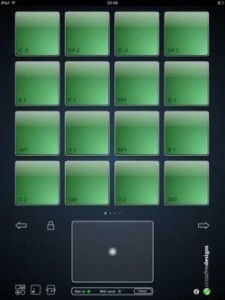
Crossfire Designs has introduced MidiPadz Lite (App Store link) – a simple MIDI controller for Network MIDI and USB MIDI that lets you trigger notes with its drum pads.
An X/Y-pad and a gravity controller, controlled by the iPad’s rotation, allow you to send MIDI slider parameters as well.
Features:
- Supports USB MIDI over iPad Camera Adapter
- Supports network MIDI over WiFi
- Touch sensitive drum pads (depends on vertical position and two-finger tap for full velocity, user-changeable)
- Four pages with 16 drum pads each
- Drum pad notes adjustable (tap on pad note symbol on bottom left, after that drag finger on pad up/down to change its note)
- One X/Y controller (big pad on bottom)
- Gravity controller (rotational axis of the iPad; Tap on rotation symbol on bottom left to activate, MIDI send light blinks every time you change the iPad’s rotation)
- All controllers can change their MIDI controller number
- Rotational- and scoll-lock for drum pad module (tap lock symbol)
MidiPadz Lite is a free download. A commercial version is scheduled to be released in January.
Free. Full version will be released in January.
via Sonic State, Crossfire Designs
Only iPad controller that lets you seamlessly edit Ableton Live MIDI clips
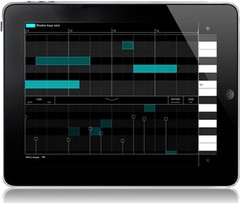
Liine has announced the Cliip module for Gridd, the only iPad controller that lets you seamlessly edit Ableton Live MIDI clips.
A world-first in controllers, Cliip allows you to create and edit MIDI clips with your fingertips using an elegant touch-enabled piano roll.
Cliip makes editing MIDI clips a truly live, musical experience. The piano roll is now an instrument too. Paint notes onto the smooth zoomable grid. Use intuitive multitouch gestures to edit note length and velocity – no need to LEARN it, just FEEL it. Snap/Fine and Percussive/Melodic modes and the powerful Duplicate function will help you unleash your creativity. Use in the studio to effortlessly create that killer hook or get personal with your audience and truly create music in front of them.
The Cliip module is initially available only when running on iPad. Cliip will run on iPhone and iPod Touch too in the next update.
Cliip features
- Piano roll with zoomable keyboard and timeline.
- iPercussive mode for short notes and Melodic mode with two finger note length gesture.
- Snap and fine modes. Snap note position (or note end) to the grid, or use fine mode to add some groove.
- Drag up the velocity lane and add dynamics to your music.
- Copy and paste functions allow you to copy the contents of one clip to another.
- Duplicate function allows you to duplicate and extend the current loop (e.g. to copy a loop 4 times so that you can add a variation on the 4th loop).
- Clear all.
- Remotely create new MIDI clip.
Cliip is included in Griid Pro, currently priced at $16.99 USD / 13.99 EUR until February 28, 2011 (regular $24.99 USD / 19.99 EUR). Cliip is available for Griid users as an “In App Purchase” (requires Griid v1.10).
More information: Liine / Griid
FunkBox iPad app MIDI synced with an x0xb0x
Nice demo of the FunkBox drum machine
This is a demo showing our FunkBox drum machine iPad app synced up with an x0xb0x synth, using CoreMIDI and an iPad camera connection kit with an m-audio uno MIDI interface. This will be included as a bonus feature in the next FunkBox 2.0 update which is coming soon! FunkBox is available for iPad, iPhone and iPod Touch from the App Store http://itunes.apple.com/us/app/funkbo…
eyoControl – MIDI controllers for the iPad
eyoControl is a set of MIDI controllers for the iPad, including a control surface. It connects to your Digital Audio Workstation (DAW) through eyoControl Server (free download at http://eyosido.com, MacOS only) allocating a virtual MIDI port per controller. Many iPads can connect to your computer this way and conrol various aspects of your DAW depending on the controller capabilities. Check out http://eyosido.com for details.
- Surface is a control surface enabling access to various settings of your tracks through faders, knobs and buttons. Surface presents a traditional Mixer view as well as a Panel view, enabling fast access to the status of 64 tracks.
- Pad is a MIDI controller with 4,6,8 or 12 programmable, touch-location sensitive pads. Each pad can be assigned a MIDI channel, color… Pad lets you play one or more virtual instruments on your DAW, such as drums or percussions.
- Keys is a dual keyboard MIDI controller. You can choose among three different key widths per keyboard to best fit your style, assign each keyboard to a different MIDI channel to play two virtual instruments on your DAW at the same time.
DATAMASKIN

