
Updated Xewton Music Studio
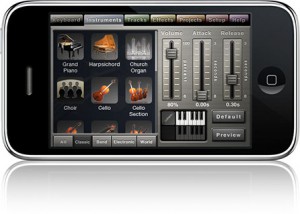
Xewton has announced an updated version of its iOS Music Studio (App Store link) that adds hardware MIDI support, file sharing, new instruments and more.
Here’s what’s new in Xewton Music Studio 1.5:
- iPhone 4 retina display support
- 16 additional instruments (13 free, 3 in the shop)
- Line 6 MIDI Mobilizer support
- 100 beat loops
- iTunes file sharing (iOS 3.2, iOS 4 and later)
- File associations (open .xms and .mid files from Safari and Mail)
- Improved multitouch on the keyboard (slide and play simultaneously)
- Battery consumption improved
- Lots of performance optimizations and stability improvements
- New instruments: HipHop Kit, Sound Effects Kit, Harp, Harmonica, 9 Synths (and Sitar, Shakuhachi, 8-bit kit in the shop)”
Music Studio, which retails for $14.99, is designed to offer a complete music production environment on the iPhone, iPod touch and iPad.
Full feature list below.
Features:
- Photorealistic dynamically configurable 85-key keyboard
- Instant positioning via the slide gesture and resize with the pinch gesture90 studio-recorded instruments (16bit 44.1kHz sampled from real instruments)
- 40 free instruments, 50 available in the in-app shop
- 4 categories: classic, band, electronic, world
- Release and attack time configurable per instrument
- Sustain samples
- Pitch bend via accelerometer
- Low-latency, highly optimized, high-polyphony, battery saving audio engine
- 100 beats (drum loops)
- 5 real-time effects with lots of parameters
- 3 high-quality reverb algorithms, delay, 3-band equalizer, amplifier, filter
- 128-track sequencer
- Beat & metronome settings (tempo, signature)
- Per-track mute, solo, effect bus, pan and volume adjustment
- Edit whole tracks or bars, down to individual notes:
- Draw, quantize, transpose, repeat, move, length, velocity, etc.
- MIDI import and export
- Save and load your songs and export to wave
- Wi-Fi and iTunes file transfer with your Mac/PC
- Songs and MIDI files can be opened directly from Safari and Mail
- Unlimited undo and redo
- Detailed in-app help
- Play or record 2 different instruments at the same time with 2 keyboard rows
- Key labels (Cs only, all keys, all keys colored)
- iPhone 4 Retina Display supported
- Line 6 MIDI Mobilizer supported
Turn your iPhone or iPad into a pad-style MIDI controller
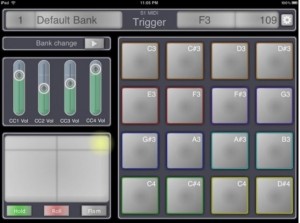
S1MidiTrigger is a new app for iOS that turns your iPhone or iPad into a pad-style MIDI controller.
With the app, you can control MIDI apps wirelessly or via the Line 6 MIDI Mobilizer.
Features:
- Send midi note message with a simple and ‘cord’
- No limit to assign ‘multiple note on one pad’
- Send midi note with velocity
- XY pad is work for modulation and pitch bend
- 4 sliders for send cc message
- Switch multiple banks
- Save unlimited banks
Here’s a preview of S1MidiTrigger in action:
S1MidiTrigger is available in a couple of versions, including a free version. You can find them in the App Store under Miura Acoustic.
The new 4midiloop controller
In collaboration with FADERFOX, Glanzmann Digital DJ Solutions has developed the new 4midiloop controller. It is the first controller which allows an entire and simultaneous control over four decks and four Effect-Slots in Traktor Pro. Equipped with the world’s best cross and linefader from Eclectic Breaks (Pro X Fade).
It is the first controller which allows an entire and simultaneous control over four decks and four Effect-Slots in Traktor Pro. This ability is achieved by over 600 electronic components, equipped with the world’s best cross and line fader from Eclectic Breaks (Pro X Fade). Only 166 keys and almost the same number of Leds allow simultaneous control over nearly all of the operations in Traktor Pro as well as indicating all the important visual feedback signals of the controller’s software. Each device has a control for every function, which makes operating a mix of four decks most enjoyable.
Further informations: www.4midiloop.com
Nice MIDI interface for your iPad
MIDI interface for your iPad – yes it DOES work with that as well as the iPhone and iPod Touch. Comes with MIDI Memo a basic recording app.
Visit: line6.com/midimobilizer
Little MIDI Machine for the iPad
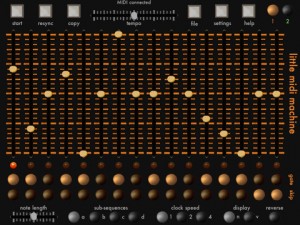
Little MIDI Machine (App Store link) is free app that turns an iPad into an MIDI step sequencer app.
The app requires the hardware Line 6 MIDI Mobilizer interface in order to connect to hardware MIDI synths.
Specs and demo video below.
Description:
Little MIDI Machine gives you the step sequencing power of a hardware analog sequencer on your iPad.
Program two independent sequencers that send note and velocity MIDI data out on two MIDI channels to control your hardware synthesizers. Little MIDI Machine includes many favorite hardware sequencer features ,such as mute and un-mute notes, skip steps, reverse the sequencer, adjustable clock speed, etc.
If you do not have a Line 6 Mobilizer, Little MM can generate very basic melodic sounds in place of sending MIDI. This will let you play around with the app and try it out, but it is not a feature that will be developed further and is not the primary purpose of the app. LittleMM is intended to be a MIDI step sequencer for driving external hardware.
All-software system for real-time pitch recognition aimed at the e-violin
MIDI – Violin
Demo of an all-software system for real-time pitch recognition aimed at the e-violin. Basically any good quality 4-string analog electric violin can deliver real-time control of VSTi plugins. The software is a standalone host for XP/Vista/W7 and is in late beta testing. eLektra is getting rave reviews as the best performing MIDI violin system anywhere. Of course it is absolutely a riot on stage, as the videos show.
http://www.youtube.com/watch?v=LirPUetT8Gg
According to the publisher the software is called eLektra and should be released this year
MIDI – what it is and how it can be used for arranging
This presentation, via Leodorain, takes a basic look at the power of MIDI – what it is and how it can be used for arranging.
This MIDI tutorial covers:
- What is MIDI?
- Getting a MIDI file
- Importing MIDI
- Replacing channels with samplers
- Changing the color of notes
- (Strings) Notes out of register
- Articulation markers
- Velocity
The information is basic, focusing on an introduction to arranging with MIDI.
http://www.youtube.com/watch?v=KAZDfeBojP0
Plugins:
Symphonic Orchestra (Sampler): http://www.soundsonline.com/products/…
Hollywood Strings (Sampler) is better for stringed instruments than symphonic orchestra (so I’ve heard): http://www.soundsonline.com/product.p…
Nexus 2 (Synthesizer): http://refx.com/?page=products/nexus/…
I’m using Nexus for the piano parts. If you want a more professional piano sound, I suggest using Quantum Leap Pianos (Sampler): http://www.soundsonline.com/products/…
EZDrummer (Sampler): http://www.toontrack.com/products.asp…
Guitar Rig (FX): http://www.native-instruments.com/#/e…
I’m using Nexus 2 for the guitar along with guitar rig (which is a bit amateurish) If you want a more professional sounding guitar, I suggest getting Ministry of Rock (Sampler): http://www.soundsonline.com/products/…
Disclaimer: I do not own the rights to the MIDI’s in the video. I am NOT RESPONSIBLE for viewers downloading, copying, distributing, or altering other people’s works. Download MIDI files AT YOUR OWN RISK!!!
This was non-profit and used for educational purposes. Hopefully copyright owners will cut me some slack if they see this video. :/
How to use Slice to Midi in Ableton using an acapella
A short tutorial using Ableton, enjoy
Vocal Beater lets you beatbox into a phone
Mike Gao has released an new $2.99 app for iPhone and iPod Touch, Vocal Beater, that lets you beatbox into a phone, email it, then load it up in a MPC, other beat machine, or DAW.
Vocal Beater turns your beat boxing into a velocity sensitive MIDI file to email. Detected hits can be edited.
The missing link
It is a wireless device that receives OSC and outputs MIDI. When I open my settings in my phone it shows up as a network that I can connect to. When I go to my OSC app, and press a button, an OSC message will be sent wirelessly from my phone. This message will get received by the Missing Link, which converts it to MIDI and sends it to the instrument. I can now use my phone to play a keyboard or control my mixer or MIDI LED lights.
In other words, you can slap one of these on your old MIDI gear and then control it wirelessly from an iPhone or iPad or other wireless device. There used to be a device called the Missing Link made by CP Technology that was a MIDI-to-Control Voltage adapter, but this doesn’t appear to be related to that.
DATAMASKIN

